Certain web page is missing information

debodun

Member
Member
VIP
Local time
4:50 PM
Messages
290
Location
upstate NY
There's a regional classified ad magazine that also lets ad be submitted online. Recently they changed their page and some sections of the ad submission page are missing using Windows 7. I called their tech support and the first question they asked is what browser and what OS I used. When I said Windows 7, the answer was that I needed to use at least Windows 10 now to submit an ad. My real question is what difference does it make what OS is being used? Also - is there any work around?
 

My Computer

Computer type
PC/Desktop
Computer Manufacturer/Model Number
refurb in an HP/Compaq case
OS
Windows 7 Ultimate x64
CPU
1.86 GHz Intrel Core 2
Motherboard
HP 0A60h XU1
Memory
3 GB Dual Channel DDR2 @ 3.32 MHz
Graphics Card(s)
Intel Q965/Q963 Express chipset
Monitor(s) Displays
Dell CRT
Hard Drives
977GB Samsung HD 103 SI ATA
Case
HP Compaq DC5800
Mouse
wired optical
Antivirus
Microsoft Security Essentials, MalwareBytes, Spyware Blaster
Browser
Firefox 32-bit
The operating system itself is of little to no importance at all for web pages. The browser does all the work and processing and the OS has little influence in the final look and feel of the site, so the browser is by far the most important factor. An older OS may limit the maximum browser version that works there, but that's it.

What could have an influence is that the browser reports the OS version by default, and the server may choose to send different html, so that the website itself can impose an arbitrary limitation. Try changing your user agent so that you report Win10 instead. Of course that if the site does that I would seriously doubt the seriousness of the company itself.
 

My Computer

Computer type
Laptop
Computer Manufacturer/Model Number
Toshiba Sattelite A665-S6092
OS
Windows 7 Ultimate x64
CPU
Intel Core i7-740QM
Memory
8 GB DDR3
Graphics Card(s)
NVIDIA GeForce 330GT
Screen Resolution
1366x768
Hard Drives
Samsung 840 SSD 500GB
1TB USB3 external HD
Cooling
Coolermaster Notepal U3 notebook cooling pad
Internet Speed
3mbps ASDL
Antivirus
ClamWin 0.98.7
Browser
Opera 12.17 x86 (main), Firefox 38 (sec), IE11 (last resort)

My Computer

Computer type
PC/Desktop
Computer Manufacturer/Model Number
refurb in an HP/Compaq case
OS
Windows 7 Ultimate x64
CPU
1.86 GHz Intrel Core 2
Motherboard
HP 0A60h XU1
Memory
3 GB Dual Channel DDR2 @ 3.32 MHz
Graphics Card(s)
Intel Q965/Q963 Express chipset
Monitor(s) Displays
Dell CRT
Hard Drives
977GB Samsung HD 103 SI ATA
Case
HP Compaq DC5800
Mouse
wired optical
Antivirus
Microsoft Security Essentials, MalwareBytes, Spyware Blaster
Browser
Firefox 32-bit
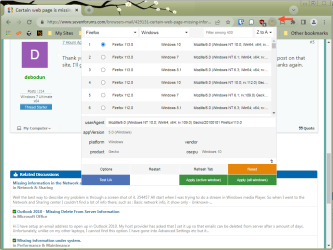
There is an extension for that. In firefox, just search for "User-Agent-Switcher," install it, and check the boxes at the top of the page that say "Windows 10" and "Firefox 102..etc". Then at the bottom, check the last two boxes to set it. You need to do this every time in my experience, as it doesn't seem to last. If using another browser. then do the same from that browser's extension or add-on feature.
 

My Computer

Computer type
PC/Desktop
Computer Manufacturer/Model Number
Gateway GT5656
OS
Windows 7 x64 SP1
CPU
AMD Athlon 64 X2 6000+ / 3.0 GHz
Motherboard
NVIDIA GeForce 6150 SE
Memory
6 GB
Monitor(s) Displays
Lenovo LED
Screen Resolution
1920 X 1080
Hard Drives
Windows on 500 GB spinner; Ubuntu 16 on Sandisk 250GB SSD; Bodhi5 on Samsung 250GB SSD; another old spinner for fooling around.
PSU
Original that came with computer
Keyboard
Logitech wireless
Mouse
Logitech wireless
Antivirus
Microsoft Sec Essentials
Browser
Vivaldi
Thank you for the follow up info. Seems like a lot of manipulation. I think if I have anything to post on that site, I'll go to the library and use their computers which I hope they have a more recent OS. Thanks again.
 

My Computer

Computer type
PC/Desktop
Computer Manufacturer/Model Number
refurb in an HP/Compaq case
OS
Windows 7 Ultimate x64
CPU
1.86 GHz Intrel Core 2
Motherboard
HP 0A60h XU1
Memory
3 GB Dual Channel DDR2 @ 3.32 MHz
Graphics Card(s)
Intel Q965/Q963 Express chipset
Monitor(s) Displays
Dell CRT
Hard Drives
977GB Samsung HD 103 SI ATA
Case
HP Compaq DC5800
Mouse
wired optical
Antivirus
Microsoft Security Essentials, MalwareBytes, Spyware Blaster
Browser
Firefox 32-bit
Seems like a lot of manipulation. I think if I have anything to post on that site, I'll go to the library and use their computers which I hope they have a more recent OS.

Suit yourself, but that's a lot more cumbersome that what michael diemer has suggested. It's as simple as installing the extension, clicking the drop-down, and choosing which browser and which OS you want to masquerade as. Here's one example using Chrome 103 on Win 7 but the website will think I'm using Firefox 113 on Win 10, and another example using Firefox 114 on Win 7 masquerading as Chrome 118 on Win 10.

uas-chrome.png

uas-ff.png

Beware there are many generic "user agent switchers" and most are not very good. Make sure you install the correct one -- it's from developer "Ray" and the logo is a shady looking guy in an orange trench-coat and gray hat.

I haven't had the problems michael referred to with a setting not "sticking", but I will note I sometimes have to refresh the page the first time I load a particular website and then my previous setting will take effect for the rest of that browser session.
 

My Computer

Computer type
PC/Desktop
Computer Manufacturer/Model Number
Dell Optiplex 7050
OS
Windows 7/8.1/10 multiboot
CPU
Intel Core i7-7700
Motherboard
Dell, Intel Q270 chipset
Memory
48GB (2x16GB Crucial DDR4-3200 + 2x8GB Hynix DDR4-2400)
Graphics Card(s)
Intel HD630 + AMD Radeon R7 450 PCIe
Monitor(s) Displays
Asus VC279 (27")
Screen Resolution
1920x1080
Hard Drives
Toshiba M.2 NVMe (256GB),
Samsung 960 Evo (500GB),
WD Red Plus 80EFBX (8TB)
Back
Top