djrobison22
New member
I have a Sony VAIO All-In-One VPCL137FX running Windows 7 SP1 64bit os with 8gb RAM, NVIDIA GeForce 330M GPU and Intel Core 2 Quad Q8400 processers @ 2.66GHz.
I recently removed all of the Sony bloatware and kept only the drivers needed to keep the hardware working. I am planning on upgrading the 1TB HDD to a 256GB Samsung 850 EVO SSD but prior to doing so I want first do a Clean Install of Windows 7 SP1 that I was able to download from the Microsoft website using my other computer that is running Windows 10 via the "downloading for another computer" method. My goal is to have a complete and clean bloat free installation of Windows 7 complete with all drivers needed before I install the SSD.
I have upgraded my other computer to an SSD by simply doing a Clean Install of the OS (Windows 10 in that case) which was much easier than doing a clone and then imaging it to the SSD and will probably do the same here (if that is something I can do in Windows 7) and I know that seems redundant but it also seems like a way to deal with any problems I may have with the clean install without them being on the SSD so that any unnecessary writing and rewriting be done on the HDD.
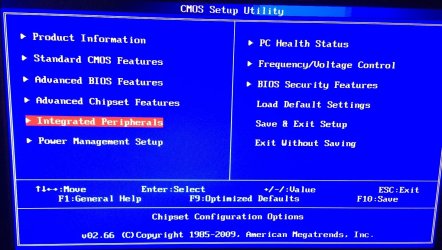
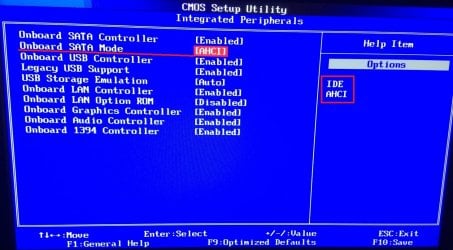
I also feel like this first clean install is a good time to change the IDE to AHCI setting which leads me to another question...
Do I have to go into the registry and enable the msahhci file if I am doing a clean install if I am going to download the latest drivers from the Intel website?
Please advise...
Thank you,
Danny R
I recently removed all of the Sony bloatware and kept only the drivers needed to keep the hardware working. I am planning on upgrading the 1TB HDD to a 256GB Samsung 850 EVO SSD but prior to doing so I want first do a Clean Install of Windows 7 SP1 that I was able to download from the Microsoft website using my other computer that is running Windows 10 via the "downloading for another computer" method. My goal is to have a complete and clean bloat free installation of Windows 7 complete with all drivers needed before I install the SSD.
I have upgraded my other computer to an SSD by simply doing a Clean Install of the OS (Windows 10 in that case) which was much easier than doing a clone and then imaging it to the SSD and will probably do the same here (if that is something I can do in Windows 7) and I know that seems redundant but it also seems like a way to deal with any problems I may have with the clean install without them being on the SSD so that any unnecessary writing and rewriting be done on the HDD.
I also feel like this first clean install is a good time to change the IDE to AHCI setting which leads me to another question...
Do I have to go into the registry and enable the msahhci file if I am doing a clean install if I am going to download the latest drivers from the Intel website?
Please advise...
Thank you,
Danny R
My Computer
At a glance
Microsoft Windows 7 Home Premium 64-bit 7601 ...Intel(R) Core(TM)2 Quad CPU Q8400 @ 2.66GHz8.00 GBNVIDIA GeForce GT 330M
- Computer type
- PC/Desktop
- Computer Manufacturer/Model Number
- Sony
- OS
- Microsoft Windows 7 Home Premium 64-bit 7601 Multiprocessor Free Service Pack 1
- CPU
- Intel(R) Core(TM)2 Quad CPU Q8400 @ 2.66GHz
- Motherboard
- Sony Corporation VAIO
- Memory
- 8.00 GB
- Graphics Card(s)
- NVIDIA GeForce GT 330M
- Sound Card
- (1) Bluetooth Hands-free Audio (2) Realtek High Definition
- Monitor(s) Displays
- Digital Flat Panel (1920X1080 60Hz)
- Screen Resolution
- 1920 x 1080 x 32 bits (4294967296 colors) @ 59 Hz
- Hard Drives
- ST31000528AS ATA Device
- Keyboard
- MS USB Dual Receiver Wireless Keyboard and Mouse
- Mouse
- MS USB Dual Receiver Wireless Keyboard and Mouse
- Antivirus
- ms security essentials, mbam 3.0 premium
- Browser
- Chrome