Question re Clean Re-install of Windows 7 Professional

Janesdf

New member
Member
Local time
8:31 PM
Messages
94
Question re Clean Re-install of Windows 7 Professional - SOLVED

I have three pcs. Two are Windows 7 Home Premium and the third has Windows 7 Professional.

As I plan to continue running Windows 7, and I have a Windows 7 Home disk that I purchased a few years ago, I did a clean reinstall of two of my pcs. I already had antivirus and malware programs, but to be sure, with the clean re-install, I wanted to remove any unknown issues.

I then re-installed Windows 7 Home on the two pcs, installed BitDefender and Malwarebytes. I will no longer use my pcs to access financial or any other important personal information, but will use my Kindle Fires instead, including for email.

For my Windows 7 Professional pc, I do not have that particular disk and cannot do a clean install. I deleted personal and financial info from that pc. However, I would like to know the best way to clean/scrub that pc as if I had done a clean reinstall OR

could I do a clean reinstall using my Windows 7 Home disk, which means I would no longer have the Professional version, whatever that it includes as I have never been able to see any difference between the two versions.

Thank you.

Jane
 
Last edited:

My Computer My Computer

At a glance

Windows 7
OS
Windows 7
Best to leave Windows 7 Pro pc as W7Pro. Others have used BleachIt to wipe any personal data away, I never have - cannot tell you how to use it. One can also clean free space with any one of many utilities, if you do so, I recommend not doing much on the pc while wiping free space.
 

My Computer My Computer

At a glance

Windows 7 Professional 64-bitDesktop i5; Acers i5 & i7desktop 16GB; 1 Acer 8GB & 1 Acer 16GB
Computer type
PC/Desktop
Computer Manufacturer/Model Number
Antec desktop; Acer Aspire laptops
OS
Windows 7 Professional 64-bit
CPU
Desktop i5; Acers i5 & i7
Memory
desktop 16GB; 1 Acer 8GB & 1 Acer 16GB
Hard Drives
1TB split into 2 equal partitions [OS and data] usable by RJS
Internet Speed
AT&T DSL
Browser
FF, GChrome, msIE
Other Info
Windows 7 Firewall, Emsisoft AM/AV, MSE [scan-only], SpywareBlaster, Ruiware/BillP combine
First, Make sure you backup the activation for your win7 pro pc. ( see next post - you can use dism++ to do it)


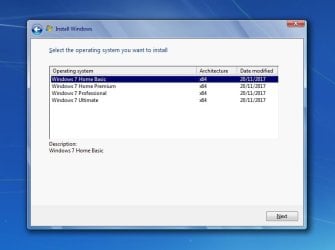
With the ei.cfg deleted, it will offer a choice of which edition to install:

editions-win7.jpg


I have three pcs. Two are Windows 7 Home Premium and the third has Windows 7 Professional.

As I plan to continue running Windows 7, and I have a Windows 7 Home disk that I purchased a few years ago, I did a clean reinstall of two of my pcs. I already had antivirus and malware programs, but to be sure, with the clean re-install, I wanted to remove any unknown issues.

I then re-installed Windows 7 Home on the two pcs, installed BitDefender and Malwarebytes. I will no longer use my pcs to access financial or any other important personal information, but will use my Kindle Fires instead, including for email.

For my Windows 7 Professional pc, I do not have that particular disk and cannot do a clean install. I deleted personal and financial info from that pc. However, I would like to know the best way to clean/scrub that pc as if I had done a clean reinstall OR

Jane
 
Last edited:

My Computers My Computers

  • At a glance

    7 X64i5 84002x8gb 3200mhz
    Computer type
    PC/Desktop
    OS
    7 X64
    CPU
    i5 8400
    Motherboard
    gigabyte b365m ds3h
    Memory
    2x8gb 3200mhz
    Hard Drives
    various
    PSU
    pure power 11 400w cm
    Case
    Coolermaster
    Cooling
    cryorig m9i
  • At a glance

    7x64g54008gb ddr4 2400
    Computer type
    PC/Desktop
    OS
    7x64
    CPU
    g5400
    Motherboard
    ga b365m ds3h
    Memory
    8gb ddr4 2400
    PSU
    xfx pro 450w
To backup activation:

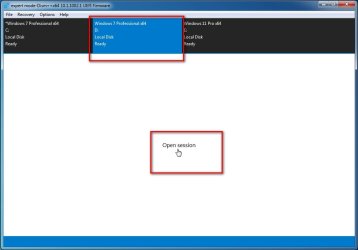
1. If it not the currently running os, Click the os in top pane to highlight it in blue.

Then click Open Session

dg-open-session.jpg

:ar: View attachment Dism++10.1.1001.10.zip

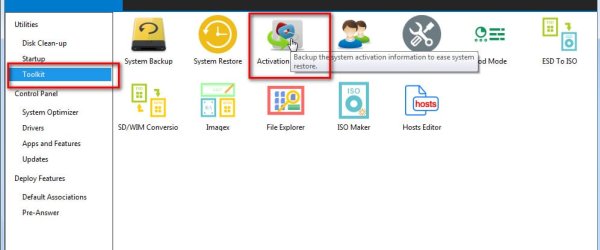
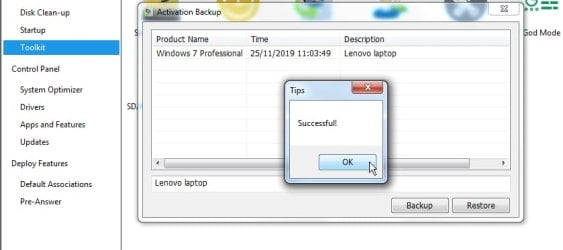
2. Click Toolkit in the left pane. Then click Activation backup in the main window

act-backup.jpg


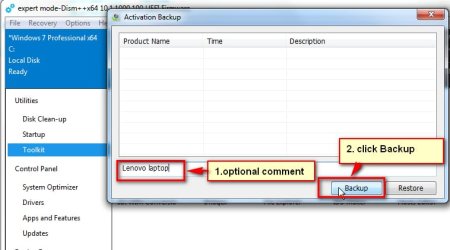
3. Optionally enter a name in case you need to remind yourself which machine it belongs to. Then Click Backup.


actbackup2.jpg


4. Done

actbackup3.jpg


:ar: Then copy the ENTIRE dism++ folder somehere safe ( e.g. a usb stick).

Then clean reinstall or repair install win7.

Then restore the activation in the same way - toolkit>activation backup>click on the backed up activation to highlight it in blue > click Restore
 
Last edited:

My Computers My Computers

  • At a glance

    7 X64i5 84002x8gb 3200mhz
    Computer type
    PC/Desktop
    OS
    7 X64
    CPU
    i5 8400
    Motherboard
    gigabyte b365m ds3h
    Memory
    2x8gb 3200mhz
    Hard Drives
    various
    PSU
    pure power 11 400w cm
    Case
    Coolermaster
    Cooling
    cryorig m9i
  • At a glance

    7x64g54008gb ddr4 2400
    Computer type
    PC/Desktop
    OS
    7x64
    CPU
    g5400
    Motherboard
    ga b365m ds3h
    Memory
    8gb ddr4 2400
    PSU
    xfx pro 450w
For the updates, use Simplix


It will only install the required updates. It may install in two sections. It will ask to reboot as necessary,
Leave Updates set to never check
Then run WU manually to find updates for Office etc and decide witch one to install.
 
Last edited:

My Computers My Computers

  • At a glance

    Windows 7 HP 64i5 6600K - 800MHz to 4200MHz4+4G GSkill DDR4 3000IG - Intel 530
    Computer type
    PC/Desktop
    Computer Manufacturer/Model Number
    custom build
    OS
    Windows 7 HP 64
    CPU
    i5 6600K - 800MHz to 4200MHz
    Motherboard
    GA-Z170-HD3P
    Memory
    4+4G GSkill DDR4 3000
    Graphics Card(s)
    IG - Intel 530
    Monitor(s) Displays
    Samsung 226BW
    Screen Resolution
    1680x1050
    Hard Drives
    (1) -1 SM951 – 128GB M.2 AHCI PCIe SSD drive for Windows 7 and Lubuntu
    (2) -1 WD SATA 3 - 1T for Data
    (3) -1 WD SATA 3 - 1T for backup
    PSU
    Thermaltake 450W TR2 gold
    Keyboard
    Old and good Chicony mechanical keyboard
    Mouse
    Logitech mX performance - 9 buttons (had to disable some)
    Internet Speed
    500Mb/s
    Browser
    Firefox 64
    Other Info
    TinyWall firewall
  • At a glance

    Windows 7 Proi7-4500U 800MHz to 3.0GHz(4+4)G DDR3 1600IG intel 4400 + NVIDIA GeForce GT 745M
    Computer type
    Laptop
    System Manufacturer/Model Number
    Asus Q550LF
    OS
    Windows 7 Pro
    CPU
    i7-4500U 800MHz to 3.0GHz
    Motherboard
    Asus Q550LF
    Memory
    (4+4)G DDR3 1600
    Graphics Card(s)
    IG intel 4400 + NVIDIA GeForce GT 745M
    Sound Card
    Realtek
    Monitor(s) Displays
    LG Display LP156WF4-SPH1
    Screen Resolution
    1920 x 1080
    Hard Drives
    BX500 120G SSD for Windows and programs +
    1T HDD for data
    Internet Speed
    500 Mb/s
    Browser
    Firefox
    Other Info
    TinyWall firewall
"...With the ei.cfg deleted, it will offer a choice of which edition to install..." SIW2
I didn't know that could happen! Thanks, I learned something new today. I wonder how that one DVD'd ISO does that.
 

My Computer My Computer

At a glance

Windows 7 Professional 64-bitDesktop i5; Acers i5 & i7desktop 16GB; 1 Acer 8GB & 1 Acer 16GB
Computer type
PC/Desktop
Computer Manufacturer/Model Number
Antec desktop; Acer Aspire laptops
OS
Windows 7 Professional 64-bit
CPU
Desktop i5; Acers i5 & i7
Memory
desktop 16GB; 1 Acer 8GB & 1 Acer 16GB
Hard Drives
1TB split into 2 equal partitions [OS and data] usable by RJS
Internet Speed
AT&T DSL
Browser
FF, GChrome, msIE
Other Info
Windows 7 Firewall, Emsisoft AM/AV, MSE [scan-only], SpywareBlaster, Ruiware/BillP combine
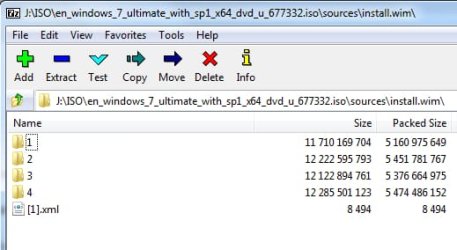
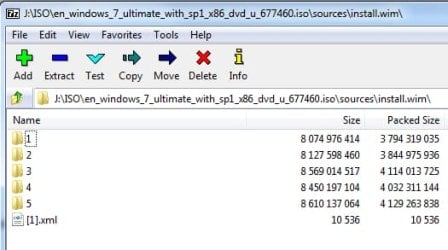
Several images in install.wim


MS x64 install.wim
install.wim-images.jpg

1=Home Basic
2=Home Premium
3=Professional
4=Ultimate


MS x86 install.wim
x86-install.wim-images.jpg

1=Starter
2=Home Basic
3=Home Premium
4=Professional
5=Ultimate

Those are standard MS iso files.

The ei.cfg file tells setup which image to apply. If there is no ei.cfg file, setup will offer a choice.

NOTE: Some Oem supplied "recovery media" only contains one image.
 
Last edited:

My Computers My Computers

  • At a glance

    7 X64i5 84002x8gb 3200mhz
    Computer type
    PC/Desktop
    OS
    7 X64
    CPU
    i5 8400
    Motherboard
    gigabyte b365m ds3h
    Memory
    2x8gb 3200mhz
    Hard Drives
    various
    PSU
    pure power 11 400w cm
    Case
    Coolermaster
    Cooling
    cryorig m9i
  • At a glance

    7x64g54008gb ddr4 2400
    Computer type
    PC/Desktop
    OS
    7x64
    CPU
    g5400
    Motherboard
    ga b365m ds3h
    Memory
    8gb ddr4 2400
    PSU
    xfx pro 450w
Sorry. I use this pc less often and forget that it does not have a CD drive whereas my other two pcs do. My Win7 Professional pc is a Lenovo M53 Thinkcentre small form factor. I could not use my Win 7 Home Premium disk if I wanted to. Any suggestions that would work with a USB drive?
 

My Computer My Computer

At a glance

Windows 7
OS
Windows 7
Backup the activation, create an iso and remove ei.cfg as described in my previous posts.

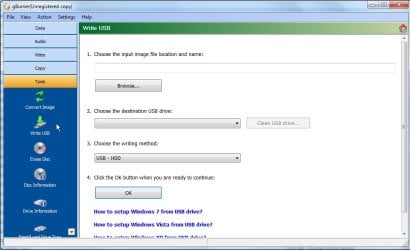
Then, instead of burning your newly created iso to dvd, create a bootable flash disk from it.

You can do that with gburner Tools>Write USB


2020-01-20_051925.jpg


or with usb7ice View attachment Usb7ice.zip
 
Last edited:

My Computers My Computers

  • At a glance

    7 X64i5 84002x8gb 3200mhz
    Computer type
    PC/Desktop
    OS
    7 X64
    CPU
    i5 8400
    Motherboard
    gigabyte b365m ds3h
    Memory
    2x8gb 3200mhz
    Hard Drives
    various
    PSU
    pure power 11 400w cm
    Case
    Coolermaster
    Cooling
    cryorig m9i
  • At a glance

    7x64g54008gb ddr4 2400
    Computer type
    PC/Desktop
    OS
    7x64
    CPU
    g5400
    Motherboard
    ga b365m ds3h
    Memory
    8gb ddr4 2400
    PSU
    xfx pro 450w
Before I attempt the re-install of Win 7 Pro, after I re-installed Win 7 Home Premium on my other two pcs, I downloaded and installed all of the Windows 7 updates before support ended. Now that support has ended, are all of the old updates still available, with the understanding that there will be no new updates OR is access to the old updates blocked?
 

My Computer My Computer

At a glance

Windows 7
OS
Windows 7

My Computers My Computers

  • At a glance

    7 X64i5 84002x8gb 3200mhz
    Computer type
    PC/Desktop
    OS
    7 X64
    CPU
    i5 8400
    Motherboard
    gigabyte b365m ds3h
    Memory
    2x8gb 3200mhz
    Hard Drives
    various
    PSU
    pure power 11 400w cm
    Case
    Coolermaster
    Cooling
    cryorig m9i
  • At a glance

    7x64g54008gb ddr4 2400
    Computer type
    PC/Desktop
    OS
    7x64
    CPU
    g5400
    Motherboard
    ga b365m ds3h
    Memory
    8gb ddr4 2400
    PSU
    xfx pro 450w
I realized after I posted my previous comment that I could create the ISO image using my pc with a dvd drive, save it to USB, and use the USB to re-install Win7 Home Pro on my 3rd pc.

I have followed almost all of the steps up to deleting the sources\ei.cfg file, and then saving it to the same usb drive. This created a new file called 5DCC.tmp. Is that because I have the ISO original and the changed ISO on the same USB drive? Do they have to be on separate usb drives for me to do the re-install?
 

Attachments

  • Win7Pro ISO.jpg
    Win7Pro ISO.jpg
    18 KB · Views: 1

My Computer My Computer

At a glance

Windows 7
OS
Windows 7
The tmp file looks like something was trying to create an iso, but was unable to complete. Try changing the extension from 5DCC.tmp to 5DCC.iso

Why have you put those files on a usb stick?

To create a bootable usb an iso must be extracted to a properly formatted usb. That is what usb7ice ( linked earlier ) is for.
 

My Computers My Computers

  • At a glance

    7 X64i5 84002x8gb 3200mhz
    Computer type
    PC/Desktop
    OS
    7 X64
    CPU
    i5 8400
    Motherboard
    gigabyte b365m ds3h
    Memory
    2x8gb 3200mhz
    Hard Drives
    various
    PSU
    pure power 11 400w cm
    Case
    Coolermaster
    Cooling
    cryorig m9i
  • At a glance

    7x64g54008gb ddr4 2400
    Computer type
    PC/Desktop
    OS
    7x64
    CPU
    g5400
    Motherboard
    ga b365m ds3h
    Memory
    8gb ddr4 2400
    PSU
    xfx pro 450w
"You can do that with gburner Copy>Write USB or with usb7ice Usb7ice.zip"

I used gBurner per your instructions.

Though I would prefer a clean install as I did with my other pcs, frankly, this whole process is more involved than I expected it to be to do the same on my Win7 Pro pc.
 

My Computer My Computer

At a glance

Windows 7
OS
Windows 7
Like most things, it is easy once you know how.
Most people use bootable usb sticks for installation media nowadays. Deleting ei.cfg file creates a "universal" installer.

It is also useful because other stuff can be copied to the usb. A folder containing drivers, or a few portable programs that can be run from the booted media - a partition manager, for example.
 

My Computers My Computers

  • At a glance

    7 X64i5 84002x8gb 3200mhz
    Computer type
    PC/Desktop
    OS
    7 X64
    CPU
    i5 8400
    Motherboard
    gigabyte b365m ds3h
    Memory
    2x8gb 3200mhz
    Hard Drives
    various
    PSU
    pure power 11 400w cm
    Case
    Coolermaster
    Cooling
    cryorig m9i
  • At a glance

    7x64g54008gb ddr4 2400
    Computer type
    PC/Desktop
    OS
    7x64
    CPU
    g5400
    Motherboard
    ga b365m ds3h
    Memory
    8gb ddr4 2400
    PSU
    xfx pro 450w
Didn't I create a bootable usb drive when I used gBurner? I can change the " tmp" to iso, but since I have both iso's on the same usb, can I install Win7 Pro from that usb?
 

My Computer My Computer

At a glance

Windows 7
OS
Windows 7
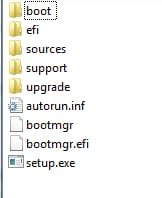
A bootable usb has the extracted contents of the windows installation .iso on the root.

You should see all this on the root of the usb stick

iso-contents.jpg

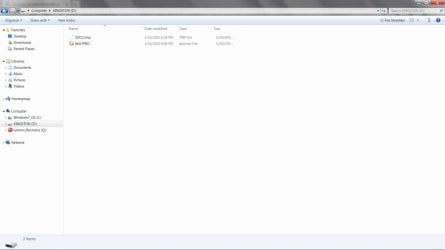
That is what you should see when you click on your Kingston D:

If there is enough extra space on your usb stick, you can then copy extra files/folders/whatever you want onto it as well.

It is important the usb stick is formatted correctly. Sometimes the usb manufacturer has already done that - but not always.

USB stick can be formatted ( FAT32 is best because it is useable for bios and efi mode) by windows disk management or any 3rd party partition manager. Then the contents of the iso can be copied to the the usb stick - using 7-zip or anything else that will extract/copy out the contents of an iso.

There are also progarms that will do both the formatting and copying of the iso contents for you - for example usb7ice, Rufus,poweriso - and plenty more.
 
Last edited:

My Computers My Computers

  • At a glance

    7 X64i5 84002x8gb 3200mhz
    Computer type
    PC/Desktop
    OS
    7 X64
    CPU
    i5 8400
    Motherboard
    gigabyte b365m ds3h
    Memory
    2x8gb 3200mhz
    Hard Drives
    various
    PSU
    pure power 11 400w cm
    Case
    Coolermaster
    Cooling
    cryorig m9i
  • At a glance

    7x64g54008gb ddr4 2400
    Computer type
    PC/Desktop
    OS
    7x64
    CPU
    g5400
    Motherboard
    ga b365m ds3h
    Memory
    8gb ddr4 2400
    PSU
    xfx pro 450w
I used vbs to access my product key as as there is no PK sticker on my Win 7 Professional pc. I decided to download the iso image from the Microsoft site. However, when I attempted to verify the product key for the iso download, I received the following message:

"Error
We encountered a problem with your request. Please visit Microsoft Support Contact Us page for assistance. ...."

I have checked and rechecked that I typed it in correctly and receive the same error message.
 

My Computer My Computer

At a glance

Windows 7
OS
Windows 7
... are all of the old updates still available, with the understanding that there will be no new updates OR is access to the old updates blocked?


Yes, windows update will still find all the old updates, there just won't be any new ones.
 

My Computers My Computers

  • At a glance

    Windows 7 Home Premium x64AMD V1204GB
    Computer type
    Laptop
    Computer Manufacturer/Model Number
    Toshiba satellite C650D
    OS
    Windows 7 Home Premium x64
    CPU
    AMD V120
    Memory
    4GB
    Internet Speed
    150 Mbps
    Antivirus
    MSE
    Browser
    IE11, Edge, Firefox
    Other Info
    I also have W7 Pro on my System Two, and several W7 Hyper-V VMs. My other machines run Windows 10/11. Their specs are in my Ten Forums & Eleven Forum profiles.
  • At a glance

    Windows 7 Pro x64Intel i5-3320M8 GB
    Computer type
    Laptop
    System Manufacturer/Model Number
    Lenovo Thinkpad T430
    OS
    Windows 7 Pro x64
    CPU
    Intel i5-3320M
    Memory
    8 GB
    Hard Drives
    250GB Samsung SSD 860 EVO
    Antivirus
    MSE
I decided to download the iso image from the Microsoft site. However, when I attempted to verify the product key for the iso download, I received the following message:

"Error
We encountered a problem with your request. Please visit Microsoft Support Contact Us page for assistance. ...."


That Ms portal is reportedly prone to errors.

Which Edition, bit version and language iso file do you need? Is it win7 Pro x64 english?


I used vbs to access my product key as as there is no PK sticker on my Win 7 Professional pc.

Slp key ( oem preinstall) can't be used by itself to activate. That is why it makes sense to back up the activation with dism++
 

My Computers My Computers

  • At a glance

    7 X64i5 84002x8gb 3200mhz
    Computer type
    PC/Desktop
    OS
    7 X64
    CPU
    i5 8400
    Motherboard
    gigabyte b365m ds3h
    Memory
    2x8gb 3200mhz
    Hard Drives
    various
    PSU
    pure power 11 400w cm
    Case
    Coolermaster
    Cooling
    cryorig m9i
  • At a glance

    7x64g54008gb ddr4 2400
    Computer type
    PC/Desktop
    OS
    7x64
    CPU
    g5400
    Motherboard
    ga b365m ds3h
    Memory
    8gb ddr4 2400
    PSU
    xfx pro 450w
Back
Top