
Y
Yanta
Guest
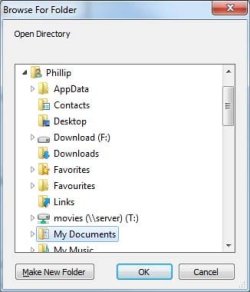
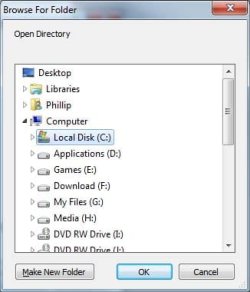
Hi, I want to change the default browse for folder dialog to point to Computer in any application that uses this dialog.
I do not use the explorer task bar icon, I have set my task bar to look like vista's
The first image is the current state, the second is what I'm after.
Had a look at the post by Brink http://www.sevenforums.com/tutorials/2863-windows-explorer-taskbar-icon-change-open-target.html, but as I said, I dont use the task bar explorer icon. I'm trying to set this up for applications that open "browse for a folder".
Perhaps this is what I need - %windir%\explorer.exe /n,::{20D04FE0-3AEA-1069-A2D8-08002B30309D}
But I don't know where I would put this setting. I scanned the registry, but didn't see anything that suggested where the setting should go.
thanks
Tanya
I do not use the explorer task bar icon, I have set my task bar to look like vista's
The first image is the current state, the second is what I'm after.
Had a look at the post by Brink http://www.sevenforums.com/tutorials/2863-windows-explorer-taskbar-icon-change-open-target.html, but as I said, I dont use the task bar explorer icon. I'm trying to set this up for applications that open "browse for a folder".
Perhaps this is what I need - %windir%\explorer.exe /n,::{20D04FE0-3AEA-1069-A2D8-08002B30309D}
But I don't know where I would put this setting. I scanned the registry, but didn't see anything that suggested where the setting should go.
thanks
Tanya


 If it behaves like some others in W7 there may be additional complications.
 There will now be a brief pause while I remember that I have a way to check this ..... aha!
  Oh dear... Maybe hubby was right.. the best computer is the one that sits in a orner turned off


