Change font in Windows Live Mail when reading emails ?

TexTwil

New member
Member
Local time
11:08 PM
Messages
64
Hi,
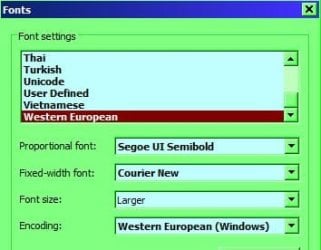
how can I change the font of text/plain emails opened in Windows Live Mail ? I"ve followed those instructions but it has no effect.

I have a clean installtion of Windows Seven and WLM.

thanks,
Tex
 

My Computer My Computer

At a glance

Windows 7i7 2.8 GhzCorsaire 8GBATI 5850
OS
Windows 7
CPU
i7 2.8 Ghz
Memory
Corsaire 8GB
Graphics Card(s)
ATI 5850
Hi Tex, I don't know if it will work as I don't know what version your using. I'm using WLM 2009 and it looks like:-

RR.jpg
 

My Computer My Computer

At a glance

Win7 H.Prem. 32bit+SP1
Computer Manufacturer/Model Number
Look in my Signature.
OS
Win7 H.Prem. 32bit+SP1
...how can I change the font of text/plain emails opened in Windows Live Mail ? I"ve followed those instructions but it has no effect...
Did you change any of the four dropdown lists before clicking the "OK" button at the bottom? If you did and nothing changed you could try closing and re-opening the program, then go back to the options page showing the 4 dropdowns to see if the settings have changed. If they have reverted back to the way they were initially, then there is something wrong with WLM.

You could try a repair...go to Programs and Features (Windows control panel), highlight Windows Live Essentials, click uninstall/change at the top, and in the next window choose "repair". All the installed components of the Essentials package will be repaird, including Mail.
 

My Computer My Computer

At a glance

Windows 8 Pro w/MC 32-bitIntel Atom 1.86 GHz2 GBIntel GMA 500
Computer type
PC/Desktop
Computer Manufacturer/Model Number
OQO 2+
OS
Windows 8 Pro w/MC 32-bit
CPU
Intel Atom 1.86 GHz
Motherboard
OQO 2+
Memory
2 GB
Graphics Card(s)
Intel GMA 500
Sound Card
IDT
Monitor(s) Displays
LCD
Screen Resolution
800 x 480 (portable) 1280 x 1024 (docked)
Hard Drives
64 GB SSD
PSU
9 Ah Battery (portable) or OQO Brick (docked)
Case
Shirt Pocket Sized
Cooling
Tiny Fan
Keyboard
Slide out (portable) DiNovo Edge (docked)
Mouse
Eraser head (portable) Logitech Bluetooth (docked)
Internet Speed
WWAN or 802.11G (portable) T1 (docked)
Browser
IE 10
Other Info
DVD-RW OQO Docking Station
Yes I changed the font select boxes and double checked that they were changed after relaunching WLM. I will try the repair. I doubt it will help though cos I've just installed WLM.

thanks for your help


My Computer My Computer

At a glance

Windows 7i7 2.8 GhzCorsaire 8GBATI 5850
OS
Windows 7
CPU
i7 2.8 Ghz
Memory
Corsaire 8GB
Graphics Card(s)
ATI 5850
...the repair. I doubt it will help though cos I've just installed WLM...
Actually, I've heard there is at least one bug in the 2011 version of WLM that can be fixed by doing a repair after install. So it's a good idea to do it anyway.

Another factor may have to do with checking the option to read messages in plain text. It's possible that if you don't do that the html setup of received messages (determined by the sender's setup) may overide your "read" setup. I've noticed that in WLM 2009 I can see a full thread of posts from different people...all with different size fonts but when I choose "read...in plain text" they're all the same.
 

My Computer My Computer

At a glance

Windows 8 Pro w/MC 32-bitIntel Atom 1.86 GHz2 GBIntel GMA 500
Computer type
PC/Desktop
Computer Manufacturer/Model Number
OQO 2+
OS
Windows 8 Pro w/MC 32-bit
CPU
Intel Atom 1.86 GHz
Motherboard
OQO 2+
Memory
2 GB
Graphics Card(s)
Intel GMA 500
Sound Card
IDT
Monitor(s) Displays
LCD
Screen Resolution
800 x 480 (portable) 1280 x 1024 (docked)
Hard Drives
64 GB SSD
PSU
9 Ah Battery (portable) or OQO Brick (docked)
Case
Shirt Pocket Sized
Cooling
Tiny Fan
Keyboard
Slide out (portable) DiNovo Edge (docked)
Mouse
Eraser head (portable) Logitech Bluetooth (docked)
Internet Speed
WWAN or 802.11G (portable) T1 (docked)
Browser
IE 10
Other Info
DVD-RW OQO Docking Station
...the repair. I doubt it will help though cos I've just installed WLM...
Actually, I've heard there is at least one bug in the 2011 version of WLM that can be fixed by doing a repair after install. So it's a good idea to do it anyway.
ok I will try today.

Another factor may have to do with checking the option to read messages in plain text. It's possible that if you don't do that the html setup of received messages (determined by the sender's setup) may overide your "read" setup.

The email that I use to check if the font was applied is only text/plain.

regards,
tex
 

My Computer My Computer

At a glance

Windows 7i7 2.8 GhzCorsaire 8GBATI 5850
OS
Windows 7
CPU
i7 2.8 Ghz
Memory
Corsaire 8GB
Graphics Card(s)
ATI 5850
The repair didn't seem to work :(

I think I give up.
 

Attachments

  • Capture.PNG
    Capture.PNG
    49.5 KB · Views: 25

My Computer My Computer

At a glance

Windows 7i7 2.8 GhzCorsaire 8GBATI 5850
OS
Windows 7
CPU
i7 2.8 Ghz
Memory
Corsaire 8GB
Graphics Card(s)
ATI 5850

My Computer My Computer

At a glance

Win7 H.Prem. 32bit+SP1
Computer Manufacturer/Model Number
Look in my Signature.
OS
Win7 H.Prem. 32bit+SP1
The repair didn't seem to work :(

I think I give up.
The window you posted is not the one where you choose to read in "plain text". It's in the previous window: Tools/Options/Read/Reading Messages/"Read all messages in plain text". If I choose that option, then all the messages I receive look the same and use my "plain text" settings.
 

My Computer My Computer

At a glance

Windows 8 Pro w/MC 32-bitIntel Atom 1.86 GHz2 GBIntel GMA 500
Computer type
PC/Desktop
Computer Manufacturer/Model Number
OQO 2+
OS
Windows 8 Pro w/MC 32-bit
CPU
Intel Atom 1.86 GHz
Motherboard
OQO 2+
Memory
2 GB
Graphics Card(s)
Intel GMA 500
Sound Card
IDT
Monitor(s) Displays
LCD
Screen Resolution
800 x 480 (portable) 1280 x 1024 (docked)
Hard Drives
64 GB SSD
PSU
9 Ah Battery (portable) or OQO Brick (docked)
Case
Shirt Pocket Sized
Cooling
Tiny Fan
Keyboard
Slide out (portable) DiNovo Edge (docked)
Mouse
Eraser head (portable) Logitech Bluetooth (docked)
Internet Speed
WWAN or 802.11G (portable) T1 (docked)
Browser
IE 10
Other Info
DVD-RW OQO Docking Station
Back
Top