Solved Change Hard Drive Letter

Keithet

New member
Local time
6:02 AM
Messages
12
I have a new computer that runs W7 Prof 64 bit. I noticed when I got it the following.

Drive C (W7 on it and it's the boot drive)
Drive E (second hard drive
Drive D (CDROM drive)
Hard Drives are both 1TB SATA3
What is on the E drive is data I copied there.
I would like to change the E drive to D and the CDROM drive D to E.
This way my hard drives will be C and D and the CDROM will be E.
I have no idea how to do this. Can anyone help me?

Keithet
 

My Computer

OS
W7 professional 64bit
You can do that in Disk Management. Right click on the drive(s) and you will see. But you will first have to assign a different letter (e.g. M) to E or D to free up that letter. If you have data on E, it may lose the path though.
 

My Computer

Computer Manufacturer/Model Number
HP, Dell, Gateway, Toshiba - 4 laptops and 2 desktops
OS
Vista, Windows7, Mint Mate, Zorin, Windows 8
CPU
from 1.6GHz Duo to i7
Monitor(s) Displays
2x HP w2207
Hard Drives
5x HDD, 7x SSD, 12x Externals
Keyboard
with trackball - no mices
Mouse
Trackball mice
Internet Speed
DSL 6000
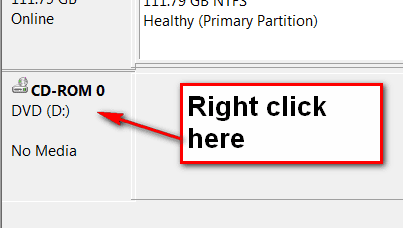
Change the CDROM Drive letter??

How do I reassign a different letter to the CDROm drive to free up the letter D?
 

My Computer

OS
W7 professional 64bit

Attachments

  • 2010-12-24_220034.png
    2010-12-24_220034.png
    4.5 KB · Views: 34

My Computer

Computer Manufacturer/Model Number
HP, Dell, Gateway, Toshiba - 4 laptops and 2 desktops
OS
Vista, Windows7, Mint Mate, Zorin, Windows 8
CPU
from 1.6GHz Duo to i7
Monitor(s) Displays
2x HP w2207
Hard Drives
5x HDD, 7x SSD, 12x Externals
Keyboard
with trackball - no mices
Mouse
Trackball mice
Internet Speed
DSL 6000

My Computer

Computer type
PC/Desktop
Computer Manufacturer/Model Number
Lenovo IdeaCenter 450
OS
Windows 10 Pro X64
CPU
Intel Quad Core i7-4770 @ 3.4Ghz
Memory
16.0GB PC3-12800 DDR3 SDRAM 1600 MHz
Graphics Card(s)
Intel Integrated HD Graphics
Sound Card
Realtek HD Audio
Monitor(s) Displays
HP 22" LCD
Screen Resolution
1680 x 1050
Hard Drives
250GB Samsung EVO SATA-3 SSD
2TB Seagate ST2000DM001 SATA-2
1.5TB Seagate ST3150041AS SATA
Keyboard
Dell USB
Mouse
Lenovo USB
Internet Speed
Cable via Road Runner 3MB Upload, 30MB Download
Antivirus
Windows Defender, MBAM Pro, MBAE
Browser
Seamonkey
Other Info
UEFI/GPT
PLDS DVD-RW DH16AERSH
Thanks for the tips. I am Xp experienced but not W7.
 

My Computer

OS
W7 professional 64bit
This is the second link I've followed from a google search to find out the answer to how to change a drive letter--and the second one that advised it can be done in Disk Management--unfortunately however, without mention that Disk Management is one of the most remote, obscure and hidden features of Windows 7. Joyously, someone later in this thread gave directions on how to find that.
 
Last edited:

My Computer

Computer Manufacturer/Model Number
Home Built
OS
Win 7 Pro
CPU
Intel i7 2600K
Motherboard
Asus P8Z68-V LX
Memory
16 GB 1333 Crucial Hyper-X Blu I think
Graphics Card(s)
Integrated
Sound Card
Integrated
Monitor(s) Displays
Dual LCD IPS panels
Screen Resolution
1980x1200, 1980x1080
Hard Drives
3 SATA: 250, 160, 2000 GB, External USB 3TB
PSU
OCZ modular 500W
Case
Antec 300
Cooling
Case: 2 Stock fans, CPU: CoolerMaster Evo 212; PSU: fan
Keyboard
Dell Logitech wireless
Mouse
Logitech Wireless 510
Internet Speed
1.0 Mbps down, 448 Kbps up
Other Info
Case is too small.
Thanks for the tips. I am Xp experienced but not W7.
For the record, the steps are identical in XP as they are in Windows 7. I'll add one caveat that I've never used XP Home Premium, so my comment may only apply to Windows XP Pro.
 

My Computer

OS
Windows 7 Ultimate x64 SP1
CPU
Intel Core i7-2600
Motherboard
Gigabyte GA-P67A-UD3P-B3
Memory
12 GB Patriot Extreme DDR3-1333
Graphics Card(s)
Nvidia GTX 470
Monitor(s) Displays
Dell UltraSharp 2209WA
Hard Drives
OCZ Agility3 240 GB, WD5001AALS, WD7501AALS
PSU
OCZ ModStream 700W
Case
CoolerMaster HAF 912 Advanced
Cooling
CoolerMaster Hyper 212 Plus
Back
Top