Solved Change hot tracking colour

Rikkitic

New member
Local time
1:56 AM
Messages
11
I use an Aero theme on my streaming computer. I don't want to change this but the hot tracking colour that shows the selected item on a menu is a faint transparent blue that is almost impossible to see. This cannot be changed in Windows. I have been researching this and I think it is in msstyles somewhere. I would like to change the colour with Resource Hacker to make it brighter or improve the visibility in some other way but it is difficult to figure out what needs to be changed in msstyles. Can anyone help me out with this?
 

My Computer

Computer type
PC/Desktop
Computer Manufacturer/Model Number
several different models
OS
32-bit Ultimate and Home Premium
CPU
various
Motherboard
various
Memory
various
Graphics Card(s)
various
Hard Drives
various
Antivirus
malwarebytes
Browser
mainly slimjet (Chrome)
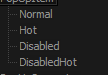
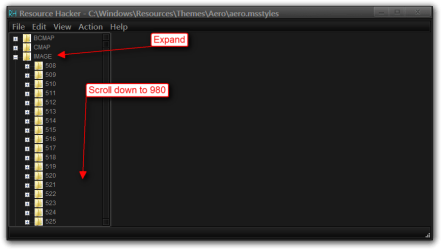
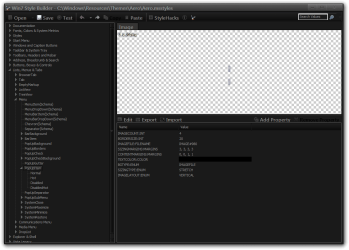
You are correct that image is in the msstyles it is image #980 the image is 7 pixels by 84 pixels and there are four states (look at screenshot below) and each state is 7 pixels by 21 pixels.
980.PNG

I would recommend that you start a new custom theme from scratch so you do not corrupt the original look at Post #38 Here it will show you how.

You will need to do 1 of these 2 ways of Enabling custom themes for it to work.
http://www.sevenforums.com/tutorials/34579-enabling-custom-themes-windows-7-a.html
Or
http://www.sevenforums.com/tutorials/28377-theme-how-apply-custom-themes.html?filter

If you need any help doing it let me know I own a program that edits the .msstyles.

Jerry
 

My Computer

Computer type
Laptop
Computer Manufacturer/Model Number
Sager NP9170
OS
Win 7 Pro x64 / Win 10 Pro
CPU
Intel(R) Core(TM) i7-3630QM CPU @ 2.40GHz
Motherboard
CLEVO P170EM
Memory
12 GB
Graphics Card(s)
(1) Intel(R) HD Graphics 4000 (2) NVIDIA GeForce GTX 675M
Sound Card
(1) Realtek High Definition Audio (2) Intel(R) Display Aud
Monitor(s) Displays
17.3
Screen Resolution
1920x1080
Hard Drives
(1) Samsung 860 EVO 500GB(OS) (1) Samsung 860 EVO 500GB(Data)
Keyboard
Backlite
Antivirus
MSE, Malwarebytes Pro
Browser
Firefox
Other Info
DESKTOP: Custom-built.
OS: Win 10 Pro x64.
CASE: Rosewill R5.
CPU: Intel I5 4670K CPU @ 3.40GHz.
CPU COOLER: Cool Master Hyper 212 EVO.
MOTHERBOARD: Asus Z87-A.
MEMORY: Kingston HyperX 2x4 GB.
GPU: Nvidia Geforce 650 TI.
PSU: Corsair TX750.
DRIVES: (1) Samsung 840 120 GB SSD (2) Western Digital blue 500 GB 7200 RPM.
Thanks a lot for the reply. I will experiment with this and see how far I get. I'm not trying to do anything fancy. I just want to make the tracking colour more visible.
 

My Computer

Computer type
PC/Desktop
Computer Manufacturer/Model Number
several different models
OS
32-bit Ultimate and Home Premium
CPU
various
Motherboard
various
Memory
various
Graphics Card(s)
various
Hard Drives
various
Antivirus
malwarebytes
Browser
mainly slimjet (Chrome)
Ok I am completely confused now. I cannot find any trace of the image referred to in msstyles. I am also not sure we are talking about the same thing. From my research I thought it was the hot tracking color, but I may have that wrong. I am referring to the slight colour shading change that indicates the selected item when scrolling down a menu list. This is what I would like to modify.
 

My Computer

Computer type
PC/Desktop
Computer Manufacturer/Model Number
several different models
OS
32-bit Ultimate and Home Premium
CPU
various
Motherboard
various
Memory
various
Graphics Card(s)
various
Hard Drives
various
Antivirus
malwarebytes
Browser
mainly slimjet (Chrome)

My Computer

Computer type
Laptop
Computer Manufacturer/Model Number
Sager NP9170
OS
Win 7 Pro x64 / Win 10 Pro
CPU
Intel(R) Core(TM) i7-3630QM CPU @ 2.40GHz
Motherboard
CLEVO P170EM
Memory
12 GB
Graphics Card(s)
(1) Intel(R) HD Graphics 4000 (2) NVIDIA GeForce GTX 675M
Sound Card
(1) Realtek High Definition Audio (2) Intel(R) Display Aud
Monitor(s) Displays
17.3
Screen Resolution
1920x1080
Hard Drives
(1) Samsung 860 EVO 500GB(OS) (1) Samsung 860 EVO 500GB(Data)
Keyboard
Backlite
Antivirus
MSE, Malwarebytes Pro
Browser
Firefox
Other Info
DESKTOP: Custom-built.
OS: Win 10 Pro x64.
CASE: Rosewill R5.
CPU: Intel I5 4670K CPU @ 3.40GHz.
CPU COOLER: Cool Master Hyper 212 EVO.
MOTHERBOARD: Asus Z87-A.
MEMORY: Kingston HyperX 2x4 GB.
GPU: Nvidia Geforce 650 TI.
PSU: Corsair TX750.
DRIVES: (1) Samsung 840 120 GB SSD (2) Western Digital blue 500 GB 7200 RPM.
Yes that is what I want changed. Just that light blue highlight bar. On my Windows 7 streaming computer it is much fainter in Aero, especially with AHK menus. I know I can improve this by switching to a non-Aero theme, but that affects other things, especially the way the magnifier works. I would like to change the colour or make it brighter. I really don't know why Microsoft keeps doing this sort of thing. It is like they want to annoy people.

I really appreciate your help with this. I am not a computer novice but this is an area that is new to me.
 

My Computer

Computer type
PC/Desktop
Computer Manufacturer/Model Number
several different models
OS
32-bit Ultimate and Home Premium
CPU
various
Motherboard
various
Memory
various
Graphics Card(s)
various
Hard Drives
various
Antivirus
malwarebytes
Browser
mainly slimjet (Chrome)

My Computer

Computer type
Laptop
Computer Manufacturer/Model Number
Sager NP9170
OS
Win 7 Pro x64 / Win 10 Pro
CPU
Intel(R) Core(TM) i7-3630QM CPU @ 2.40GHz
Motherboard
CLEVO P170EM
Memory
12 GB
Graphics Card(s)
(1) Intel(R) HD Graphics 4000 (2) NVIDIA GeForce GTX 675M
Sound Card
(1) Realtek High Definition Audio (2) Intel(R) Display Aud
Monitor(s) Displays
17.3
Screen Resolution
1920x1080
Hard Drives
(1) Samsung 860 EVO 500GB(OS) (1) Samsung 860 EVO 500GB(Data)
Keyboard
Backlite
Antivirus
MSE, Malwarebytes Pro
Browser
Firefox
Other Info
DESKTOP: Custom-built.
OS: Win 10 Pro x64.
CASE: Rosewill R5.
CPU: Intel I5 4670K CPU @ 3.40GHz.
CPU COOLER: Cool Master Hyper 212 EVO.
MOTHERBOARD: Asus Z87-A.
MEMORY: Kingston HyperX 2x4 GB.
GPU: Nvidia Geforce 650 TI.
PSU: Corsair TX750.
DRIVES: (1) Samsung 840 120 GB SSD (2) Western Digital blue 500 GB 7200 RPM.
The display of your first screen shot didn't appear correctly on my monitor for some reason, which is what confused me. I couldn't see what you meant. Now it makes sense.

If you don't mind doing this for me I would certainly prefer that. You obviously know what you are doing and I'm sure it would save me a lot of fumbling frustration. I don't care about aesthetics. The computer is purely a workhorse and I just want a practical solution so feel free to make it as garish as you like as long as I can read the text underneath.

Thank you again for doing all this and for being so patient with my ignorance. I really appreciate this.
 

My Computer

Computer type
PC/Desktop
Computer Manufacturer/Model Number
several different models
OS
32-bit Ultimate and Home Premium
CPU
various
Motherboard
various
Memory
various
Graphics Card(s)
various
Hard Drives
various
Antivirus
malwarebytes
Browser
mainly slimjet (Chrome)
OK I will do it and post it here later today.

Jerry
 

My Computer

Computer type
Laptop
Computer Manufacturer/Model Number
Sager NP9170
OS
Win 7 Pro x64 / Win 10 Pro
CPU
Intel(R) Core(TM) i7-3630QM CPU @ 2.40GHz
Motherboard
CLEVO P170EM
Memory
12 GB
Graphics Card(s)
(1) Intel(R) HD Graphics 4000 (2) NVIDIA GeForce GTX 675M
Sound Card
(1) Realtek High Definition Audio (2) Intel(R) Display Aud
Monitor(s) Displays
17.3
Screen Resolution
1920x1080
Hard Drives
(1) Samsung 860 EVO 500GB(OS) (1) Samsung 860 EVO 500GB(Data)
Keyboard
Backlite
Antivirus
MSE, Malwarebytes Pro
Browser
Firefox
Other Info
DESKTOP: Custom-built.
OS: Win 10 Pro x64.
CASE: Rosewill R5.
CPU: Intel I5 4670K CPU @ 3.40GHz.
CPU COOLER: Cool Master Hyper 212 EVO.
MOTHERBOARD: Asus Z87-A.
MEMORY: Kingston HyperX 2x4 GB.
GPU: Nvidia Geforce 650 TI.
PSU: Corsair TX750.
DRIVES: (1) Samsung 840 120 GB SSD (2) Western Digital blue 500 GB 7200 RPM.
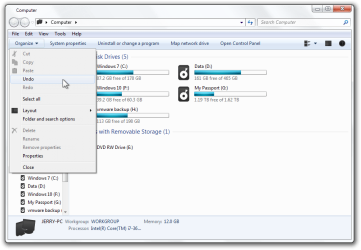
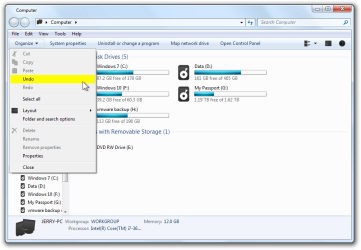
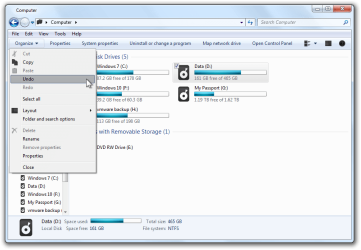
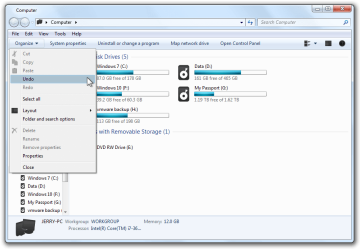
Do you like either 1 of these?
Or darker or lighter?
1
1.png
2
2.png

Jerry
 

My Computer

Computer type
Laptop
Computer Manufacturer/Model Number
Sager NP9170
OS
Win 7 Pro x64 / Win 10 Pro
CPU
Intel(R) Core(TM) i7-3630QM CPU @ 2.40GHz
Motherboard
CLEVO P170EM
Memory
12 GB
Graphics Card(s)
(1) Intel(R) HD Graphics 4000 (2) NVIDIA GeForce GTX 675M
Sound Card
(1) Realtek High Definition Audio (2) Intel(R) Display Aud
Monitor(s) Displays
17.3
Screen Resolution
1920x1080
Hard Drives
(1) Samsung 860 EVO 500GB(OS) (1) Samsung 860 EVO 500GB(Data)
Keyboard
Backlite
Antivirus
MSE, Malwarebytes Pro
Browser
Firefox
Other Info
DESKTOP: Custom-built.
OS: Win 10 Pro x64.
CASE: Rosewill R5.
CPU: Intel I5 4670K CPU @ 3.40GHz.
CPU COOLER: Cool Master Hyper 212 EVO.
MOTHERBOARD: Asus Z87-A.
MEMORY: Kingston HyperX 2x4 GB.
GPU: Nvidia Geforce 650 TI.
PSU: Corsair TX750.
DRIVES: (1) Samsung 840 120 GB SSD (2) Western Digital blue 500 GB 7200 RPM.
I think the first one is better. It shouldn't be too dark but I have noticed that different menus have different contrast levels, especially AHK menus, so the more it stands out, the better.
 

My Computer

Computer type
PC/Desktop
Computer Manufacturer/Model Number
several different models
OS
32-bit Ultimate and Home Premium
CPU
various
Motherboard
various
Memory
various
Graphics Card(s)
various
Hard Drives
various
Antivirus
malwarebytes
Browser
mainly slimjet (Chrome)
Download and extract the zip folder at the bottom of this post to your Desktop.

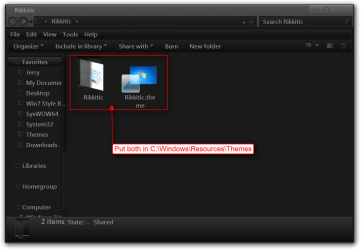
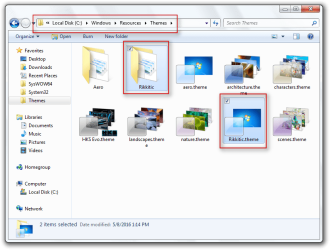
Put both the Rikkitic theme folder and the Rikkitic.theme file in C:\Windows\Resources\Themes
Rikkitic.PNG_2.png
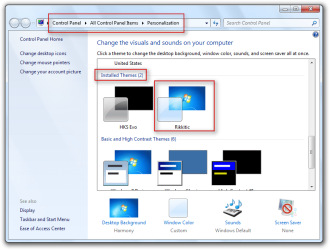
It will show up under Installed Themes as Rikkitic in Personalization.
Personalization.png
Make sure you do 1 of these 2 ways of Enabling custom themes for it to work.
http://www.sevenforums.com/tutorials/34579-enabling-custom-themes-windows-7-a.html
Or
http://www.sevenforums.com/tutorials/28377-theme-how-apply-custom-themes.html?filter

Let me know if it's OK

Jerry
 

Attachments

My Computer

Computer type
Laptop
Computer Manufacturer/Model Number
Sager NP9170
OS
Win 7 Pro x64 / Win 10 Pro
CPU
Intel(R) Core(TM) i7-3630QM CPU @ 2.40GHz
Motherboard
CLEVO P170EM
Memory
12 GB
Graphics Card(s)
(1) Intel(R) HD Graphics 4000 (2) NVIDIA GeForce GTX 675M
Sound Card
(1) Realtek High Definition Audio (2) Intel(R) Display Aud
Monitor(s) Displays
17.3
Screen Resolution
1920x1080
Hard Drives
(1) Samsung 860 EVO 500GB(OS) (1) Samsung 860 EVO 500GB(Data)
Keyboard
Backlite
Antivirus
MSE, Malwarebytes Pro
Browser
Firefox
Other Info
DESKTOP: Custom-built.
OS: Win 10 Pro x64.
CASE: Rosewill R5.
CPU: Intel I5 4670K CPU @ 3.40GHz.
CPU COOLER: Cool Master Hyper 212 EVO.
MOTHERBOARD: Asus Z87-A.
MEMORY: Kingston HyperX 2x4 GB.
GPU: Nvidia Geforce 650 TI.
PSU: Corsair TX750.
DRIVES: (1) Samsung 840 120 GB SSD (2) Western Digital blue 500 GB 7200 RPM.
Hi Jerry,

That works like a charm. It is brilliant. Again, I can't thank you enough for all of your trouble. It is exactly what I wanted.

Thanks again, Rikki
 

My Computer

Computer type
PC/Desktop
Computer Manufacturer/Model Number
several different models
OS
32-bit Ultimate and Home Premium
CPU
various
Motherboard
various
Memory
various
Graphics Card(s)
various
Hard Drives
various
Antivirus
malwarebytes
Browser
mainly slimjet (Chrome)
You're Welcome, glad I could help.

Jerry
 

My Computer

Computer type
Laptop
Computer Manufacturer/Model Number
Sager NP9170
OS
Win 7 Pro x64 / Win 10 Pro
CPU
Intel(R) Core(TM) i7-3630QM CPU @ 2.40GHz
Motherboard
CLEVO P170EM
Memory
12 GB
Graphics Card(s)
(1) Intel(R) HD Graphics 4000 (2) NVIDIA GeForce GTX 675M
Sound Card
(1) Realtek High Definition Audio (2) Intel(R) Display Aud
Monitor(s) Displays
17.3
Screen Resolution
1920x1080
Hard Drives
(1) Samsung 860 EVO 500GB(OS) (1) Samsung 860 EVO 500GB(Data)
Keyboard
Backlite
Antivirus
MSE, Malwarebytes Pro
Browser
Firefox
Other Info
DESKTOP: Custom-built.
OS: Win 10 Pro x64.
CASE: Rosewill R5.
CPU: Intel I5 4670K CPU @ 3.40GHz.
CPU COOLER: Cool Master Hyper 212 EVO.
MOTHERBOARD: Asus Z87-A.
MEMORY: Kingston HyperX 2x4 GB.
GPU: Nvidia Geforce 650 TI.
PSU: Corsair TX750.
DRIVES: (1) Samsung 840 120 GB SSD (2) Western Digital blue 500 GB 7200 RPM.
Back
Top