Please report here if the issue was resolved with the drive replacement....I contacted Patriot with a MINOR problem I was having with slow writes for flash player temp files and they immediately told me to send them the drive and sent me a new one. I'm not quite sure it needed to be RMAd but I am just setting up the new one today...

You are using an out of date browser. It may not display this or other websites correctly.
You should upgrade or use an alternative browser.
You should upgrade or use an alternative browser.
Change IDE to AHCI in BIOS - Much better performance
- Thread starter jimbo45
- Start date
I believe during install you have to be in AHCI if you plan to switch back and forth between the two
No u dont. If u install in IDE or RAID mode and then change the registry to AHCI later on windows will detect the registry changes made and install the drivers needed on next boot.
I also installed Win7 in IDE mode on my acer one d250 netbook (works pretty smooth) then changed the reg values and "rebootet into ahci" no problems. no significant improvements either

My Computer
At a glance
Windows 7
- OS
- Windows 7

Please report here if the issue was resolved with the drive replacement....I contacted Patriot with a MINOR problem I was having with slow writes for flash player temp files and they immediately told me to send them the drive and sent me a new one. I'm not quite sure it needed to be RMAd but I am just setting up the new one today...
I will Antman. I am going to switch motherboards now. I'm going back to my P55 board and i7860 with the SSD. I will report my findings.
My Computer
At a glance
Windows 7 Professional x64Intel Core i7 8604GB DDR3 Mushkin 1600Mhz @ 7-8-7-20MSI GTS250 1GB DDR3 Twin Frozr
- Computer Manufacturer/Model Number
- Keeps changing - (Custom)
- OS
- Windows 7 Professional x64
- CPU
- Intel Core i7 860
- Motherboard
- Gigabyte GA-P55-UD4P
- Memory
- 4GB DDR3 Mushkin 1600Mhz @ 7-8-7-20
- Graphics Card(s)
- MSI GTS250 1GB DDR3 Twin Frozr
- Sound Card
- Onboard realtek
- Monitor(s) Displays
- Samsung SyncMaster 24" P2450 + Samsung 20" 2033
- Screen Resolution
- 1920 X 1080 and 1600 X 900 (#2 system 1440 X 900)
- Hard Drives
- Patriot Inferno 120GB SSD + 3 WD Blue 640GB drives
- PSU
- Corsair 750 HX Modular
- Case
- Lancool PC-K62
- Cooling
- Cooler Master TX3 CPU cooler and 4-140mm and 1-120mm case
- Keyboard
- Gigabyte USB keyboard
- Mouse
- Microsoft wireless laser mouse 5000
- Internet Speed
- 7 Mb down 1.5 up
- Other Info
- System #2: AMD Phenom II X6 1055T (Freezer 7 Pro cooler) - Gigabyte 880GMA-UD2H - WD 500GB Black - 9500GT (1GB) 500W OCZ modular PSU - Antec 200 case. System #3 (LapTop) Core 2 Duo T6670 - 320GB 7200RPM HD - 4GB DDR3 RAM.
I believe during install you have to be in AHCI if you plan to switch back and forth between the two
No u dont. If u install in IDE or RAID mode and then change the registry to AHCI later on windows will detect the registry changes made and install the drivers needed on next boot.
I also installed Win7 in IDE mode on my acer one d250 netbook (works pretty smooth) then changed the reg values and "rebootet into ahci" no problems. no significant improvements either
Good point, I have heard of this but I think it will be easier to install in AHCI mode.....
Edit: I decided to install in IDE so I don't even have an easy option to use AHCI for a while. I cannot switch to AHCI....it BSODs.
@Antman - The new Patriot Torqx SSD is blazing fast. The Flash temp files are writing as fast as my connection will allow. I am left with this:
1. Was the slow performance because of an incompatibility in AHCI mode. I never even tried IDE witht he last drive
2. Was the slow performance because of prolonged use (about 4 months)
3. Was it just a bad drive.
I have a feeling it was #1 but maybe will never know (unless the same problem comes up in 4 months or sooner)
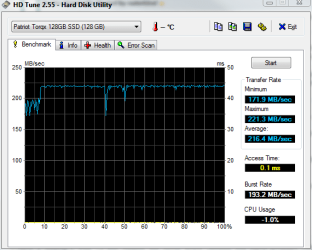
If you click the "my SSD" link in the sig you'll see it's a little better in AHCI and a little "smoother" I don't know why this would be. Something to do with IDE mode I guess.
Last edited:
My Computer
At a glance
Windows 7 Professional x64Intel Core i7 8604GB DDR3 Mushkin 1600Mhz @ 7-8-7-20MSI GTS250 1GB DDR3 Twin Frozr
- Computer Manufacturer/Model Number
- Keeps changing - (Custom)
- OS
- Windows 7 Professional x64
- CPU
- Intel Core i7 860
- Motherboard
- Gigabyte GA-P55-UD4P
- Memory
- 4GB DDR3 Mushkin 1600Mhz @ 7-8-7-20
- Graphics Card(s)
- MSI GTS250 1GB DDR3 Twin Frozr
- Sound Card
- Onboard realtek
- Monitor(s) Displays
- Samsung SyncMaster 24" P2450 + Samsung 20" 2033
- Screen Resolution
- 1920 X 1080 and 1600 X 900 (#2 system 1440 X 900)
- Hard Drives
- Patriot Inferno 120GB SSD + 3 WD Blue 640GB drives
- PSU
- Corsair 750 HX Modular
- Case
- Lancool PC-K62
- Cooling
- Cooler Master TX3 CPU cooler and 4-140mm and 1-120mm case
- Keyboard
- Gigabyte USB keyboard
- Mouse
- Microsoft wireless laser mouse 5000
- Internet Speed
- 7 Mb down 1.5 up
- Other Info
- System #2: AMD Phenom II X6 1055T (Freezer 7 Pro cooler) - Gigabyte 880GMA-UD2H - WD 500GB Black - 9500GT (1GB) 500W OCZ modular PSU - Antec 200 case. System #3 (LapTop) Core 2 Duo T6670 - 320GB 7200RPM HD - 4GB DDR3 RAM.
I recently built a computer using an Asrock X58 Extreme mobo. I installed Windows 7, but realized only afterward that the mobo's default setting for the HDDs was IDE rather than SATA.
I followed the registry hack instructions to change the "start" paramater for the MSAHCI driver to "0" (Error message when you start a Windows 7 or Windows Vista-based computer after you change the SATA mode of the boot drive: "STOP 0x0000007B INACCESSABLE_BOOT_DEVICE"), rebooted, changed the BIOS setting to AHCI and everything worked fine. The SATA drivers loaded and things were looking good!
However, a few days later I had a problem with going into "sleep" mode. The computer hung, and after several minutes I just switched if off and rebooted.
Now, I cannot get it to boot properly with the BIOS in AHCI mode. The registry entries are still the same as when AHCI was working, but it will not boot in SATA mode. I get the message "Problem loading OS". Changing the BIOS back to IDE allows me to boot.
Any ideas as to what went wrong (was it the hard shutdown that messed me up?), and any ideas on how to get SATA working again?
Thanks.
I followed the registry hack instructions to change the "start" paramater for the MSAHCI driver to "0" (Error message when you start a Windows 7 or Windows Vista-based computer after you change the SATA mode of the boot drive: "STOP 0x0000007B INACCESSABLE_BOOT_DEVICE"), rebooted, changed the BIOS setting to AHCI and everything worked fine. The SATA drivers loaded and things were looking good!
However, a few days later I had a problem with going into "sleep" mode. The computer hung, and after several minutes I just switched if off and rebooted.
Now, I cannot get it to boot properly with the BIOS in AHCI mode. The registry entries are still the same as when AHCI was working, but it will not boot in SATA mode. I get the message "Problem loading OS". Changing the BIOS back to IDE allows me to boot.
Any ideas as to what went wrong (was it the hard shutdown that messed me up?), and any ideas on how to get SATA working again?
Thanks.
My Computer
At a glance
Windows 7
- OS
- Windows 7

- Local time
- 1:40 AM
- Messages
- 3,028
Enabling AHCI gave me no noticeable performance increase. Benchmark results showed very little speed increase. It slows down my boot time so I switched back to IDE.
My Computer
At a glance
Windows 7 Ultimate (x64) SP1Intel 3770k 4.6GHz8GB (2x 4GB) Crucial BallistixSapphire 7950 (1060/1600)
- Computer Manufacturer/Model Number
- tw33k
- OS
- Windows 7 Ultimate (x64) SP1
- CPU
- Intel 3770k 4.6GHz
- Motherboard
- ASUS Maximus V Formula
- Memory
- 8GB (2x 4GB) Crucial Ballistix
- Graphics Card(s)
- Sapphire 7950 (1060/1600)
- Sound Card
- On Board Realtek HD Audio
- Monitor(s) Displays
- 27" Acer B273HU (via HDMI)
- Screen Resolution
- 2048 x 1152
- Hard Drives
- Crucial M4 128GB
2TB WD Black
1TB Samsung F3 SATA
1TB WD Elite External
2TB WD USB 3.0
- PSU
- Corsair AX750 Gold
- Case
- Corsair Obsidian 800DW
- Cooling
- Corsair H100 (2x AP-121/2x UK-3000 push/pull)
- Keyboard
- Microsoft Wireless 5000
- Mouse
- Microsoft Wireless 5000
- Internet Speed
- 5mb/s
- Other Info
- Logitech z-2300 2.1 speakers
Lamptron FC-5 v2

- Local time
- 8:40 AM
- Messages
- 50,634
What is the driver support like for AHCI?
Did you get a WIn7 driver from MS or mobo maker?
WHere did it initially load from? DVD Driverstore or provided by you from where?
This is something I've wondered, having dealt with some of these here but never done it myself yet.
Did you get a WIn7 driver from MS or mobo maker?
WHere did it initially load from? DVD Driverstore or provided by you from where?
This is something I've wondered, having dealt with some of these here but never done it myself yet.

Driver should load from Windows if the board supports it
My Computer
At a glance
Windows 7 x64 Ultimate SP1I5 875K UnlockedKingston HyperX Genesis DDR3-1600MHz 9-9-9-27...EVGA GeForce GTX 570 HD 732 MHz GPU 1280 MB, ...
- Computer Manufacturer/Model Number
- Asus
- OS
- Windows 7 x64 Ultimate SP1
- CPU
- I5 875K Unlocked
- Motherboard
- P7P55D-E-PRO
- Memory
- Kingston HyperX Genesis DDR3-1600MHz 9-9-9-27 @ 1.65V XMP
- Graphics Card(s)
- EVGA GeForce GTX 570 HD 732 MHz GPU 1280 MB, 152 GB Mem
- Sound Card
- Onboard Via 1828S
- Monitor(s) Displays
- Samsung T240 HD
- Screen Resolution
- Dual 1920X1200 1027X768
- Hard Drives
- OCZ Vertex II Extended Sandforce SSD 60 Gig 2X WD Black Caviar 1 terabyte 6GBS Transer Sata 3 Marvell Chip
- PSU
- Corsair Gold fully Modular 80 Plus 850
- Case
- Coolermaster Half X Full Tower
- Cooling
- Noctua NH-U12P
- Keyboard
- MS
- Mouse
- MS
- Internet Speed
- Fast enough
- Other Info
- My fridge has a water tap

- Local time
- 10:40 AM
- Messages
- 7,877
Enabling AHCI gave me no noticeable performance increase. Benchmark results showed very little speed increase. It slows down my boot time so I switched back to IDE.
That was my experience as well. There was a BIOS update for my mobo which reduced my boot delay from 8 seconds to 2 seconds....but other than a benchmark, I don't see any real quantifiable real world performance increases.
My Computer
At a glance
Windows 7 Ultimate x64Intel Q9550 2.83Ghz OC'd to 3.40Ghz8GB G.Skill PI DDR2-800, 4-4-4-12 timingsEVGA 1280MB Nvidia GeForce GTX570
- Computer Manufacturer/Model Number
- Self-Built in July 2009
- OS
- Windows 7 Ultimate x64
- CPU
- Intel Q9550 2.83Ghz OC'd to 3.40Ghz
- Motherboard
- Gigabyte GA-EP45-UD3R rev. 1.1, F12 BIOS
- Memory
- 8GB G.Skill PI DDR2-800, 4-4-4-12 timings
- Graphics Card(s)
- EVGA 1280MB Nvidia GeForce GTX570
- Sound Card
- Realtek ALC899A 8 channel onboard audio
- Monitor(s) Displays
- 23" Acer x233H
- Screen Resolution
- 1920x1080
- Hard Drives
- Intel X25-M 80GB Gen 2 SSD
Western Digital 1TB Caviar Black, 32MB cache. WD1001FALS
- PSU
- Corsair 620HX modular
- Case
- Antec P182
- Cooling
- stock
- Keyboard
- ABS M1 Mechanical
- Mouse
- Logitech G9 Laser Mouse
- Internet Speed
- 15/2 cable modem
- Other Info
- Windows and Linux enthusiast. Logitech G35 Headset.
I have ran a raid 1 config on my last two rigs. Twice I have had a problem. I tried to install a new disk and was not successful. I resorted to other backups etc. to solve the problem. I am cosidering on the new Win 7 install to scrap raid and go to another scheme for saving my operating system in case of a catastrophic failure.
Cons for raid:
speed reduction
uses up an extra disc
I think if I took the extra disk and put it in a dock and cloned the os to it once in a while. In the event of failure I could just replace the disk.
Does this sound reasonable?
Hi, Sounds like I've had similar problems. My PC was built for me with RAID 1 config. Here's my PC info:
- Processor : Intel i5 650 Dual Core 3.20 GHz Cache 4MB Threads: 4
- Hard Drives (2) : SEAGATE BARRACUDA 3.5” INTERNAL 500GB 16 MB SATA 3 (formerly Raid 1 Config) P/N: 9SL142-302
- Mother Bd : ASUS PRO P7P55D-E (Raid 0,1,5,10 capable)
P/N: 90-MIBBN0-G0AAY00Z
- Memory : OCZ 4GB DDR-3 P/N: OCZ30B1600LV4GK Speed: 1600M Unbuffered Timing: 9-9-9-24 1.65V
- Video Card : ZOTAC GeFORCE 9500 ZT-95TEK2M-FSL 1GB GDDR2
- DVD Drive : SAMSUNG 22x DVD-RW
When I first started using my PC (RAID 1) , it ran error-free for about 4 months, then an intermittent problem appeared. The PC would freeze up. Upon reboot, the Intel Matrix Storage Console utility would report "array errors" in the RAID 1 array and would do the self-rebuild of the array. The intermittent freeze-up errors would continue but with no apparent pattern in their frequency. The problem that I had though was that after one of the freeze-up problems, the RAID 1 wouldn't resume upon reboot. The Intel Matrix Console would report "plug-in disabled" and as a layman, when it comes to RAID knowledge, I couldn't recover the Raid array as I'm not familiar enough with RAID to recover the array. My PC has a 2-yr warranty so I took it to the store and they said the problem was the GForce Video Board overheating as the fan onboard was not running. They installed a new/differnt Video card.
The PC ran (still RAID 1 config) for almost 2 months without any issues, then the original symptom intermittent freeze-up problem returned. I disabled RAID 1 in the BIOS as a troubleshooting step to eliminate RAID as a possible source of the intermittent problem.
So far, PC's running ok but it'll have to run at least 4-6 months, imo, before I can declare it "fixed" and say that RAID 1 was the problem.
I bought a couple of hot-swap HD racks, mainly for ease of occasional HD cloning. So I gave up on RAID 1 for now as, with a home PC, I plan on cloning on a 3-month basis with "Acronis" 2011 software. That'll be good enough for me without RAID as I always backup daily data files as most do (Outlook PST, etc).
I've been trying to catch up with the AHCI vs IDE modes. I'm still running IDE mode in BIOS.
The question that I have about the BIOS setting comparisons is:
I have SATA drives in my PC. My BIOS is set to IDE. Does that mean that I'm actually running my HD's and DVD Drive in "IDE speed" mode even though my devices are connected to my Mother Bd SATA ports?
I haven't tried changing the BIOS setting yet, still taking notes about this as I'm going to be careful in the registy editor.
My Computer
At a glance
Windows 7 Home Premium 64 bitIntel i5 650 Dual Core 3.20 GHz Cache 4MB Thr...Corsair 16GB DDR3 1600MHz 9-9-9-24 P/N: CMZ8G...ZOTAC GeFORCE 9500 ZT-95TEK2M-FSL 1GB GDDR2
- Computer type
- PC/Desktop
- Computer Manufacturer/Model Number
- Built at Micro Center Richardson, TX
- OS
- Windows 7 Home Premium 64 bit
- CPU
- Intel i5 650 Dual Core 3.20 GHz Cache 4MB Threads: 4
- Motherboard
- ASUS PRO P7P55D-E
- Memory
- Corsair 16GB DDR3 1600MHz 9-9-9-24 P/N: CMZ8GX3M2A1600C
- Graphics Card(s)
- ZOTAC GeFORCE 9500 ZT-95TEK2M-FSL 1GB GDDR2
- Sound Card
- Mother Bd
- Monitor(s) Displays
- ASUS V228H 21.5” Diag
- Screen Resolution
- 1440 x 900
- Hard Drives
- SEAGATE BARRACUDA (2ea) 3.5” INTERNAL 1Tb 16 MB SATA ST1000DM003-9YN162 7200RPM, 64MB, SATA 6Gb/s ** 2 Sata Hot-Swap Racks installed in Tower
- PSU
- Thermaltake Model TR2 RX 750W
- Cooling
- 2 Tower Fans
- Keyboard
- Dell Quietkey PS/2 Windows 104 P/N 0463CD
- Mouse
- Kensington Mechanical Trackball USB Model 64217
- Internet Speed
- 35/35
- Antivirus
- Norton 360 & MBAM Pro
- Browser
- IE10
- Other Info
- Printer: HP DeskJet 3520 USB 2.0 **
Speakers: ALTEC Model VS4621 2.1 28 W/Channel w/Sub-woofer **
IOGEAR HDMI Monitor Switcher Swx3 MODEL GHDSW3 ** Addonics ZDRWESU3 eSata/USB 3.0 external DVD Read/Write DVD Drive** SEAGATE GoFlex USB 2.0 Portable HD 500GB 5400 RPM P/N: 9ZF2A2-570

The controller and drives still communicate with each other via SATA and the speed is the same.
However, the BIOS controls how the SATA controller presents itself to the OS - as a native SATA controller (AHCI mode) or as an IDE controller. What some BIOSes call "IDE mode" is referred to as simply "compatibility mode" in others.
The main difference is that in IDE mode, the OS can't take advantage of native command queueing (NCQ) or hotplugging drives, since these are not features that a real IDE controller would know about. The SATA controller and the drives still understand these features of course, they simply aren't used in IDE mode.
I tried running my system in AHCI mode and also saw no noticeable improvement from it - but the biggest annoyance for me personally was that I was now stuck with the Safely remove hardware icon (because of hotplugging capability). To me that says "I left an USB stick/external HD plugged in" so it really irritated me...well, back to IDE I went
However, the BIOS controls how the SATA controller presents itself to the OS - as a native SATA controller (AHCI mode) or as an IDE controller. What some BIOSes call "IDE mode" is referred to as simply "compatibility mode" in others.
The main difference is that in IDE mode, the OS can't take advantage of native command queueing (NCQ) or hotplugging drives, since these are not features that a real IDE controller would know about. The SATA controller and the drives still understand these features of course, they simply aren't used in IDE mode.
I tried running my system in AHCI mode and also saw no noticeable improvement from it - but the biggest annoyance for me personally was that I was now stuck with the Safely remove hardware icon (because of hotplugging capability). To me that says "I left an USB stick/external HD plugged in" so it really irritated me...well, back to IDE I went
My Computer
At a glance
Windows 7 Professional SP1 32-bitIntel Core 2 Duo E6600 2.4GHz4GB DDR2-667 (4x1GB in dual-channel config)nVidia GeForce 9800 GT
- Computer type
- PC/Desktop
- Computer Manufacturer/Model Number
- Custom-built
- OS
- Windows 7 Professional SP1 32-bit
- CPU
- Intel Core 2 Duo E6600 2.4GHz
- Motherboard
- Asus PL5D2
- Memory
- 4GB DDR2-667 (4x1GB in dual-channel config)
- Graphics Card(s)
- nVidia GeForce 9800 GT
- Sound Card
- Creative X-Fi XtremeMusic
- Monitor(s) Displays
- Acer P236H
- Screen Resolution
- 1920x1200 (DVI)
- Hard Drives
- OCZ SSD Vertex Plus 60GB SATA (Firmware 3.55), 64MB cache
Hitachi HD321KJ SATA, 320GB, 7200rpm, 16MB cache
- PSU
- Antec TruePower 2.0
- Case
- Cooler Master Centurion
- Cooling
- Too many fans
- Keyboard
- Standard
- Mouse
- Microsoft wireless optical mouse
- Internet Speed
- AT&T U-verse (18mbit/sec)
- Antivirus
- Microsoft Security Essentials
- Browser
- Firefox
- Other Info
- Other devices:
Compaq CQ-60 laptop
Google Nexus 7 (2012) tablet
Nvidia SHIELD tablet (US/LTE)
Hardkernel ODROID-XU single-board computer (Samsung Exynos 5420)
The controller and drives still communicate with each other via SATA and the speed is the same.
However, the BIOS controls how the SATA controller presents itself to the OS - as a native SATA controller (AHCI mode) or as an IDE controller. What some BIOSes call "IDE mode" is referred to as simply "compatibility mode" in others.
The main difference is that in IDE mode, the OS can't take advantage of native command queueing (NCQ) or hotplugging drives, since these are not features that a real IDE controller would know about. The SATA controller and the drives still understand these features of course, they simply aren't used in IDE mode.
I tried running my system in AHCI mode and also saw no noticeable improvement from it - but the biggest annoyance for me personally was that I was now stuck with the Safely remove hardware icon (because of hotplugging capability). To me that says "I left an USB stick/external HD plugged in" so it really irritated me...well, back to IDE I went
Thanks for the info
I've been reading some other forum posts around the 'net and that seems to be what some others have seen, AHCI in their situations, wasn't worth switching from IDE in BIOS.
I looked into the HD hot-swapping stuff and downloaded a free utility "Hotswap!" to see how it looked in the tray. I guess for my PC needs, I'm not that interested in hot-swapping my HD's. I installed those hot-swap racks mainly for cloning ease and to have fast swap-out capability for troubleshooting purposes.
My Computer
At a glance
Windows 7 Home Premium 64 bitIntel i5 650 Dual Core 3.20 GHz Cache 4MB Thr...Corsair 16GB DDR3 1600MHz 9-9-9-24 P/N: CMZ8G...ZOTAC GeFORCE 9500 ZT-95TEK2M-FSL 1GB GDDR2
- Computer type
- PC/Desktop
- Computer Manufacturer/Model Number
- Built at Micro Center Richardson, TX
- OS
- Windows 7 Home Premium 64 bit
- CPU
- Intel i5 650 Dual Core 3.20 GHz Cache 4MB Threads: 4
- Motherboard
- ASUS PRO P7P55D-E
- Memory
- Corsair 16GB DDR3 1600MHz 9-9-9-24 P/N: CMZ8GX3M2A1600C
- Graphics Card(s)
- ZOTAC GeFORCE 9500 ZT-95TEK2M-FSL 1GB GDDR2
- Sound Card
- Mother Bd
- Monitor(s) Displays
- ASUS V228H 21.5” Diag
- Screen Resolution
- 1440 x 900
- Hard Drives
- SEAGATE BARRACUDA (2ea) 3.5” INTERNAL 1Tb 16 MB SATA ST1000DM003-9YN162 7200RPM, 64MB, SATA 6Gb/s ** 2 Sata Hot-Swap Racks installed in Tower
- PSU
- Thermaltake Model TR2 RX 750W
- Cooling
- 2 Tower Fans
- Keyboard
- Dell Quietkey PS/2 Windows 104 P/N 0463CD
- Mouse
- Kensington Mechanical Trackball USB Model 64217
- Internet Speed
- 35/35
- Antivirus
- Norton 360 & MBAM Pro
- Browser
- IE10
- Other Info
- Printer: HP DeskJet 3520 USB 2.0 **
Speakers: ALTEC Model VS4621 2.1 28 W/Channel w/Sub-woofer **
IOGEAR HDMI Monitor Switcher Swx3 MODEL GHDSW3 ** Addonics ZDRWESU3 eSata/USB 3.0 external DVD Read/Write DVD Drive** SEAGATE GoFlex USB 2.0 Portable HD 500GB 5400 RPM P/N: 9ZF2A2-570
Similar threads
- Replies
- 4
- Views
- 19K
- Replies
- 19
- Views
- 12K

- Replies
- 12
- Views
- 19K
