SATA drives.. Enabling better performance??

musiclover7

New member
Power User
Local time
11:02 PM
Messages
210
Location
Stoughton, WI
I was looking at one of my 320gb SATA interna 3.5 inch drives from Seagate today, and noticed some nice little jumper pins around the back of it. Curious, it says that if they are pinned, it will limit the SATA drive to 1.5 gbps, and if not pinned, will allow 3gbps. Currently, they are pinned. I am wondering if there is a good reason for this.

Additionally, I downloaded a program from yamicsoft, called windows 7 manager, which has a free 15 day trial. In it, it there is an option to "Enable SATA disk advanced function to improve performance." if you hover over it, it says.. "This tweak will enable advanced function of your sata hard disks, and increase disk performance to decrease read/write of SATA hard disk, but it also increases chance of data loss.."

Given the last part of that sentence, I held off, but I am wondering if anyone around here can weigh in on it..

Thanks in advance for your response..
 

My Computer

Computer Manufacturer/Model Number
Custom
OS
Windows 7 Ultimate
CPU
Amd 5400+ dual core overclocked to 3.0 ghz
Motherboard
EVGA 590 sli aM2
Memory
8gb 5-5-5-5-15 g-skill
Graphics Card(s)
Nvidia 9800gt 512mb
Sound Card
M-Audio Delta 2496
Monitor(s) Displays
Acer 22 inch lcd
Screen Resolution
1680 x 1050
Hard Drives
Hmm

4.0 terabytes total..
PSU
650 watts
Case
Antec Sonata II
Cooling
Zallmen Xpu cooler
Keyboard
some rubbish I found in my garage
Mouse
logitech
Internet Speed
caps at about 650kb down, 50kb up . Gigabit local network.
Set the jumpers to enable "SATA3". If your mobo supports it, good. If not, no foul.

You do not need any software to tweak Windows 7.

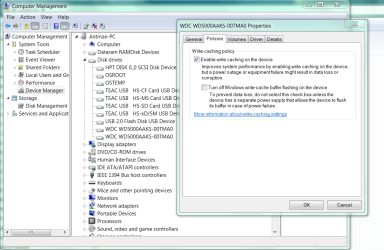
Device Manager
Disk Drive
Properties

There are two check boxes. Check the first one, don't check the second one.

Many will elaborate from here.
 
I was looking at one of my 320gb SATA interna 3.5 inch drives from Seagate today, and noticed some nice little jumper pins around the back of it. Curious, it says that if they are pinned, it will limit the SATA drive to 1.5 gbps, and if not pinned, will allow 3gbps. Currently, they are pinned. I am wondering if there is a good reason for this.

Additionally, I downloaded a program from yamicsoft, called windows 7 manager, which has a free 15 day trial. In it, it there is an option to "Enable SATA disk advanced function to improve performance." if you hover over it, it says.. "This tweak will enable advanced function of your sata hard disks, and increase disk performance to decrease read/write of SATA hard disk, but it also increases chance of data loss.."

Given the last part of that sentence, I held off, but I am wondering if anyone around here can weigh in on it..

Thanks in advance for your response..

Modern drives usually have several settings that5 BIOS and control. Performance, normal, and quiet.

It says it all. If you hear your drive and it annoys you you can make it quieter with a slight performance hit, normal is a compromise faster but noisier, and perf is I dont care how load its is give me warp drive. Problem with perf is that it has to forgo some safety checks to achieve the speed.

Sata is a pretty safe format, but choose your poison safety or speed. Since HD is always the bottleneck device, and since I back up everything daily, and my data on this machine is not critical I use perf. perf also tends to kill drives faster. I have been thru 3 doa (seagates) in 18 months.

Good luck

Ken
 

My Computer

Computer Manufacturer/Model Number
HP Pavillion dv-7 1005 Tx
OS
Win 8 Release candidate 8400
CPU
[email protected]
Memory
4 gigs
Graphics Card(s)
Nvidia 9600M
Sound Card
HD built-in
Monitor(s) Displays
17" Wxga
Screen Resolution
1440x900
Cooling
none
Internet Speed
45Mb down 5Mb up
The Jumper pin is for forced compatibility with older SATA 1 controllers.
...some older SATA controllers do not properly implement SATA speed negotiation. Affected systems require the user to set the SATA 3 Gbit/s peripherals to 1.5 Gbit/s mode...
But mechanical HDD barely even fully utilize 1.5gb/s let alone 3gb/s so adjusting that really wouldn't have an effect. I have no idea about the software or its features, but enabling Advanced Host Controller Interface could be what you really want.
 

My Computer

Computer type
PC/Desktop
Computer Manufacturer/Model Number
Alienware Aurora ALX R4
OS
Windows 10 Pro (x64)
CPU
Intel Core i7-3930K (3.2GHz - 4.5GHz)
Motherboard
Alienware Aurora-R4 x79
Memory
4x Samsung 4GB PC3-12800 DDR3 (16GB 1600MHz)
Graphics Card(s)
Nvidia Geforce GTX 690
Sound Card
SteelSeries Siberia Elite
Monitor(s) Displays
Dell UltraSharp U3011
Screen Resolution
2560x1600
Hard Drives
Samsung 850 Pro 256 GB, Seagate 1TB Desktop Hybrid HDD, 2x Western Digital 4TB Green HDD
PSU
875W Some Dell PSU <.<
Case
Alienware Aurora ALX
Cooling
Custom Liquid Cooling (EK CPU & GPU blocks) dual EK 480RAD
Keyboard
Logitech G710+ Mechanical
Mouse
Logitech G700s
Internet Speed
Verizon Fios (50 mbps average)
Other Info
Server: Intel NUC D54250WYK: i5-4250U, 16GB, 256 GB mSATA, Windows Server 2012 R2
Here is a clip of the tweak I am describing..
 

Attachments

  • Hard drive.png
    Hard drive.png
    31.9 KB · Views: 899

My Computer

Computer Manufacturer/Model Number
Custom
OS
Windows 7 Ultimate
CPU
Amd 5400+ dual core overclocked to 3.0 ghz
Motherboard
EVGA 590 sli aM2
Memory
8gb 5-5-5-5-15 g-skill
Graphics Card(s)
Nvidia 9800gt 512mb
Sound Card
M-Audio Delta 2496
Monitor(s) Displays
Acer 22 inch lcd
Screen Resolution
1680 x 1050
Hard Drives
Hmm

4.0 terabytes total..
PSU
650 watts
Case
Antec Sonata II
Cooling
Zallmen Xpu cooler
Keyboard
some rubbish I found in my garage
Mouse
logitech
Internet Speed
caps at about 650kb down, 50kb up . Gigabit local network.
K.. thanks for that folks..
 

My Computer

Computer Manufacturer/Model Number
Custom
OS
Windows 7 Ultimate
CPU
Amd 5400+ dual core overclocked to 3.0 ghz
Motherboard
EVGA 590 sli aM2
Memory
8gb 5-5-5-5-15 g-skill
Graphics Card(s)
Nvidia 9800gt 512mb
Sound Card
M-Audio Delta 2496
Monitor(s) Displays
Acer 22 inch lcd
Screen Resolution
1680 x 1050
Hard Drives
Hmm

4.0 terabytes total..
PSU
650 watts
Case
Antec Sonata II
Cooling
Zallmen Xpu cooler
Keyboard
some rubbish I found in my garage
Mouse
logitech
Internet Speed
caps at about 650kb down, 50kb up . Gigabit local network.
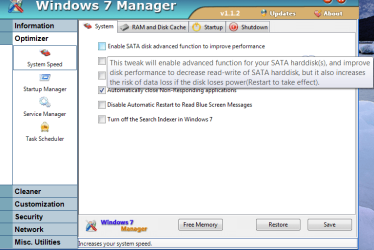
Here is a clip of the tweak I am describing..

My problem isn't with the warning disclaimer. Its the random failures, and freezes and data corruption that worries me.
 

My Computer

Computer Manufacturer/Model Number
HP Pavillion dv-7 1005 Tx
OS
Win 8 Release candidate 8400
CPU
[email protected]
Memory
4 gigs
Graphics Card(s)
Nvidia 9600M
Sound Card
HD built-in
Monitor(s) Displays
17" Wxga
Screen Resolution
1440x900
Cooling
none
Internet Speed
45Mb down 5Mb up
interesting that someone has mentioned windows 7 manager.

just yesterday i got myself a job with the chinese software company, yamicsoft, to improve the english translation used on this program.

@antman - i don't agree that you don't need software to tweak windows 7 - control panel applets and regedit are software after all. while i admit that third party tweakers need to be used with caution, well-written tools make the job a lot easier. personally, i find it a lot simpler ticking or unticking boxes or moving slider controls, rather than having to trawl through countless obscure and cryptic registry keys if i want to make changes to my operating system.
 

My Computer

Computer Manufacturer/Model Number
mickey megabyte 1234
OS
ultimate 64 sp1
CPU
i5 2500K [email protected]
Motherboard
MSI P67A-GD53
Memory
8 gigs GSkill Ripjaws 1600
Graphics Card(s)
amd hd6950
Sound Card
creative x-fi gamer
Monitor(s) Displays
samsung 24"
Screen Resolution
1920x1080
Hard Drives
ocz vertex 2e 60 gig, samsung f3 1tb, buffalo 2tb ext
PSU
antec 550
Case
antec three hundred
Cooling
i'm a cooling fan
Keyboard
saitek eclipse ii
Mouse
logitech g3
Internet Speed
about 4 Mbps
Other Info
i love win7
You don't need it. It may be convenient.
 

My Computers

System One System Two

  • Computer type
    PC/Desktop
    OS
    7 X64
    CPU
    i5 8400
    Motherboard
    gigabyte b365m ds3h
    Memory
    2x8gb 3200mhz
    Hard Drives
    various
    PSU
    pure power 11 400w cm
    Case
    Coolermaster
    Cooling
    cryorig m9i
  • Computer type
    PC/Desktop
    OS
    7x64
    CPU
    g5400
    Motherboard
    ga b365m ds3h
    Memory
    8gb ddr4 2400
    PSU
    xfx pro 450w
...just yesterday i got myself a job with the chinese software company, yamicsoft, to improve the english translation used on this program...

@antman - i don't agree that you don't need software to tweak windows 7 ....
First, congrats on the new contract.

Secondly, my most pleasant surprise about Windows 7 was that most of the valid performance and enhancement tweaks, and customization tweaks, were easily accessible through the GUI. The few that remain without a GUI are well documented and available as simple reg file merges at a number of trustworthy sites, including SF.

No need to play the BS licensing game with TweakVI, no taking chances with malware's clever look-alike names. No need to install multiple tweaking apps to address the shortcomings of other tweaking apps. Even TweakUI contained the BagsMRU error (Bags MRU typo).

edit: How many of these apps still contain "Disable paging executive" and label it as a performance enhancer?

I am looking forward to the needless revenue that these apps will generate for my tech support and repair business. And the forum influx.

That being said, I completely agree that a single, well-written tweaking app is a nice tool. I want one. The winner in this category likely does not exist today. Until, of course, you m-square away the yamicsoft offering.
 
as usual, valid points Anthony. i just can't help being a pedant (i know i shouldn't have read both Korzybski {Science and Sanity} and Robert Anton Wilson {Quantum Psychology} at an impressionable age... :geek:)

That being said, I completely agree that a single, well-written tweaking app is a nice tool. I want one. The winner in this category likely does not exist today. Until, of course, you m-square away the yamicsoft offering.

i've already started m-squaring away - i'm trying hard to remember to capitalize and use american spelling, even though it really hurts! :p
 

My Computer

Computer Manufacturer/Model Number
mickey megabyte 1234
OS
ultimate 64 sp1
CPU
i5 2500K [email protected]
Motherboard
MSI P67A-GD53
Memory
8 gigs GSkill Ripjaws 1600
Graphics Card(s)
amd hd6950
Sound Card
creative x-fi gamer
Monitor(s) Displays
samsung 24"
Screen Resolution
1920x1080
Hard Drives
ocz vertex 2e 60 gig, samsung f3 1tb, buffalo 2tb ext
PSU
antec 550
Case
antec three hundred
Cooling
i'm a cooling fan
Keyboard
saitek eclipse ii
Mouse
logitech g3
Internet Speed
about 4 Mbps
Other Info
i love win7
I was looking at one of my 320gb SATA interna 3.5 inch drives from Seagate today, and noticed some nice little jumper pins around the back of it. Curious, it says that if they are pinned, it will limit the SATA drive to 1.5 gbps, and if not pinned, will allow 3gbps. Currently, they are pinned. I am wondering if there is a good reason for this.

...

Thanks in advance for your response..
I use lots of Seagate SATA drives, and it annoyed me to no end that they came set to SATA 1 by default and they so thoughtfully made the jumper half-height so as to make it almost impossible to get the damned thing out without mutilating something. Lately they appear to come without the jumper, set for SATA 2. They probably figured they could save some money by not including the jumper ... :sarc:
 

My Computer

Computer Manufacturer/Model Number
Custom workstation /// Lenovo X61t tablet notebook
OS
Windows 7 RTM x64
CPU
Core i7 980X @ 4.04GHz OC /// Core Duo L7500 @ 1.6GHz
Motherboard
Asus P6T6 WS Revolution ///
Memory
12GB G. Skill @ DDR-1600 OC /// 4GB
Graphics Card(s)
Saphire HD4870 Toxic 1GB /// Intel Mobile GMA X3100
Monitor(s) Displays
Dual Eizo 24" SX2461W /// 12"
Screen Resolution
1920x1200 /// 1400x1050
Hard Drives
Workstation:
5x 750GB Barracuda-11 on Areca ARC-1220;
4x 1.5TB Barracuda-11 on Intel ICH10R;
Volumes:
300GB RAID 0, 2.7TB RAID 10 on Intel;
100GB RAID 0, 1.4TB RAID 10 on Areca ///
Notebook: G.Skill Titan 256GB SSD
PSU
Tagan ITZ 1100
Case
GHS-1500 ///
Cooling
Thermalright IFX-14 + a slew of stealth fans ///
Keyboard
Logitech Edge ///
Mouse
Logitech Wireless Optical Trackball
Internet Speed
5Mbps down / 820Kbps up
Other Info
Main use: photography;
DVD Drive: L.G GGW-H20L Blu-Ray / DVD;
OC: QPI/DRAM @ 1.33v, CPU @ 1.293v, DRAM Bus @ 1.65v, CPU PLL @ 1.88v, CPU mult = 25x, BCLK = 160, DDR3-1604 @ 7-8-7-24
Back
Top