

- Local time
- 1:05 PM
- Messages
- 299
Hello,
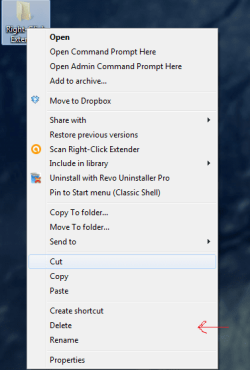
Often times when I want to rename a file, I hit "delete" by mistake. I was wondering if there is a way to move the delete option up, so that it is not next to rename? I have tried a few context menu editors, but they do not seem to have rename or delete as options to play around with. Please see attached.
Thanks!
Often times when I want to rename a file, I hit "delete" by mistake. I was wondering if there is a way to move the delete option up, so that it is not next to rename? I have tried a few context menu editors, but they do not seem to have rename or delete as options to play around with. Please see attached.
Thanks!
Attachments
My Computer
At a glance
Win 7 Professional 32-bitIntel Core 2 Duo CPU T5750 @ 2.00 GHz3GB
- Computer Manufacturer/Model Number
- Gateway M6827
- OS
- Win 7 Professional 32-bit
- CPU
- Intel Core 2 Duo CPU T5750 @ 2.00 GHz
- Memory
- 3GB
- Monitor(s) Displays
- ViewSonic Vx900
- Screen Resolution
- 1280x1024
- Hard Drives
- 150GB Hard Drive


