Solved Change system partition?

danime91

New member
Local time
9:39 PM
Messages
21
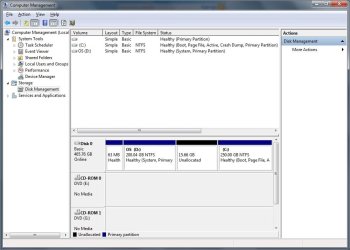
I had installed Windows 7 to dual-boot along with my old installation of Windows XP so that I could finish backing up the old files before deleting it. Well now I've pretty much got everything off the XP partition so I don't need it anymore. So I set 7 as the active partition, and it was already set as C:. The 7 partition comes after the XP partition, and though it is marked as (Boot, Page File, Active, Crash Dump, Primary Partition), the XP partition is marked as (System, Primary Partition). Is it safe to delete it? Or if not, how do I make the Windows 7 Partition the System partition?
 

My Computer

OS
Windows 7 Professional x32
CPU
AMD Phenom II X4 940 Processor
Memory
4.00 GB
Hello danime91, welcome to Seven Forums!


Are XP and Windows 7 on separate Hard Disk Drives?


Before we make any specific recommendations will you please post a snip/screen-shot of the entire disk management drive map with a full description as to which drive/partition is which, so we can see what you have going on as there may be a fairly simple way to resolve the situation.

In the Windows start menu right click computer and click manage, in the left pane of the "Computer Management" window that opens click disk management and post a snip of that.


How to Upload and Post a Screenshot and File in Seven Forums
 

My Computer

Computer Manufacturer/Model Number
* BFK Customs *
OS
W 7 64-bit Ultimate
CPU
Intel Q9550 Yorkfield
Motherboard
ASUS P5Q Pro
Memory
8GB Dominator 8500C5D
Graphics Card(s)
ATI : XFX 5870
Sound Card
Realtek HD Audio 7-1
Monitor(s) Displays
1x 47" LCD HDMI & 3x 26" LCD HDMI
Screen Resolution
1920x1080P & 1920x1200
Hard Drives
1x 80GB Intel X25-M G2 SSD : 1x 500GB & 1x 640GB WD Caviar Black(s)
PSU
Corsair 620HX
Case
Cooler Master RC-690
Cooling
Tuniq Tower 120, 2x 140mm and 3x 120mm case fans
Keyboard
Microsoft 500
Mouse
Razer Diamondback 3G
Internet Speed
14 Mb/s
Other Info
1x Koutech 3Gb/s SATA HDD Hot Swap Rack
I have both partitions on one HDD. C: is the drive that Windows 7 is installed on. D: is the unneeded Windows XP drive.
 

Attachments

  • diskmanage.jpg
    diskmanage.jpg
    65.8 KB · Views: 425

My Computer

OS
Windows 7 Professional x32
CPU
AMD Phenom II X4 940 Processor
Memory
4.00 GB
After you have copied out or made back-ups of the data you need to save to external media, have a look at this tutorial at the link below to recover all the space to the left of Windows 7 into the C: partition and be sure to post back with any further questions you may have and to keep us informed.


Partition : Recover Space Used by an Older OS
 

My Computer

Computer Manufacturer/Model Number
* BFK Customs *
OS
W 7 64-bit Ultimate
CPU
Intel Q9550 Yorkfield
Motherboard
ASUS P5Q Pro
Memory
8GB Dominator 8500C5D
Graphics Card(s)
ATI : XFX 5870
Sound Card
Realtek HD Audio 7-1
Monitor(s) Displays
1x 47" LCD HDMI & 3x 26" LCD HDMI
Screen Resolution
1920x1080P & 1920x1200
Hard Drives
1x 80GB Intel X25-M G2 SSD : 1x 500GB & 1x 640GB WD Caviar Black(s)
PSU
Corsair 620HX
Case
Cooler Master RC-690
Cooling
Tuniq Tower 120, 2x 140mm and 3x 120mm case fans
Keyboard
Microsoft 500
Mouse
Razer Diamondback 3G
Internet Speed
14 Mb/s
Other Info
1x Koutech 3Gb/s SATA HDD Hot Swap Rack
So now apparently I need to load the drivers for my hard drive. Been looking on google, but no luck. Does anybody know where to download drivers for a WD5000AAKS-75A7B2 HDD?
 

My Computer

OS
Windows 7 Professional x32
CPU
AMD Phenom II X4 940 Processor
Memory
4.00 GB
What makes you think you need your SATA controller drivers? You'd really only need them if you were installing XP, not removing it.

What is the exact error code you are getting and when is it encountered?
 
It is not so much an error code. Before I get to the system recovery options screen, it tells me to select the operating system I would like to repair, but the field is blank. At first I tried just going ahead with this, but it doesn't work. So now I'm trying to go with the option of load drivers.
 

My Computer

OS
Windows 7 Professional x32
CPU
AMD Phenom II X4 940 Processor
Memory
4.00 GB
At the first screen after booting DVD/Repair CD, press Shift + F10 to open a Command Line, type:

bootrec.exe /fixboot
bootrec.exe /fixmbr

Now enter Repair console to see if it finds an installation to repair.
 
For the /fixboot it returns the message "Element not found" but for the /fixmbr it returns "The operation completed successfully". And it still doesn't find an operating system to repair.

EDIT: I don't know whether this is significant or not, but when I open the command line the address is X:\Sources
 

My Computer

OS
Windows 7 Professional x32
CPU
AMD Phenom II X4 940 Processor
Memory
4.00 GB
Use free Partition Wizard bootable CD, rightclick Win7 partition to Modify>Set to Active, click OK.

Then from Disk tab choose Rebuild MBR, Apply all steps.

If this fails, click through to Recovery Options to run Startup Repair anyway.
 
It is already set to active, and just thought to mention that none of the partitions seem to have drive letters. Anyway, everything under the Disk tab is greyed out, so I can't do Rebuild MBR.
 

My Computer

OS
Windows 7 Professional x32
CPU
AMD Phenom II X4 940 Processor
Memory
4.00 GB
Boot back into Repair Command Line and run "bootrec.exe /fixboot" and "bootrec.exe /fixmbr" or if those don't work "Bootsect.exe /nt60 all /force".

If this will not force WinRE to see the installation, try running Startup Repair x3 anyway.

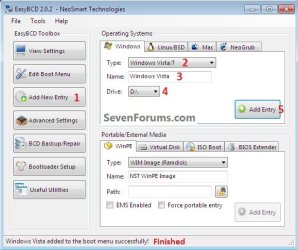
If that fails, what I would do now is make a small partition at the front of your HD to install Win7 upon, at startup install EasyBCD to Add OS, selecting Win7 and the stranded partition's drive letter. Restart to see if you can now boot it. http://neosmart.net/blog/2010/welcome-to-easybcd-2/

We will help you later remove all of the files except those for booting on the rescue install, shrink the partition down to around 200mb to serve as a boot partition, then Resize Win7 into the rest of the recovered space.

I would wait til morning to see what BareFootKid has to suggest since you are using his tutorial to recover deleted XP space into Win7 install.
 
I'm sorry but could you be a little more detailed as to how to use EasyBCD? The documentation is not very helpful in this. And by install do you mean boot from a disk? Because right now I cannot boot Windows 7 due to the missing bootmgr error.
 

My Computer

OS
Windows 7 Professional x32
CPU
AMD Phenom II X4 940 Processor
Memory
4.00 GB
Here's how to add using EasyBCD, though this says Vista it's the same.


click to enlarge
Vista.jpg
 

My Computer

Computer Manufacturer/Model Number
* BFK Customs *
OS
W 7 64-bit Ultimate
CPU
Intel Q9550 Yorkfield
Motherboard
ASUS P5Q Pro
Memory
8GB Dominator 8500C5D
Graphics Card(s)
ATI : XFX 5870
Sound Card
Realtek HD Audio 7-1
Monitor(s) Displays
1x 47" LCD HDMI & 3x 26" LCD HDMI
Screen Resolution
1920x1080P & 1920x1200
Hard Drives
1x 80GB Intel X25-M G2 SSD : 1x 500GB & 1x 640GB WD Caviar Black(s)
PSU
Corsair 620HX
Case
Cooler Master RC-690
Cooling
Tuniq Tower 120, 2x 140mm and 3x 120mm case fans
Keyboard
Microsoft 500
Mouse
Razer Diamondback 3G
Internet Speed
14 Mb/s
Other Info
1x Koutech 3Gb/s SATA HDD Hot Swap Rack
Alright, so now there seems to be a problem. Now when I try /fixboot and /fixmbr they both give me "The system cannot find the path specified." the Bootsect.exe part seemed to have worked, since it gives a "Bootcode was successfully updated on all targeted volumes." But I still can't see the installation. So I try running Startup Repair. But now Startup Repair gives me a "Startup Repair cannot repair this computer automatically" error. Here's the problem signature.

Problem Signature:
Problem Event Name: StartupRepairOffline
Problem Signature 01: 0.0.0.0
Problem Signature 02: 0.0.0.0
Problem Signature 03: unknown
Problem Signature 04: 0
Problem Signature 05: unknown
Problem Signature 06: 1
Problem Signature 07: unknown
OS Version: 6.1.7600.2.0.0.256.1
Locale ID: 1033

So then I used Partition Wizard to create some free space at the front of my HDD, then tried installing Windows 7 on it. But after I click "install now" it gives me

Load Driver
A required CD/DVD drive device driver is missing. If you have a driver floppy disk, CD, DVD, or USB flash drive, please insert it now.

It seems that all this happened because I marked my Windows 7 partition as the boot partition. Could I at least be able to boot in to 7 again if I make Windows XP active?
 

My Computer

OS
Windows 7 Professional x32
CPU
AMD Phenom II X4 940 Processor
Memory
4.00 GB
Your problem suggest you need to rebuild your BCD. You were probably originally booting through the XP partition.

Do the following from the system repair disk command prompt.

>bootrec /scanos
This should come back and identify the Windows 7 OS partition.
then
rebuild the MBR
>bootrec /fixmbr
then
Fix the Partition Boot Record/Boot sector.
>bootrec /fixboot
then
importantly, rebuild the BCD
>Bootrec /rebuildbcd

[FONT=&quot][FONT=&quot]

[FONT=&quot][/FONT][/FONT][/FONT]
 

My Computer

Computer type
PC/Desktop
Computer Manufacturer/Model Number
Own build
OS
Windows 7x64 Home Premium SP1
CPU
Intel i7 2600k
Motherboard
ASUS P8Z68 Deluxe
Memory
G.Skill Ripjaws (DDR3-1600) 2x4GB
Graphics Card(s)
Nvidia GeForce GTS 450; Intel HD Graphics 3000(GT2+)
Monitor(s) Displays
Dell Ultrasharp IPS panel U2311H, Samsung SyncMaster P2350
Screen Resolution
1920x1080
Hard Drives
Samsung 850 Pro SSD 256GB, Samsung SSD 840 120GB, Seagates 1TB Barracuda ST31000528AS x2
PSU
Seasonic M12II 520W
Case
Lian Li Lancool PC-K60
Cooling
Case: 1x120mm, 3x140mm CPU: Hyper 212+
Keyboard
Logitech MK520 (wireless)
Mouse
Logitech MK520
Internet Speed
6-7 Mbps
Antivirus
Norton Security Premium, Malwarebytes on 2 (MSE on 3rd PC)
Browser
FireFox
Other Info
Audio: Logitech Z523 2.1
Alright, I tried it, but /scanos returns 0 identified Windows installations.
 

My Computer

OS
Windows 7 Professional x32
CPU
AMD Phenom II X4 940 Processor
Memory
4.00 GB
When you boot the system repair disk it generally also has a look for an OS - does it find one?

Anyway try the other 3 bootrec commands. The BCD rebuild is important and shouldn't succeed if an OS isn't present.
 

My Computer

Computer type
PC/Desktop
Computer Manufacturer/Model Number
Own build
OS
Windows 7x64 Home Premium SP1
CPU
Intel i7 2600k
Motherboard
ASUS P8Z68 Deluxe
Memory
G.Skill Ripjaws (DDR3-1600) 2x4GB
Graphics Card(s)
Nvidia GeForce GTS 450; Intel HD Graphics 3000(GT2+)
Monitor(s) Displays
Dell Ultrasharp IPS panel U2311H, Samsung SyncMaster P2350
Screen Resolution
1920x1080
Hard Drives
Samsung 850 Pro SSD 256GB, Samsung SSD 840 120GB, Seagates 1TB Barracuda ST31000528AS x2
PSU
Seasonic M12II 520W
Case
Lian Li Lancool PC-K60
Cooling
Case: 1x120mm, 3x140mm CPU: Hyper 212+
Keyboard
Logitech MK520 (wireless)
Mouse
Logitech MK520
Internet Speed
6-7 Mbps
Antivirus
Norton Security Premium, Malwarebytes on 2 (MSE on 3rd PC)
Browser
FireFox
Other Info
Audio: Logitech Z523 2.1
fixboot and fixmbr both return that the system cannot find the path specified. rebuildbcd also scans for windows installations and finds none.
 

My Computer

OS
Windows 7 Professional x32
CPU
AMD Phenom II X4 940 Processor
Memory
4.00 GB
Back
Top