Change the "Desktop" icon itself

Keida

New member
Local time
7:02 PM
Messages
4
Okay, hello, this is driving me crazy so I have finally decided to sign up to these forums and ask for some help. Hi everyone.

In the places bar, my Desktop icon used to look like this:
ohl9xl.jpg


But for some reason, I changed it and it now looks like this:
1juqkp.jpg


Is there a way to change it back to the default or change it again to something else? I can't remember how I changed the places bar Desktop icon in the first place, and looking online didn't help since I only got tutorials on how to change the desktop icons, but not the "Desktop" icon itself.

If anyone could help, thanks a lot. Since I'm new to these forums, if I end up posting in the wrong place, I'm sorry for any trouble.

PS oh yeah, and another is the Desktop icon when using Alt+Tab
ing95y.jpg


How did I even change these icons in the first place?
 

My Computer My Computer

OS
Windows 7 Home Premium x64
Hello and welcome, Kedia :)

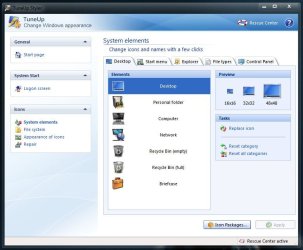
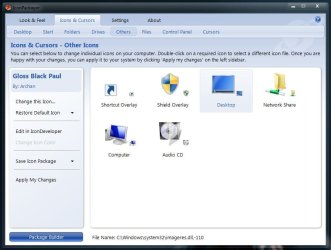
Some third party apps do have easier ways to change that icons ... here is two examples of TuneUp Styler and IconPackager
Capture.JPGCapture1.JPG

But those programs damage windows 7's system, if used improperly ... So I dont recommend those ...

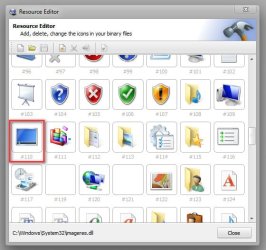
You can follow the tutorial http://www.sevenforums.com/tutorials/73191-icons-change-using-resource-hacker.html , and change icon group #110 ... it will do the same thing that you want.
2012-03-22_102144.jpg

If it troubles, let us know !
 

My Computer My Computer

Computer type
PC/Desktop
Computer Manufacturer/Model Number
Self Assembled
OS
Microsoft Windows 10 Pro Insider Preview 64-bit
CPU
Intel(R) Core(TM) i3-4130 CPU @ 3.40GHz
Motherboard
Gigabyte Technology Co., Ltd. B85M-D3H
Memory
Corsair Vengence 4GB x2 (8.00GB Dual-Channel DDR3 @ 798MHz)
Graphics Card(s)
2047MB GeForce GTS 450 (ZOTAC International)
Sound Card
Onboard (Realtek High Definition Audio)
Monitor(s) Displays
LG Flatron E2040T
Screen Resolution
1600x900
Hard Drives
Western Digital 1 TB
Seagate 500 GB
PSU
Corsair VS550
Case
Cooler Master K380
Cooling
Cooler Master Seidon 120V Plus
Keyboard
Logitech MK260r
Mouse
Logitech MK260r
Internet Speed
PMPL Broadband
Antivirus
Windows Defender + MBAM
Browser
Firefox
Other Info
Dell Studio 15" Laptop
Thanks for your reply. I do have Iconpackager, however it only changed the Desktop icon in the Navigation Pane but not the one used in the Places Bar.

Opening up Resource Hacker, the Desktop icon seems to be the default windows desktop icon (image), but it's not the one shown in the Places Bar or ALT+TAB.

Is there possibly some other location that I have not checked? If you could think of any, please let me know.

I still have the funny cute House icon and the Plus icon. >^<
 

My Computer My Computer

OS
Windows 7 Home Premium x64
Is there possibly some other location that I have not checked? If you could think of any, please let me know.
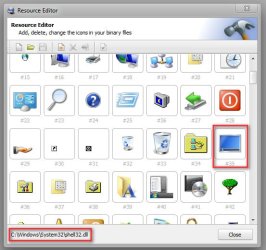
Icon Group #35 in shell32.dll ?
2012-03-22_112920.jpg
 

My Computer My Computer

Computer type
PC/Desktop
Computer Manufacturer/Model Number
Self Assembled
OS
Microsoft Windows 10 Pro Insider Preview 64-bit
CPU
Intel(R) Core(TM) i3-4130 CPU @ 3.40GHz
Motherboard
Gigabyte Technology Co., Ltd. B85M-D3H
Memory
Corsair Vengence 4GB x2 (8.00GB Dual-Channel DDR3 @ 798MHz)
Graphics Card(s)
2047MB GeForce GTS 450 (ZOTAC International)
Sound Card
Onboard (Realtek High Definition Audio)
Monitor(s) Displays
LG Flatron E2040T
Screen Resolution
1600x900
Hard Drives
Western Digital 1 TB
Seagate 500 GB
PSU
Corsair VS550
Case
Cooler Master K380
Cooling
Cooler Master Seidon 120V Plus
Keyboard
Logitech MK260r
Mouse
Logitech MK260r
Internet Speed
PMPL Broadband
Antivirus
Windows Defender + MBAM
Browser
Firefox
Other Info
Dell Studio 15" Laptop
Hmmm, nope. :[ Still don't know what's affecting the Desktop icon in the Places Bar.

I don't know why there are so many locations for each icon. Can't windows just have a single Desktop icon somewhere and that's it? *Clutches head after endless headdesks.*

More info: I'm wondering is it possibly a regedit thing? I know I mess around with it a lot, but I can't remember how to change the icons in the places bar. The tutorials only shows how to change the locations in the places bar, but not the icons themselves.
 

My Computer My Computer

OS
Windows 7 Home Premium x64
I don't know why there are so many locations for each icon. Can't windows just have a single Desktop icon somewhere and that's it? *Clutches head after endless headdesks.*
It seemed like this at first when I started messing around Win3.11 and Win95, but there's only a few dll files that Windows looks at. Unfortunately I stopped messing with icons some time ago so I forgot what files, sorry >_<

Would be nice if there was a single .\icons folder like there is for fonts.
 

My Computer My Computer

Computer Manufacturer/Model Number
Self-built rig
OS
Win7 Pro x64
CPU
Koa i5-2550K
Memory
8 GB
Graphics Card(s)
Sapphire ATI 6870 1GB GDDR5
Sound Card
RealTek HD Audio / ATI HDMI Audio
Monitor(s) Displays
Samsung HDTV Monitor T23A350
Screen Resolution
1920 x 1080
Hard Drives
- SSD (C:)
- HDD (D:)
- BD-ROM (E:)
Keyboard
Logitech G110
Internet Speed
Unifi home (5mbps)
Hello Keida, and welcome to Seven Forums.

You might see if running a sfc /scannow command may help if it's just a system file issue.

Hope this helps,
Shawn
 

My Computer My Computer

Computer type
PC/Desktop
Computer Manufacturer/Model Number
Self built custom
OS
64-bit Windows 11 Pro for Workstations
CPU
Intel i7-8700K OC'd to 5 GHz
Motherboard
ASUS ROG Maximus XI Formula Z390
Memory
64 GB (4x16GB) G.SKILL TridentZ RGB DDR4 3600 MHz
Graphics Card(s)
ASUS ROG-STRIX-GTX1080TI-O11G-GAMING
Sound Card
Integrated
Monitor(s) Displays
2 x Samsung Odyssey G7 27"
Screen Resolution
2560x1440
Hard Drives
1TB Samsung 990 PRO M.2,
4TB Samsung 990 PRO PRO M.2,
TerraMaster F8 SSD Plus NAS
PSU
Seasonic Prime Titanium 850W
Case
Thermaltake Core P3
Cooling
Corsair Hydro H115i
Keyboard
Logitech wireless K800
Mouse
Logitech MX Master 4
Internet Speed
2 Gb/s Download and 100 Mb/s Upload
Antivirus
Malwarebyte Anti-Malware Premium
Browser
Google Chrome
Other Info
Logitech Z625 speaker system,
Logitech BRIO 4K Pro webcam,
HP Color LaserJet Pro MFP M477fdn,
APC SMART-UPS RT 1000 XL - SURT1000XLI,
Galaxy S23 Plus phone
Hello Keida, and welcome to Seven Forums.

You might see if running a sfc /scannow command may help if it's just a system file issue.

Hope this helps,
Shawn
Shawn,
If it is tried to be changed, is it possible to change the icon in the places dialog only, without affecting the others places ?

I tried, but it takes the effect of the change in all the locations. :(
 

My Computer My Computer

Computer type
PC/Desktop
Computer Manufacturer/Model Number
Self Assembled
OS
Microsoft Windows 10 Pro Insider Preview 64-bit
CPU
Intel(R) Core(TM) i3-4130 CPU @ 3.40GHz
Motherboard
Gigabyte Technology Co., Ltd. B85M-D3H
Memory
Corsair Vengence 4GB x2 (8.00GB Dual-Channel DDR3 @ 798MHz)
Graphics Card(s)
2047MB GeForce GTS 450 (ZOTAC International)
Sound Card
Onboard (Realtek High Definition Audio)
Monitor(s) Displays
LG Flatron E2040T
Screen Resolution
1600x900
Hard Drives
Western Digital 1 TB
Seagate 500 GB
PSU
Corsair VS550
Case
Cooler Master K380
Cooling
Cooler Master Seidon 120V Plus
Keyboard
Logitech MK260r
Mouse
Logitech MK260r
Internet Speed
PMPL Broadband
Antivirus
Windows Defender + MBAM
Browser
Firefox
Other Info
Dell Studio 15" Laptop

My Computer My Computer

Computer type
Laptop
Computer Manufacturer/Model Number
Sager NP9170
OS
Win 7 Pro x64 / Win 10 Pro
CPU
Intel(R) Core(TM) i7-3630QM CPU @ 2.40GHz
Motherboard
CLEVO P170EM
Memory
12 GB
Graphics Card(s)
(1) Intel(R) HD Graphics 4000 (2) NVIDIA GeForce GTX 675M
Sound Card
(1) Realtek High Definition Audio (2) Intel(R) Display Aud
Monitor(s) Displays
17.3
Screen Resolution
1920x1080
Hard Drives
(1) Samsung 860 EVO 500GB(OS) (1) Samsung 860 EVO 500GB(Data)
Keyboard
Backlite
Antivirus
MSE, Malwarebytes Pro
Browser
Firefox
Other Info
DESKTOP: Custom-built.
OS: Win 10 Pro x64.
CASE: Rosewill R5.
CPU: Intel I5 4670K CPU @ 3.40GHz.
CPU COOLER: Cool Master Hyper 212 EVO.
MOTHERBOARD: Asus Z87-A.
MEMORY: Kingston HyperX 2x4 GB.
GPU: Nvidia Geforce 650 TI.
PSU: Corsair TX750.
DRIVES: (1) Samsung 840 120 GB SSD (2) Western Digital blue 500 GB 7200 RPM.
Arc,

Yeah, a sfc /scannow command would restore all system files back to default.

Unless it's known exactly how the icons were changed to begin with, it's going to be hard to just change those specific ones back. :(
 

My Computer My Computer

Computer type
PC/Desktop
Computer Manufacturer/Model Number
Self built custom
OS
64-bit Windows 11 Pro for Workstations
CPU
Intel i7-8700K OC'd to 5 GHz
Motherboard
ASUS ROG Maximus XI Formula Z390
Memory
64 GB (4x16GB) G.SKILL TridentZ RGB DDR4 3600 MHz
Graphics Card(s)
ASUS ROG-STRIX-GTX1080TI-O11G-GAMING
Sound Card
Integrated
Monitor(s) Displays
2 x Samsung Odyssey G7 27"
Screen Resolution
2560x1440
Hard Drives
1TB Samsung 990 PRO M.2,
4TB Samsung 990 PRO PRO M.2,
TerraMaster F8 SSD Plus NAS
PSU
Seasonic Prime Titanium 850W
Case
Thermaltake Core P3
Cooling
Corsair Hydro H115i
Keyboard
Logitech wireless K800
Mouse
Logitech MX Master 4
Internet Speed
2 Gb/s Download and 100 Mb/s Upload
Antivirus
Malwarebyte Anti-Malware Premium
Browser
Google Chrome
Other Info
Logitech Z625 speaker system,
Logitech BRIO 4K Pro webcam,
HP Color LaserJet Pro MFP M477fdn,
APC SMART-UPS RT 1000 XL - SURT1000XLI,
Galaxy S23 Plus phone
Thanks Arc, for all your help up till now.

And thank you Shawn, I'll try restoring the system files if all else fails. I can simply reapply my theme/settings again. Although I might just keep the desktop icon the way it is, if nothing bad is going to happen.

I'm pretty sure though, that I didn't replace any of the original icons, just redirected the item in the placebar/ALT+TAB to use a different icon instead of the default Desktop icon, either by regedit or right clicking and properties -> change icon.

Thanks everybody! It was worth a shot.
 

My Computer My Computer

OS
Windows 7 Home Premium x64
Back
Top