
Hey guys. So I got myself a new motherboard and CPU. So I gave me dad my old motherboard and CPU for him to install on his older PC.
He had an E5200 and a P5G41T-M LX motherboard and I had the E8200 with a EP45T-UD3LR motherboard.
So everything was fine, the computer loaded but for some reason the Windows did not.
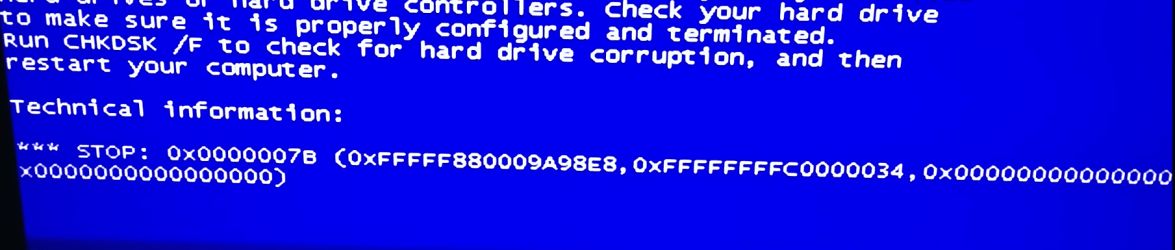
I just loaded the windows logo for less than a second, gave a BSOD for 1/4 of a sec and then restarted to do the same thing. Windows repair did not work.
What did work, was reinstalling the Windows. So I did, and now, after a few hours it did it again and I need to reinstall it again! I don't know what to do... Seriously, I'm lost. I've read online about my BSOD error, and it said it might has something to do with HDDs and changing settings of it in the BIOS to AHCI (Sorry if Im wrong, Im not very knowledgeable in this area).
I ran a CHKDSK F like it says in the BIOS error and it said I have a problem there. I don't know what could be the problem, Im sure I connected the HDD correctly to the motherboard...
Please help me, thanks
He had an E5200 and a P5G41T-M LX motherboard and I had the E8200 with a EP45T-UD3LR motherboard.
So everything was fine, the computer loaded but for some reason the Windows did not.
I just loaded the windows logo for less than a second, gave a BSOD for 1/4 of a sec and then restarted to do the same thing. Windows repair did not work.
What did work, was reinstalling the Windows. So I did, and now, after a few hours it did it again and I need to reinstall it again! I don't know what to do... Seriously, I'm lost. I've read online about my BSOD error, and it said it might has something to do with HDDs and changing settings of it in the BIOS to AHCI (Sorry if Im wrong, Im not very knowledgeable in this area).
I ran a CHKDSK F like it says in the BIOS error and it said I have a problem there. I don't know what could be the problem, Im sure I connected the HDD correctly to the motherboard...
Please help me, thanks
Attachments
Last edited:
My Computer
At a glance
Windows 8.1 Pro 64-BitIntel Core i5-4460 @ 3.20GHz8.00GB Dual-Channel DDR3 @ 799MHz (11-11-11-28)1023MB NVIDIA GeForce GTX 560 Ti (Gigabyte)
- Computer type
- PC/Desktop
- OS
- Windows 8.1 Pro 64-Bit
- CPU
- Intel Core i5-4460 @ 3.20GHz
- Motherboard
- Gigabyte Technology Co., Ltd. H97-D3H-CF (SOCKET 0)
- Memory
- 8.00GB Dual-Channel DDR3 @ 799MHz (11-11-11-28)
- Graphics Card(s)
- 1023MB NVIDIA GeForce GTX 560 Ti (Gigabyte)
- Monitor(s) Displays
- SyncMaster (1920x1080@59Hz)
- Screen Resolution
- 1980 X 1080
- Hard Drives
- 488GB Western Digital WDC WD5000AAKS-00M9A0 ATA Device (IDE)


