Changing right-click links

MikeyChris

New member
Local time
3:22 AM
Messages
19
I've been meaning to ask this (literally) for years but always got lost on a tangent. How do I change the right-click options? For example, I want to change the program that launches when I right click a JPeG and select edit. I thought there was an easier way to do this (besides hacking the registry). I'm sure I did it when I used XP (I know, a zillion years ago). I'm running Win 7 Pro 64 bit and hope to stick with it for a long time yet. Thanx.
 

My Computer

Computer type
PC/Desktop
Computer Manufacturer/Model Number
Lenovo M70e
OS
Win 7 Pro 64 bit
CPU
Core 2 Duo E8400 3Ghz
Motherboard
Unknown
Memory
4 GB
Graphics Card(s)
Nvidea GE FORCE 310 512MB
Sound Card
mother board
Monitor(s) Displays
HP vs17
Hard Drives
500GB maker unknown
PSU
unknown
Case
Lenovo
Cooling
several fans (PSU, CPU, Graphics, Case)
Keyboard
Lenovo KU-0225
Mouse
Lenovo
Internet Speed
20MB/sec
Antivirus
MSSE
Browser
Chrome
Control Panel\All Control Panel Items\Default Programs
 

My Computers

System One System Two

  • Computer type
    PC/Desktop
    Computer Manufacturer/Model Number
    custom build
    OS
    Windows 7 HP 64
    CPU
    i5 6600K - 800MHz to 4200MHz
    Motherboard
    GA-Z170-HD3P
    Memory
    4+4G GSkill DDR4 3000
    Graphics Card(s)
    IG - Intel 530
    Monitor(s) Displays
    Samsung 226BW
    Screen Resolution
    1680x1050
    Hard Drives
    (1) -1 SM951 – 128GB M.2 AHCI PCIe SSD drive for Windows 7 and Lubuntu
    (2) -1 WD SATA 3 - 1T for Data
    (3) -1 WD SATA 3 - 1T for backup
    PSU
    Thermaltake 450W TR2 gold
    Keyboard
    Old and good Chicony mechanical keyboard
    Mouse
    Logitech mX performance - 9 buttons (had to disable some)
    Internet Speed
    500Mb/s
    Browser
    Firefox 64
    Other Info
    TinyWall firewall
  • Computer type
    Laptop
    System Manufacturer/Model Number
    Asus Q550LF
    OS
    Windows 7 Pro
    CPU
    i7-4500U 800MHz to 3.0GHz
    Motherboard
    Asus Q550LF
    Memory
    (4+4)G DDR3 1600
    Graphics Card(s)
    IG intel 4400 + NVIDIA GeForce GT 745M
    Sound Card
    Realtek
    Monitor(s) Displays
    LG Display LP156WF4-SPH1
    Screen Resolution
    1920 x 1080
    Hard Drives
    BX500 120G SSD for Windows and programs +
    1T HDD for data
    Internet Speed
    500 Mb/s
    Browser
    Firefox
    Other Info
    TinyWall firewall
`

Or just hit the Windows key and type Default Programs. The easier the better. Speaking of easier! Here a little app that should fix you up! And its standalone No Install.. ----> Default Programs Editor
 

My Computer

Computer type
PC/Desktop
Computer Manufacturer/Model Number
Custom Built By Me.
OS
Windows 10 Pro 64 bit
CPU
AMD FX 9590 8 Core Black Edition
Motherboard
MSI 990FXA GAMING (MS-7893)
Memory
Corsair Vengeance 16GB DDR3
Graphics Card(s)
AMD Radeon (TM) R9 380 Gaming Series
Sound Card
AMD High Definition
Monitor(s) Displays
Samsung 32" 60Hz 4ms Curved PLS LED
Screen Resolution
1920 X 1080
Hard Drives
C: 223 GB SSD = E: 465 GB HDD = F: 931 GB HDD = G: 149 GB HDD = H: 931 GB HDD
PSU
EVGA Supernova NEX750B 750W ATX EPS12V 80PLUS Bronze
Case
Cool Master
Cooling
Noctua NH-D15 Premium Cooler with 2x NF-A15 PWM 140mm Fan
Internet Speed
Fiber Optic: Download 332.7 Mbps / Upload 331.5 Mbps
Antivirus
Windows Defender
Browser
Slimjet (64bit)
Properties Window & Command Bar

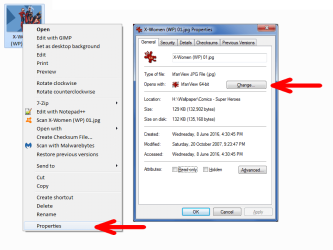
You can set the desired program using the file's Properties window.
WE - Set Default Program.png
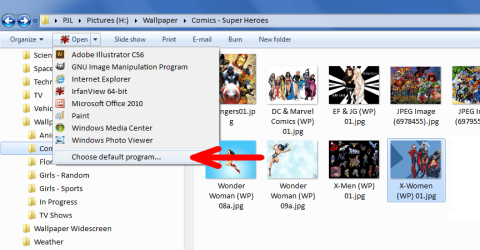
You can also set the desired program using the Command Bar.
WE - Set Default Program 02.png
 
Last edited:

My Computer

Computer type
PC/Desktop
Computer Manufacturer/Model Number
n/a
OS
W7 Ultimate SP1, LM19.2 MATE, W10 Home 1703, W10 Pro 1703 VM, #All 64 bit
CPU
AMD Phenom II x6 1100T, 3.3 GHz
Motherboard
ASUS M4A88T-M/USB3 (AM3)
Memory
12GB DDR3 1333 G-Skill (4GB x 2), G-Skill (2GB x 2)
Graphics Card(s)
NVIDIA GeForce GTX 660
Sound Card
Realtek?
Monitor(s) Displays
Samsung S23B350
Screen Resolution
1920x1080
Hard Drives
WD Green 2TB (SATA), WD Green 3TB (SATA), WD Blue 4TB (SATA), WD Blue 6TB (SATA)
PSU
Cooler Master
Case
Antec GX300 Tower
Cooling
3x Antec TRICOOL 120mm Fans
Mouse
Wired Optical
Internet Speed
DSL
Antivirus
Avast
Browser
Pale Moon (64 bit)
Other Info
2018-12-27 Upgraded HDDs
2015-12-10 Upgraded case, graphics card, storage
2015-08-15 Upgraded motherboard & RAM
2015-07-15 Upgraded LM17.1 to LM17.2
For advanced USER ONLY(lol probably ;) )

I discovered a program called, Types :D :D

http://ystr.github.io/types/ <-- Home/Download page.
http://ystr.github.io/types/new.rss <-- The News-feed is the changelog!
Requires .NET Framework v2 or newer(it seems ;) ).
lol, there are a hand full of "Localization" files available, English is the default!

How it WORKS:
you can right-click on any individual FILE to bring up the "context-menu" to edit that file types associations!
or you can run Types from the menu and it will bring up a general LIST of all of the systems "FILE TYPE ASSOCIATIONS"
and you can even search from there to find the one you are looking for lol ;)

been using it for a few years now..
Made for Windows 7 and XP (.Net framework 2.0 required).
May or may not work in Windows 8 and 10.
 

My Computers

System One System Two

  • Computer type
    PC/Desktop
    Computer Manufacturer/Model Number
    [Self-built](custom-build)(June 2020)
    OS
    Windows 11 Pro (x64)
    CPU
    AMD Ryzen 9 3900X 12-Core Processor
    Motherboard
    Asus PRIME X570-PRO
    Memory
    32GB, 2x G.Skill 16GB (PC3200)(DDR4-2137)
    Graphics Card(s)
    NVIDIA GeForce RTX 3070 Ti 8GB XC3 model by EVGA
    Sound Card
    Realtek® ALC1220A 8-Channel High Definition Audio CODEC
    Monitor(s) Displays
    24" DELL Gaming Monitor - G2422HS - DisplayPort used
    Screen Resolution
    1920x1080p at 165Hz (16:9 Aspect Ratio)
    Hard Drives
    1TB Samsung 980 Pro (NVMe)(SSD)
    2TB Samsung 980 Pro (NVMe)(SSD)
    2TB Samsung 870 EVO (SSD)

    NVMe 1TB
    -- OS(Win10 Pro x64),
    -- programs,
    -- programming(MS Visual Studios 2022 Community Ed.),
    -- music

    NV
    PSU
    Thermaltake TOUGHPOWER DPS G RGB Titanium Certified 1250Watt
    Case
    Corsair Graphite Series 780T Full Tower PC Case
    Cooling
    AMD Wraith cooler (stock) & 3x Corsair case fans
    Keyboard
    Alienware Low Profile RGB Mechanical USB Gaming Keyboard - A
    Mouse
    Redragon M602 RGB Wired USB Gaming mouse
    Internet Speed
    2100Mbps Download, 350Mbps Upload
    Antivirus
    n/a aka "ABOVE TOP SECRET!" lol ;)
    Browser
    Firefox & Google Chrome
  • Computer type
    Laptop
    System Manufacturer/Model Number
    DELL G15 Ryzen edition, model 5515
    OS
    Windows 11 Pro
    CPU
    AMD Ryzen 7 5800H
    Motherboard
    DELL G15 Ryzen edition
    Memory
    16GB DDR4
    Graphics Card(s)
    Ryzen 7 5800H integrated AMD Radeon Graphics and Nvidia GeForce 3060 6GB
    Sound Card
    Realtek ALC3254 with Nahimic 3D Audio for Gamers
    Monitor(s) Displays
    built-in
    Screen Resolution
    1920x1080
    Hard Drives
    500GB NVMe SSD
    PSU
    DELL power brick.
    Case
    laptop
    Cooling
    laptop cooling
    Keyboard
    built-in
    Mouse
    Microsoft basic optical scroll mouse
    Internet Speed
    1000Mbps download, 20Mbps upload
    Browser
    Firefox & Waterfox Classic
Control Panel\All Control Panel Items\Default Programs
Doesn't that just change which program OPENs the file? I want to change the EDIT link.
 

My Computer

Computer type
PC/Desktop
Computer Manufacturer/Model Number
Lenovo M70e
OS
Win 7 Pro 64 bit
CPU
Core 2 Duo E8400 3Ghz
Motherboard
Unknown
Memory
4 GB
Graphics Card(s)
Nvidea GE FORCE 310 512MB
Sound Card
mother board
Monitor(s) Displays
HP vs17
Hard Drives
500GB maker unknown
PSU
unknown
Case
Lenovo
Cooling
several fans (PSU, CPU, Graphics, Case)
Keyboard
Lenovo KU-0225
Mouse
Lenovo
Internet Speed
20MB/sec
Antivirus
MSSE
Browser
Chrome
Doesn't that just change which program OPENs the file? I want to change the EDIT link.
I posted the link to Types so grab it, as it allows full editing of the file type associations..
by searching for or right clicking on the any file of that type you want to edit and choosing
"Edit file type"
 

My Computers

System One System Two

  • Computer type
    PC/Desktop
    Computer Manufacturer/Model Number
    [Self-built](custom-build)(June 2020)
    OS
    Windows 11 Pro (x64)
    CPU
    AMD Ryzen 9 3900X 12-Core Processor
    Motherboard
    Asus PRIME X570-PRO
    Memory
    32GB, 2x G.Skill 16GB (PC3200)(DDR4-2137)
    Graphics Card(s)
    NVIDIA GeForce RTX 3070 Ti 8GB XC3 model by EVGA
    Sound Card
    Realtek® ALC1220A 8-Channel High Definition Audio CODEC
    Monitor(s) Displays
    24" DELL Gaming Monitor - G2422HS - DisplayPort used
    Screen Resolution
    1920x1080p at 165Hz (16:9 Aspect Ratio)
    Hard Drives
    1TB Samsung 980 Pro (NVMe)(SSD)
    2TB Samsung 980 Pro (NVMe)(SSD)
    2TB Samsung 870 EVO (SSD)

    NVMe 1TB
    -- OS(Win10 Pro x64),
    -- programs,
    -- programming(MS Visual Studios 2022 Community Ed.),
    -- music

    NV
    PSU
    Thermaltake TOUGHPOWER DPS G RGB Titanium Certified 1250Watt
    Case
    Corsair Graphite Series 780T Full Tower PC Case
    Cooling
    AMD Wraith cooler (stock) & 3x Corsair case fans
    Keyboard
    Alienware Low Profile RGB Mechanical USB Gaming Keyboard - A
    Mouse
    Redragon M602 RGB Wired USB Gaming mouse
    Internet Speed
    2100Mbps Download, 350Mbps Upload
    Antivirus
    n/a aka "ABOVE TOP SECRET!" lol ;)
    Browser
    Firefox & Google Chrome
  • Computer type
    Laptop
    System Manufacturer/Model Number
    DELL G15 Ryzen edition, model 5515
    OS
    Windows 11 Pro
    CPU
    AMD Ryzen 7 5800H
    Motherboard
    DELL G15 Ryzen edition
    Memory
    16GB DDR4
    Graphics Card(s)
    Ryzen 7 5800H integrated AMD Radeon Graphics and Nvidia GeForce 3060 6GB
    Sound Card
    Realtek ALC3254 with Nahimic 3D Audio for Gamers
    Monitor(s) Displays
    built-in
    Screen Resolution
    1920x1080
    Hard Drives
    500GB NVMe SSD
    PSU
    DELL power brick.
    Case
    laptop
    Cooling
    laptop cooling
    Keyboard
    built-in
    Mouse
    Microsoft basic optical scroll mouse
    Internet Speed
    1000Mbps download, 20Mbps upload
    Browser
    Firefox & Waterfox Classic
It was easier in XP, because it had a built-in tool for adding Context Menu entries.
 

My Computer

Computer type
PC/Desktop
Computer Manufacturer/Model Number
n/a
OS
W7 Ultimate SP1, LM19.2 MATE, W10 Home 1703, W10 Pro 1703 VM, #All 64 bit
CPU
AMD Phenom II x6 1100T, 3.3 GHz
Motherboard
ASUS M4A88T-M/USB3 (AM3)
Memory
12GB DDR3 1333 G-Skill (4GB x 2), G-Skill (2GB x 2)
Graphics Card(s)
NVIDIA GeForce GTX 660
Sound Card
Realtek?
Monitor(s) Displays
Samsung S23B350
Screen Resolution
1920x1080
Hard Drives
WD Green 2TB (SATA), WD Green 3TB (SATA), WD Blue 4TB (SATA), WD Blue 6TB (SATA)
PSU
Cooler Master
Case
Antec GX300 Tower
Cooling
3x Antec TRICOOL 120mm Fans
Mouse
Wired Optical
Internet Speed
DSL
Antivirus
Avast
Browser
Pale Moon (64 bit)
Other Info
2018-12-27 Upgraded HDDs
2015-12-10 Upgraded case, graphics card, storage
2015-08-15 Upgraded motherboard & RAM
2015-07-15 Upgraded LM17.1 to LM17.2
It was easier in XP, because it had a built-in tool for adding Context Menu entries.
YUP! that was one of Windows most important FEATURES..
BUT anyway that is in the past..

the program "TYPES" IS THE NOW! ;)
give it a try!,
its G.R.E.A.T.

Like I use MS paint and well as.. Paint.NET
so I just added a custom context-menu entry for .jpeg ... I will do the other two mains
later... that is .png and .gif..

ooh heck I might as well do it right now... SINCE the program makes file type editing a BREEZE
OK DONE!
 

My Computers

System One System Two

  • Computer type
    PC/Desktop
    Computer Manufacturer/Model Number
    [Self-built](custom-build)(June 2020)
    OS
    Windows 11 Pro (x64)
    CPU
    AMD Ryzen 9 3900X 12-Core Processor
    Motherboard
    Asus PRIME X570-PRO
    Memory
    32GB, 2x G.Skill 16GB (PC3200)(DDR4-2137)
    Graphics Card(s)
    NVIDIA GeForce RTX 3070 Ti 8GB XC3 model by EVGA
    Sound Card
    Realtek® ALC1220A 8-Channel High Definition Audio CODEC
    Monitor(s) Displays
    24" DELL Gaming Monitor - G2422HS - DisplayPort used
    Screen Resolution
    1920x1080p at 165Hz (16:9 Aspect Ratio)
    Hard Drives
    1TB Samsung 980 Pro (NVMe)(SSD)
    2TB Samsung 980 Pro (NVMe)(SSD)
    2TB Samsung 870 EVO (SSD)

    NVMe 1TB
    -- OS(Win10 Pro x64),
    -- programs,
    -- programming(MS Visual Studios 2022 Community Ed.),
    -- music

    NV
    PSU
    Thermaltake TOUGHPOWER DPS G RGB Titanium Certified 1250Watt
    Case
    Corsair Graphite Series 780T Full Tower PC Case
    Cooling
    AMD Wraith cooler (stock) & 3x Corsair case fans
    Keyboard
    Alienware Low Profile RGB Mechanical USB Gaming Keyboard - A
    Mouse
    Redragon M602 RGB Wired USB Gaming mouse
    Internet Speed
    2100Mbps Download, 350Mbps Upload
    Antivirus
    n/a aka "ABOVE TOP SECRET!" lol ;)
    Browser
    Firefox & Google Chrome
  • Computer type
    Laptop
    System Manufacturer/Model Number
    DELL G15 Ryzen edition, model 5515
    OS
    Windows 11 Pro
    CPU
    AMD Ryzen 7 5800H
    Motherboard
    DELL G15 Ryzen edition
    Memory
    16GB DDR4
    Graphics Card(s)
    Ryzen 7 5800H integrated AMD Radeon Graphics and Nvidia GeForce 3060 6GB
    Sound Card
    Realtek ALC3254 with Nahimic 3D Audio for Gamers
    Monitor(s) Displays
    built-in
    Screen Resolution
    1920x1080
    Hard Drives
    500GB NVMe SSD
    PSU
    DELL power brick.
    Case
    laptop
    Cooling
    laptop cooling
    Keyboard
    built-in
    Mouse
    Microsoft basic optical scroll mouse
    Internet Speed
    1000Mbps download, 20Mbps upload
    Browser
    Firefox & Waterfox Classic
For advanced USER ONLY(lol probably ;) )

I discovered a program called, Types ...

How it WORKS:
you can right-click on any individual FILE to bring up the "context-menu" to edit that file types associations!
or you can run Types from the menu and it will bring up a general LIST of all of the systems "FILE TYPE ASSOCIATIONS" and you can even search from there to find the one you are looking for lol ;)

Thanx for the link and the info. However, I must be doing something wrong or my system is messed up. I can launch the proggy OK, but when I change stuff it doesn't seem to do anything. Perhaps there is more to this than I am seeing. So when I right click a file, all I see is the context menu I had originally. If I understand your directions, I should see a link to TYPES, right? Also, the desktop icon is a link to the web not to the exe file on my computer. Launching the exe results in the same thing however, a window opens showing a zillion file extensions. Right-clicking the JPEG type, I get a dialog box with four tabs (Class, ACTIONS, ICON & OTHER). My first issue is with CLASS - is it jpegfile, .jpg, .jpeg - or all of them, or what? I'm not a programmer, but I have been playing with computers since DOS 3 and written batch files, etc. I feel I should be able to do this :-) Please help!
 

My Computer

Computer type
PC/Desktop
Computer Manufacturer/Model Number
Lenovo M70e
OS
Win 7 Pro 64 bit
CPU
Core 2 Duo E8400 3Ghz
Motherboard
Unknown
Memory
4 GB
Graphics Card(s)
Nvidea GE FORCE 310 512MB
Sound Card
mother board
Monitor(s) Displays
HP vs17
Hard Drives
500GB maker unknown
PSU
unknown
Case
Lenovo
Cooling
several fans (PSU, CPU, Graphics, Case)
Keyboard
Lenovo KU-0225
Mouse
Lenovo
Internet Speed
20MB/sec
Antivirus
MSSE
Browser
Chrome
Classes deal with the internal registry programming and where it's located in the registry you see first of all you have the .jpg .jpeg file extensions you generally find those at the top of the window the root registry hive and those generally will link to a class far below usually the word 'file' appended to it the extensions above will link to the class below and it's in the class below that the actual
context-menu entries will actually be stored...


The second tab "actions" that's where you're going to put all your context-menu and entries the last tab will have a setting for perceived-types, it's for file type associations that are always prevalent and present regardless of the actions you create and it would go back to the action tab that's we're going to put the entries you'll the box of the top you'll create the new labels you can use spaces if you want since I helped bug report we fix that particular issue the label you create now in the actual class area will create underscores in place of the spaces so that is you no longer occurs bug wise and stuff after you printed the label you need to go into it and then it'll bring up a box of the bottom will you put in with exe is stored with the program you're going to use the launch it there's a little button of the far-right you can click to bring up a box to select the file you left in navigate to wherever this program is located once you're done it'll automatically create an extension beyond the program EXE that looks like "%1" that is normal that is the placeholder for your file that you're going to open Windows replaces that with the actual file name when you go to run a program open a file that is.

if you if you want to add an icon from the exe so it appears next to the context menu entry you need to double-click on the label that you created that'll bring up a new window click on the icon Tab and click on the icon you want that of course just makes it nice and pretty for the for the context menu entry if you want to change the icon associated with the file type itself you'll need to go to the icon tab, which is the second to last tab by default it should show whatever it was currently associated you'll have to read it navigate to the program you just selective if you're going to change the icon to that one stored internally in one in the exe you are planning to associate if that is the case.....
 
Last edited:

My Computers

System One System Two

  • Computer type
    PC/Desktop
    Computer Manufacturer/Model Number
    [Self-built](custom-build)(June 2020)
    OS
    Windows 11 Pro (x64)
    CPU
    AMD Ryzen 9 3900X 12-Core Processor
    Motherboard
    Asus PRIME X570-PRO
    Memory
    32GB, 2x G.Skill 16GB (PC3200)(DDR4-2137)
    Graphics Card(s)
    NVIDIA GeForce RTX 3070 Ti 8GB XC3 model by EVGA
    Sound Card
    Realtek® ALC1220A 8-Channel High Definition Audio CODEC
    Monitor(s) Displays
    24" DELL Gaming Monitor - G2422HS - DisplayPort used
    Screen Resolution
    1920x1080p at 165Hz (16:9 Aspect Ratio)
    Hard Drives
    1TB Samsung 980 Pro (NVMe)(SSD)
    2TB Samsung 980 Pro (NVMe)(SSD)
    2TB Samsung 870 EVO (SSD)

    NVMe 1TB
    -- OS(Win10 Pro x64),
    -- programs,
    -- programming(MS Visual Studios 2022 Community Ed.),
    -- music

    NV
    PSU
    Thermaltake TOUGHPOWER DPS G RGB Titanium Certified 1250Watt
    Case
    Corsair Graphite Series 780T Full Tower PC Case
    Cooling
    AMD Wraith cooler (stock) & 3x Corsair case fans
    Keyboard
    Alienware Low Profile RGB Mechanical USB Gaming Keyboard - A
    Mouse
    Redragon M602 RGB Wired USB Gaming mouse
    Internet Speed
    2100Mbps Download, 350Mbps Upload
    Antivirus
    n/a aka "ABOVE TOP SECRET!" lol ;)
    Browser
    Firefox & Google Chrome
  • Computer type
    Laptop
    System Manufacturer/Model Number
    DELL G15 Ryzen edition, model 5515
    OS
    Windows 11 Pro
    CPU
    AMD Ryzen 7 5800H
    Motherboard
    DELL G15 Ryzen edition
    Memory
    16GB DDR4
    Graphics Card(s)
    Ryzen 7 5800H integrated AMD Radeon Graphics and Nvidia GeForce 3060 6GB
    Sound Card
    Realtek ALC3254 with Nahimic 3D Audio for Gamers
    Monitor(s) Displays
    built-in
    Screen Resolution
    1920x1080
    Hard Drives
    500GB NVMe SSD
    PSU
    DELL power brick.
    Case
    laptop
    Cooling
    laptop cooling
    Keyboard
    built-in
    Mouse
    Microsoft basic optical scroll mouse
    Internet Speed
    1000Mbps download, 20Mbps upload
    Browser
    Firefox & Waterfox Classic
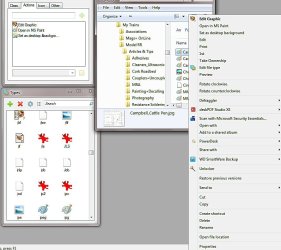
OK, I've solved my issues (my own brain's gaseous release). However, I don't see all the options that are listed in my context menu, listed in ACTIONS in TYPES. I will attempt to attach a screen grab. Any comments are appreciated. Thanx again! Please note the items I can edit in TYPES are listed on the top left, and the context menu on lower right. I don't understand how so many are in the menu and NOT listed in TYPES.
 

Attachments

  • TypeGrab.jpg
    TypeGrab.jpg
    83.1 KB · Views: 2

My Computer

Computer type
PC/Desktop
Computer Manufacturer/Model Number
Lenovo M70e
OS
Win 7 Pro 64 bit
CPU
Core 2 Duo E8400 3Ghz
Motherboard
Unknown
Memory
4 GB
Graphics Card(s)
Nvidea GE FORCE 310 512MB
Sound Card
mother board
Monitor(s) Displays
HP vs17
Hard Drives
500GB maker unknown
PSU
unknown
Case
Lenovo
Cooling
several fans (PSU, CPU, Graphics, Case)
Keyboard
Lenovo KU-0225
Mouse
Lenovo
Internet Speed
20MB/sec
Antivirus
MSSE
Browser
Chrome
Classes deal with the internal registry .....
.

Thank you so much for taking the time to say all that and then having to transcribe it as well! It was quite helpful. If you have any comments on my last post (difference between context menu and actions menu in Types) I look forward to reading them.:geek:
 

My Computer

Computer type
PC/Desktop
Computer Manufacturer/Model Number
Lenovo M70e
OS
Win 7 Pro 64 bit
CPU
Core 2 Duo E8400 3Ghz
Motherboard
Unknown
Memory
4 GB
Graphics Card(s)
Nvidea GE FORCE 310 512MB
Sound Card
mother board
Monitor(s) Displays
HP vs17
Hard Drives
500GB maker unknown
PSU
unknown
Case
Lenovo
Cooling
several fans (PSU, CPU, Graphics, Case)
Keyboard
Lenovo KU-0225
Mouse
Lenovo
Internet Speed
20MB/sec
Antivirus
MSSE
Browser
Chrome
POST EDIT(talk to text from my phone, then edit from my PC.. lol)::
Sorry about this wall of text, I'm using the voice to text on my phone, and LOL it doesn't always get what I am saying right..!
half of the below text I edited out was ALL a duplicate of text above it.... epic FAIL.. SAMSUNG!


Of course NP, I have a HIGHLY CONFIGURED Windows 7 System(s)(Desktop and Laptop ;) )
so I have spent a LONG time modding my file type associations list(s)...! ;)

Well first of all you're missing your icon for the Microsoft Paint context-menu entry,
if you double-click on "Open in MS Paint" entry in the actions tab or right click and click properties you'll be able to bring it up go to the icons Tab and then click on an icon for it that u want...


As far as the other things I mentioned above, some of them are due to the "perceived types" located in the "Others Tab",
it's some kind of bonus file type of association that the Microsoft created, its "perceived type" = "image" in this case...

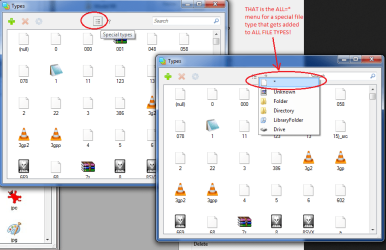
All the rest of the context-menu entries are mostly in the ALL = * menu.. that is located in the .. see the attached pic.. or in the in the special entries list..


I should say you could uncheck the box but I'd "memorize" the name/label/setting first because there's no going back once you uncheck the box, ie. automatically deletes what is in that text-box and so you're going to want to save it

and unfortunately at this point in time there are no "undue buttons" in Types.. soo.. make SURE you "get it right" seriously...
LOL LOL LOL!!

You can get rid of the
- "Edit",
- "Print",
- "Take Ownership",
- "Preview",
- "Rotate Clockwise",
- "Rotate Counterclockwise"

the only problem is you kinda want those, they are essential for image files...
so not much you can do about them.... especially, in the sense you can't make any of them the "Default"
at at least not with the present development of Types.. lol.. yeah...
I see you made "Edit Graphics" the default... its a little vague... sorry..
I use for ALL my text file types like (.txt .c .cpp .h , etc)
"Edit w/ Notepad 2" so its "Edit w/" followed by the name of the program doing the editing
SO YOU KNOW what is gonna open that file... lol yeah... you can of course rename the context-menu entry...

 

Attachments

  • Types__ALL-FILE-TYPES-MENU_.png
    Types__ALL-FILE-TYPES-MENU_.png
    45.4 KB · Views: 2

My Computers

System One System Two

  • Computer type
    PC/Desktop
    Computer Manufacturer/Model Number
    [Self-built](custom-build)(June 2020)
    OS
    Windows 11 Pro (x64)
    CPU
    AMD Ryzen 9 3900X 12-Core Processor
    Motherboard
    Asus PRIME X570-PRO
    Memory
    32GB, 2x G.Skill 16GB (PC3200)(DDR4-2137)
    Graphics Card(s)
    NVIDIA GeForce RTX 3070 Ti 8GB XC3 model by EVGA
    Sound Card
    Realtek® ALC1220A 8-Channel High Definition Audio CODEC
    Monitor(s) Displays
    24" DELL Gaming Monitor - G2422HS - DisplayPort used
    Screen Resolution
    1920x1080p at 165Hz (16:9 Aspect Ratio)
    Hard Drives
    1TB Samsung 980 Pro (NVMe)(SSD)
    2TB Samsung 980 Pro (NVMe)(SSD)
    2TB Samsung 870 EVO (SSD)

    NVMe 1TB
    -- OS(Win10 Pro x64),
    -- programs,
    -- programming(MS Visual Studios 2022 Community Ed.),
    -- music

    NV
    PSU
    Thermaltake TOUGHPOWER DPS G RGB Titanium Certified 1250Watt
    Case
    Corsair Graphite Series 780T Full Tower PC Case
    Cooling
    AMD Wraith cooler (stock) & 3x Corsair case fans
    Keyboard
    Alienware Low Profile RGB Mechanical USB Gaming Keyboard - A
    Mouse
    Redragon M602 RGB Wired USB Gaming mouse
    Internet Speed
    2100Mbps Download, 350Mbps Upload
    Antivirus
    n/a aka "ABOVE TOP SECRET!" lol ;)
    Browser
    Firefox & Google Chrome
  • Computer type
    Laptop
    System Manufacturer/Model Number
    DELL G15 Ryzen edition, model 5515
    OS
    Windows 11 Pro
    CPU
    AMD Ryzen 7 5800H
    Motherboard
    DELL G15 Ryzen edition
    Memory
    16GB DDR4
    Graphics Card(s)
    Ryzen 7 5800H integrated AMD Radeon Graphics and Nvidia GeForce 3060 6GB
    Sound Card
    Realtek ALC3254 with Nahimic 3D Audio for Gamers
    Monitor(s) Displays
    built-in
    Screen Resolution
    1920x1080
    Hard Drives
    500GB NVMe SSD
    PSU
    DELL power brick.
    Case
    laptop
    Cooling
    laptop cooling
    Keyboard
    built-in
    Mouse
    Microsoft basic optical scroll mouse
    Internet Speed
    1000Mbps download, 20Mbps upload
    Browser
    Firefox & Waterfox Classic
Take a look through these and see if one is what you are looking for.

New Context Menu - Remove Restore Default Menu Items - Windows 7 Help Forums

At the bottom of the page.

How to Edit the Windows 7 Desktop NEW Context Menu
How to Remove and Restore the Default Windows 7 Send To Context Menu Items
How to Create a New Library in Windows 7
How to Restore or Remove "New" from the Context Menu in Vista and Windows 7
How to Add "New VBScript File" to the Context Menu in Windows
How to Add "New Batch File" to the Context Menu in Windows
How to Add "New Registry File" to the Context Menu in Windows
Restore Default Windows 7 File Extension Type Associations


Jack
 

My Computer

Computer type
PC/Desktop
Computer Manufacturer/Model Number
Home made Desktop
OS
Windows 10 Pro. 64/ version 1709 Windows 7 Pro/64
CPU
Intel i7-6800K @ 4.3
Motherboard
ASUS X-99 Deluxe II
Memory
Corsair Platinum 16 gig @2400
Graphics Card(s)
EVGA GTX 1070 OC
Monitor(s) Displays
Asus 27" LED LCD/VE278Q
Screen Resolution
1920-1080 or 1280-720 HDMI
Hard Drives
INTEL SSD 730-240 Gb Sata 3.0/
PSU
EVGA Platium 1200W
Case
Phanteks Luxe Tempered Glass 8 fans/ one radiator
Cooling
XSPC/ Water Cooled CPU
Keyboard
Das 4 Professional
Mouse
Logitech M705/MX Anywhere 2-S
Internet Speed
100 mbits
Antivirus
Microsoft Security Essentials/ Malwarebytes Premium 3.0/ SAS
Browser
I.E. 11 default/Firefox/ ISP Time Warner Cable/Spectrum
Other Info
LG BluRay Burner/
Sound system-KLipsch-THX/
Icy Dock ssd Hot Swap bays.
Back
Top