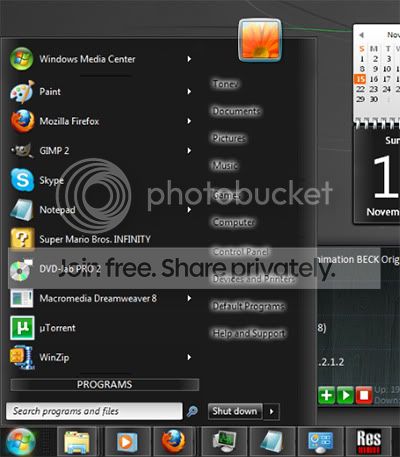
Changing Start Menu Color

numbobo

New member
Local time
1:01 PM
Messages
4
Hi,

I would like to change the BG-Color of my startmenu to a light grey.
The result should look some thing like this:

Start_Menu_Change.png


I allready spend over 2 hours looking for a solution, if i was just to stupid to find a way im sorry:o, but i really could not find any way to change that.
 

My Computer

OS
Windows 7

My Computer

Computer Manufacturer/Model Number
Me :) I build all my PCs
OS
Windows 7 Home 64, Vista Ultimate 64
I did patch Windows 7 with UniversalThemePatcher, i hope that this is correct.


But, i'm not really into editing and creating .dll files.
To make it clear: I have no clue about .dll files :o(
Well i know what there about and whats in it and also how to see what's inside, but then again i dont know how to put new files inside or how to edit the files inside.

The only thing i'm "good" at (i can do) is making my own .ico files and startorbs but that's it.


//edit

So if you can give me the help i would be nice telling me how to edit that file =)
 

My Computer

OS
Windows 7
1) Run Resource Hacker, open the msstyles file and locate the image you want to change.
2) Then export it as a PNG file.
3) Then edit the PNG file with Photoshop (or other image editor that respects transparency).
4) Go back to Resource Hacker and replace the image with the edited version.

Ask here if you have troubles with any of these steps.
 

My Computer

Computer Manufacturer/Model Number
Me :) I build all my PCs
OS
Windows 7 Home 64, Vista Ultimate 64
Now i installed Resource Hacker, opend the msstyles file and started searching for the image.

I looked at every image from 760 - 900 and i did find some images that look like borders but none where i see the menu background.
Am I doing something wrong again?


btw. Thank you for your help =)
 

My Computer

OS
Windows 7
Which Visual Style are you trying to change? Aero? Or one you have downloaded?
 

My Computer

Computer type
PC/Desktop
Computer Manufacturer/Model Number
Self Build
OS
MS Windows 7 Professional 64-bit SP1
CPU
AMD FX(tm)-6100 Six-Core Processor Socket AM3+ (942)
Motherboard
ASUSTeK COMPUTER INC. SABERTOOTH 990FX (AM3r2)
Memory
8.00 GB Dual-Channel DDR3 @ 802MHz (11-11-11-36) 1.5Volts
Graphics Card(s)
NVIDIA GeForce GTX 560 Ti
Sound Card
Onboard Realtek HD
Monitor(s) Displays
shimian (1920x1080@60Hz)
Screen Resolution
1920*1080
Hard Drives
OCZ-AGIL ITY3 SATA Disk Device 120GB
PSU
Corsair TX 750
Case
Corsair
Cooling
WaterCooled
Keyboard
Microsoft Wired
Mouse
Logitech USB Optical TiltWheel Mouse
Internet Speed
Realtek PCIe GBE Family Controller 20MB*1MB
Antivirus
Avast
Browser
Firefox
Other Info
150GB Internal Hard Drive for Backing Up Important Files -
Hauppauge Nova-DT Dual DVB-T Tuner Device (+IR) -
USB PC Camera with Mic (SN9C105)
Look at images 778, 781, 782 and 785. I'm not sure which one exactly is used in your case. Color the insides of each one in a different color - red, green, blue, yellow, to see which one Windows uses.
 

My Computer

Computer Manufacturer/Model Number
Me :) I build all my PCs
OS
Windows 7 Home 64, Vista Ultimate 64
i think you people that know how to do this is very very cheap with information about it,

i've been searching diffrenst forums for 3 day's and this is all i got


Looks kind of crappy in my eye, not the color i want either, i want to learn how to do it right before i start making it the way i want it

when i edit the all programs tab i looose aero affect. this is killing my brain, if i compare to others and other images i find i am edeting the right ones (brain exploding)

i cant understand why the would remove this setting that were sooooo quick and easy in xp i went from xp to Windows 7. this is the kind of thing that makes me want to change op, thinking of going back to the good old easy tweaking xp...

As you can see i am in neeed of help with this

so now on to my next question, does any one have the correct image numbers for:
Start Menu backgrounds (installed programs,search field/result and all programs)
Explorer background/fields
Mouse Over/marked/inactive.

Remember has to be a Windows 7 version 6.1 7600 build

if some kind soul has these image numbers i can finish, these are the last thing's i need to change.
then i am done.

i will be posting theme,icons and my aero.msstyles file here when i am done, along with a nice tutorial, so the next one after me doesn't have to spend 3-4 days figuring out what to do?


\\Targa

 

My Computer

Computer Manufacturer/Model Number
Targa
OS
windows 7 ultimate 64 Build 7600
CPU
Intel i5 750 @ 2.73
Motherboard
Asus P7P55D LE P7P55D LE
Memory
Corsair 4GB (KIT) DDR3 1600MHz/CL8/XMS3 DOMINATOR with DHX+
Graphics Card(s)
Nvidia Geforce 7300gs
Hard Drives
Intel x-15 g2 80gig
Case
corsair 520w
Cooling
H50 Liquid Cooling
i think you people that know how to do this is very very cheap with information about it,

i've been searching diffrenst forums for 3 day's and this is all i got


Looks kind of crappy in my eye, not the color i want either, i want to learn how to do it right before i start making it the way i want it

when i edit the all programs tab i looose aero affect. this is killing my brain, if i compare to others and other images i find i am edeting the right ones (brain exploding)

i cant understand why the would remove this setting that were sooooo quick and easy in xp i went from xp to Windows 7. this is the kind of thing that makes me want to change op, thinking of going back to the good old easy tweaking xp...

As you can see i am in neeed of help with this

so now on to my next question, does any one have the correct image numbers for:
Start Menu backgrounds (installed programs,search field/result and all programs)
Explorer background/fields
Mouse Over/marked/inactive.

Remember has to be a Windows 7 version 6.1 7600 build

if some kind soul has these image numbers i can finish, these are the last thing's i need to change.
then i am done.

i will be posting theme,icons and my aero.msstyles file here when i am done, along with a nice tutorial, so the next one after me doesn't have to spend 3-4 days figuring out what to do?


\\Targa

Try here as well, #15 Windows 7 Theme & Resource Mods
Also, the all programs and search results are not going to work well. You can edit the images but it also uses color which if you do edit will also bork some other element within Windows GUI such as the left pane in Registry Editor. I have Win 7 style builder and it's the same with it.
 

My Computer

Computer Manufacturer/Model Number
Averatec 6130HS-20
OS
Windows 7 Professional 32-bit (6.1, Build 7600)
CPU
Intel(R) Pentium(R) 4 3.00 GHz HT
Memory
2.0 GB
Graphics Card(s)
ATI Mobility Radeon 9600 64MB
Sound Card
Realtek AC'97 Audio
Screen Resolution
1280 x 800
Hard Drives
Seagate 96023A 60GB 7200RPM -
Seagate FreeAgentDesktop 250GB
Cooling
20 Inch Box Fan
Mouse
Targus PAWM10 Wireless Optical Laptop Mouse
I need help. I cant even get aero theme to open in reshacker and i dont know much beyond what i have read in the forums. if anyone could help me to figure this out it would be greatly appreciated.
 

My Computer

OS
Windows 7
I would like to change the background color of the start menu as well, but not other window backgrounds. This one by tonev looks good, but is there another method to change only this area and not the entire theme?

BlackStartmenuscr.jpg
 

My Computer

Computer Manufacturer/Model Number
Acer Aspire 4730Z
OS
Windows 7 Ultimate
CPU
Intel Pentium Dual CPU T3400 @ 2.16GHz
Motherboard
Acer Aspire 4730Z V1.22 GL40
Memory
4.0GB Dual-Channel DDR2 @ 332MHz
Graphics Card(s)
Mobile Intel(R) 4 Series Express Chipset Family 1309 MB
Sound Card
Realtek High Definition Audio
Monitor(s) Displays
AOC 2795V
Screen Resolution
1920 x 1080
Hard Drives
500GB Hitachi HTS545050B9A300 ATA Travelstar
I need help. I cant even get aero theme to open in reshacker and i dont know much beyond what i have read in the forums. if anyone could help me to figure this out it would be greatly appreciated.
If you mean aero.theme, it's not the file to open, it's basically a text file. Open one with notepad to see what I mean. It's the aero.msstyles file you need to open and edit.
 

My Computer

OS
Win7 HP 64bit
I didn't understand how to load the only black theme above to get it's effects,
but did load it, clicked personalization and chose what was shown. I ended
up with an old XP UI that allowed me to change the colors in many different
windows including start menu, etc. Now the background is black with yellow
lettering, etc.

My eyes are so weak anymore that bright colors [backgrounds] almost
blind me, so it has helped me a LOT. I wouldn't have been able to do
this without the help of Windows 7 Forums once again ! What a great
site with so many helpful Admin's, Mod's, and Members !

Thanks so much !
n2gc.
 

My Computer

OS
W8 Pro, W7 bogus Ultimate [resolved] watch what ya buy at ebay. W7 Pro, Vista Prem, Xp Pro
Back
Top