Solved Changing Sticky Notes default font

  • Thread starter Thread starter NuevaEcija
  • Start date Start date
You're Welcome
That is a good solution nice find.
 

My Computer

Computer type
Laptop
Computer Manufacturer/Model Number
Sager NP9170
OS
Win 7 Pro x64 / Win 10 Pro
CPU
Intel(R) Core(TM) i7-3630QM CPU @ 2.40GHz
Motherboard
CLEVO P170EM
Memory
12 GB
Graphics Card(s)
(1) Intel(R) HD Graphics 4000 (2) NVIDIA GeForce GTX 675M
Sound Card
(1) Realtek High Definition Audio (2) Intel(R) Display Aud
Monitor(s) Displays
17.3
Screen Resolution
1920x1080
Hard Drives
(1) Samsung 860 EVO 500GB(OS) (1) Samsung 860 EVO 500GB(Data)
Keyboard
Backlite
Antivirus
MSE, Malwarebytes Pro
Browser
Firefox
Other Info
DESKTOP: Custom-built.
OS: Win 10 Pro x64.
CASE: Rosewill R5.
CPU: Intel I5 4670K CPU @ 3.40GHz.
CPU COOLER: Cool Master Hyper 212 EVO.
MOTHERBOARD: Asus Z87-A.
MEMORY: Kingston HyperX 2x4 GB.
GPU: Nvidia Geforce 650 TI.
PSU: Corsair TX750.
DRIVES: (1) Samsung 840 120 GB SSD (2) Western Digital blue 500 GB 7200 RPM.
Easiest way to change the font.

The easiest way to change the font is to copy all of your text and past it into word. Change the font, to which ever you like in word and then past and copy it back into your sticky.
 

My Computer

Computer type
PC/Desktop
Computer Manufacturer/Model Number
Lenovo w530
OS
Windows 8.1 enterprise 64bit
Memory
16 gig
Hard Drives
256GB
Browser
Chrome, IE, Firefox
Easier way!

If you guys want a super quick fix, simply delete the above mentioned hard to read .... font, and it will automatically default to arial :) No one uses that font anyway!

hope this helps!
 

My Computer

Computer type
PC/Desktop
OS
Win 7 Ultimate 64bit
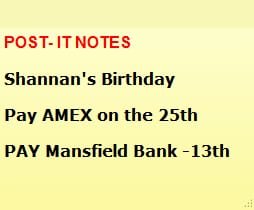
What I did was I went into my Microsoft WORD program, and chose the font I wanted (Verdana), then I made it bold in WORD. I copied that word ("Sticky Notes") and pasted it onto my sticky note on the desktop. That worked. I use the same sticky note (which can be elongated by dragging the lower right-hand corner down or wider), and delete things on the sticky note as they get done, or I add a new line on the same sticky note when I need to add something to get done. In all cases, the same font that I chose in WORD stays intact. You can even choose to color the fonts if you like in WORD...which I did for just the headline. It is in VERDANA, BOLD and Red. No other thing worked for me. Couldn't delete the original font...could not find Windows NT in my registry, so I finally figured out what WOULD work. John Tyler
 

Attachments

  • Sticky Notes.jpg
    Sticky Notes.jpg
    10.9 KB · Views: 17
Last edited:

My Computer

Computer type
PC/Desktop
Computer Manufacturer/Model Number
Dell
OS
Windows 7
I do the modification on my W7 x86 and it works well.
Now i tried to do the same on W7 Ultimate 64bit and there is a complete different situation.

The File "StikyNot.exe.mui" is not located in WINDOWS\SYSTEM32\en-US\ (for me de-DE, because I´m on German W7)

In W7 it is only located in
c:\Windows\winsxs\amd64_microsoft-windows-stickynotes.resources_31bf3856ad364e35_6.1.7600.16385_de-de_ad8e988c6b87813d\StikyNot.exe.mui

I do the same Font Type replacement but in Notes I see still "Segoe Print" as Font.
Is there any solution for 64bit?
:sick:

Hi, not sure if this is still an issue, but I've noticed that when searching my x64 builds for mui's, they don't always seem to be where you'd expect them...

Do you have any multi-build options (so you can mount the C: drive in question, and investigate)?

I would first manually check...
Go to Explorer, ensure (folder options, from tools menu) show hidden files and don't hide protected OS files (don't think affects, but PointOfConsideration, if visibillity issues persist)...

I use the search tool Everything

screenshot shows the results found for taskmgr.exe. E: is another build that was mounted (you can keep disconnected drives indexed, as well as perform lightning fast searches using all kinds of smartsyntax), and you'll notice there's no finds @ system32\en-us

Search tip: (View) Group by type, then sort alphabetically
(alt&v then c to collapse all groups)

Finally, always copy the resource file (e.g. to c:\temp), then modify, then replace...

I'm not sure when you need to rebuild, but if you're replacing a label (startmenu text) or a contextmenu, you might need to run mcbuilder (admin cmd). And don't run sfc after any changes!!

Qmm3vyM.png
 
Last edited:

My Computer

Computer type
Laptop
Computer Manufacturer/Model Number
Dell
OS
Windows 7 Ultimate 64bit
CPU
2.2
Memory
8Gb
Graphics Card(s)
NVIDIA
Screen Resolution
1280/762
Mouse
built in pad || iphone || MS wireless
Internet Speed
100MB
Antivirus
Avast
Browser
Chrome, Chrome portable
Back
Top