
You are using an out of date browser. It may not display this or other websites correctly.
You should upgrade or use an alternative browser.
You should upgrade or use an alternative browser.
Changing the folder icon in windows 7
- Thread starter newtr0n
- Start date


My Computer
- Computer Manufacturer/Model Number
- Micro-Star International/MS-7529
- OS
- Windows 7 Ultimate x32
- CPU
- DualCore Intel Pentium E2200, 2218 MHz (11 x 202)
- Motherboard
- MSI G31M3 V2 (MS-7529) (2 PCI, 1 PCI-E x16,2 DDR2 DIMM)
- Memory
- 2 GB DDR2-800 DDR2 SDRAM
- Graphics Card(s)
- nVIDIA GeForce 9500GT 1GB
- Sound Card
- Realtek ALC888/1200 @ Intel 82801GB ICH7
- Monitor(s) Displays
- Samsung SyncMaster 2253BW (Digital) 22'' LCD
- Screen Resolution
- 1680x1050
- Hard Drives
- SAMSUNG HD322IJ ATA Device (298 GB , IDE)

- Local time
- 3:37 AM
- Messages
- 8,608
Or you can download icons and change them to what you want. (this is just a small sampling)
Colorflow 1.0 Icons
Colorflow 1.0 Icons
My Computer
- Computer type
- PC/Desktop
- Computer Manufacturer/Model Number
- Bruce ... somewhere in his 40's
- OS
- Windows 7 Ultimate 32bit SP1
- CPU
- Intel(R) Core(TM)2 Quad CPU @ 2.40GHz, 2400 MHz
- Motherboard
- INTEL/D975XBX2
- Memory
- 4 GB
- Graphics Card(s)
- ATI Radeon HD 2600 Pro
- Monitor(s) Displays
- Samsung SyncMaster 914v
- Screen Resolution
- 1280 x 1024
- Hard Drives
- 2/500GB each ... ST3500630AS ATA Device.
One is not connected
- PSU
- Rocketfish 700 W
- Case
- G.Skill Gigabyte Chassis
- Keyboard
- Standard PS/2 Keyboard
- Mouse
- Microsoft PS/2 Mouse
- Internet Speed
- DSL
- Antivirus
- Avira Internet Security
- Browser
- IE 11
- Other Info
- ATI HDMI Audio

- Local time
- 4:07 PM
- Messages
- 35,002
Hi Grimmjow!
I am also planning to change the folder icons (live). The tutorial can change the icons only, but vanishes the stuff inside the folder display, what is the function of windows live folder.
Is there really any way to change them other than editing imageres.dll (I dont know how to do it using restorer or resource hacker) ?
My Computer
- Computer type
- PC/Desktop
- Computer Manufacturer/Model Number
- Self Assembled
- OS
- Microsoft Windows 10 Pro Insider Preview 64-bit
- CPU
- Intel(R) Core(TM) i3-4130 CPU @ 3.40GHz
- Motherboard
- Gigabyte Technology Co., Ltd. B85M-D3H
- Memory
- Corsair Vengence 4GB x2 (8.00GB Dual-Channel DDR3 @ 798MHz)
- Graphics Card(s)
- 2047MB GeForce GTS 450 (ZOTAC International)
- Sound Card
- Onboard (Realtek High Definition Audio)
- Monitor(s) Displays
- LG Flatron E2040T
- Screen Resolution
- 1600x900
- Hard Drives
- Western Digital 1 TB
Seagate 500 GB
- PSU
- Corsair VS550
- Case
- Cooler Master K380
- Cooling
- Cooler Master Seidon 120V Plus
- Keyboard
- Logitech MK260r
- Mouse
- Logitech MK260r
- Internet Speed
- PMPL Broadband
- Antivirus
- Windows Defender + MBAM
- Browser
- Firefox
- Other Info
- Dell Studio 15" Laptop

Phil K
New member
But the Windows folder itself CANNOT be changed in 64bit.
Anyone have a fix ?
Anyone have a fix ?
My Computer
- Computer Manufacturer/Model Number
- Home made !
- OS
- Windows 7 Home Premium x64
- CPU
- Pentium Dual Core E6300 2.8ghz o/c - 3.4ghz
- Motherboard
- Gigabyte GA-G31M-ES2L
- Memory
- 4gb Corsair DDR2 800MHz/PC2-6400 XMS2 Memory
- Graphics Card(s)
- XFX 9800GT 512MB DDR3 Dual DVI HDTV Out
- Sound Card
- on Motherboard
- Monitor(s) Displays
- Samsung 2032mw
- Screen Resolution
- 1600x1050
- Hard Drives
- 3.
2x1tb
1x750gb
All Samsung
- PSU
- 450
- Case
- Coolermaster 330
- Cooling
- Zalman
- Keyboard
- Microsoft Curve
- Mouse
- Logitech Lazer
- Internet Speed
- 20mb

Hello Phil,
I'm not sure what you mean, the tutorial below can changed the default folder icon of all folders in both the 32-bit and 64-bit Windows 7 versions.
http://www.sevenforums.com/tutorials/23825-folder-icon-change-windows-7-default-folder-icon.html
I'm not sure what you mean, the tutorial below can changed the default folder icon of all folders in both the 32-bit and 64-bit Windows 7 versions.
http://www.sevenforums.com/tutorials/23825-folder-icon-change-windows-7-default-folder-icon.html
My Computer
- Computer type
- PC/Desktop
- Computer Manufacturer/Model Number
- Self built custom
- OS
- 64-bit Windows 11 Pro for Workstations
- CPU
- Intel i7-8700K OC'd to 5 GHz
- Motherboard
- ASUS ROG Maximus XI Formula Z390
- Memory
- 64 GB (4x16GB) G.SKILL TridentZ RGB DDR4 3600 MHz
- Graphics Card(s)
- ASUS ROG-STRIX-GTX1080TI-O11G-GAMING
- Sound Card
- Integrated
- Monitor(s) Displays
- 2 x Samsung Odyssey G7 27"
- Screen Resolution
- 2560x1440
- Hard Drives
- 1TB Samsung 990 PRO M.2,
4TB Samsung 990 PRO PRO M.2,
TerraMaster F8 SSD Plus NAS
- PSU
- Seasonic Prime Titanium 850W
- Case
- Thermaltake Core P3
- Cooling
- Corsair Hydro H115i
- Keyboard
- Logitech wireless K800
- Mouse
- Logitech MX Master 4
- Internet Speed
- 2 Gb/s Download and 100 Mb/s Upload
- Antivirus
- Malwarebyte Anti-Malware Premium
- Browser
- Google Chrome
- Other Info
- Logitech Z625 speaker system,
Logitech BRIO 4K Pro webcam,
HP Color LaserJet Pro MFP M477fdn,
APC SMART-UPS RT 1000 XL - SURT1000XLI,
Galaxy S23 Plus phone

gamepoint
Banned
- Local time
- 4:37 AM
- Messages
- 169
@phil..if u don't prefer the tutorial that brink provided.U can use Iconpackager though
Stardock.com - Your Edge In Software
Stardock.com - Your Edge In Software
My Computer
- Computer Manufacturer/Model Number
- Compaq Presario CQ40 502AU
- OS
- windows 7 professional x64 bit RTM
- Motherboard
- Compal 30FE
- Memory
- 4G
- Graphics Card(s)
- ATI radeon HD 3200
- Screen Resolution
- 1280 x 800
- Local time
- 4:07 PM
- Messages
- 35,002
Hello Phil,
I'm not sure what you mean, the tutorial below can changed the default folder icon of all folders in both the 32-bit and 64-bit Windows 7 versions.
http://www.sevenforums.com/tutorials/23825-folder-icon-change-windows-7-default-folder-icon.html
Hi Shawn!
I want to change the live folder icons. The tutorial Changes icons though , but doesnot display the contents of the folder, what a live folder usually dose . Due to some reason , I dont want to use stardock iconpackager.
Can you help me?
My Computer
- Computer type
- PC/Desktop
- Computer Manufacturer/Model Number
- Self Assembled
- OS
- Microsoft Windows 10 Pro Insider Preview 64-bit
- CPU
- Intel(R) Core(TM) i3-4130 CPU @ 3.40GHz
- Motherboard
- Gigabyte Technology Co., Ltd. B85M-D3H
- Memory
- Corsair Vengence 4GB x2 (8.00GB Dual-Channel DDR3 @ 798MHz)
- Graphics Card(s)
- 2047MB GeForce GTS 450 (ZOTAC International)
- Sound Card
- Onboard (Realtek High Definition Audio)
- Monitor(s) Displays
- LG Flatron E2040T
- Screen Resolution
- 1600x900
- Hard Drives
- Western Digital 1 TB
Seagate 500 GB
- PSU
- Corsair VS550
- Case
- Cooler Master K380
- Cooling
- Cooler Master Seidon 120V Plus
- Keyboard
- Logitech MK260r
- Mouse
- Logitech MK260r
- Internet Speed
- PMPL Broadband
- Antivirus
- Windows Defender + MBAM
- Browser
- Firefox
- Other Info
- Dell Studio 15" Laptop
Arc,
The only way that I know how to change the folder icon and still have thumbnail previews is to use a 3rd party program that does this. While I'm sure that there are many others that do, Stardock is the only one that I know of. Hopefully someone else may know of one for you.
The only way that I know how to change the folder icon and still have thumbnail previews is to use a 3rd party program that does this. While I'm sure that there are many others that do, Stardock is the only one that I know of. Hopefully someone else may know of one for you.
My Computer
- Computer type
- PC/Desktop
- Computer Manufacturer/Model Number
- Self built custom
- OS
- 64-bit Windows 11 Pro for Workstations
- CPU
- Intel i7-8700K OC'd to 5 GHz
- Motherboard
- ASUS ROG Maximus XI Formula Z390
- Memory
- 64 GB (4x16GB) G.SKILL TridentZ RGB DDR4 3600 MHz
- Graphics Card(s)
- ASUS ROG-STRIX-GTX1080TI-O11G-GAMING
- Sound Card
- Integrated
- Monitor(s) Displays
- 2 x Samsung Odyssey G7 27"
- Screen Resolution
- 2560x1440
- Hard Drives
- 1TB Samsung 990 PRO M.2,
4TB Samsung 990 PRO PRO M.2,
TerraMaster F8 SSD Plus NAS
- PSU
- Seasonic Prime Titanium 850W
- Case
- Thermaltake Core P3
- Cooling
- Corsair Hydro H115i
- Keyboard
- Logitech wireless K800
- Mouse
- Logitech MX Master 4
- Internet Speed
- 2 Gb/s Download and 100 Mb/s Upload
- Antivirus
- Malwarebyte Anti-Malware Premium
- Browser
- Google Chrome
- Other Info
- Logitech Z625 speaker system,
Logitech BRIO 4K Pro webcam,
HP Color LaserJet Pro MFP M477fdn,
APC SMART-UPS RT 1000 XL - SURT1000XLI,
Galaxy S23 Plus phone
- Local time
- 4:07 PM
- Messages
- 35,002
Arc,
The only way that I know how to change the folder icon and still have thumbnail previews is to use a 3rd party program that does this. While I'm sure that there are many others that do, Stardock is the only one that I know of. Hopefully someone else may know of one for you.
My bad luck

My Computer
- Computer type
- PC/Desktop
- Computer Manufacturer/Model Number
- Self Assembled
- OS
- Microsoft Windows 10 Pro Insider Preview 64-bit
- CPU
- Intel(R) Core(TM) i3-4130 CPU @ 3.40GHz
- Motherboard
- Gigabyte Technology Co., Ltd. B85M-D3H
- Memory
- Corsair Vengence 4GB x2 (8.00GB Dual-Channel DDR3 @ 798MHz)
- Graphics Card(s)
- 2047MB GeForce GTS 450 (ZOTAC International)
- Sound Card
- Onboard (Realtek High Definition Audio)
- Monitor(s) Displays
- LG Flatron E2040T
- Screen Resolution
- 1600x900
- Hard Drives
- Western Digital 1 TB
Seagate 500 GB
- PSU
- Corsair VS550
- Case
- Cooler Master K380
- Cooling
- Cooler Master Seidon 120V Plus
- Keyboard
- Logitech MK260r
- Mouse
- Logitech MK260r
- Internet Speed
- PMPL Broadband
- Antivirus
- Windows Defender + MBAM
- Browser
- Firefox
- Other Info
- Dell Studio 15" Laptop

My Computer
- Computer Manufacturer/Model Number
- Myself
- OS
- Windows 7 Ultimate 64Bit
- CPU
- C2D E8200
- Motherboard
- XFX 750i
- Memory
- 8GB PNY PC2-6400
- Graphics Card(s)
- BFG 9600GT x 2
- Sound Card
- Stock XFX Optical
- Monitor(s) Displays
- Gateway 22" HD Display
- Hard Drives
- C: 1 TB G: 500 GB H: 500 GB
- PSU
- Ultra LSP 550 Pro Lifetime Series
- Case
- Xion2
- Cooling
- ThermalTake
- Local time
- 4:07 PM
- Messages
- 35,002
Outstanding software ... I use it.
And it also fails to replace the live folders ...
In all fucntions > change windows appearence > system elements > explorer , there is only the option to change the open folder and the closed folder
My Computer
- Computer type
- PC/Desktop
- Computer Manufacturer/Model Number
- Self Assembled
- OS
- Microsoft Windows 10 Pro Insider Preview 64-bit
- CPU
- Intel(R) Core(TM) i3-4130 CPU @ 3.40GHz
- Motherboard
- Gigabyte Technology Co., Ltd. B85M-D3H
- Memory
- Corsair Vengence 4GB x2 (8.00GB Dual-Channel DDR3 @ 798MHz)
- Graphics Card(s)
- 2047MB GeForce GTS 450 (ZOTAC International)
- Sound Card
- Onboard (Realtek High Definition Audio)
- Monitor(s) Displays
- LG Flatron E2040T
- Screen Resolution
- 1600x900
- Hard Drives
- Western Digital 1 TB
Seagate 500 GB
- PSU
- Corsair VS550
- Case
- Cooler Master K380
- Cooling
- Cooler Master Seidon 120V Plus
- Keyboard
- Logitech MK260r
- Mouse
- Logitech MK260r
- Internet Speed
- PMPL Broadband
- Antivirus
- Windows Defender + MBAM
- Browser
- Firefox
- Other Info
- Dell Studio 15" Laptop
Phil K
New member
Bink - thanks - I mean the Windows folder itself. I change all folders to the actuall image the prog represents ie Adobe has the red adobe "A", Nero has the icon for Nero etc - I have a smashing Windows 7 icon I wish to use for the Windows folder, and its always worked via Tune Up Utilities 2008 only it doesn't work since I went 64bit.
Its the only folder that doesn't have an icon all its own.
I'd like to put that Win7 icon on it if anyone knows how.
I don't mean folders in general, I've already changed those to a neat blue number off DeviantArt !
Gamepoint - already used Iconpackager, its not a case of not liking Bink's tutorial at all ! (If I remember rightly, I used it to change to the blue icon mentioned above)
Its the Windows folder itself in C:\ and only in 64bit. Somehow its only a problem in 64bit, not 32 to change the image for Windows folder.
Its the only folder that doesn't have an icon all its own.
I'd like to put that Win7 icon on it if anyone knows how.
I don't mean folders in general, I've already changed those to a neat blue number off DeviantArt !
Gamepoint - already used Iconpackager, its not a case of not liking Bink's tutorial at all ! (If I remember rightly, I used it to change to the blue icon mentioned above)
Its the Windows folder itself in C:\ and only in 64bit. Somehow its only a problem in 64bit, not 32 to change the image for Windows folder.
My Computer
- Computer Manufacturer/Model Number
- Home made !
- OS
- Windows 7 Home Premium x64
- CPU
- Pentium Dual Core E6300 2.8ghz o/c - 3.4ghz
- Motherboard
- Gigabyte GA-G31M-ES2L
- Memory
- 4gb Corsair DDR2 800MHz/PC2-6400 XMS2 Memory
- Graphics Card(s)
- XFX 9800GT 512MB DDR3 Dual DVI HDTV Out
- Sound Card
- on Motherboard
- Monitor(s) Displays
- Samsung 2032mw
- Screen Resolution
- 1600x1050
- Hard Drives
- 3.
2x1tb
1x750gb
All Samsung
- PSU
- 450
- Case
- Coolermaster 330
- Cooling
- Zalman
- Keyboard
- Microsoft Curve
- Mouse
- Logitech Lazer
- Internet Speed
- 20mb
Phil K
New member
No it doesn't. It did in the 32bit but not 64bit.
It seems to have changed, then you check, and no - it's still unchanged.
Oh - and TuneUp is a GERMAN product if I remember right.
Outstanding software ... I use it.
And it also fails to replace the live folders ...
In all fucntions > change windows appearence > system elements > explorer , there is only the option to change the open folder and the closed folder
Try customize windows>file system>C:\ then look for folder, then replace icon.
Sadly, the only one it won't do is Windows folder. Never tried any other "live" folders though
Last edited:
My Computer
- Computer Manufacturer/Model Number
- Home made !
- OS
- Windows 7 Home Premium x64
- CPU
- Pentium Dual Core E6300 2.8ghz o/c - 3.4ghz
- Motherboard
- Gigabyte GA-G31M-ES2L
- Memory
- 4gb Corsair DDR2 800MHz/PC2-6400 XMS2 Memory
- Graphics Card(s)
- XFX 9800GT 512MB DDR3 Dual DVI HDTV Out
- Sound Card
- on Motherboard
- Monitor(s) Displays
- Samsung 2032mw
- Screen Resolution
- 1600x1050
- Hard Drives
- 3.
2x1tb
1x750gb
All Samsung
- PSU
- 450
- Case
- Coolermaster 330
- Cooling
- Zalman
- Keyboard
- Microsoft Curve
- Mouse
- Logitech Lazer
- Internet Speed
- 20mb
- Local time
- 4:07 PM
- Messages
- 35,002
Try customize windows>file system>C:\ then look for folder, then replace icon.
Sadly, the only one it won't do is Windows folder. Never tried any other "live" folders though
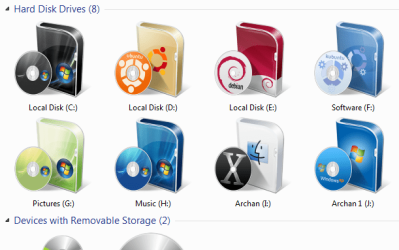
File System > local disk (c) Doesnot change any folder icon at all ! It changes the C drive (or any other drive ) icon in explorer window. I already have done it (see the screenshot). I only trying to change the windows live folder icon (the folder icon which shows a hint of files in it). Do you have any better idea , phil?
Edit : what I want to change is in another screenshot, the yellow folders.
Attachments

My Computer
- Computer type
- PC/Desktop
- Computer Manufacturer/Model Number
- Self Assembled
- OS
- Microsoft Windows 10 Pro Insider Preview 64-bit
- CPU
- Intel(R) Core(TM) i3-4130 CPU @ 3.40GHz
- Motherboard
- Gigabyte Technology Co., Ltd. B85M-D3H
- Memory
- Corsair Vengence 4GB x2 (8.00GB Dual-Channel DDR3 @ 798MHz)
- Graphics Card(s)
- 2047MB GeForce GTS 450 (ZOTAC International)
- Sound Card
- Onboard (Realtek High Definition Audio)
- Monitor(s) Displays
- LG Flatron E2040T
- Screen Resolution
- 1600x900
- Hard Drives
- Western Digital 1 TB
Seagate 500 GB
- PSU
- Corsair VS550
- Case
- Cooler Master K380
- Cooling
- Cooler Master Seidon 120V Plus
- Keyboard
- Logitech MK260r
- Mouse
- Logitech MK260r
- Internet Speed
- PMPL Broadband
- Antivirus
- Windows Defender + MBAM
- Browser
- Firefox
- Other Info
- Dell Studio 15" Laptop
gamepoint
Banned
- Local time
- 4:37 AM
- Messages
- 169
@arc..u can use Iconpackager..in iconpackager,go to look and feel-live folder..u can change it there..Stardock.com - Your Edge In Softwareiconpackager/download.asp
My Computer
- Computer Manufacturer/Model Number
- Compaq Presario CQ40 502AU
- OS
- windows 7 professional x64 bit RTM
- Motherboard
- Compal 30FE
- Memory
- 4G
- Graphics Card(s)
- ATI radeon HD 3200
- Screen Resolution
- 1280 x 800
Phil K
New member
Well Arc, I will TRY to help you - but if it doesn't work for you (and stuff mentioned seems to work for me) probably not catching what your after but still, try the above by Gamepoint - that failing, I'd say (I haven't a clue about "live folders" actually) perhaps :-
Icon Packager>Icons & Cursors>Folders and you'll see "Live Folder (back) and Live Folder (front)" there to change the icon with a right click
Maybe thats what your after ?
Icon Packager>Icons & Cursors>Folders and you'll see "Live Folder (back) and Live Folder (front)" there to change the icon with a right click
Maybe thats what your after ?
My Computer
- Computer Manufacturer/Model Number
- Home made !
- OS
- Windows 7 Home Premium x64
- CPU
- Pentium Dual Core E6300 2.8ghz o/c - 3.4ghz
- Motherboard
- Gigabyte GA-G31M-ES2L
- Memory
- 4gb Corsair DDR2 800MHz/PC2-6400 XMS2 Memory
- Graphics Card(s)
- XFX 9800GT 512MB DDR3 Dual DVI HDTV Out
- Sound Card
- on Motherboard
- Monitor(s) Displays
- Samsung 2032mw
- Screen Resolution
- 1600x1050
- Hard Drives
- 3.
2x1tb
1x750gb
All Samsung
- PSU
- 450
- Case
- Coolermaster 330
- Cooling
- Zalman
- Keyboard
- Microsoft Curve
- Mouse
- Logitech Lazer
- Internet Speed
- 20mb
- Local time
- 4:07 PM
- Messages
- 35,002
Well Arc, I will TRY to help you - but if it doesn't work for you (and stuff mentioned seems to work for me) probably not catching what your after but still, try the above by Gamepoint - that failing, I'd say (I haven't a clue about "live folders" actually) perhaps :-
Icon Packager>Icons & Cursors>Folders and you'll see "Live Folder (back) and Live Folder (front)" there to change the icon with a right click
Maybe thats what your after ?
Thanks a lot Phil! But I already got the issue solved.

I used Resource Hacker to edit Icon group no. 3, 4, 5 and 6 in imageres.dll . and it done that.
Though I took a bit help of IcoFX to come to know the numbers (i.e. 3, 4, 5, 6)
Again i am thanking you that you have tried to help me! Hats off to you, my friend

My Computer
- Computer type
- PC/Desktop
- Computer Manufacturer/Model Number
- Self Assembled
- OS
- Microsoft Windows 10 Pro Insider Preview 64-bit
- CPU
- Intel(R) Core(TM) i3-4130 CPU @ 3.40GHz
- Motherboard
- Gigabyte Technology Co., Ltd. B85M-D3H
- Memory
- Corsair Vengence 4GB x2 (8.00GB Dual-Channel DDR3 @ 798MHz)
- Graphics Card(s)
- 2047MB GeForce GTS 450 (ZOTAC International)
- Sound Card
- Onboard (Realtek High Definition Audio)
- Monitor(s) Displays
- LG Flatron E2040T
- Screen Resolution
- 1600x900
- Hard Drives
- Western Digital 1 TB
Seagate 500 GB
- PSU
- Corsair VS550
- Case
- Cooler Master K380
- Cooling
- Cooler Master Seidon 120V Plus
- Keyboard
- Logitech MK260r
- Mouse
- Logitech MK260r
- Internet Speed
- PMPL Broadband
- Antivirus
- Windows Defender + MBAM
- Browser
- Firefox
- Other Info
- Dell Studio 15" Laptop
Similar threads


- Replies
- 2
- Views
- 735
