Changing the folder way of view

Zivo

New member
Member
Local time
5:26 PM
Messages
31
Hello

every time i used your forum i get answers and solutions, i really like your forum you r doing a great job, thank you all

now for another question a bit complicated,

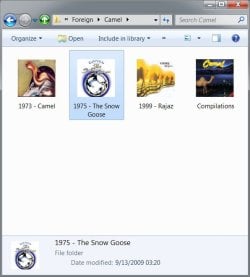
i want to view the folder thumbnail without the folder icon, what i mean is that i will see only the image inside the folder. the idea is to use this for my music folders
so i will see the album cover instead of the folder

i attach 2 images for example:
on the left the original on the right photoshop manipulation
 

Attachments

  • exemple 1.jpg
    exemple 1.jpg
    54.4 KB · Views: 96
  • exemple 2.jpg
    exemple 2.jpg
    56.1 KB · Views: 151

My Computer My Computer

At a glance

Windows 7
OS
Windows 7
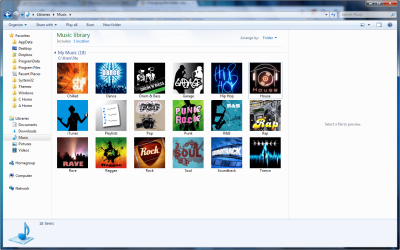
Hi Zivo, I have my Music folder set up like so, is this what you are looking for?

78.png

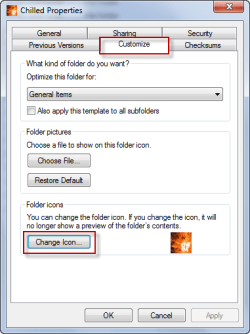
If so, navigate to the folders location on your hard drive, right click the folder and choose Properties > Customize > Change Icon.

hjhj.png

Choose your .ICO image and hit OK > OK
 

My Computer My Computer

At a glance

Windows 7 Ultimate x64AMD Turion(tm) 64 X2 Mobile Technology TL-563GB Nanya PC2-6400 DDR2-SDRAM SO-DIM (400MHz)NVIDIA GeForce Go 7600 256MB GDDR3 SDRAM
Computer Manufacturer/Model Number
HP Touchsmart IQ771.uk
OS
Windows 7 Ultimate x64
CPU
AMD Turion(tm) 64 X2 Mobile Technology TL-56
Motherboard
ASUS Pheonix
Memory
3GB Nanya PC2-6400 DDR2-SDRAM SO-DIM (400MHz)
Graphics Card(s)
NVIDIA GeForce Go 7600 256MB GDDR3 SDRAM
Sound Card
High Definition Intergrated NVIDIA MCP51
Monitor(s) Displays
46" Sony Bravia HDTV
Screen Resolution
1600x1200
Hard Drives
1.5TB Samsug
320GB Seagate ST3320820AS - SATA 3Gb/s 8MB
500GB Maxtor Basics STM305003EHD301-RK
Internet Speed
↓6.32 Mb/s ↑0.35 Mb/s ↔26ms
Other Info
BIOS - American Megatrends Inc. 5.07
Ethernet Port - NVIDIA nForce 10/100/1000 Mbps
DVD Drive - TSSTcorp DVDR/RW TS-T632L
Make a *ico from your cover whith IcoFX or Axialis IconWorkShop (256x256 px) and replace it in the properties.

For german User: deskmodder-Wiki
 

My Computer My Computer

At a glance

Win 7
OS
Win 7
hey thanks for the aswers

I knew the way of making icon from images and then go and change one by one
but i think its crazy to do this when you have more the 700 folders

i know that windows takes the thumbnail from a file called "folder.jpg" that is inside the folder and i make it hidden. i thougt maybe with registry editing i will be able to remvoe the folder that covers the thumbnail, same idea like removing the shortcut arrow form icon
 

My Computer My Computer

At a glance

Windows 7
OS
Windows 7
I don't think that's possible. Maybe with a 3rd party app.........
 

My Computer My Computer

At a glance

Windows 7 Ultimate x64AMD Turion(tm) 64 X2 Mobile Technology TL-563GB Nanya PC2-6400 DDR2-SDRAM SO-DIM (400MHz)NVIDIA GeForce Go 7600 256MB GDDR3 SDRAM
Computer Manufacturer/Model Number
HP Touchsmart IQ771.uk
OS
Windows 7 Ultimate x64
CPU
AMD Turion(tm) 64 X2 Mobile Technology TL-56
Motherboard
ASUS Pheonix
Memory
3GB Nanya PC2-6400 DDR2-SDRAM SO-DIM (400MHz)
Graphics Card(s)
NVIDIA GeForce Go 7600 256MB GDDR3 SDRAM
Sound Card
High Definition Intergrated NVIDIA MCP51
Monitor(s) Displays
46" Sony Bravia HDTV
Screen Resolution
1600x1200
Hard Drives
1.5TB Samsug
320GB Seagate ST3320820AS - SATA 3Gb/s 8MB
500GB Maxtor Basics STM305003EHD301-RK
Internet Speed
↓6.32 Mb/s ↑0.35 Mb/s ↔26ms
Other Info
BIOS - American Megatrends Inc. 5.07
Ethernet Port - NVIDIA nForce 10/100/1000 Mbps
DVD Drive - TSSTcorp DVDR/RW TS-T632L
boorkmarked...

i want my explorer also like this.
how to customize ?

33516d1256729744t-changing-folder-way-view-exemple-2.jpg
 
Last edited:

My Computer My Computer

At a glance

Windows 7
OS
Windows 7
Hey ghyphy

what you see in this picture is a Photoshop Manipulation i still dont know how to make my folder look like this
does any one have some news about my idea, i would like to hear them
 

My Computer My Computer

At a glance

Windows 7
OS
Windows 7
You can get that view you want BUT only through the Libary.

Added to fact since RTM (was ok on older builds) the option for "Album/Thumbnail Views" will not appear unless Indexing (Windows Search) is enabled and even then you need to index the Albums manually or wait till next Auto Run or they all appear inside 1 folder.

Bit of a joke if you ask me but many things in Windows 7 are a joke but some think its the "Holy Grail".


Last edited:

My Computer My Computer

At a glance

Vista (Hate Win 7)
OS
Vista (Hate Win 7)
sound nice i tried it but still to complicted and frustrating
i am a neat person i dont need windows to arrange my music i allready did it with a simple folder arrangment.

why cant i enjoy folder tumnbnail with just a simple command or whatever do it
that will take a jpg file that is in the folder and use it as a big nice icon instead of this stupid "image in folder" look

any 3rd party software that will do it will make me very happy
 

My Computer My Computer

At a glance

Windows 7
OS
Windows 7
You can do that freely above but as I said only in the Libary will it look like that, if you manually browse to your Music folder it will be open folders like your example.
 

My Computer My Computer

At a glance

Vista (Hate Win 7)
OS
Vista (Hate Win 7)
Back
Top