Chassis Fan Control

Un4GiVeN78

Banned
Local time
12:25 PM
Messages
55
Location
Cairo, Egypt
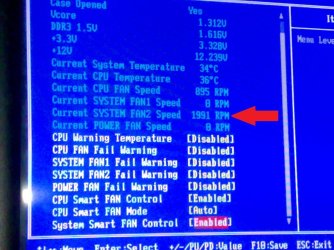
Hello, I bought a new rear case fan (CoolerMaster 120mm Blue Led), The problem that it is always running @ max RPM all the time, Can i control its speed? to make it 1000 RPM or less.. There's a screenshot of my BIOS (Gigabyte GA-MA770T-UD3P), Is there anyway to control this fan speed? Thank you in Advance.
 

Attachments
  • smartfancontrol.jpg
    smartfancontrol.jpg
    129 KB · Views: 127

My Computer

OS
MS Windows 7 Ultimate 64-bit
CPU
AMD Phenom II X4 Black Edition 955
Motherboard
Gigabyte GA-MA770T-UD3P
Memory
KingSton 8GB BUS1333 DDR3
Graphics Card(s)
SAPPHIRE HD 5850 1GB GDDR5 PCIE (Game Edition)
Sound Card
Realtek High Definition Audio
Monitor(s) Displays
DELL M993s Flat screen 19inch
Screen Resolution
1280x1024
Hard Drives
WD Caviar Green 1 TB, 5400 RPM, 64 MB Cache
PSU
Gamma-HEC 500 Watt
Case
Gamma
Cooling
Cooler Master hyper 212 plus
Keyboard
A4TECH
Mouse
A4TECH
Internet Speed
ADSL 2048 Kbps
Hi ... :)
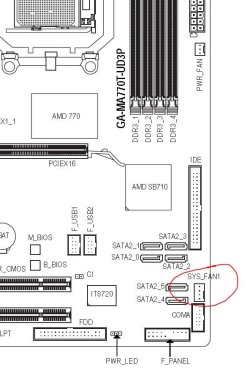
If you have knowledge of electronics - or know someone who has - you can make use of a resistor. Otherwise, you can use SpeedFan, but since the fan is connected to the motherboard. Remember to use 3 to 4 pin adapter and plug it in where shown below.
Hope it helps! ;)


Attachments

  • Capturar.JPG
    Capturar.JPG
    70.3 KB · Views: 281

My Computer

Computer Manufacturer/Model Number
WALLONN7 / LIN BLACK SERIES II
OS
Windows 7 Ultimate x64 SP1
CPU
AMD PHENOM II X6 1090T 3.2GHz
Motherboard
GIGABYTE GA-890FXA-UD7
Memory
8GB G.SKILL RIPJAWS - F3-10666CL7D
Graphics Card(s)
SAPPHIRE ATI RADEON HD 5870 VAPOR X OC
Sound Card
REALTEK DOLBY HOME THEATER
Monitor(s) Displays
LED LG W2486L
Screen Resolution
1080p
Hard Drives
SEAGATE 1TB -ST31000528AS - AHCI MODE - AS SATA
PSU
ZALMAN ZM1000-HP 1000W
Case
THERMALTAKE XASER VI VG4000SWA
Cooling
140MM x3 / 120MM x1 AIR COOLING - THERMALTAKE
Keyboard
MICROSOFT DIGITAL MEDIA KEYBOARD 3000 - USB
Mouse
MICROSOFT BASIC OPTICAL MOUSE 2.0 - USB
Internet Speed
600KBPS
Other Info
MICROSOFT XBOX 360 CONTROLLER
You could always manually drop your fans voltage to 7v or possibly even 5v. I'd expect in your case this would bugger up your LED display though.
Good article describing the methods at Hardware Secrets
 

My Computer

OS
windows 7 ultimate
Hello, I bought a new rear case fan (CoolerMaster 120mm Blue Led), The problem that it is always running @ max RPM all the time, Can i control its speed? to make it 1000 RPM or less.. There's a screenshot of my BIOS (Gigabyte GA-MA770T-UD3P), Is there anyway to control this fan speed? Thank you in Advance.

Is there any other option below System Smart Fan Control?
Or if it is set to manual, off Auto, does another option show underneath that control.

On my Asus board there is Enable/Disable for CPU and system fans. Set to disable ther is not other options displayed. If set to Enable another box appears that has other options.
Those options are Standard/Turbo/Silent.

Or on you board if you highlight that Auto setting and hit the enter key what other option are available.
 

My Computer

Computer Manufacturer/Model Number
Built be Me
OS
Windows 7 Pro x64
CPU
i5 760
Motherboard
Asus P7P55D-E Pro
Memory
16GB
Graphics Card(s)
Nvidia GTS450
Sound Card
On board
Monitor(s) Displays
Dell 2007WFP Dell 1800FP
Screen Resolution
1680x1050 1280x1024
Hard Drives
Seagate 250GB & 750GB
WD 1TB
PSU
Antec 750
Case
In Win
Cooling
Cooler Master Hyper 212+
Keyboard
IBM
Mouse
MS
Hi ... :)
If you have knowledge of electronics - or know someone who has - you can make use of a resistor. Otherwise, you can use SpeedFan, but since the fan is connected to the motherboard. Remember to use 3 to 4 pin adapter and plug it in where shown below.
Hope it helps! ;)


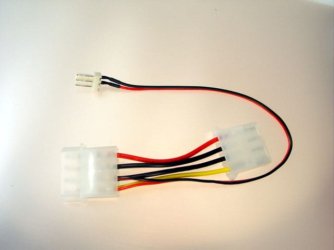
I'm afraid i don't have a very good knowledge of electronics so i got an adapter that came with the fan.. just like this pic
I'll try the SpeedFan software it may work.
Thank you
 

Attachments

  • 3-4 pin.jpg
    3-4 pin.jpg
    32 KB · Views: 69
Last edited:

My Computer

OS
MS Windows 7 Ultimate 64-bit
CPU
AMD Phenom II X4 Black Edition 955
Motherboard
Gigabyte GA-MA770T-UD3P
Memory
KingSton 8GB BUS1333 DDR3
Graphics Card(s)
SAPPHIRE HD 5850 1GB GDDR5 PCIE (Game Edition)
Sound Card
Realtek High Definition Audio
Monitor(s) Displays
DELL M993s Flat screen 19inch
Screen Resolution
1280x1024
Hard Drives
WD Caviar Green 1 TB, 5400 RPM, 64 MB Cache
PSU
Gamma-HEC 500 Watt
Case
Gamma
Cooling
Cooler Master hyper 212 plus
Keyboard
A4TECH
Mouse
A4TECH
Internet Speed
ADSL 2048 Kbps
You could always manually drop your fans voltage to 7v or possibly even 5v. I'd expect in your case this would bugger up your LED display though.
Good article describing the methods at Hardware Secrets

Thank you.
 

My Computer

OS
MS Windows 7 Ultimate 64-bit
CPU
AMD Phenom II X4 Black Edition 955
Motherboard
Gigabyte GA-MA770T-UD3P
Memory
KingSton 8GB BUS1333 DDR3
Graphics Card(s)
SAPPHIRE HD 5850 1GB GDDR5 PCIE (Game Edition)
Sound Card
Realtek High Definition Audio
Monitor(s) Displays
DELL M993s Flat screen 19inch
Screen Resolution
1280x1024
Hard Drives
WD Caviar Green 1 TB, 5400 RPM, 64 MB Cache
PSU
Gamma-HEC 500 Watt
Case
Gamma
Cooling
Cooler Master hyper 212 plus
Keyboard
A4TECH
Mouse
A4TECH
Internet Speed
ADSL 2048 Kbps
Is there any other option below System Smart Fan Control?
Or if it is set to manual, off Auto, does another option show underneath that control.

On my Asus board there is Enable/Disable for CPU and system fans. Set to disable ther is not other options displayed. If set to Enable another box appears that has other options.
Those options are Standard/Turbo/Silent.

Or on you board if you highlight that Auto setting and hit the enter key what other option are available.

There's no other options about Fans except the ones in the screenshot i sent, Nothing happens if i select " Disabled " or " Enabled " on System Smart Fan Control,
In fact i suspect having any fan control on my BIOS maybe by software or another way.
 

My Computer

OS
MS Windows 7 Ultimate 64-bit
CPU
AMD Phenom II X4 Black Edition 955
Motherboard
Gigabyte GA-MA770T-UD3P
Memory
KingSton 8GB BUS1333 DDR3
Graphics Card(s)
SAPPHIRE HD 5850 1GB GDDR5 PCIE (Game Edition)
Sound Card
Realtek High Definition Audio
Monitor(s) Displays
DELL M993s Flat screen 19inch
Screen Resolution
1280x1024
Hard Drives
WD Caviar Green 1 TB, 5400 RPM, 64 MB Cache
PSU
Gamma-HEC 500 Watt
Case
Gamma
Cooling
Cooler Master hyper 212 plus
Keyboard
A4TECH
Mouse
A4TECH
Internet Speed
ADSL 2048 Kbps
Hi ... :)
If you have knowledge of electronics - or know someone who has - you can make use of a resistor. Otherwise, you can use SpeedFan, but since the fan is connected to the motherboard. Remember to use 3 to 4 pin adapter and plug it in where shown below.
Hope it helps! ;)


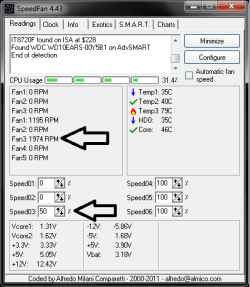
I tried to lower the percentage to 50% but it is not working and lower fan speed from the config. and still not working(look at the pic).
 

Attachments

  • Untitled.png
    Untitled.png
    10.1 KB · Views: 146
Last edited:

My Computer

OS
MS Windows 7 Ultimate 64-bit
CPU
AMD Phenom II X4 Black Edition 955
Motherboard
Gigabyte GA-MA770T-UD3P
Memory
KingSton 8GB BUS1333 DDR3
Graphics Card(s)
SAPPHIRE HD 5850 1GB GDDR5 PCIE (Game Edition)
Sound Card
Realtek High Definition Audio
Monitor(s) Displays
DELL M993s Flat screen 19inch
Screen Resolution
1280x1024
Hard Drives
WD Caviar Green 1 TB, 5400 RPM, 64 MB Cache
PSU
Gamma-HEC 500 Watt
Case
Gamma
Cooling
Cooler Master hyper 212 plus
Keyboard
A4TECH
Mouse
A4TECH
Internet Speed
ADSL 2048 Kbps

My Computer

Computer Manufacturer/Model Number
Built be Me
OS
Windows 7 Pro x64
CPU
i5 760
Motherboard
Asus P7P55D-E Pro
Memory
16GB
Graphics Card(s)
Nvidia GTS450
Sound Card
On board
Monitor(s) Displays
Dell 2007WFP Dell 1800FP
Screen Resolution
1680x1050 1280x1024
Hard Drives
Seagate 250GB & 750GB
WD 1TB
PSU
Antec 750
Case
In Win
Cooling
Cooler Master Hyper 212+
Keyboard
IBM
Mouse
MS

My Computer

OS
MS Windows 7 Ultimate 64-bit
CPU
AMD Phenom II X4 Black Edition 955
Motherboard
Gigabyte GA-MA770T-UD3P
Memory
KingSton 8GB BUS1333 DDR3
Graphics Card(s)
SAPPHIRE HD 5850 1GB GDDR5 PCIE (Game Edition)
Sound Card
Realtek High Definition Audio
Monitor(s) Displays
DELL M993s Flat screen 19inch
Screen Resolution
1280x1024
Hard Drives
WD Caviar Green 1 TB, 5400 RPM, 64 MB Cache
PSU
Gamma-HEC 500 Watt
Case
Gamma
Cooling
Cooler Master hyper 212 plus
Keyboard
A4TECH
Mouse
A4TECH
Internet Speed
ADSL 2048 Kbps
Hi ... :)
If you have knowledge of electronics - or know someone who has - you can make use of a resistor. Otherwise, you can use SpeedFan, but since the fan is connected to the motherboard. Remember to use 3 to 4 pin adapter and plug it in where shown below.
Hope it helps! ;)


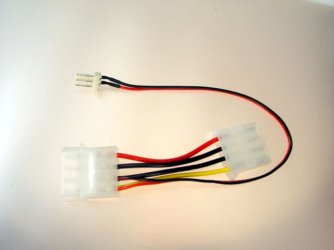
Bytheway, The fan comes with an adapter with 2 wires red and black just like the one in the picture, Does it work?
 

Attachments

  • 3-4 pin.jpg
    3-4 pin.jpg
    32 KB · Views: 6

My Computer

OS
MS Windows 7 Ultimate 64-bit
CPU
AMD Phenom II X4 Black Edition 955
Motherboard
Gigabyte GA-MA770T-UD3P
Memory
KingSton 8GB BUS1333 DDR3
Graphics Card(s)
SAPPHIRE HD 5850 1GB GDDR5 PCIE (Game Edition)
Sound Card
Realtek High Definition Audio
Monitor(s) Displays
DELL M993s Flat screen 19inch
Screen Resolution
1280x1024
Hard Drives
WD Caviar Green 1 TB, 5400 RPM, 64 MB Cache
PSU
Gamma-HEC 500 Watt
Case
Gamma
Cooling
Cooler Master hyper 212 plus
Keyboard
A4TECH
Mouse
A4TECH
Internet Speed
ADSL 2048 Kbps
That adapter is for connecting the fan directly to the power supply using a spare molex connector instead of connecting it directly to the motherboard.

A fan controller like Shootist linked to will work. Another option would be to return the fan you bought for one that is PWM capable; uses a 4 pin connector on the motherboard instead of a 3 pin like the one you have, and can be controller by the bios (yes I checked your motherboard manual and there is one 4 pin/PWM connector in addition to the one for the CPU fan; as well 2 3 pin headers, one of which you are using with the new fan).
 

My Computer

Computer type
PC/Desktop
Computer Manufacturer/Model Number
Me
OS
Win 7 Ultimate x64
CPU
FX-8350 @ 4.6 GHz so far
Motherboard
Asus M5A97 EVO
Memory
ADATA XPG V1 Series Black 8GB DDR3 1600
Graphics Card(s)
Sapphire R9 270x Dual-X
Sound Card
Xonar DGX w/ Corsair Vengence 1300
Monitor(s) Displays
Acer S232HL Abid
Screen Resolution
1920x1080
Hard Drives
120 GB OCZ Vertex 3
500 GB Seagate 7200.12
PSU
Antec Earthwatts 650W Green
Case
Antec Three Hundred
Cooling
Cooler Master 212 EVO
Keyboard
Logitech G510
Mouse
Logitech G500s
Internet Speed
35000/3000
That adapter is for connecting the fan directly to the power supply using a spare molex connector instead of connecting it directly to the motherboard.

A fan controller like Shootist linked to will work. Another option would be to return the fan you bought for one that is PWM capable; uses a 4 pin connector on the motherboard instead of a 3 pin like the one you have, and can be controller by the bios (yes I checked your motherboard manual and there is one 4 pin/PWM connector in addition to the one for the CPU fan; as well 2 3 pin headers, one of which you are using with the new fan).

Sry I'm afraid i need more explanation, May you tell me if i get that "3 to 4 pin adapter" and mount it to the 4 pin place in my motherboard will let me control the fan speed? it would be great if you send me a picture for it, If not possible to control my FAN by using that adapter, I can buy another PWM FAN with 4 pin wire like you suggested. Hope u understand my bad English.(would be good if you use simple words to let me understand ur meaning).
Thank you
 

My Computer

OS
MS Windows 7 Ultimate 64-bit
CPU
AMD Phenom II X4 Black Edition 955
Motherboard
Gigabyte GA-MA770T-UD3P
Memory
KingSton 8GB BUS1333 DDR3
Graphics Card(s)
SAPPHIRE HD 5850 1GB GDDR5 PCIE (Game Edition)
Sound Card
Realtek High Definition Audio
Monitor(s) Displays
DELL M993s Flat screen 19inch
Screen Resolution
1280x1024
Hard Drives
WD Caviar Green 1 TB, 5400 RPM, 64 MB Cache
PSU
Gamma-HEC 500 Watt
Case
Gamma
Cooling
Cooler Master hyper 212 plus
Keyboard
A4TECH
Mouse
A4TECH
Internet Speed
ADSL 2048 Kbps
Sry I'm afraid i need more explanation, May you tell me if i get that "3 to 4 pin adapter" and mount it to the 4 pin place in my motherboard will let me control the fan speed? it would be great if you send me a picture for it, If not possible to control my FAN by using that adapter, I can buy another PWM FAN with 4 pin wire like you suggested. Hope u understand my bad English.(would be good if you use simple words to let me understand ur meaning).
Thank you

It seems your motherboard only has some rudimentary fan controls in the BIOS. But you do have 2 4 pin fan connectors. one 4 pin for the CPU fan and the other 4 pin can also be used for a second CPU fan, a push pull arrangement on certain types of heatsinks.

But you can still connect a 3 pin fan to that 4 pin connector.

The adapter shown in the other post allows you to connect a fan that would normally connect to one of the motherboards fan connector, 3 or 4 pin, to a standard power supply 4 pin molex connector.
No it does not give you speed control without using a separate speed controller like I linked to in my other post.
 

My Computer

Computer Manufacturer/Model Number
Built be Me
OS
Windows 7 Pro x64
CPU
i5 760
Motherboard
Asus P7P55D-E Pro
Memory
16GB
Graphics Card(s)
Nvidia GTS450
Sound Card
On board
Monitor(s) Displays
Dell 2007WFP Dell 1800FP
Screen Resolution
1680x1050 1280x1024
Hard Drives
Seagate 250GB & 750GB
WD 1TB
PSU
Antec 750
Case
In Win
Cooling
Cooler Master Hyper 212+
Keyboard
IBM
Mouse
MS
A 3 pin to 4 pin adapter won't allow for fan speed control for one very simple reason, there is no 4th wire from the fan itself which is what is needed for that to happen.
 

My Computer

Computer type
PC/Desktop
Computer Manufacturer/Model Number
Me
OS
Win 7 Ultimate x64
CPU
FX-8350 @ 4.6 GHz so far
Motherboard
Asus M5A97 EVO
Memory
ADATA XPG V1 Series Black 8GB DDR3 1600
Graphics Card(s)
Sapphire R9 270x Dual-X
Sound Card
Xonar DGX w/ Corsair Vengence 1300
Monitor(s) Displays
Acer S232HL Abid
Screen Resolution
1920x1080
Hard Drives
120 GB OCZ Vertex 3
500 GB Seagate 7200.12
PSU
Antec Earthwatts 650W Green
Case
Antec Three Hundred
Cooling
Cooler Master 212 EVO
Keyboard
Logitech G510
Mouse
Logitech G500s
Internet Speed
35000/3000
It seems your motherboard only has some rudimentary fan controls in the BIOS. But you do have 2 4 pin fan connectors. one 4 pin for the CPU fan and the other 4 pin can also be used for a second CPU fan, a push pull arrangement on certain types of heatsinks.

But you can still connect a 3 pin fan to that 4 pin connector.

The adapter shown in the other post allows you to connect a fan that would normally connect to one of the motherboards fan connector, 3 or 4 pin, to a standard power supply 4 pin molex connector.
No it does not give you speed control without using a separate speed controller like I linked to in my other post.

I understand, I have CM Hyper 212 plus HS and i use only 1 push FAN and only 1 4 pin connector and the other 4 pic connector is not used.
I'll buy a separate speed controller like u linked before or i think it will be more better to buy PWM fan and throw this CM Blue LED noisy fan in trash, I think PWM is close price to separate fan controller.
Thank you.
 

My Computer

OS
MS Windows 7 Ultimate 64-bit
CPU
AMD Phenom II X4 Black Edition 955
Motherboard
Gigabyte GA-MA770T-UD3P
Memory
KingSton 8GB BUS1333 DDR3
Graphics Card(s)
SAPPHIRE HD 5850 1GB GDDR5 PCIE (Game Edition)
Sound Card
Realtek High Definition Audio
Monitor(s) Displays
DELL M993s Flat screen 19inch
Screen Resolution
1280x1024
Hard Drives
WD Caviar Green 1 TB, 5400 RPM, 64 MB Cache
PSU
Gamma-HEC 500 Watt
Case
Gamma
Cooling
Cooler Master hyper 212 plus
Keyboard
A4TECH
Mouse
A4TECH
Internet Speed
ADSL 2048 Kbps
A 3 pin to 4 pin adapter won't allow for fan speed control for one very simple reason, there is no 4th wire from the fan itself which is what is needed for that to happen.

Ohh, u mean the fan itself has only 3 wires and there's no 4th wire that is responsible for fan speed control so whatever adapter i use will not work.

Thank you for your explanation.
 

My Computer

OS
MS Windows 7 Ultimate 64-bit
CPU
AMD Phenom II X4 Black Edition 955
Motherboard
Gigabyte GA-MA770T-UD3P
Memory
KingSton 8GB BUS1333 DDR3
Graphics Card(s)
SAPPHIRE HD 5850 1GB GDDR5 PCIE (Game Edition)
Sound Card
Realtek High Definition Audio
Monitor(s) Displays
DELL M993s Flat screen 19inch
Screen Resolution
1280x1024
Hard Drives
WD Caviar Green 1 TB, 5400 RPM, 64 MB Cache
PSU
Gamma-HEC 500 Watt
Case
Gamma
Cooling
Cooler Master hyper 212 plus
Keyboard
A4TECH
Mouse
A4TECH
Internet Speed
ADSL 2048 Kbps
Thank you very much guys <333 i luv u all
 

My Computer

OS
MS Windows 7 Ultimate 64-bit
CPU
AMD Phenom II X4 Black Edition 955
Motherboard
Gigabyte GA-MA770T-UD3P
Memory
KingSton 8GB BUS1333 DDR3
Graphics Card(s)
SAPPHIRE HD 5850 1GB GDDR5 PCIE (Game Edition)
Sound Card
Realtek High Definition Audio
Monitor(s) Displays
DELL M993s Flat screen 19inch
Screen Resolution
1280x1024
Hard Drives
WD Caviar Green 1 TB, 5400 RPM, 64 MB Cache
PSU
Gamma-HEC 500 Watt
Case
Gamma
Cooling
Cooler Master hyper 212 plus
Keyboard
A4TECH
Mouse
A4TECH
Internet Speed
ADSL 2048 Kbps
A 3 pin to 4 pin adapter won't allow for fan speed control for one very simple reason, there is no 4th wire from the fan itself which is what is needed for that to happen.

Not really. I have 3 120mm 3 pin case fan and 1 120mm CPU fan in my system. 2 of them connect to 3 pin headers. The other one connects to the secondary 4 pin header, CPU fan to the CPU header. All of them, including the CPU fan which is 4 pin, are controlled by the BIOS settings and set to Silent which makes them run at around 800RPM, including the CPU fan. If the system starts to get hot the BIOS raises there speed accordingly. CPU first as that is what gets the hottest.

The BIOS lowers or raises the voltage supplied to the fans to increase or decrease there speed.
 

My Computer

Computer Manufacturer/Model Number
Built be Me
OS
Windows 7 Pro x64
CPU
i5 760
Motherboard
Asus P7P55D-E Pro
Memory
16GB
Graphics Card(s)
Nvidia GTS450
Sound Card
On board
Monitor(s) Displays
Dell 2007WFP Dell 1800FP
Screen Resolution
1680x1050 1280x1024
Hard Drives
Seagate 250GB & 750GB
WD 1TB
PSU
Antec 750
Case
In Win
Cooling
Cooler Master Hyper 212+
Keyboard
IBM
Mouse
MS
Hi Un4GiVeN78 :)

To make Speedfan work you need to put a tick in Automatic Fan Speed honey

Untitled-1.png
 

My Computer

Computer Manufacturer/Model Number
Home Built
OS
Windows 7 Professional 64-bit SP1
CPU
Intel E8400
Motherboard
MSI P35 Neo
Memory
4GB Crucial Ballistix
Graphics Card(s)
ATI ASUS Radeon HD 4830
Sound Card
Realtek ALC888 on Board
Monitor(s) Displays
Asus 22-inch VH226H Widescreen
Screen Resolution
1920 x 1080
Hard Drives
Two Western Digital 500GB
PSU
Hiper HPU-4M 530W
Case
Thermaltake Tsunami Dream Black
Cooling
Air/Fans
Keyboard
Saitek Eclipse
Mouse
Razer
Internet Speed
Sky Broadband
Other Info
USB Hub/Card Reader - 2 Pen Drives, 1 Phone Dock
Back
Top