Solved Checking for CD ripping errors?

cake247

New member
Local time
4:24 AM
Messages
8
Can someone help me with this problem? I ripped a whole bunch of CDs using Itunes and just noticed that some of the resulting MP3s were only partially copied or skip during playback. Is there some utility that will allow me to easily compare the track information from all the albums in my Itunes library to the original CDs (or some online database) so I can see which tracks are different lengths or missing entirely? At this point, all I can do is insert the CDs and then look at the album folders and compare them myself, but that's way too time consuming. I was just hoping there was either a function in Itunes that will do this or some other program I can use. One thing also is that I've noticed that a lot of the tracks differ by just 1 second which I think is normal and not a problem. But others are different by 10 seconds or more because there was some kind of error with the disc. Those are the problems I'm concerned about.

I'm also looking for some Itunes function or other program that can check to see if the MP3s will skip during playback instead of having to listen to each individual track all the way through which would take forever. I didn't use "error correction" when ripping the CDs and I don't wanna have to do them all over again using it (which apparently makes ripping take longer as well). Any ideas on how to deal with this? Thanks.
 

My Computer

Computer type
Laptop
Computer Manufacturer/Model Number
Dell
OS
Windows 7 Home Premium 32-bit
Hello and welcome cake mate just what program are you using to rip and burn the CD's? and please put some specs in your profile - it is very hard to help not knowing what we are working with
System Info - See Your System Specs

Now I am assuming you are keeping the iTune albums / tracks in the Music folder??
 

My Computer

Computer type
PC/Desktop
Computer Manufacturer/Model Number
Own build (new) Desk1 / Asus ROG Win 7 / Desk2 1st build
OS
Desk1 7 Home Prem / Desk2 10 Pro / Main lap Asus ROG 10 Pro 2 laptop Toshiba 7 Pro Asus P2520 7 & 10
CPU
Desk1 i5 3750K / Laptop i7 GTX 860M / Desk2 i5 2500
Motherboard
Desk1 Asus P877-V / Desk2 Gigabyte H67 UD3H / Laptop ?
Memory
Desk1 8GB (1866) / Desk2 16GB (1333) / Laptop 8Gb DDR3
Graphics Card(s)
Desk 1& 2NVidia GTX 650 & Laptops on board Intel
Sound Card
Desk 1 & 2 -XONAR DG Realtek High Def audio Laptop
Monitor(s) Displays
Desk 1 Benq HD 2450 / Desk2 Philips 24" / Laptop 17.5"
Screen Resolution
1920x1080 D1 & D2 & Laptop 1
Hard Drives
Desk1 Samsung 120GB 830 SSD
Asus ROG 256GB 850 Pro SSD
Desk2 Samsung 840 256 SSD
Toshiba 120GB EVO
PSU
Desk 1 Corsair HX 1050/ Laptop ? / Desk 2 Corsair HX 650
Case
Desk 1 Cooler HAF XM ? Toshiba laptop / Desk2 Coolermaster
Cooling
Fans on all Desk1 -2 Desk2 - all Coolermasters 5 Laptop ?
Keyboard
Desk 1 MS Sidewinder X6 Desk 2 MS Sidewinder X 4
Mouse
Desk 1&2 - Gigabyte MS 900 gamer - laptop - Logitec wireless
Internet Speed
ADSL2+
Other Info
One other Desktop (tester) and spare Toshba laptop both with SSD's
Running Kaspersky 2016 ISS on all machines config'd identically
Logitec audio stereo systems on each machine (x3)
Canon MG5250MFC
Router/modem TP-Link running WPA2SK
  • I used the latest version of Itunes to rip the CDs. Yes, the tracks are in the Itunes Music folder in My Music folder. I'm just looking for a Windows 7 program that will compare the ripped tracks to the original CDs to make sure none of the tracks are missing or incomplete. Does such a program exist? It would also be good if it could somehow check for skipping. I've been told the program Exact Audio Copy will give information about errors when you rip the CDs but that won't help me for CDs I've already ripped. I really don't want to have to do them all over again. System info:


  • Computer typeLaptopComputer Manufacturer/Model NumberDellOSWindows 7 Home Premium 32-bit
 

My Computer

Computer type
Laptop
Computer Manufacturer/Model Number
Dell
OS
Windows 7 Home Premium 32-bit
Now cake mate the specs would be good for your machine please as per my previous reply.

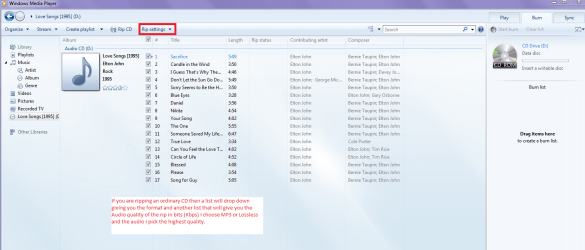
Now if you are going to rip a CD for example find out what format you want to rip it with are in for example MP3 or whatever you also have a choice as to the audio quality - see pic and then rip.
A tip when you insert the CD it will want to start playing it straight away - be ready and pause it to be able to choose what formats etc you want before hitting rip

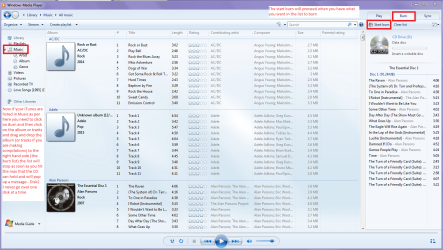
Burning with the Windows Media Player - if the iTunes are in the Music library then it is a simple matter of clicking Burn then clicking on an album (or tracks if you are making a compilation) and dragging and dropping it into the right hand side area for burning. I do not have iTunes so I have never tried but if they are in the library then there should be no problems in burning the music.

Edit I ma not sure how you check for the skipping with this though.


See pics
 

Attachments

  • WMP.PNG
    WMP.PNG
    142.7 KB · Views: 2
  • WMP 2.PNG
    WMP 2.PNG
    191.1 KB · Views: 1

My Computer

Computer type
PC/Desktop
Computer Manufacturer/Model Number
Own build (new) Desk1 / Asus ROG Win 7 / Desk2 1st build
OS
Desk1 7 Home Prem / Desk2 10 Pro / Main lap Asus ROG 10 Pro 2 laptop Toshiba 7 Pro Asus P2520 7 & 10
CPU
Desk1 i5 3750K / Laptop i7 GTX 860M / Desk2 i5 2500
Motherboard
Desk1 Asus P877-V / Desk2 Gigabyte H67 UD3H / Laptop ?
Memory
Desk1 8GB (1866) / Desk2 16GB (1333) / Laptop 8Gb DDR3
Graphics Card(s)
Desk 1& 2NVidia GTX 650 & Laptops on board Intel
Sound Card
Desk 1 & 2 -XONAR DG Realtek High Def audio Laptop
Monitor(s) Displays
Desk 1 Benq HD 2450 / Desk2 Philips 24" / Laptop 17.5"
Screen Resolution
1920x1080 D1 & D2 & Laptop 1
Hard Drives
Desk1 Samsung 120GB 830 SSD
Asus ROG 256GB 850 Pro SSD
Desk2 Samsung 840 256 SSD
Toshiba 120GB EVO
PSU
Desk 1 Corsair HX 1050/ Laptop ? / Desk 2 Corsair HX 650
Case
Desk 1 Cooler HAF XM ? Toshiba laptop / Desk2 Coolermaster
Cooling
Fans on all Desk1 -2 Desk2 - all Coolermasters 5 Laptop ?
Keyboard
Desk 1 MS Sidewinder X6 Desk 2 MS Sidewinder X 4
Mouse
Desk 1&2 - Gigabyte MS 900 gamer - laptop - Logitec wireless
Internet Speed
ADSL2+
Other Info
One other Desktop (tester) and spare Toshba laptop both with SSD's
Running Kaspersky 2016 ISS on all machines config'd identically
Logitec audio stereo systems on each machine (x3)
Canon MG5250MFC
Router/modem TP-Link running WPA2SK
Thanks for the help. I did eventually find a solution to this (sort of) using the program PerfectTunes. What I'm doing now is just doing a quick comparison of the track lengths between the MP3s and the original CD right after I rip them.
 

My Computer

Computer type
Laptop
Computer Manufacturer/Model Number
Dell
OS
Windows 7 Home Premium 32-bit
Ok mate now just for the record the WMP rip settings have a bit option too and I find it can if you choose the best quality make the album for example too long to burn. I don't know the program you are using but I would be checking out stuff like that.

It may even be worth a Google to find out what formats of different types of software make to the length of the tracks that you are going to burn if that is what you do. I might even try that myself because it is annoying to rip say an album in a certain format and bit rate only to find the album will not fit into the burn window. I burn my original albums only because the original can get wrecked - in my car at least LOL!!;)
 

My Computer

Computer type
PC/Desktop
Computer Manufacturer/Model Number
Own build (new) Desk1 / Asus ROG Win 7 / Desk2 1st build
OS
Desk1 7 Home Prem / Desk2 10 Pro / Main lap Asus ROG 10 Pro 2 laptop Toshiba 7 Pro Asus P2520 7 & 10
CPU
Desk1 i5 3750K / Laptop i7 GTX 860M / Desk2 i5 2500
Motherboard
Desk1 Asus P877-V / Desk2 Gigabyte H67 UD3H / Laptop ?
Memory
Desk1 8GB (1866) / Desk2 16GB (1333) / Laptop 8Gb DDR3
Graphics Card(s)
Desk 1& 2NVidia GTX 650 & Laptops on board Intel
Sound Card
Desk 1 & 2 -XONAR DG Realtek High Def audio Laptop
Monitor(s) Displays
Desk 1 Benq HD 2450 / Desk2 Philips 24" / Laptop 17.5"
Screen Resolution
1920x1080 D1 & D2 & Laptop 1
Hard Drives
Desk1 Samsung 120GB 830 SSD
Asus ROG 256GB 850 Pro SSD
Desk2 Samsung 840 256 SSD
Toshiba 120GB EVO
PSU
Desk 1 Corsair HX 1050/ Laptop ? / Desk 2 Corsair HX 650
Case
Desk 1 Cooler HAF XM ? Toshiba laptop / Desk2 Coolermaster
Cooling
Fans on all Desk1 -2 Desk2 - all Coolermasters 5 Laptop ?
Keyboard
Desk 1 MS Sidewinder X6 Desk 2 MS Sidewinder X 4
Mouse
Desk 1&2 - Gigabyte MS 900 gamer - laptop - Logitec wireless
Internet Speed
ADSL2+
Other Info
One other Desktop (tester) and spare Toshba laptop both with SSD's
Running Kaspersky 2016 ISS on all machines config'd identically
Logitec audio stereo systems on each machine (x3)
Canon MG5250MFC
Router/modem TP-Link running WPA2SK
Back
Top