Solved Windows Update appears to have stopped checking for updates

Gwaihir

Member
Member
VIP
Local time
3:48 PM
Messages
135
Hi,

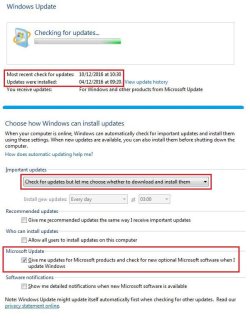
Must admit to feeling a bit embarrassed about this. I just realised that I hadn't received any notifications about updates recently and, on checking, I find the last check was done in December 2016 :o

As you can see from the attached screenshots I have Windows Update configured to notify me of updates relating to Microsoft products but, as I say, it seems to have stopped checking.

Needless to say when I manually set it checking it never completes . . . . . . .

Also, for the last several months I have had to resort to downloading and installing MSE and Defender updates manually every week as that doesn't seem to be able to do it either even though MSE is configured to automatically update every Sunday.
 

Attachments

  • Wupdate.jpg
    Wupdate.jpg
    62 KB · Views: 1

My Computer My Computer

Computer type
PC/Desktop
Computer Manufacturer/Model Number
Home build
OS
Windows 7 Professional 64-bit SP1
CPU
Pentium Core i5-2500 3.3GHz
Motherboard
Gigabyte P61-USB3-B3
Memory
2 x 4GB DDR3 1333MHz
Graphics Card(s)
Asus GT440 1GB GDDR5
Sound Card
Realtek integrated sound
Monitor(s) Displays
LG L1942PE
Screen Resolution
1280 x 1024 @ 60Hz
Hard Drives
2 x 1TB Western Digital WD10EARS, 1 x 1TB Seagate ST1000DM010
PSU
EVGA 450BR
Case
Novatech Panther ATX
Cooling
Sharkoon Silent Eagle 1000 120mm in case rear extracting
Keyboard
Logitech K120
windows update

Hello Gwaihir, Since I have learned from 7 forums. Delete the contents from Software Distribution Folder.
Set Windows Update to never check for updates. Type in search box services.msc and scroll down to Windows Update, and right click stop the service. I have also run command prompt as an administrator
and typed in net stop wuauserv. Restart the pc, Run command prompt again net start wuauserv, change
the settings back in Windows Update to check for updates, and see if it works.:D
 

My Computer My Computer

Computer type
PC/Desktop
Computer Manufacturer/Model Number
ASUS A85XM-A custom build
OS
Windows 10 Pro 64 bit
CPU
AMD A4-5300 APU with Radeon(tm) HD Graphics
Motherboard
ASUSTeK COMPUTER INC. A85XM-A
Memory
8.00 GB
Graphics Card(s)
AMD Radeon HD 7480D
Sound Card
(1) High Definition Audio Device (2) Realtek High Definiti
Monitor(s) Displays
HP W2072a 20 inch Led Backlit Monitor
Screen Resolution
1600 x 900 x 32 bits (4294967296 colors) @ 60 Hz
Hard Drives
TOSHIBA DT01ACA100 SATA Disk Device
Keyboard
Acer
Mouse
Acer
Internet Speed
varies
Antivirus
Windows Defender Antivirus
Browser
Waterfox, Edge
I can't seem to find a Software Distribution Folder. Any pointers to it's location would be gratefully received.

In January of this year I installed Windows6.1-KB3020369-x64, Windows6.1-KB3172605-x64 and windows-kb890830-v2.6 to overcome the problem of WU never finishing the search for updates. That cured the problem at that time but it seems that WU hasn't checked for any updates since so I wonder if that is significant.

Do I need to download any more KB files? I have had a quick look through the various threads on update problems but it's all very confusing.
 

My Computer My Computer

Computer type
PC/Desktop
Computer Manufacturer/Model Number
Home build
OS
Windows 7 Professional 64-bit SP1
CPU
Pentium Core i5-2500 3.3GHz
Motherboard
Gigabyte P61-USB3-B3
Memory
2 x 4GB DDR3 1333MHz
Graphics Card(s)
Asus GT440 1GB GDDR5
Sound Card
Realtek integrated sound
Monitor(s) Displays
LG L1942PE
Screen Resolution
1280 x 1024 @ 60Hz
Hard Drives
2 x 1TB Western Digital WD10EARS, 1 x 1TB Seagate ST1000DM010
PSU
EVGA 450BR
Case
Novatech Panther ATX
Cooling
Sharkoon Silent Eagle 1000 120mm in case rear extracting
Keyboard
Logitech K120
windows update

Hello Gwaihir, To locate the Software Distribution File

click on the start orb

click on computer - listed to the right

click on local disk C

scroll down to windows file and open, and scroll down to Software Distribution File.:D
 

My Computer My Computer

Computer type
PC/Desktop
Computer Manufacturer/Model Number
ASUS A85XM-A custom build
OS
Windows 10 Pro 64 bit
CPU
AMD A4-5300 APU with Radeon(tm) HD Graphics
Motherboard
ASUSTeK COMPUTER INC. A85XM-A
Memory
8.00 GB
Graphics Card(s)
AMD Radeon HD 7480D
Sound Card
(1) High Definition Audio Device (2) Realtek High Definiti
Monitor(s) Displays
HP W2072a 20 inch Led Backlit Monitor
Screen Resolution
1600 x 900 x 32 bits (4294967296 colors) @ 60 Hz
Hard Drives
TOSHIBA DT01ACA100 SATA Disk Device
Keyboard
Acer
Mouse
Acer
Internet Speed
varies
Antivirus
Windows Defender Antivirus
Browser
Waterfox, Edge
Ok, thanks, I've found it now. I won't be doing anything with it for the time being, though, as I first need to resolve the failure to complete the search for updates.

I thought the three files I'd installed previously were supposed to update Windows Update itself. My understanding was that it was failing to find updates because it was ploughing through all the updates on Microsoft's servers and the purpose of the update was to cause it to only search for the latest ones. Sorry if that's a bit over-simplified but I'm only a simple person and can't get my head around the complexities of this problem. Anyway, as I said, it seemed to work at the time but now it's back to constantly searching.

I tried looking on the Microsoft support pages and found a wizard named WindowsUpdate.diagcab that was supposed to diagnose and fix faults with Windows Update. It did report finding some issues and fixed them but it hasn't cured the problem.

To be honest I'm rapidly losing the will to live with Microsoft.
 

My Computer My Computer

Computer type
PC/Desktop
Computer Manufacturer/Model Number
Home build
OS
Windows 7 Professional 64-bit SP1
CPU
Pentium Core i5-2500 3.3GHz
Motherboard
Gigabyte P61-USB3-B3
Memory
2 x 4GB DDR3 1333MHz
Graphics Card(s)
Asus GT440 1GB GDDR5
Sound Card
Realtek integrated sound
Monitor(s) Displays
LG L1942PE
Screen Resolution
1280 x 1024 @ 60Hz
Hard Drives
2 x 1TB Western Digital WD10EARS, 1 x 1TB Seagate ST1000DM010
PSU
EVGA 450BR
Case
Novatech Panther ATX
Cooling
Sharkoon Silent Eagle 1000 120mm in case rear extracting
Keyboard
Logitech K120
windows update

Hello Gwaihir, Have you tried to download the December Quality Monthly Roll Up from Microsoft Catalog

December kb3207752 windows 7 x 64 bit If you have it installed, you could download

January kb3212646 windows 7 x 64 bit

I am not an expert, it is just something else to try.:D
 

My Computer My Computer

Computer type
PC/Desktop
Computer Manufacturer/Model Number
ASUS A85XM-A custom build
OS
Windows 10 Pro 64 bit
CPU
AMD A4-5300 APU with Radeon(tm) HD Graphics
Motherboard
ASUSTeK COMPUTER INC. A85XM-A
Memory
8.00 GB
Graphics Card(s)
AMD Radeon HD 7480D
Sound Card
(1) High Definition Audio Device (2) Realtek High Definiti
Monitor(s) Displays
HP W2072a 20 inch Led Backlit Monitor
Screen Resolution
1600 x 900 x 32 bits (4294967296 colors) @ 60 Hz
Hard Drives
TOSHIBA DT01ACA100 SATA Disk Device
Keyboard
Acer
Mouse
Acer
Internet Speed
varies
Antivirus
Windows Defender Antivirus
Browser
Waterfox, Edge
Hi ethel,

Thanks for trying to help. I'm not an expert either, just an ordinary user trying to pick my way through the minefield that Microsoft has created :)

I took a look at the list of installed updates and it shows that the last successful update of anything other than MSE definitions was, in fact, November 2016, so I downloaded the December kb3207752 rollup and tried to install it. 40 minutes later it was still reporting "Searching for updates on this computer...."

To my untutored eye it looks as if there's something very amiss with my system because I'm having similar problems with MSE. If I click to manually update the definitions the progress bar gets to about 30% then hangs indefinitely. What is more, if I click the Cancel button it has no effect, MSE continues trying to search. The same thing happens with Windows Update, it ignores the Cancel button and so did the kb3207752 rollup installer.

I seem to be at a bit of a dead end at the moment. Something seems to have screwed up in my system but I've no idea what or how to go about finding it. Hopefully one of the true experts on here will chime in with some thoughts eventually.

Thanks again for your input.

Edit: I've since run System File Checker which didn't find anything and, after downloading and installing the latest MSE definitions (thankfully that does still work) I set MSE to do a full scan which also didn't find anything. I've also downloaded and run the most recent version of the Malicious Software Removal Tool set to do a full scan. That didn't find anything either so I'm pretty confident that there's nothing obviously wrong with my system and no infections.

Ideas, anyone?
 
Last edited:

My Computer My Computer

Computer type
PC/Desktop
Computer Manufacturer/Model Number
Home build
OS
Windows 7 Professional 64-bit SP1
CPU
Pentium Core i5-2500 3.3GHz
Motherboard
Gigabyte P61-USB3-B3
Memory
2 x 4GB DDR3 1333MHz
Graphics Card(s)
Asus GT440 1GB GDDR5
Sound Card
Realtek integrated sound
Monitor(s) Displays
LG L1942PE
Screen Resolution
1280 x 1024 @ 60Hz
Hard Drives
2 x 1TB Western Digital WD10EARS, 1 x 1TB Seagate ST1000DM010
PSU
EVGA 450BR
Case
Novatech Panther ATX
Cooling
Sharkoon Silent Eagle 1000 120mm in case rear extracting
Keyboard
Logitech K120
windows update

Windows Update - Reset Gwaihir, Another thing you can try is the Windows Update Reset from the tutorial here.
 

My Computer My Computer

Computer type
PC/Desktop
Computer Manufacturer/Model Number
ASUS A85XM-A custom build
OS
Windows 10 Pro 64 bit
CPU
AMD A4-5300 APU with Radeon(tm) HD Graphics
Motherboard
ASUSTeK COMPUTER INC. A85XM-A
Memory
8.00 GB
Graphics Card(s)
AMD Radeon HD 7480D
Sound Card
(1) High Definition Audio Device (2) Realtek High Definiti
Monitor(s) Displays
HP W2072a 20 inch Led Backlit Monitor
Screen Resolution
1600 x 900 x 32 bits (4294967296 colors) @ 60 Hz
Hard Drives
TOSHIBA DT01ACA100 SATA Disk Device
Keyboard
Acer
Mouse
Acer
Internet Speed
varies
Antivirus
Windows Defender Antivirus
Browser
Waterfox, Edge
Unfortunately that doesn't seem to have helped either.

Looking at the contents of the batch file I notice the last thing it does is clear the BITS queue which, according to the Microsoft support page, is only to be used for Vista. Hope this hasn't screwed anything up.
 

My Computer My Computer

Computer type
PC/Desktop
Computer Manufacturer/Model Number
Home build
OS
Windows 7 Professional 64-bit SP1
CPU
Pentium Core i5-2500 3.3GHz
Motherboard
Gigabyte P61-USB3-B3
Memory
2 x 4GB DDR3 1333MHz
Graphics Card(s)
Asus GT440 1GB GDDR5
Sound Card
Realtek integrated sound
Monitor(s) Displays
LG L1942PE
Screen Resolution
1280 x 1024 @ 60Hz
Hard Drives
2 x 1TB Western Digital WD10EARS, 1 x 1TB Seagate ST1000DM010
PSU
EVGA 450BR
Case
Novatech Panther ATX
Cooling
Sharkoon Silent Eagle 1000 120mm in case rear extracting
Keyboard
Logitech K120
windows update

Hello Gwaihir, I am sorry I have not been able to help you more. Windows Update-Reset is not just for Vista, it is also for Windows 7. There are a lot of replies from people who have used it, if you want to read
them.:D
 

My Computer My Computer

Computer type
PC/Desktop
Computer Manufacturer/Model Number
ASUS A85XM-A custom build
OS
Windows 10 Pro 64 bit
CPU
AMD A4-5300 APU with Radeon(tm) HD Graphics
Motherboard
ASUSTeK COMPUTER INC. A85XM-A
Memory
8.00 GB
Graphics Card(s)
AMD Radeon HD 7480D
Sound Card
(1) High Definition Audio Device (2) Realtek High Definiti
Monitor(s) Displays
HP W2072a 20 inch Led Backlit Monitor
Screen Resolution
1600 x 900 x 32 bits (4294967296 colors) @ 60 Hz
Hard Drives
TOSHIBA DT01ACA100 SATA Disk Device
Keyboard
Acer
Mouse
Acer
Internet Speed
varies
Antivirus
Windows Defender Antivirus
Browser
Waterfox, Edge
Never mind. I appreciate your efforts to help, especially as you've been the only member to try.

I realise the update reset is for several versions of Windows. Shawn has obviously constructed the batch file from the command sequences published on the support page but the last command, numbered (10), says for Vista only so I just wonder what the implications are if it's used for other versions.

I think I'm going to put the problem on ice for now & maybe return to it after I get back from holiday.

Thanks again.
 

My Computer My Computer

Computer type
PC/Desktop
Computer Manufacturer/Model Number
Home build
OS
Windows 7 Professional 64-bit SP1
CPU
Pentium Core i5-2500 3.3GHz
Motherboard
Gigabyte P61-USB3-B3
Memory
2 x 4GB DDR3 1333MHz
Graphics Card(s)
Asus GT440 1GB GDDR5
Sound Card
Realtek integrated sound
Monitor(s) Displays
LG L1942PE
Screen Resolution
1280 x 1024 @ 60Hz
Hard Drives
2 x 1TB Western Digital WD10EARS, 1 x 1TB Seagate ST1000DM010
PSU
EVGA 450BR
Case
Novatech Panther ATX
Cooling
Sharkoon Silent Eagle 1000 120mm in case rear extracting
Keyboard
Logitech K120

My Computer My Computer

Computer type
PC/Desktop
Computer Manufacturer/Model Number
Custom assembled by me :}
OS
Win-7-Pro64bit 7-H-Prem-64bit
CPU
i7-5930K 2nd i9-9940x both water blocked VRM's too
Motherboard
ASUS SABERTOOTH X99 2nd ASUS x299 Apex
Memory
Trident-z 3200C14 2nd Trident-z 3600C16
Graphics Card(s)
EVGA 1080ti ftw3 2nd Titan Xp both water blocked
Sound Card
Built-in Realtek
Monitor(s) Displays
1-AOC G2460PG 24"G-Sync 144Hz/ 2nd 1-ASUS VG248QE 24" 144Hz
Screen Resolution
1920 x 1080 144Hz
Hard Drives
2-Samsung M.2 Evo & Evo Plus
2-Samsung 850 EVO 500GB SSD's/ 3-2.5 W.D. Black 1tb-&3-1tb/3-3.5 WD Black 1tb hdd's
PSU
EVGA SuperNOVA 1000-P2 2nd 1200-P2
Case
2-Corsair Obsidian Series 450D Black ATX Mid Tower
Cooling
Custom water loops
Keyboard
Logitech G710+/ 2nd Logitech G910
Mouse
2-RedDragon M901 Perdition 16400 dpi Gaming mouse = wired
Internet Speed
Comcast Ping 19ms 89.31mbps download speed 6.12mbps upload
Antivirus
Malwarebytes Pro/ Superantispyware Pro
Browser
FireFox & Pale moon
Other Info
2nd ASUS X299 Apex/Intel i9-9940x with Custom water loop/7H-Prem-x64/Corsair 450D case/Ram Trident-z 3600C16 4x8gb / Samsung970Evo plus 500gb SSD/Dual ssd EZ swap evo/PSU EVGA SuperNova 1200w-P2 80+Platinum/GPU Titan Xp /8-ML-140 on push-pull on 2-280GTX rads
For bringing a fresh Win 7 SP1 install up to date without the Telemetry KBs or installing Superseded KBs, and for integrating updates into an install ISO, a lot of us use something called the Simplix Pack.

A direct link to Ozone.net will throw a Warning so I'm Not allowed to post the link. You could goto Forums.MyDigitalLife and read the thread there for more info but You'll need to join as a member. You'll also need a bittorrent client for the download. I'd post the Hash checksums but Don't know if that's allowed here ?

Simple way is to just to place it on the desktop and run as Admin. The latest UpdatePack will bring your PC up to date to 15 May 2017. If WUS doesn't work after doing that then a refresh install might be the only option ?
 

My Computer My Computer

Computer type
PC/Desktop
OS
8.1 home x64
Hi ThrashZone, thanks for responding.

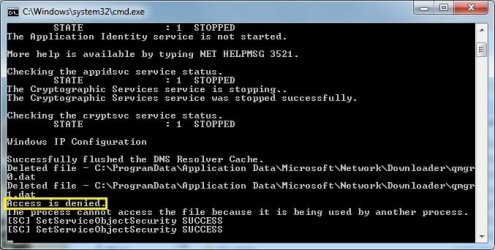
I have now tried using the Option 3 batch file. This hasn't made any difference. Whilst monitoring the commands I did notice an 'access denied, the process cannot access the file because it is being used by another process' response at one point, shown in the attached screenshot. No idea what processes were involved so I tried rebooting and running the .bat again with the same result. Incidentally when I launched Windows Update and clicked 'View update history' it was all still there. I presume the Option 3 batch file should have cleared it.

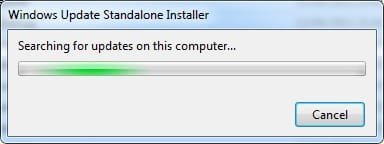
I then tried downloading and running the System Update Readiness Tool. That popped up the attached window 'Searching for updates on this computer'. After 6 hours I gave up. Clicking Cancel didn't work - again - so I resorted to Task Manager to kill the task.

More in hope than expectation I rebooted by cycling the power and tried Windows Update again. I clicked 'Check for updates' and after another three hours gave up on that also. NOTE: When I closed Windows Update it still continued searching, as it was still searching next time I launched it. I had to stop then restart the update service to cancel the search.

I tried to send the CBS.zip requested but the filesize was too large at 10.8Mb so I have had to take out the oldest CbsPersist .cab file and zip that separately as I didn't know whether I could leave it out or if it's something you need to look at.
 

Attachments

  • ResetUpdCmdWindow.jpg
    ResetUpdCmdWindow.jpg
    40.7 KB · Views: 52
  • Searching.jpg
    Searching.jpg
    7.9 KB · Views: 50
Last edited:

My Computer My Computer

Computer type
PC/Desktop
Computer Manufacturer/Model Number
Home build
OS
Windows 7 Professional 64-bit SP1
CPU
Pentium Core i5-2500 3.3GHz
Motherboard
Gigabyte P61-USB3-B3
Memory
2 x 4GB DDR3 1333MHz
Graphics Card(s)
Asus GT440 1GB GDDR5
Sound Card
Realtek integrated sound
Monitor(s) Displays
LG L1942PE
Screen Resolution
1280 x 1024 @ 60Hz
Hard Drives
2 x 1TB Western Digital WD10EARS, 1 x 1TB Seagate ST1000DM010
PSU
EVGA 450BR
Case
Novatech Panther ATX
Cooling
Sharkoon Silent Eagle 1000 120mm in case rear extracting
Keyboard
Logitech K120

My Computer My Computer

Computer type
PC/Desktop
Computer Manufacturer/Model Number
Custom assembled by me :}
OS
Win-7-Pro64bit 7-H-Prem-64bit
CPU
i7-5930K 2nd i9-9940x both water blocked VRM's too
Motherboard
ASUS SABERTOOTH X99 2nd ASUS x299 Apex
Memory
Trident-z 3200C14 2nd Trident-z 3600C16
Graphics Card(s)
EVGA 1080ti ftw3 2nd Titan Xp both water blocked
Sound Card
Built-in Realtek
Monitor(s) Displays
1-AOC G2460PG 24"G-Sync 144Hz/ 2nd 1-ASUS VG248QE 24" 144Hz
Screen Resolution
1920 x 1080 144Hz
Hard Drives
2-Samsung M.2 Evo & Evo Plus
2-Samsung 850 EVO 500GB SSD's/ 3-2.5 W.D. Black 1tb-&3-1tb/3-3.5 WD Black 1tb hdd's
PSU
EVGA SuperNOVA 1000-P2 2nd 1200-P2
Case
2-Corsair Obsidian Series 450D Black ATX Mid Tower
Cooling
Custom water loops
Keyboard
Logitech G710+/ 2nd Logitech G910
Mouse
2-RedDragon M901 Perdition 16400 dpi Gaming mouse = wired
Internet Speed
Comcast Ping 19ms 89.31mbps download speed 6.12mbps upload
Antivirus
Malwarebytes Pro/ Superantispyware Pro
Browser
FireFox & Pale moon
Other Info
2nd ASUS X299 Apex/Intel i9-9940x with Custom water loop/7H-Prem-x64/Corsair 450D case/Ram Trident-z 3600C16 4x8gb / Samsung970Evo plus 500gb SSD/Dual ssd EZ swap evo/PSU EVGA SuperNova 1200w-P2 80+Platinum/GPU Titan Xp /8-ML-140 on push-pull on 2-280GTX rads
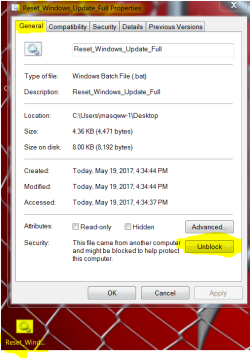
Sorry if I'm being a bit thick but I don't understand what you mean by 'right click the reg and go to
Properties and use the Unblock button/ save then also right click it again and use run as admin' :o

Ok, here's the MGAdiag report:

Diagnostic Report (1.9.0027.0):
-----------------------------------------
Windows Validation Data-->

Validation Code: 0
Cached Online Validation Code: 0x0
Windows Product Key: *****-*****-8Y3M8-96CMW-MPP4M
Windows Product Key Hash: laMRDwnQ4gYk1DAFzCzLOXFTPA8=
Windows Product ID: 00371-OEM-9044846-25295
Windows Product ID Type: 3
Windows License Type: OEM System Builder
Windows OS version: 6.1.7601.2.00010100.1.0.048
ID: {220F4AD9-9961-4AE7-B355-660A7D0C3E28}(1)
Is Admin: Yes
TestCab: 0x0
LegitcheckControl ActiveX: N/A, hr = 0x80070002
Signed By: N/A, hr = 0x80070002
Product Name: Windows 7 Professional
Architecture: 0x00000009
Build lab: 7601.win7sp1_ldr.161007-0600
TTS Error:
Validation Diagnostic:
Resolution Status: N/A

Vista WgaER Data-->
ThreatID(s): N/A, hr = 0x80070002
Version: N/A, hr = 0x80070002

Windows XP Notifications Data-->
Cached Result: N/A, hr = 0x80070002
File Exists: No
Version: N/A, hr = 0x80070002
WgaTray.exe Signed By: N/A, hr = 0x80070002
WgaLogon.dll Signed By: N/A, hr = 0x80070002

OGA Notifications Data-->
Cached Result: N/A, hr = 0x80070002
Version: N/A, hr = 0x80070002
OGAExec.exe Signed By: N/A, hr = 0x80070002
OGAAddin.dll Signed By: N/A, hr = 0x80070002

OGA Data-->
Office Status: 109 N/A
OGA Version: N/A, 0x80070002
Signed By: N/A, hr = 0x80070002
Office Diagnostics: 025D1FF3-364-80041010_025D1FF3-229-80041010_025D1FF3-230-1_025D1FF3-517-80040154_025D1FF3-237-80040154_025D1FF3-238-2_025D1FF3-244-80070002_025D1FF3-258-3

Browser Data-->
Proxy settings: N/A
User Agent: Mozilla/4.0 (compatible; MSIE 8.0; Win32)
Default Browser: C:\Program Files (x86)\Mozilla Firefox\firefox.exe
Download signed ActiveX controls: Prompt
Download unsigned ActiveX controls: Disabled
Run ActiveX controls and plug-ins: Allowed
Initialize and script ActiveX controls not marked as safe: Disabled
Allow scripting of Internet Explorer Webbrowser control: Disabled
Active scripting: Allowed
Script ActiveX controls marked as safe for scripting: Allowed

File Scan Data-->

Other data-->
Office Details: <GenuineResults><MachineData><UGUID>{220F4AD9-9961-4AE7-B355-660A7D0C3E28}</UGUID><Version>1.9.0027.0</Version><OS>6.1.7601.2.00010100.1.0.048</OS><Architecture>x64</Architecture><PKey>*****-*****-*****-*****-MPP4M</PKey><PID>00371-OEM-9044846-25295</PID><PIDType>3</PIDType><SID>S-1-5-21-1494054516-1227699634-2539432986</SID><SYSTEM><Manufacturer>Gigabyte Technology Co., Ltd.</Manufacturer><Model>P61-USB3-B3</Model></SYSTEM><BIOS><Manufacturer>Award Software International, Inc.</Manufacturer><Version>F3</Version><SMBIOSVersion major="2" minor="4"/><Date>20110222000000.000000+000</Date></BIOS><HWID>DB233007018400FE</HWID><UserLCID>0809</UserLCID><SystemLCID>0409</SystemLCID><TimeZone>GMT Standard Time(GMT+00:00)</TimeZone><iJoin>0</iJoin><SBID><stat>3</stat><msppid></msppid><name></name><model></model></SBID><OEM/><GANotification/></MachineData><Software><Office><Result>109</Result><Products/><Applications/></Office></Software></GenuineResults>

Spsys.log Content: 0x80070002

Licensing Data-->
Software licensing service version: 6.1.7601.17514

Name: Windows(R) 7, Professional edition
Description: Windows Operating System - Windows(R) 7, OEM_COA_NSLP channel
Activation ID: e120e868-3df2-464a-95a0-b52fa5ada4bf
Application ID: 55c92734-d682-4d71-983e-d6ec3f16059f
Extended PID: 00371-00180-448-425295-02-2057-7601.0000-2902011
Installation ID: 010083052111028005017611356534686573992242449102105054
Processor Certificate URL: http://go.microsoft.com/fwlink/?LinkID=88338
Machine Certificate URL: http://go.microsoft.com/fwlink/?LinkID=88339
Use License URL: http://go.microsoft.com/fwlink/?LinkID=88341
Product Key Certificate URL: http://go.microsoft.com/fwlink/?LinkID=88340
Partial Product Key: MPP4M
License Status: Licensed
Remaining Windows rearm count: 3
Trusted time: 19/05/2017 10:07:56

Windows Activation Technologies-->
HrOffline: 0x00000000
HrOnline: 0x00000000
HealthStatus: 0x0000000000000000
Event Time Stamp: 4:14:2017 17:39
ActiveX: Registered, Version: 7.1.7600.16395
Admin Service: Registered, Version: 7.1.7600.16395
HealthStatus Bitmask Output:


HWID Data-->
HWID Hash Current: MAAAAAEABAABAAEAAAABAAAAAQABAAEAln2CftatPkJyOGI0St3YCcYHzpps+C5z

OEM Activation 1.0 Data-->
N/A

OEM Activation 2.0 Data-->
BIOS valid for OA 2.0: yes, but no SLIC table
Windows marker version: N/A
OEMID and OEMTableID Consistent: N/A
BIOS Information:
ACPI Table Name OEMID Value OEMTableID Value
APIC GBT GBTUACPI
FACP GBT GBTUACPI
HPET GBT GBTUACPI
MCFG GBT GBTUACPI
ASPT GBT PerfTune
SSPT GBT SsptHead
EUDS GBT
MATS GBT
TAMG GBT GBT B0
SSDT INTEL PPM RCM

 

My Computer My Computer

Computer type
PC/Desktop
Computer Manufacturer/Model Number
Home build
OS
Windows 7 Professional 64-bit SP1
CPU
Pentium Core i5-2500 3.3GHz
Motherboard
Gigabyte P61-USB3-B3
Memory
2 x 4GB DDR3 1333MHz
Graphics Card(s)
Asus GT440 1GB GDDR5
Sound Card
Realtek integrated sound
Monitor(s) Displays
LG L1942PE
Screen Resolution
1280 x 1024 @ 60Hz
Hard Drives
2 x 1TB Western Digital WD10EARS, 1 x 1TB Seagate ST1000DM010
PSU
EVGA 450BR
Case
Novatech Panther ATX
Cooling
Sharkoon Silent Eagle 1000 120mm in case rear extracting
Keyboard
Logitech K120
Hi,
Here is an example of the option three and right click it and the unblock button to click on
reset properties unblock.PNG
 

My Computer My Computer

Computer type
PC/Desktop
Computer Manufacturer/Model Number
Custom assembled by me :}
OS
Win-7-Pro64bit 7-H-Prem-64bit
CPU
i7-5930K 2nd i9-9940x both water blocked VRM's too
Motherboard
ASUS SABERTOOTH X99 2nd ASUS x299 Apex
Memory
Trident-z 3200C14 2nd Trident-z 3600C16
Graphics Card(s)
EVGA 1080ti ftw3 2nd Titan Xp both water blocked
Sound Card
Built-in Realtek
Monitor(s) Displays
1-AOC G2460PG 24"G-Sync 144Hz/ 2nd 1-ASUS VG248QE 24" 144Hz
Screen Resolution
1920 x 1080 144Hz
Hard Drives
2-Samsung M.2 Evo & Evo Plus
2-Samsung 850 EVO 500GB SSD's/ 3-2.5 W.D. Black 1tb-&3-1tb/3-3.5 WD Black 1tb hdd's
PSU
EVGA SuperNOVA 1000-P2 2nd 1200-P2
Case
2-Corsair Obsidian Series 450D Black ATX Mid Tower
Cooling
Custom water loops
Keyboard
Logitech G710+/ 2nd Logitech G910
Mouse
2-RedDragon M901 Perdition 16400 dpi Gaming mouse = wired
Internet Speed
Comcast Ping 19ms 89.31mbps download speed 6.12mbps upload
Antivirus
Malwarebytes Pro/ Superantispyware Pro
Browser
FireFox & Pale moon
Other Info
2nd ASUS X299 Apex/Intel i9-9940x with Custom water loop/7H-Prem-x64/Corsair 450D case/Ram Trident-z 3600C16 4x8gb / Samsung970Evo plus 500gb SSD/Dual ssd EZ swap evo/PSU EVGA SuperNova 1200w-P2 80+Platinum/GPU Titan Xp /8-ML-140 on push-pull on 2-280GTX rads

My Computer My Computer

Computer type
PC/Desktop
Computer Manufacturer/Model Number
Custom assembled by me :}
OS
Win-7-Pro64bit 7-H-Prem-64bit
CPU
i7-5930K 2nd i9-9940x both water blocked VRM's too
Motherboard
ASUS SABERTOOTH X99 2nd ASUS x299 Apex
Memory
Trident-z 3200C14 2nd Trident-z 3600C16
Graphics Card(s)
EVGA 1080ti ftw3 2nd Titan Xp both water blocked
Sound Card
Built-in Realtek
Monitor(s) Displays
1-AOC G2460PG 24"G-Sync 144Hz/ 2nd 1-ASUS VG248QE 24" 144Hz
Screen Resolution
1920 x 1080 144Hz
Hard Drives
2-Samsung M.2 Evo & Evo Plus
2-Samsung 850 EVO 500GB SSD's/ 3-2.5 W.D. Black 1tb-&3-1tb/3-3.5 WD Black 1tb hdd's
PSU
EVGA SuperNOVA 1000-P2 2nd 1200-P2
Case
2-Corsair Obsidian Series 450D Black ATX Mid Tower
Cooling
Custom water loops
Keyboard
Logitech G710+/ 2nd Logitech G910
Mouse
2-RedDragon M901 Perdition 16400 dpi Gaming mouse = wired
Internet Speed
Comcast Ping 19ms 89.31mbps download speed 6.12mbps upload
Antivirus
Malwarebytes Pro/ Superantispyware Pro
Browser
FireFox & Pale moon
Other Info
2nd ASUS X299 Apex/Intel i9-9940x with Custom water loop/7H-Prem-x64/Corsair 450D case/Ram Trident-z 3600C16 4x8gb / Samsung970Evo plus 500gb SSD/Dual ssd EZ swap evo/PSU EVGA SuperNova 1200w-P2 80+Platinum/GPU Titan Xp /8-ML-140 on push-pull on 2-280GTX rads
398830d1495136621-windows-update-appears-have-stopped-checking-updates-resetupdcmdwindow.jpg

FYI: Security software can interfere with WU reset scripts. Try temporarily disabling security software.

Windows Update - Reset - Page 29 - Windows 7 Help Forums

In your case the next line in the script was to delete C:\SoftwareDistribution

Also elements of that script have never worked properly on my machine anyway. I've checked by running it one line at a time.
 

My Computer My Computer

Computer type
Laptop
Computer Manufacturer/Model Number
ASUS
OS
Microsoft Windows 7 Home Premium 64-bit 7601 Multiprocessor Free Service Pack 1
CPU
AMD C-60 APU with Radeon(tm) HD Graphics
Motherboard
ASUSTeK COMPUTER INC. X501U
Memory
4.00 GB
Graphics Card(s)
AMD Radeon HD 6290 Graphics
Sound Card
(1) AMD High Definition Audio Device (2) Realtek High Defi
Screen Resolution
1366 x 768 x 32 bits (4294967296 colors) @ 60 Hz
Hard Drives
Hitachi HTS545050A7E380 SATA Disk Device
Antivirus
Comodo CIS & FW, SecureAplus App Whitelisting, Threatfire
Browser
Cyberfox 64bit, Opera 64bit, Airfox
Other Info
Spy-The-Spy, HitmanPro.Alert, Norton Connect Safe, MJRegWatcher, BitDefender TrafficLight, Voodoo Shield, Zemana AntiMalware
Hi,

Thanks everyone for your help. Any further action will now have to wait until I get back from holiday. I'll report back then.

Cheers.
 

My Computer My Computer

Computer type
PC/Desktop
Computer Manufacturer/Model Number
Home build
OS
Windows 7 Professional 64-bit SP1
CPU
Pentium Core i5-2500 3.3GHz
Motherboard
Gigabyte P61-USB3-B3
Memory
2 x 4GB DDR3 1333MHz
Graphics Card(s)
Asus GT440 1GB GDDR5
Sound Card
Realtek integrated sound
Monitor(s) Displays
LG L1942PE
Screen Resolution
1280 x 1024 @ 60Hz
Hard Drives
2 x 1TB Western Digital WD10EARS, 1 x 1TB Seagate ST1000DM010
PSU
EVGA 450BR
Case
Novatech Panther ATX
Cooling
Sharkoon Silent Eagle 1000 120mm in case rear extracting
Keyboard
Logitech K120
Back
Top