Checking WiFi Signal Strength

debodun

Member
Member
VIP
Local time
5:22 AM
Messages
295
Location
upstate NY
How do I do that in Windows 7?
 

My Computer My Computer

At a glance

Windows 7 Ultimate x641.86 GHz Intrel Core 23 GB Dual Channel DDR2 @ 3.32 MHzIntel Q965/Q963 Express chipset
Computer type
PC/Desktop
Computer Manufacturer/Model Number
refurb in an HP/Compaq case
OS
Windows 7 Ultimate x64
CPU
1.86 GHz Intrel Core 2
Motherboard
HP 0A60h XU1
Memory
3 GB Dual Channel DDR2 @ 3.32 MHz
Graphics Card(s)
Intel Q965/Q963 Express chipset
Monitor(s) Displays
Dell CRT
Hard Drives
977GB Samsung HD 103 SI ATA
Case
HP Compaq DC5800
Mouse
wired optical
Antivirus
Microsoft Security Essentials, MalwareBytes, Spyware Blaster
Browser
Firefox 32-bit
If you're indeed connected to a Wi-Fi signal then you should have an icon like this in the task bar below... or where ever you placed the task bar...
 

My Computer My Computer

At a glance

Windows 7 Ultimate x64
Computer type
PC/Desktop
OS
Windows 7 Ultimate x64
I only see this in my Taskbar:
 

Attachments

  • taskbar.jpg
    taskbar.jpg
    2.8 KB · Views: 3

My Computer My Computer

At a glance

Windows 7 Ultimate x641.86 GHz Intrel Core 23 GB Dual Channel DDR2 @ 3.32 MHzIntel Q965/Q963 Express chipset
Computer type
PC/Desktop
Computer Manufacturer/Model Number
refurb in an HP/Compaq case
OS
Windows 7 Ultimate x64
CPU
1.86 GHz Intrel Core 2
Motherboard
HP 0A60h XU1
Memory
3 GB Dual Channel DDR2 @ 3.32 MHz
Graphics Card(s)
Intel Q965/Q963 Express chipset
Monitor(s) Displays
Dell CRT
Hard Drives
977GB Samsung HD 103 SI ATA
Case
HP Compaq DC5800
Mouse
wired optical
Antivirus
Microsoft Security Essentials, MalwareBytes, Spyware Blaster
Browser
Firefox 32-bit
You're not connected to a Wi-Fi signal... That's your Ethernet cable. If a Wi-Fi card is installed, unplug the Ethernet cable if you want to use Wi-Fi. But I recommend you stick to Ethernet if you can.

I should also mention that if you have a propitiatory Wi-Fi driver and its connection software installed, that too will show its version of a Wi-Fi signal bar. Usually Windows loads its own driver, but not all the time. You would need to use the Wi-Fi manufacture's driver software.
 

My Computer My Computer

At a glance

Windows 7 Ultimate x64
Computer type
PC/Desktop
OS
Windows 7 Ultimate x64
This is the router and modem that I have. Are they ethernet equipment?
 

Attachments

  • router modem.jpg
    router modem.jpg
    11.6 KB · Views: 2

My Computer My Computer

At a glance

Windows 7 Ultimate x641.86 GHz Intrel Core 23 GB Dual Channel DDR2 @ 3.32 MHzIntel Q965/Q963 Express chipset
Computer type
PC/Desktop
Computer Manufacturer/Model Number
refurb in an HP/Compaq case
OS
Windows 7 Ultimate x64
CPU
1.86 GHz Intrel Core 2
Motherboard
HP 0A60h XU1
Memory
3 GB Dual Channel DDR2 @ 3.32 MHz
Graphics Card(s)
Intel Q965/Q963 Express chipset
Monitor(s) Displays
Dell CRT
Hard Drives
977GB Samsung HD 103 SI ATA
Case
HP Compaq DC5800
Mouse
wired optical
Antivirus
Microsoft Security Essentials, MalwareBytes, Spyware Blaster
Browser
Firefox 32-bit

My Computers My Computers

  • At a glance

    Windows 7 Home Premium x64AMD V1204GB
    Computer type
    Laptop
    Computer Manufacturer/Model Number
    Toshiba satellite C650D
    OS
    Windows 7 Home Premium x64
    CPU
    AMD V120
    Memory
    4GB
    Internet Speed
    150 Mbps
    Antivirus
    MSE
    Browser
    IE11, Edge, Firefox
    Other Info
    I also have W7 Pro on my System Two, and several W7 Hyper-V VMs. My other machines run Windows 10/11. Their specs are in my Ten Forums & Eleven Forum profiles.
  • At a glance

    Windows 7 Pro x64Intel i5-3320M8 GB
    Computer type
    Laptop
    System Manufacturer/Model Number
    Lenovo Thinkpad T430
    OS
    Windows 7 Pro x64
    CPU
    Intel i5-3320M
    Memory
    8 GB
    Hard Drives
    250GB Samsung SSD 860 EVO
    Antivirus
    MSE
I doubt it has a WiFi card - it's a 12 year old computer.

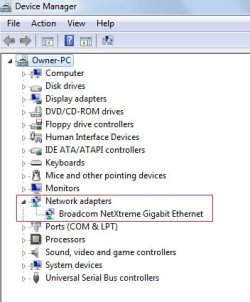
I went to Device Manager (which I should have done first) and found it IS ethernet connected.
 

Attachments

  • network.jpg
    network.jpg
    24 KB · Views: 3

My Computer My Computer

At a glance

Windows 7 Ultimate x641.86 GHz Intrel Core 23 GB Dual Channel DDR2 @ 3.32 MHzIntel Q965/Q963 Express chipset
Computer type
PC/Desktop
Computer Manufacturer/Model Number
refurb in an HP/Compaq case
OS
Windows 7 Ultimate x64
CPU
1.86 GHz Intrel Core 2
Motherboard
HP 0A60h XU1
Memory
3 GB Dual Channel DDR2 @ 3.32 MHz
Graphics Card(s)
Intel Q965/Q963 Express chipset
Monitor(s) Displays
Dell CRT
Hard Drives
977GB Samsung HD 103 SI ATA
Case
HP Compaq DC5800
Mouse
wired optical
Antivirus
Microsoft Security Essentials, MalwareBytes, Spyware Blaster
Browser
Firefox 32-bit
I doubt it has a WiFi card - it's a 12 year old computer.

I went to Device Manager (which I should have done first) and found it IS ethernet connected.
Since you have an Ethernet connection you could test your Internet speed. Do you want to do that?

12 years ago most desktop computers used an Ethernet connection. However, you could add a WiFi card if you wanted to. Today it is not unusual for a desktop computer to come with WiFi card in addition to Ethernet.

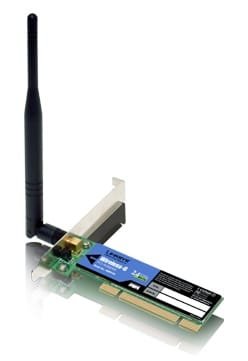
BTW, below is a WiFi PCI card that I bought at least 20 years ago. It came with drivers for Windows 98 & XP. The problem with old WiFi cards is that they are relatively slow. It is usually better to use an Ethernet connection if that is possible.

wifi_card.jpg

wif-card_DM.jpg
 

My Computers My Computers

  • At a glance

    Windows 7 Professional 64bit / Windows 10 Hom...AMD FX-8350GSKILL Ripjaw-X PC3 12800 12GB (2x4GB, 2x2GB)ASUS ENGTX560 DCII OC/2DI/1GD5 1GB
    Computer type
    PC/Desktop
    Computer Manufacturer/Model Number
    Custom build
    OS
    Windows 7 Professional 64bit / Windows 10 Home 64bit
    CPU
    AMD FX-8350
    Motherboard
    Gigabyte GA-990FXA-UD3 (AM3+) Rev. 4.0
    Memory
    GSKILL Ripjaw-X PC3 12800 12GB (2x4GB, 2x2GB)
    Graphics Card(s)
    ASUS ENGTX560 DCII OC/2DI/1GD5 1GB
    Sound Card
    Integrated
    Monitor(s) Displays
    Asus VE228H (21.5-in)
    Screen Resolution
    1920x1080 60Hz
    Hard Drives
    SAMSUNG 870 EVO 1TB (2.5" SATA SSD)
    SAMSUNG 870 EVO 500GB (2.5" SATA SSD)
    PSU
    Antec TruePower (new) TP-650 (650 watts)
    Case
    Antec Three Hundred
    Cooling
    AMD stock (plan to upgrade to Cooler Master Hyper 212 EVO)
    Keyboard
    Logitech K540 (wireless)
    Mouse
    Logitech M310 (wireless)
    Internet Speed
    Comcast Gigabit X2 Internet (2100Mbps down / 300Mbps up)
    Browser
    Firefox, Edge, Chrome
    Other Info
    Optical drive: ASUS DRW-24B3ST/BLK/G (Black) (24X)
    External hard drives: 2TB & 6TB
    Internet Gateway: Comcast XB8
  • Computer type
    PC/Desktop
I can test the speed through my ISP web site. Thanks for all the info.
 

My Computer My Computer

At a glance

Windows 7 Ultimate x641.86 GHz Intrel Core 23 GB Dual Channel DDR2 @ 3.32 MHzIntel Q965/Q963 Express chipset
Computer type
PC/Desktop
Computer Manufacturer/Model Number
refurb in an HP/Compaq case
OS
Windows 7 Ultimate x64
CPU
1.86 GHz Intrel Core 2
Motherboard
HP 0A60h XU1
Memory
3 GB Dual Channel DDR2 @ 3.32 MHz
Graphics Card(s)
Intel Q965/Q963 Express chipset
Monitor(s) Displays
Dell CRT
Hard Drives
977GB Samsung HD 103 SI ATA
Case
HP Compaq DC5800
Mouse
wired optical
Antivirus
Microsoft Security Essentials, MalwareBytes, Spyware Blaster
Browser
Firefox 32-bit

My Computers My Computers

  • At a glance

    Windows 7 Home Premium x64AMD V1204GB
    Computer type
    Laptop
    Computer Manufacturer/Model Number
    Toshiba satellite C650D
    OS
    Windows 7 Home Premium x64
    CPU
    AMD V120
    Memory
    4GB
    Internet Speed
    150 Mbps
    Antivirus
    MSE
    Browser
    IE11, Edge, Firefox
    Other Info
    I also have W7 Pro on my System Two, and several W7 Hyper-V VMs. My other machines run Windows 10/11. Their specs are in my Ten Forums & Eleven Forum profiles.
  • At a glance

    Windows 7 Pro x64Intel i5-3320M8 GB
    Computer type
    Laptop
    System Manufacturer/Model Number
    Lenovo Thinkpad T430
    OS
    Windows 7 Pro x64
    CPU
    Intel i5-3320M
    Memory
    8 GB
    Hard Drives
    250GB Samsung SSD 860 EVO
    Antivirus
    MSE
Thanks for the tip, but as long as it's working, why invest more in a virtually antique desktop?
 

My Computer My Computer

At a glance

Windows 7 Ultimate x641.86 GHz Intrel Core 23 GB Dual Channel DDR2 @ 3.32 MHzIntel Q965/Q963 Express chipset
Computer type
PC/Desktop
Computer Manufacturer/Model Number
refurb in an HP/Compaq case
OS
Windows 7 Ultimate x64
CPU
1.86 GHz Intrel Core 2
Motherboard
HP 0A60h XU1
Memory
3 GB Dual Channel DDR2 @ 3.32 MHz
Graphics Card(s)
Intel Q965/Q963 Express chipset
Monitor(s) Displays
Dell CRT
Hard Drives
977GB Samsung HD 103 SI ATA
Case
HP Compaq DC5800
Mouse
wired optical
Antivirus
Microsoft Security Essentials, MalwareBytes, Spyware Blaster
Browser
Firefox 32-bit
Back
Top