Checking WiFi Signal Strength

debodun

Member
Member
VIP
Local time
3:09 PM
Messages
290
Location
upstate NY
How do I do that in Windows 7?
 

My Computer

Computer type
PC/Desktop
Computer Manufacturer/Model Number
refurb in an HP/Compaq case
OS
Windows 7 Ultimate x64
CPU
1.86 GHz Intrel Core 2
Motherboard
HP 0A60h XU1
Memory
3 GB Dual Channel DDR2 @ 3.32 MHz
Graphics Card(s)
Intel Q965/Q963 Express chipset
Monitor(s) Displays
Dell CRT
Hard Drives
977GB Samsung HD 103 SI ATA
Case
HP Compaq DC5800
Mouse
wired optical
Antivirus
Microsoft Security Essentials, MalwareBytes, Spyware Blaster
Browser
Firefox 32-bit
If you're indeed connected to a Wi-Fi signal then you should have an icon like this in the task bar below... or where ever you placed the task bar...
 

My Computer

Computer type
PC/Desktop
OS
Windows 7 Ultimate x64
I only see this in my Taskbar:
 

Attachments

  • taskbar.jpg
    taskbar.jpg
    6.9 KB · Views: 3

My Computer

Computer type
PC/Desktop
Computer Manufacturer/Model Number
refurb in an HP/Compaq case
OS
Windows 7 Ultimate x64
CPU
1.86 GHz Intrel Core 2
Motherboard
HP 0A60h XU1
Memory
3 GB Dual Channel DDR2 @ 3.32 MHz
Graphics Card(s)
Intel Q965/Q963 Express chipset
Monitor(s) Displays
Dell CRT
Hard Drives
977GB Samsung HD 103 SI ATA
Case
HP Compaq DC5800
Mouse
wired optical
Antivirus
Microsoft Security Essentials, MalwareBytes, Spyware Blaster
Browser
Firefox 32-bit
You're not connected to a Wi-Fi signal... That's your Ethernet cable. If a Wi-Fi card is installed, unplug the Ethernet cable if you want to use Wi-Fi. But I recommend you stick to Ethernet if you can.

I should also mention that if you have a propitiatory Wi-Fi driver and its connection software installed, that too will show its version of a Wi-Fi signal bar. Usually Windows loads its own driver, but not all the time. You would need to use the Wi-Fi manufacture's driver software.
 

My Computer

Computer type
PC/Desktop
OS
Windows 7 Ultimate x64
This is the router and modem that I have. Are they ethernet equipment?
 

Attachments

  • router modem.jpg
    router modem.jpg
    25.7 KB · Views: 2

My Computer

Computer type
PC/Desktop
Computer Manufacturer/Model Number
refurb in an HP/Compaq case
OS
Windows 7 Ultimate x64
CPU
1.86 GHz Intrel Core 2
Motherboard
HP 0A60h XU1
Memory
3 GB Dual Channel DDR2 @ 3.32 MHz
Graphics Card(s)
Intel Q965/Q963 Express chipset
Monitor(s) Displays
Dell CRT
Hard Drives
977GB Samsung HD 103 SI ATA
Case
HP Compaq DC5800
Mouse
wired optical
Antivirus
Microsoft Security Essentials, MalwareBytes, Spyware Blaster
Browser
Firefox 32-bit

My Computers

System One System Two

  • Computer type
    Laptop
    Computer Manufacturer/Model Number
    Toshiba satellite C650D
    OS
    Windows 7 Home Premium x64
    CPU
    AMD V120
    Memory
    4GB
    Internet Speed
    150 Mbps
    Antivirus
    MSE
    Browser
    IE11, Edge, Firefox
    Other Info
    I also have W7 Pro on my System Two, and several W7 Hyper-V VMs. My other machines run Windows 10/11. Their specs are in my Ten Forums & Eleven Forum profiles.
  • Computer type
    Laptop
    System Manufacturer/Model Number
    Lenovo Thinkpad T430
    OS
    Windows 7 Pro x64
    CPU
    Intel i5-3320M
    Memory
    8 GB
    Hard Drives
    250GB Samsung SSD 860 EVO
    Other Info
    Antivirus: MSE
I doubt it has a WiFi card - it's a 12 year old computer.

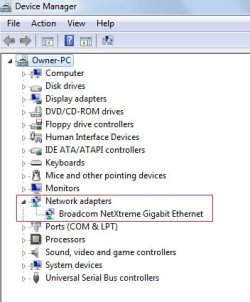
I went to Device Manager (which I should have done first) and found it IS ethernet connected.
 

Attachments

  • network.jpg
    network.jpg
    53.2 KB · Views: 3

My Computer

Computer type
PC/Desktop
Computer Manufacturer/Model Number
refurb in an HP/Compaq case
OS
Windows 7 Ultimate x64
CPU
1.86 GHz Intrel Core 2
Motherboard
HP 0A60h XU1
Memory
3 GB Dual Channel DDR2 @ 3.32 MHz
Graphics Card(s)
Intel Q965/Q963 Express chipset
Monitor(s) Displays
Dell CRT
Hard Drives
977GB Samsung HD 103 SI ATA
Case
HP Compaq DC5800
Mouse
wired optical
Antivirus
Microsoft Security Essentials, MalwareBytes, Spyware Blaster
Browser
Firefox 32-bit
I doubt it has a WiFi card - it's a 12 year old computer.

I went to Device Manager (which I should have done first) and found it IS ethernet connected.
Since you have an Ethernet connection you could test your Internet speed. Do you want to do that?

12 years ago most desktop computers used an Ethernet connection. However, you could add a WiFi card if you wanted to. Today it is not unusual for a desktop computer to come with WiFi card in addition to Ethernet.

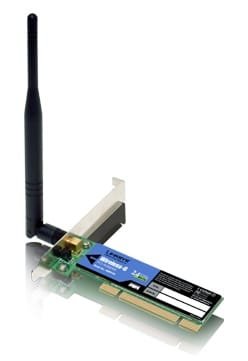
BTW, below is a WiFi PCI card that I bought at least 20 years ago. It came with drivers for Windows 98 & XP. The problem with old WiFi cards is that they are relatively slow. It is usually better to use an Ethernet connection if that is possible.

wifi_card.jpg

wif-card_DM.jpg
 

My Computers

System One System Two

  • Computer type
    PC/Desktop
    Computer Manufacturer/Model Number
    Custom build
    OS
    Windows 7 Home Premium 64-bits
    CPU
    AMD FX-8350
    Motherboard
    Gigabyte GA-990FXA-UD3 (AM3+)
    Memory
    GSKILL Ripjaw-X PC3 12800 8GB (2x4GB)
    Graphics Card(s)
    ASUS ROG STRIX GTX 1060 6GB
    Sound Card
    Integrated
    Monitor(s) Displays
    Asus VE228H (21.5-in)
    Screen Resolution
    1920x1080 60Hz
    Hard Drives
    SAMSUNG 870 EVO 2.5 Inch SATA SSD (1TB)
    SAMSUNG 870 EVO 2.5 Inch SATA SSD (1TB)
    SAMSUNG 870 EVO 2.5 Inch SATA SSD (1TB)
    PSU
    Corsair RM750x (750 watts)
    Case
    Corsair Carbide Series 200R
    Cooling
    Corsair Hydro Series H60 (CWCH60)
    Keyboard
    Logitech Elite
    Mouse
    Logitech M510 Wireless Mouse
    Internet Speed
    Comcast Gigabit Extra (1200Mbps down / 35Mbps up)
    Antivirus
    Malwarebytes
    Browser
    Firefox, Edge, Chrome
    Other Info
    ASUS DRW-24B1ST DVD-RW (24X) optical drive
    Seagate Expansion Desk (5TB) external SATA/USB HDD
    Comcast XB8 Internet Gateway
  • Computer type
    PC/Desktop
    System Manufacturer/Model Number
    Custom
    OS
    Windows 7 Pro (64-bit)
    CPU
    AMD Phenom II 960T X4
    Motherboard
    ASUS M4N82 Deluxe
    Memory
    Corsair XMS2 DDR2-800 8GB (4x2GB)
    Graphics Card(s)
    ASUS ENGTX560 DCII OC/2DI/1GD5 1GB
    Monitor(s) Displays
    Samsung 930B 19-inch LCD
    Screen Resolution
    1280x1024
    Hard Drives
    Samsung SSD 870 EVO 1000 GB (Windows 10)
    Seagate ST1000DM003 1000 GB (Windows 7)
    PSU
    Antec TruePower (new) TP-650
    Case
    Antec Three Hundred
    Cooling
    AMD stock cooler from FX8350
    Mouse
    Logitech M100
    Internet Speed
    Xfinity Gigabit Extra 1200/35 Mbps
I can test the speed through my ISP web site. Thanks for all the info.
 

My Computer

Computer type
PC/Desktop
Computer Manufacturer/Model Number
refurb in an HP/Compaq case
OS
Windows 7 Ultimate x64
CPU
1.86 GHz Intrel Core 2
Motherboard
HP 0A60h XU1
Memory
3 GB Dual Channel DDR2 @ 3.32 MHz
Graphics Card(s)
Intel Q965/Q963 Express chipset
Monitor(s) Displays
Dell CRT
Hard Drives
977GB Samsung HD 103 SI ATA
Case
HP Compaq DC5800
Mouse
wired optical
Antivirus
Microsoft Security Essentials, MalwareBytes, Spyware Blaster
Browser
Firefox 32-bit

My Computers

System One System Two

  • Computer type
    Laptop
    Computer Manufacturer/Model Number
    Toshiba satellite C650D
    OS
    Windows 7 Home Premium x64
    CPU
    AMD V120
    Memory
    4GB
    Internet Speed
    150 Mbps
    Antivirus
    MSE
    Browser
    IE11, Edge, Firefox
    Other Info
    I also have W7 Pro on my System Two, and several W7 Hyper-V VMs. My other machines run Windows 10/11. Their specs are in my Ten Forums & Eleven Forum profiles.
  • Computer type
    Laptop
    System Manufacturer/Model Number
    Lenovo Thinkpad T430
    OS
    Windows 7 Pro x64
    CPU
    Intel i5-3320M
    Memory
    8 GB
    Hard Drives
    250GB Samsung SSD 860 EVO
    Other Info
    Antivirus: MSE
Thanks for the tip, but as long as it's working, why invest more in a virtually antique desktop?
 

My Computer

Computer type
PC/Desktop
Computer Manufacturer/Model Number
refurb in an HP/Compaq case
OS
Windows 7 Ultimate x64
CPU
1.86 GHz Intrel Core 2
Motherboard
HP 0A60h XU1
Memory
3 GB Dual Channel DDR2 @ 3.32 MHz
Graphics Card(s)
Intel Q965/Q963 Express chipset
Monitor(s) Displays
Dell CRT
Hard Drives
977GB Samsung HD 103 SI ATA
Case
HP Compaq DC5800
Mouse
wired optical
Antivirus
Microsoft Security Essentials, MalwareBytes, Spyware Blaster
Browser
Firefox 32-bit
Back
Top