chkdsk....allocation unit

fluidmotion

New member
Member
VIP
Local time
9:54 PM
Messages
275
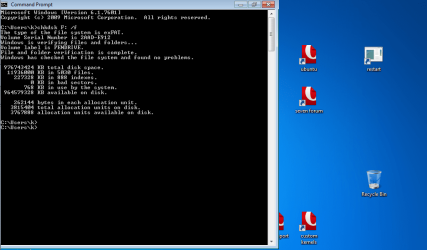
Ran chkdsk on USB Hard disk drive.
what is allocation unit in this disk?
 

Attachments

  • chkdsk.allocation.unit.png
    chkdsk.allocation.unit.png
    60.2 KB · Views: 34

My Computer

Computer Manufacturer/Model Number
MP Mini Netbook 110
OS
Win7 Starter 32 bits
Ran chkdsk on USB Hard disk drive.
what is allocation unit in this disk?

Allocation unit is the size of the blocks on the HD. DO you mean what size is the allocation unit, or something else?
 

My Computer

Computer Manufacturer/Model Number
HP Pavillion dv-7 1005 Tx
OS
Win 8 Release candidate 8400
CPU
[email protected]
Memory
4 gigs
Graphics Card(s)
Nvidia 9600M
Sound Card
HD built-in
Monitor(s) Displays
17" Wxga
Screen Resolution
1440x900
Cooling
none
Internet Speed
45Mb down 5Mb up

My Computer

Computer Manufacturer/Model Number
MP Mini Netbook 110
OS
Win7 Starter 32 bits
what's the difference between disk space and allocation unit?

Ran chkdsk on USB Hard disk drive.
what is allocation unit in this disk?

Allocation unit is the size of the blocks on the HD. DO you mean what size is the allocation unit, or something else?

DIsk space free is the total the HD has free, allocation units tell you how many units x the number of units for the same figure. Only useful for more complex things.
 

My Computer

Computer Manufacturer/Model Number
HP Pavillion dv-7 1005 Tx
OS
Win 8 Release candidate 8400
CPU
[email protected]
Memory
4 gigs
Graphics Card(s)
Nvidia 9600M
Sound Card
HD built-in
Monitor(s) Displays
17" Wxga
Screen Resolution
1440x900
Cooling
none
Internet Speed
45Mb down 5Mb up
Blocks, or sectors, on the HD are determined by the HD itself and have traditionally always been 512 bytes.

So-called AF (advanced format) drives are an exception as they have actual 4096-byte sectors, but often still use block addressing based on a 512-byte sector size to be compatible with current OSes.

The allocation unit size as reported by Windows is a filesystem feature and is the same as the cluster size. By default, clusters on an NTFS filesystem are 8 sectors each, or 4096 bytes (4k).

In your case, you're using the exFAT filesystem and a cluster size of 256KB. This is unusually big and will lead to a lot of lost disk space if you're storing many small files on the drive, but it does give a slight performance boost with sequential reading/writing of very large files.

 

My Computer

Computer type
PC/Desktop
Computer Manufacturer/Model Number
Custom-built
OS
Windows 7 Professional SP1 32-bit
CPU
Intel Core 2 Duo E6600 2.4GHz
Motherboard
Asus PL5D2
Memory
4GB DDR2-667 (4x1GB in dual-channel config)
Graphics Card(s)
nVidia GeForce 9800 GT
Sound Card
Creative X-Fi XtremeMusic
Monitor(s) Displays
Acer P236H
Screen Resolution
1920x1200 (DVI)
Hard Drives
OCZ SSD Vertex Plus 60GB SATA (Firmware 3.55), 64MB cache
Hitachi HD321KJ SATA, 320GB, 7200rpm, 16MB cache
PSU
Antec TruePower 2.0
Case
Cooler Master Centurion
Cooling
Too many fans
Keyboard
Standard
Mouse
Microsoft wireless optical mouse
Internet Speed
AT&T U-verse (18mbit/sec)
Antivirus
Microsoft Security Essentials
Browser
Firefox
Other Info
Other devices:
Compaq CQ-60 laptop
Google Nexus 7 (2012) tablet
Nvidia SHIELD tablet (US/LTE)
Hardkernel ODROID-XU single-board computer (Samsung Exynos 5420)
Back
Top