CHKDSK failed

xiaohui0116

New member
Local time
5:27 PM
Messages
3
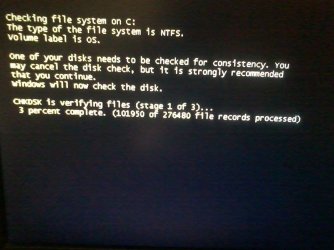
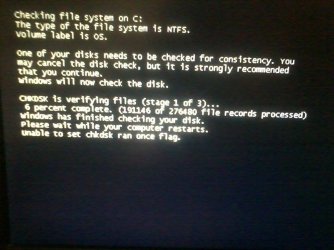
checkdisk pages keep repeating and the computer keep restarting then back to the checkdisk pages....

if anyone knows how to solve it,please help because its really troublesome, thank you!!!!!!
 

Attachments
  • 12285664_456294627904026_1074970501_n.jpg
    12285664_456294627904026_1074970501_n.jpg
    69.2 KB · Views: 0
  • 12305987_456294654570690_1058998818_n.jpg
    12305987_456294654570690_1058998818_n.jpg
    52 KB · Views: 0
  • 12319658_456294587904030_834960902_n.jpg
    12319658_456294587904030_834960902_n.jpg
    62.2 KB · Views: 0

My Computer

Computer type
PC/Desktop
Computer Manufacturer/Model Number
Dell
OS
Windows 7 32-bit
Hi xiaohui0116,

Welcome to SevenForums.

1.DELL desktop Model No???????

2. Is it still under warranty?

3. Have you made the recovery disks?

4. Do you have the manual that came with the PC?

One of the reasons why Check Disk keeps repeating is that the HDD could have developed bad sectors. Not a pleasant news.

Your first priority now will be to boot from a live Linux pendrive and check whether you can access the drive. If you are able to, immediately copy all important data you may not want to lose to another external drive.

Read my post here http://www.sevenforums.com/hardware...ly-unrecognisable-hard-drive.html#post2936753 on how to create your bootable Lucid Puppy pen drive. That post will also lead to my thread http://www.sevenforums.com/software/198909-lucid-puppy-way-recover-files-non-bootable-computer.html . Straight away go to the topic Recovering files from the non-bootable Internal Drive: in that thread which tells you how to use Lucid Puppy to recover the data.

Once you have recovered the data, you may have to check your HDD. Check your manual whether there is a way to run Dell Diagnostics by pressing a function key. ( On some Dell PCs pressing F12 on bootstart can run Dell Diagnostics.) If not you have to find out the manufacturer of your HDD by inspecting it on your Desktop and running the manufacturer's diagnostic/repair utility.
 

My Computer

OS
Windows 7 Home Premium 32 bit
Thank you for your reply. I will try it.
 

My Computer

Computer type
PC/Desktop
Computer Manufacturer/Model Number
Dell
OS
Windows 7 32-bit
Hi jumanji,

Thank you for your reply.

1. Model: Optiplex 7010.

2. Not under warranty.

3. NO.

4. I forgot.
 

My Computer

Computer type
PC/Desktop
Computer Manufacturer/Model Number
Dell
OS
Windows 7 32-bit
Back
Top