
Choosing a GPU - The Core Basics
INTRODUCTION
Overview and Contents
There are many factors to take into consideration these days when choosing a GPU. With the myriad of hardware combinations and multiple versions of numerous cards available it’s become somewhat of a minefield as to whether the GPU you’ve chosen for your system will actually prove to be the correct choice.
Below we’ll look at some of the major factors you should look into before purchasing a GPU as a mistake could prove to be very costly, especially when you’re in the market for a higher end GPU.
Part One: Usage
Part Two: Power Requirements
Part Three: Size
Part Four: Compatibility
Part Five: Benchmarks & Comparisons
Part Six: List of nVidia & AMD GPUs
PART ONE
Usage
First and foremost you must take into consideration what you’re going to be using the GPU for. Most instances of needing (or wanting) a new GPU will be down to gaming, and gamers will be looking to get the best GPU they can within their budget for the highest framerates and smoothest gaming experience. Gaming relies heavily on GPU power so this is pretty much a given.
The choice between AMD and nVidia will more often than not be down to personal preference and it’s always a good idea to check online benchmarks if you’re not certain which camp you want to go with. It’s virtually always the case that AMD cards provide better ‘bang for buck’ with nVidia cards weighing in with substantially higher prices, although this doesn’t necessarily mean that nVidia cards automatically give better performance.
Both companies offer their own additional perks, for instance AMD have developed Mantle while nVidia offer Geforce Experience. Again, more info to be taken into account.
So do your research and decide which team you want side with.
It’s important here to understand the need for VRAM. In computing terms it’s usually the case that the higher the number, the better performance. And while this remains true in regards to VRAM, sometimes that extra performance isn’t needed and money can be saved from making an educated choice.
Let’s take nVidia’s GTX 770 as an example; the 770 is available in two models, the 2GB VRAM model and the 4GB VRAM model. Now if you’re using just one 1080p monitor the 2GB model will be more than adequate and there is no need for the extra VRAM, it won’t be used and the extra 2GB (along with the extra cost) will be wasted. On the other hand, if you’re running a multiple monitor setup, a higher resolution monitor or a 3D monitor then the extra VRAM will not only come in handy but will be a must.
For non-gamers, it will always be wise to check whatever recommendations are made by the vendor of the software you’re planning on using your new GPU for. In some cases you won’t need a top end graphics card, and while in some photo and video editing suites GPU acceleration can be utilised it may be overkill going for a top end card when a mid-range card will be just as beneficial at a lower cost. For day to day use with no gaming, rendering or editing then lower end cards should be considered, and in some cases the onboard graphics offered by most systems will be more than adequate.
To summarise, do your homework on what you need from your card before making a purchase. Graphics cards aren’t cheap and you want to get it right first time. Budget will be a big factor in determining what level of GPU you can buy and with the plethora of card out there (whether reference or manufacturer aftermarket) it’s critical you get the best cards available for your money.
Note
Benchmarks and comparison sites are linked at the end of this guide.
PART TWO
Power Requirements
The PSU (Power Supply Unit) is probably the most overlooked component of modern PC building. Time and again cases arise where someone has built (or bought) a system and cheaped out on the PSU as it ‘only’ provides power. On the contrary, the PSU is one of, if not the, most important part of a build. It’s always recommended to have a quality PSU with Corsair (my personal recommendation) and Seasonic being widely regarded as the best of the best.
When looking for a GPU then you must look to your PSU’s rating before making a purchase. Manufacturer’s will always give power recommendations on their website so this is a pretty easy piece of information to look up. Below is a guideline for the previously mentioned GTX 770, the first shot is from the nVidia website which is the recommendation for a reference 770, the second screenshot is from a retailer’s listing for a an ASUS 770 Direct CUII manufacturer’s aftermarket card.
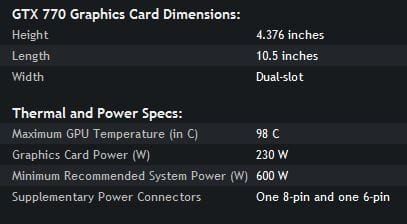
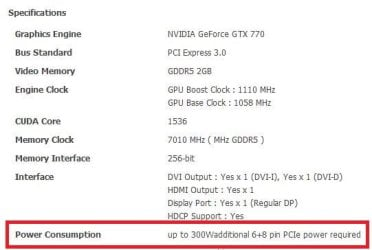
So if you have a 500W PSU you can infer from that information that your PSU probably won’t be capable of running the overclocked aftermarket card which tells you to allow for 300W just for the card. The reference version suggests a 600W PSU and these will generally use less power as they are set to stock clocks, so to run one of these cards you’d need to upgrade your PSU too. The alternative would be to look for a lower range card that uses less power.
PART THREE
Size
A lot of today’s cards are absolute monsters when it comes to the sheer size of them and again this another factor that is often overlooked. Unless you’re housing your components in a full tower case you need to research whether the card you want to buy will actually fit into your rig or not.
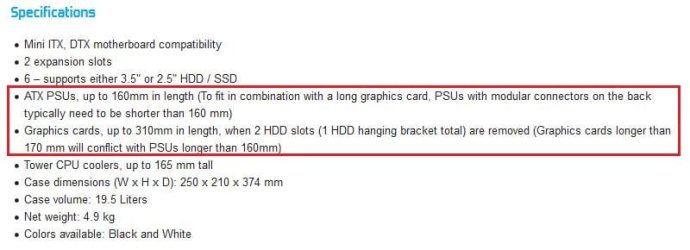
I’ve recently dealt with just such a case over on PCHF. The OP wanted to know whether the card he wanted to buy (an MSI N780 TF) would be compatible with his motherboard. The answer to that was pretty straight forward, the card would indeed be compatible with his ASUS P8Z77-I Deluxe, and his 600W was just scraping in as man enough to run the card. However, looking at the size of the card and the specifications of his case (Fractal Node 304) from the manufacturer’s website, it was a possibility that the card wouldn’t physically fit. Below are the card’s length and the specifications from the case manufacturer’s website. Not only is it just the case that need taking into consideration, but the card may also foul on the PSU depending on the size of it.

Another example comes straight from myself. I bought a rig last year that was to replace my old desktop rig, I didn’t intend on gaming so bought an A10-5800k APU with an HD6670 GPU in a Cooler Master Sileo 500 case. After a couple of weeks I decided I wanted to game and the 6670 just wasn’t up to the task, so I checked my PSU (400W) and found that the highest card it would run was an HD7850.
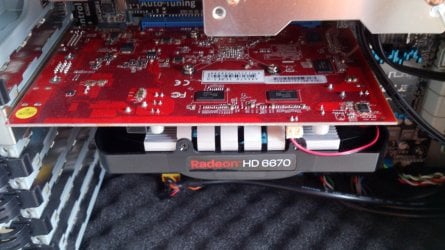
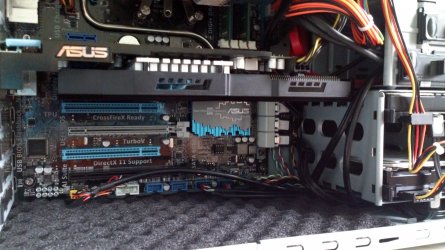
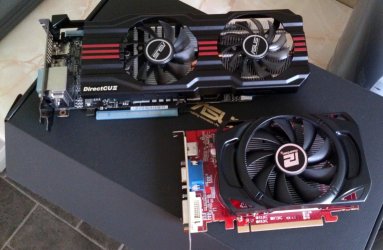
I scoured the market and settled on an ASUS HD7850-DC2T and bought it straight away. However, when I came to fit it I found that I had to literally force it into the case with the end of the card sitting against the HDD cage. Below are two photos of the rig, one with the 6670 fitted and one with the 7850 fitted to give you an idea of the size difference in these cards.
The higher range of card you’re going for will usually be a lot bigger than the lower and mid-range cards. Be sure that your card will fit in your case. HD6670:
HD7850-DC2T:
The cards side by side:
PART FOUR
Size
Your CPU will also play a part in the choice of your GPU. It’s not as critical as power requirements or the size of the card as it won’t stop the card from working or fitting into your case, but an old CPU or lower or mid ranged CPU will bottleneck higher end GPUs. Most modern quad core CPUs will be fine coupled with modern GPUs, but older CPUs and dual core CPUs could well hold back the performance of your GPU depending on which GPU you’ve chosen.
Again, it’s wise to check benchmarks online for your CPU if you’re in any doubt.
All modern motherboards these days come with PCIe 3.0 as standard, and all modern video cards will be PCIe 3.0 compliant. However, if your motherboard is an older model with only PCIe 2.0 slots available, your card will still work as the interface is backwards compatible. It’s worth noting that the card will be capped to PCIe 2.0 transfer rates but it will still work.
PART FIVE
Benchmarks & Comparisons
GPU Boss
HWCompare
GPU Review
Video Card Benchmarks: Passmark Software
Anandtech
PART SIX
List of nVidia & AMD GPUs
nVidia GPU List
AMD GPU List

Last edited:


