
Choosing columns in WMP

nate42nd

Learning every day
Guru
Gold Member
VIP
Local time
7:58 PM
Messages
2,036
Location
The Wild West
WMP is displaying the two "album art" covers for all albums. I only have two album covers and WMP has decided to display these two for all albums. When I go into "choose columns" to make WMP stop displaying album art altogether, "album art" is "grayed out" so I cannot un-check it. How could I either make it stop displaying the album art or delete the album art? Thanks.
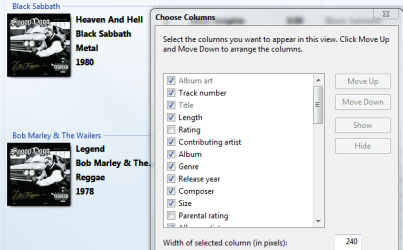
WMPalbumart.PNG
 

My Computer

Computer Manufacturer/Model Number
Keeps changing - (Custom)
OS
Windows 7 Professional x64
CPU
Intel Core i7 860
Motherboard
Gigabyte GA-P55-UD4P
Memory
4GB DDR3 Mushkin 1600Mhz @ 7-8-7-20
Graphics Card(s)
MSI GTS250 1GB DDR3 Twin Frozr
Sound Card
Onboard realtek
Monitor(s) Displays
Samsung SyncMaster 24" P2450 + Samsung 20" 2033
Screen Resolution
1920 X 1080 and 1600 X 900 (#2 system 1440 X 900)
Hard Drives
Patriot Inferno 120GB SSD + 3 WD Blue 640GB drives
PSU
Corsair 750 HX Modular
Case
Lancool PC-K62
Cooling
Cooler Master TX3 CPU cooler and 4-140mm and 1-120mm case
Keyboard
Gigabyte USB keyboard
Mouse
Microsoft wireless laser mouse 5000
Internet Speed
7 Mb down 1.5 up
Other Info
System #2: AMD Phenom II X6 1055T (Freezer 7 Pro cooler) - Gigabyte 880GMA-UD2H - WD 500GB Black - 9500GT (1GB) 500W OCZ modular PSU - Antec 200 case. System #3 (LapTop) Core 2 Duo T6670 - 320GB 7200RPM HD - 4GB DDR3 RAM.
Sorry to dig back up this thread. I am having the same problem and I can't turn off album art. Anyone have a fix for this problem?
 

My Computer

OS
Windows 7
it's in the View options - to the left of the search box
- just select "Details" from the drop-down list and the album covers should disappear....
 

My Computer

Computer type
PC/Desktop
Computer Manufacturer/Model Number
benchtec, built to personal specs
OS
Windows10 Pro - 64Bit vs.10547
CPU
i7-965 Extreme Edition (8 Cores) at 3.3GHz (no OC)
Motherboard
BloodRageX58 (Socket1366)
Memory
12G Corsair Dominator DDR3 - tripled
Graphics Card(s)
2xAMD SapphireNITRO R9 380(4G) crossfire
Sound Card
Sonar(SB)X-Fi onboard
Monitor(s) Displays
SyncMaster P2050 20"
Screen Resolution
1600x900 (widescreen)
Hard Drives
480G\OCZSolid3SSD, 64G\OCZVertex3SSD,60G\OCZVertex2SSD, 1TB\spinpointF1SATAHDD
PSU
1200w Power Station Gold
Case
ANTEC 900/2 all blue lights, etc..
Cooling
Noctua SE1366 NH-U12P - a tight fit, but a monster cooler!!
Keyboard
Logitech G19 (wired)
Mouse
Logitech G9 Laser (wired)
Internet Speed
150mb unlimited
Browser
IE11(RP)
Other Info
Xbox One, Nokia735 Windows10 mobile, LG HD/DVD/Blu-Ray r/w, CyberlinkPowerDVD15, LogitechZ5500-SS(5.1), LogitechG35Phones-SS(7.1),MSOffice 2007,CorelDrawX7,Painter2016, Wacom Intuos Pro-SE
That doesn't solve anything at all. The incorrect album art will still appear in the playlist and in the Now Playing window if the user decides to use "Album Art" instead of a visualization...

My advice is to simply download and add proper album art to each album, that's what album art is for.
If you want to completely delete the album art, first you need to find the folder where it is located, then click Organize -> Folder and search options -> click the View tab and uncheck "Hide protected operating system files" -> click Yes, then Apply, and OK.
You should now see the hidden album art files, simply delete them and you're done. Make sure that WMP12 is closed before you do this, so that when you finish, you can start WMP12 and (hopefully) after it automatically updates your library, the album art should be gone for good.

Also, in case you do not want this to happen in the future, you can prevent WMP from automatically downloading album info by clicking in WMP: Organize -> Options -> and on the Library tab uncheck "Retrieve media information from the Internet" -> click Apply, and OK.

Hope this solves the problem.
 

My Computer

Computer type
Laptop
Computer Manufacturer/Model Number
Custom
OS
Windows 7 Home Premium x64
CPU
Intel Core i5 2500K
Motherboard
MSI MS-7750
Memory
8GB DDR3
Graphics Card(s)
nVidia GeForce GTX650 Ti BOOST
Sound Card
Realtek
Monitor(s) Displays
21' Philips
Screen Resolution
Full HD
Hard Drives
1TB
PSU
500W
Details" from the drop-down list and the album covers should disappear :D
 

My Computer

Computer Manufacturer/Model Number
I wont tell ^^
OS
1ºpc:Windows7x64 bit,Notebook:(7)x32 bit, 2ºWindows XP x32bit-3ºWindows Vista x32bit and 4ºpc: Linux
CPU
windows 7, windows xp, windows vista and linux(different pc)
Motherboard
Core (TM)2 Quad CPU
Memory
4,00 GB
Graphics Card(s)
GeForce 9400
Sound Card
This i dont know =P
Monitor(s) Displays
1920x1080
Hard Drives
This i dont know ^~
C: 100 GB
D: 370 GB
this ?
PSU
This i dont know :x
Case
This i dont know ;(
Cooling
This i dont know :)
Internet Speed
1GB auhauhah
*sigh*
I just said, they won't they'd just be hidden from the library, but will still show up at the top of the playlist. Jesus...
 

My Computer

Computer type
Laptop
Computer Manufacturer/Model Number
Custom
OS
Windows 7 Home Premium x64
CPU
Intel Core i5 2500K
Motherboard
MSI MS-7750
Memory
8GB DDR3
Graphics Card(s)
nVidia GeForce GTX650 Ti BOOST
Sound Card
Realtek
Monitor(s) Displays
21' Philips
Screen Resolution
Full HD
Hard Drives
1TB
PSU
500W
Thanks for all the help. I'm happy with just having it off the library list. :D
 

My Computer

OS
Windows 7
Back
Top