
Win7 Chrome Bookmark Bar How remove and add?

jjr

New member
Member
VIP
Local time
11:48 AM
Messages
315
I used to have a folder in my bookmarks bar that said favorites in that I had folders for mobile bookmarks, other bookmarks and all my favorites. Many just disappeared , I do have a lot of stored bookmarks but many of these I would like to remove from the bookmark bar but not delete from the saved ones in my manager. If I just right click on the bookmark in the bar and delete will it delete what I have saved?

How can I do that? Basically had Gmail, Yahoo mail, Favorite folder and a few other bookmarks. Now the Gmail disappeared as well as the favorites folder.

I did uninstall chrome and reinstall but that did not do it.

Help ;-)

TIA
 

My Computer My Computer

Computer type
PC/Desktop
Computer Manufacturer/Model Number
DELL XPS 8700 DESKTOP
OS
Microsoft Windows 7 Professional 64-bit
CPU
Intel(R) Core(TM) i7-4790 CPU @ 3.60GHz
Motherboard
Dell Inc.Base Board 0KWVT8
Memory
16.00 GB Hynix/Hyundai HMT451U6BFR8A-PB
Graphics Card(s)
NVIDIA GeForce GT 720 1920 x 1080 x 32 bits (4294967296 colo
Sound Card
Broadcom Bluetooth Hands-free Audio
Screen Resolution
1920 x 1080 x 32 bits (4294967296 colors) @ 60 Hz
Hard Drives
ST1000DM ST1000DM003-1ER1 SCSI Disk Device
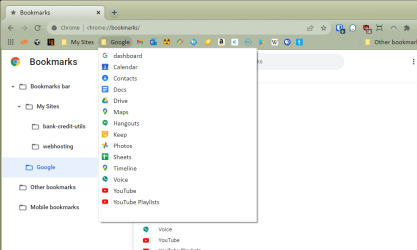
Use Chrome's Bookmarks Manager to sort and arrange your bookmarks. And once you've done so, use the Bookmarks Manager to backup your bookmarks to a file, from which you can restore anytime in the future.

The "Bookmarks Bar" is just the bookmarks in the top level, not in any subfolder.

If you delete a bookmark, it's gone. If you want to keep it but just not have it in the top Bar, move it elsewhere.

Note that you can add your own custom folders in your Bookmarks Bar if you wish. In this illustration, I've grouped all the various Google sites under a Google folder for quick access without cluttering up the Bar.

bookmarks-mgr.png

I use the Bar only for my most frequently visited sites, and since I visit them regularly I don't need text labels on the favicons. Thus, I've also edited each bookmark in the Bar to use a blank "Name" field. That gives me a cleaner look, and space for more bookmarks in the Bar.

Warning: if you login to a Google account (in the top right corner), by default your bookmarks will be synced across all your browsers to which you've logged in. Changes made on one browser or your smartphone can change what bookmarks you see on another.
 

My Computer My Computer

Computer type
PC/Desktop
Computer Manufacturer/Model Number
Dell Optiplex 7050
OS
Windows 7/8.1/10 multiboot
CPU
Intel Core i7-7700
Motherboard
Dell, Intel Q270 chipset
Memory
48GB (2x16GB Crucial DDR4-3200 + 2x8GB Hynix DDR4-2400)
Graphics Card(s)
Intel HD630 + AMD Radeon R7 450 PCIe
Monitor(s) Displays
Asus VC279 (27")
Screen Resolution
1920x1080
Hard Drives
Toshiba M.2 NVMe (256GB),
Samsung 960 Evo (500GB),
WD Red Plus 80EFBX (8TB)
This is how my bookmarks are all stored alphabetically in their own folder. Also easier to back up.
-
RR.png
 

My Computer My Computer

Computer Manufacturer/Model Number
Look in my Signature.
OS
Win7 H.Prem. 32bit+SP1
Back
Top