
Chrome tabs - how to edit?

Roman5

New member
Member
VIP
Local time
1:11 PM
Messages
111
Location
London UK
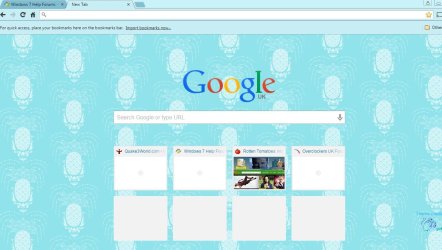
Chrome thumbnails - how to edit?

Google Chrome has been my browser of choice for many years. But I've never known how, if it's even possible, to edit the 8 boxes (as per screenshot) and manually bookmark my favourite sites. Those boxes display my visited sites automatically but it does it in it's own time, not instantly. I don't know what determines the time Chrome takes to acknowledge that it should display a thumbnail of a site I've visited. It also doesn't always display the image for a while, just the name of the site. I'd love to be in control and bookmark my sites manually, but using those boxes. Is it possible?
 

Attachments
  • Capture.JPG
    Capture.JPG
    112.9 KB · Views: 1
Last edited:

My Computer My Computer

At a glance

Windows 7 HP x64 SP1Phenom II x2 550BE @3.1GhzPatriot Viper 2x2GB DDR2 6400Sapphire HD5850 Extreme 1GB
Computer type
PC/Desktop
OS
Windows 7 HP x64 SP1
CPU
Phenom II x2 550BE @3.1Ghz
Motherboard
GA-MA770-UD3 rev 2.0
Memory
Patriot Viper 2x2GB DDR2 6400
Graphics Card(s)
Sapphire HD5850 Extreme 1GB
Sound Card
Onboard Realtek
Monitor(s) Displays
Samsung 23" S23A700D * 120Hz * 3D * 2ms response
Screen Resolution
1920x1080
Hard Drives
SSD Samsung 830 128GB/Seagate 2TB (2 x single platter)/ WD 1TB Cav Black/ WD RE3 1TB /WD 320GB IDE/IBM 120GB IDE
PSU
XFX Pro 650w Core Edition
Case
Coolermaster CM690 Dominator
Cooling
TRUE Rev.C + Arctic Cooling MX-2 + various 12cm fans
Keyboard
Razer Lycosa
Mouse
Logitech MX518
Internet Speed
Fibre Optic 100MB Down * 6MB Up
Top right click on the Star that add to Bookmarks ...

Top right again where the three horizontal stripes has a list of your Bookmarks ...

There is also a list of Recent places ...

Have a look in Settings also ...
 

My Computer My Computer

At a glance

windows 7 home 64bitINTEL-CORE I716GB
Computer Manufacturer/Model Number
W530-3630QM1
OS
windows 7 home 64bit
CPU
INTEL-CORE I7
Memory
16GB
Hard Drives
750GB
Browser
Chrome
Top right click on the Star that add to Bookmarks ...

Top right again where the three horizontal stripes has a list of your Bookmarks ...

There is also a list of Recent places ...

Have a look in Settings also ...

I might not be seeing the correct thing, but I don't think any of those are to do with what shows in the box tabs?
 

My Computer My Computer

At a glance

Windows 7 HP x64 SP1Phenom II x2 550BE @3.1GhzPatriot Viper 2x2GB DDR2 6400Sapphire HD5850 Extreme 1GB
Computer type
PC/Desktop
OS
Windows 7 HP x64 SP1
CPU
Phenom II x2 550BE @3.1Ghz
Motherboard
GA-MA770-UD3 rev 2.0
Memory
Patriot Viper 2x2GB DDR2 6400
Graphics Card(s)
Sapphire HD5850 Extreme 1GB
Sound Card
Onboard Realtek
Monitor(s) Displays
Samsung 23" S23A700D * 120Hz * 3D * 2ms response
Screen Resolution
1920x1080
Hard Drives
SSD Samsung 830 128GB/Seagate 2TB (2 x single platter)/ WD 1TB Cav Black/ WD RE3 1TB /WD 320GB IDE/IBM 120GB IDE
PSU
XFX Pro 650w Core Edition
Case
Coolermaster CM690 Dominator
Cooling
TRUE Rev.C + Arctic Cooling MX-2 + various 12cm fans
Keyboard
Razer Lycosa
Mouse
Logitech MX518
Internet Speed
Fibre Optic 100MB Down * 6MB Up
If you look in Settings under Tabs ...

On Start up you have these Options

Open the new Tab page

Continue where you left of

Open a specific page or set pages
 

My Computer My Computer

At a glance

windows 7 home 64bitINTEL-CORE I716GB
Computer Manufacturer/Model Number
W530-3630QM1
OS
windows 7 home 64bit
CPU
INTEL-CORE I7
Memory
16GB
Hard Drives
750GB
Browser
Chrome

My Computer My Computer

At a glance

Windows 7 HP x64 SP1Phenom II x2 550BE @3.1GhzPatriot Viper 2x2GB DDR2 6400Sapphire HD5850 Extreme 1GB
Computer type
PC/Desktop
OS
Windows 7 HP x64 SP1
CPU
Phenom II x2 550BE @3.1Ghz
Motherboard
GA-MA770-UD3 rev 2.0
Memory
Patriot Viper 2x2GB DDR2 6400
Graphics Card(s)
Sapphire HD5850 Extreme 1GB
Sound Card
Onboard Realtek
Monitor(s) Displays
Samsung 23" S23A700D * 120Hz * 3D * 2ms response
Screen Resolution
1920x1080
Hard Drives
SSD Samsung 830 128GB/Seagate 2TB (2 x single platter)/ WD 1TB Cav Black/ WD RE3 1TB /WD 320GB IDE/IBM 120GB IDE
PSU
XFX Pro 650w Core Edition
Case
Coolermaster CM690 Dominator
Cooling
TRUE Rev.C + Arctic Cooling MX-2 + various 12cm fans
Keyboard
Razer Lycosa
Mouse
Logitech MX518
Internet Speed
Fibre Optic 100MB Down * 6MB Up

My Computer My Computer

At a glance

windows 7 home 64bitINTEL-CORE I716GB
Computer Manufacturer/Model Number
W530-3630QM1
OS
windows 7 home 64bit
CPU
INTEL-CORE I7
Memory
16GB
Hard Drives
750GB
Browser
Chrome

My Computer My Computer

At a glance

Windows 7 HP x64 SP1Phenom II x2 550BE @3.1GhzPatriot Viper 2x2GB DDR2 6400Sapphire HD5850 Extreme 1GB
Computer type
PC/Desktop
OS
Windows 7 HP x64 SP1
CPU
Phenom II x2 550BE @3.1Ghz
Motherboard
GA-MA770-UD3 rev 2.0
Memory
Patriot Viper 2x2GB DDR2 6400
Graphics Card(s)
Sapphire HD5850 Extreme 1GB
Sound Card
Onboard Realtek
Monitor(s) Displays
Samsung 23" S23A700D * 120Hz * 3D * 2ms response
Screen Resolution
1920x1080
Hard Drives
SSD Samsung 830 128GB/Seagate 2TB (2 x single platter)/ WD 1TB Cav Black/ WD RE3 1TB /WD 320GB IDE/IBM 120GB IDE
PSU
XFX Pro 650w Core Edition
Case
Coolermaster CM690 Dominator
Cooling
TRUE Rev.C + Arctic Cooling MX-2 + various 12cm fans
Keyboard
Razer Lycosa
Mouse
Logitech MX518
Internet Speed
Fibre Optic 100MB Down * 6MB Up
Back
Top