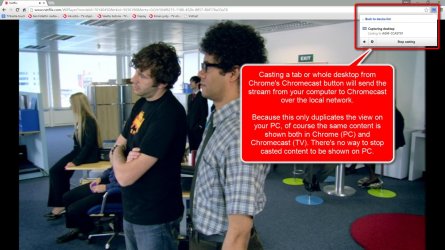
If I play a video on my tv using Chromecast through my desktop, the video on the desktop stops playing as it should do. The desktop hangs on the cable.
However, if I use my laptop wireless, the video on both will keep playing.
That results in staggering movies, because the wireless is not fast enough.
How to stop my laptop from playing when I cast to my TV?
However, if I use my laptop wireless, the video on both will keep playing.
That results in staggering movies, because the wireless is not fast enough.
How to stop my laptop from playing when I cast to my TV?
My Computer
- Computer type
- PC/Desktop
- OS
- Microsoft Windows 7 Ultimate 64-bits 7601 Multiprocessor Free Service Pack 1
- CPU
- Intel(R) Core(TM)2 Duo CPU E8400 @ 3.00GHz
- Motherboard
- ASRock G41MH/USB3.
- Memory
- 8,00 GB
- Graphics Card(s)
- (1) Intel(R) G41 Express Chipset (2) Intel(R) G41 Express
- Sound Card
- (1) VIA High Definition Audio (2) Intel(R) High Definition
- Monitor(s) Displays
- S24B350 Samsung
- Screen Resolution
- 1920 x 1080 x 32 bits (4294967296 colors) @ 60 Hz
- Hard Drives
- (1) ST31000528AS ATA Device (2) Generic- Compact Flash USB Device (3) Generic- MS/MS-Pro USB Device (4) Generic- SD/MMC USB Device (5) Generic- SM/xD-Picture USB Device
- Antivirus
- ZoneAlarm Free Antivirus + Firewall version: 12.0.104.000 Vs

 (click screenshots to enlarge):