
Civ4

Azural

New member
Power User
VIP
Local time
6:48 PM
Messages
184
Anyone else notice that 7 turns off Aero when running Civ4? This has happened with 7000, '68, and '77, all x86. Not sure if it's the same with other versions. The game runs the same as it did before...nothing's changed other than the loading time between turns on big maps being faster.

I just found it odd considering Vista didn't do this.
 

Attachments
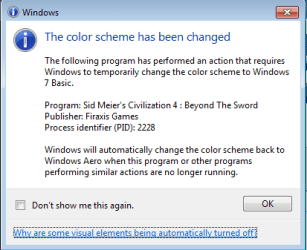
  • civ4aero.png
    civ4aero.png
    8.8 KB · Views: 68

My Computer

Computer Manufacturer/Model Number
HP Pavillion dv2550se
OS
Windows 7 Build 7229 x64
CPU
Intel Core2 Duo T5250 @ 1.50GHz
Memory
2GB DDR2
Graphics Card(s)
Moble Intel 965 Express
Screen Resolution
1280x800
Hard Drives
160GB
750GB External
Not happening to me with Civ4 BTS on the 64bit Win7 version.

It really does load faster as you noted. But then I also upgraded to an i7 processor over the old Vista system.
 

My Computer

Computer Manufacturer/Model Number
Hand Built
OS
Windows 7 x64 build 7100
CPU
2.67GHz Intel i7
Motherboard
ASUS P6T
Memory
6GB DDR3
Graphics Card(s)
2xEVGA 9800 GT 512MB DDR3
Sound Card
Creative X-Fi Elite Pro
Monitor(s) Displays
2 Acer
Screen Resolution
1920x1080 and 1680x1050
Hard Drives
2 WD Green 1TB SATA 7200RPM
PSU
500W Antec
Case
Antec Sonata
Cooling
Standard
Keyboard
Microsoft Wireless Multimedia
Mouse
Microsoft Wireless Laser
Internet Speed
T1 - 1.54 MB
Other Info
DVD-RW and LG Blue-Ray/HD-DVD Combo Drive
1TB MyBook USB Removable for backup
What build are you using?


I can't even get past the first turn in 7100 x64 on BTS. Still having it turn off Aero, though I noticed it didn't do this for the normal Civ4.


Edit: I updated to 1.17 and it's working fine now. The issue with Aero is still there, though.
 
Last edited:

My Computer

Computer Manufacturer/Model Number
HP Pavillion dv2550se
OS
Windows 7 Build 7229 x64
CPU
Intel Core2 Duo T5250 @ 1.50GHz
Memory
2GB DDR2
Graphics Card(s)
Moble Intel 965 Express
Screen Resolution
1280x800
Hard Drives
160GB
750GB External
What build are you using?


...

I was running 7000 when I wrote that, but am running 7100 now (the Technet download.) I did have it turn off Aero and set itself to low res with most animations, etc turned off the first time I ran it. I set it back to high res and turned back on the features, but it is still turning off Aero when I start it.

Other than that, no problems.
 

My Computer

Computer Manufacturer/Model Number
Hand Built
OS
Windows 7 x64 build 7100
CPU
2.67GHz Intel i7
Motherboard
ASUS P6T
Memory
6GB DDR3
Graphics Card(s)
2xEVGA 9800 GT 512MB DDR3
Sound Card
Creative X-Fi Elite Pro
Monitor(s) Displays
2 Acer
Screen Resolution
1920x1080 and 1680x1050
Hard Drives
2 WD Green 1TB SATA 7200RPM
PSU
500W Antec
Case
Antec Sonata
Cooling
Standard
Keyboard
Microsoft Wireless Multimedia
Mouse
Microsoft Wireless Laser
Internet Speed
T1 - 1.54 MB
Other Info
DVD-RW and LG Blue-Ray/HD-DVD Combo Drive
1TB MyBook USB Removable for backup
Yeah, it's been working great for me since I updated it to 1.17. It actually defaulted to the highest setting for everything but resolution when it installed. Odd that it didn't for you as you've definitely got the hardware to support the highest settings.
 

My Computer

Computer Manufacturer/Model Number
HP Pavillion dv2550se
OS
Windows 7 Build 7229 x64
CPU
Intel Core2 Duo T5250 @ 1.50GHz
Memory
2GB DDR2
Graphics Card(s)
Moble Intel 965 Express
Screen Resolution
1280x800
Hard Drives
160GB
750GB External
Are you running the latest video card driver for your system?
What card are you running?
 

My Computer

Computer Manufacturer/Model Number
Black_Box (homebuilt)
OS
windows 7 RTM x64
CPU
Phenom II 965 Quad Core 3.4Ghz
Motherboard
Asus M4A79T Deluxe
Memory
Mushkin Blackline 8GB (4x2gb)
Graphics Card(s)
XFX Radeon 5970 Black Edition
Sound Card
onboard
Monitor(s) Displays
Dell 2408WPF-main Dell E248WFP-secondary
Screen Resolution
1920x1200-main 1920x1200-secondary
Hard Drives
OCZ Vertex Limited Edition 100GB (OS)
x1 WD Black Edition 500GB drive (Storage)
PSU
XFX 850w Black Edition (Modular)
Case
Mountian Mods H2go
Cooling
CoolITSystems ECO A.L.C.
Keyboard
Logitech MX 5500 wireless keyboard
Mouse
Razor Copperhead
Internet Speed
16Mb down/2Mb up Wowway Cable Internet
Moble Intel 965 Express...definitely not the greatest, but I don't have any trouble running Civ4 or it's expansions on the highest settings. I am using the latest driver.


It wouldn't bug me so much if I didn't tab out of games often.
 

My Computer

Computer Manufacturer/Model Number
HP Pavillion dv2550se
OS
Windows 7 Build 7229 x64
CPU
Intel Core2 Duo T5250 @ 1.50GHz
Memory
2GB DDR2
Graphics Card(s)
Moble Intel 965 Express
Screen Resolution
1280x800
Hard Drives
160GB
750GB External
I noticed this happening too with Beyond the Sword 3.17 (Civ4 and Civ4:Warlords have both latest patches installed as well).
 

My Computer

Computer Manufacturer/Model Number
Apple MacBook Pro
OS
Windows 7 64-bit (7127) & Mac OS X 10.5.7
CPU
2.53 GHz Intel Core2Duo (6MB L2 Cache)
Memory
4GB DDR2 667
Graphics Card(s)
8600M GT 512MB
Monitor(s) Displays
15.4 LED backlit LCD
Screen Resolution
1440x900
Hard Drives
Hitachi 250GB 5400 RPM (soon to be replaced)
Mouse
Logitech
I cannot even get Civ4 to install. I have Windows 7 ultimate x64 build 7600 with a new machine. nVidia, recent driver. I right click the setup.exe file and run as admin and get this:

Error Code: -5009 : 0x8002802b
Error Information:
>Ctor\ObjectWrapper.cpp (163)
>Ctor\ObjectWrapper.cpp (391)
>Kernel\Component.cpp (1163)
>Ctor\ObjectWrapper.cpp (34)
>Ctor\DriverWrapper.cpp (31)
>Kernel\Component.cpp (1152)
>Kernel\CABFile.cpp (384)
>SetupDLL\SetupDLL.cpp (1526)
PAPP:Sid Meier's Civilization 4
PVENDOR:Firaxis Games (##IDS_PRODUCT_URL##)
PGUID:CFBCE791-2D53-4FCE-B3FB-D6E01F4112E8
$11.0.0.28844
@Windows 98 (67766446) BT_OTH
 

My Computer

OS
Windows 7 Ultimate
You need a good Video Card

you need a good video card with 64Mb and be running ultimate Eddition for Areo to work.
 

My Computer

Computer Manufacturer/Model Number
Toshibia Satellite
OS
wndows 7 Retail 32bit
CPU
AMD Athlon Dual core x64

My Computer

Computer type
Laptop
Computer Manufacturer/Model Number
Dell Latitude XT2 Tablet PC
OS
Windows 7 Professional 32-bit SP1
CPU
Intel Mobile Core 2 Duo SU9600 @ 1.60GHz
Motherboard
Dell Inc. 0M374P (Microprocessor)
Memory
3.00GB Dual-Channel DDR3 @ 398MHz (6-6-6-15)
Graphics Card(s)
Intel Mobile Intel 4 Series Express Chipset Family (Dell)
Sound Card
High Definition Audio Device
Monitor(s) Displays
Generic PnP Monitor (1280x800@60Hz)
Screen Resolution
1280 x 800
Hard Drives
232GB TOSHIBA MK2529GSGF (SATA)
Keyboard
HID Keyboard Device; Standard PS/2 Keyboard
Mouse
HID-compliant mouse; PS/2 Compatible Mouse
Antivirus
Norton 360
Browser
Google Chrome, Mozilla Firefox
Other Info
From Piriform Speccy!
also you dont even need a good graphics card
 

My Computer

Computer type
Laptop
Computer Manufacturer/Model Number
Dell Latitude XT2 Tablet PC
OS
Windows 7 Professional 32-bit SP1
CPU
Intel Mobile Core 2 Duo SU9600 @ 1.60GHz
Motherboard
Dell Inc. 0M374P (Microprocessor)
Memory
3.00GB Dual-Channel DDR3 @ 398MHz (6-6-6-15)
Graphics Card(s)
Intel Mobile Intel 4 Series Express Chipset Family (Dell)
Sound Card
High Definition Audio Device
Monitor(s) Displays
Generic PnP Monitor (1280x800@60Hz)
Screen Resolution
1280 x 800
Hard Drives
232GB TOSHIBA MK2529GSGF (SATA)
Keyboard
HID Keyboard Device; Standard PS/2 Keyboard
Mouse
HID-compliant mouse; PS/2 Compatible Mouse
Antivirus
Norton 360
Browser
Google Chrome, Mozilla Firefox
Other Info
From Piriform Speccy!
Back
Top