
Solved Class Not Registered Error In Outlook 2010

jsquareg

New member
Power User
Local time
7:52 AM
Messages
400
I recently downloaded IE9 for my Win7 SP1 system and set it as the default browser. When I open an email in Outlook 2010 and try to access a link to a web site from it. I get a "Class not registered" error. See attached snip. I have tried the 'Fix' found on the web { How to reset Internet Explorer settings) to no success. I then did a repair of Office but still no luck. When I have Firefox as my default browser, any email link opens as it should.

What else do I need to do make Outlook 2010 and IE9 to play together nicely with respect to links in an email?

Thank you very much.
 

Attachments

  • Capture.PNG
    Capture.PNG
    4.1 KB · Views: 25

My Computer My Computer

Computer type
PC/Desktop
Computer Manufacturer/Model Number
Dell XPS-8500
OS
Windows 7 Home Premium (Retail) Full version - With SP1
CPU
3.10 Gig Intel Core i5-3350P
Motherboard
Dell 0NW73C A00
Memory
8192 Megabytes Usable Installed Memory
Monitor(s) Displays
Samsung SyncMaster [Monitor] (19.1"vis, s/n HVELA10194, Octo
Screen Resolution
1024 X 768
Hard Drives
INTEL SSDSA2CW120G3 ATA Device [Hard drive] (120.03 GB)
INTEL SSDSA2CW080G3 ATA Device [Hard drive] (80.02 GB)
Keyboard
HID Keyboard Device (HP)
Mouse
Dell (came with computer)
Internet Speed
cox high speed
Other Info
The above taken with Bel Arc Advisor
That error can mean that while IE is set as your default browser, perhaps it is not set as default for all file types it can handle

http://www.sevenforums.com/tutorials/2630-default-programs-set-program-s-default-associations.html

Also make sure HTTP and HTTPS are associated with Internet Explorer

http://www.sevenforums.com/tutorials/9154-default-programs-associate-file-type-protocol.html

This fixit is not specific to your error, but it does address outlook hyperlink issues, and is worth trying as well if IE is already default for Outlook.

Hyperlinks are not working in Outlook

A Guy
 

My Computer My Computer

Computer type
PC/Desktop
OS
Windows 10 Home x64
CPU
INTEL Core i5-750 Quad-Core 3.37GHz
Motherboard
ASUS P7P55D
Memory
HyperX Fury Black Series 8GB (2 x 4GB) 1866Mhz
Graphics Card(s)
EVGA GeForce GTX 750 Superclocked 1GB 128-Bit GDDR5
Monitor(s) Displays
LG 32MA68HY 32" IPS
Screen Resolution
1920 x 1080
Hard Drives
Samsung 840 Evo 120GB, SEAGATE 500GB Barracuda® 7200.12, SATA 3 Gb/s, 7200 RPM, 16MB cache
PSU
ANTEC TruePower New TP-550, 80 PLUS, 550W
Case
ANTEC Three Hundred Illusion
Cooling
COOLER MASTER Hyper 212 Plus, 4 x 120mm 1 x 140mm Noctua's
Internet Speed
85 + Mbps
Antivirus
Avast
Browser
Vivaldi
Thank you A Guy.

I made sure Http and Https were associated with IE9 but still the problem exists. I even uninstalled Firefox to see if a possible conflict existed. No luck with that either. Earlier, I did a Repair/Install from the Win7 DVD but that had no effect.

Now I am at a total loss. Have you any other suggestions?

Thanks again.


That error can mean that while IE is set as your default browser, perhaps it is not set as default for all file types it can handle

http://www.sevenforums.com/tutorials/2630-default-programs-set-program-s-default-associations.html

Also make sure HTTP and HTTPS are associated with Internet Explorer

http://www.sevenforums.com/tutorials/9154-default-programs-associate-file-type-protocol.html

This fixit is not specific to your error, but it does address outlook hyperlink issues, and is worth trying as well if IE is already default for Outlook.

Hyperlinks are not working in Outlook

A Guy
 

My Computer My Computer

Computer type
PC/Desktop
Computer Manufacturer/Model Number
Dell XPS-8500
OS
Windows 7 Home Premium (Retail) Full version - With SP1
CPU
3.10 Gig Intel Core i5-3350P
Motherboard
Dell 0NW73C A00
Memory
8192 Megabytes Usable Installed Memory
Monitor(s) Displays
Samsung SyncMaster [Monitor] (19.1"vis, s/n HVELA10194, Octo
Screen Resolution
1024 X 768
Hard Drives
INTEL SSDSA2CW120G3 ATA Device [Hard drive] (120.03 GB)
INTEL SSDSA2CW080G3 ATA Device [Hard drive] (80.02 GB)
Keyboard
HID Keyboard Device (HP)
Mouse
Dell (came with computer)
Internet Speed
cox high speed
Other Info
The above taken with Bel Arc Advisor

My Computer My Computer

Computer type
PC/Desktop
OS
Windows 10 Home x64
CPU
INTEL Core i5-750 Quad-Core 3.37GHz
Motherboard
ASUS P7P55D
Memory
HyperX Fury Black Series 8GB (2 x 4GB) 1866Mhz
Graphics Card(s)
EVGA GeForce GTX 750 Superclocked 1GB 128-Bit GDDR5
Monitor(s) Displays
LG 32MA68HY 32" IPS
Screen Resolution
1920 x 1080
Hard Drives
Samsung 840 Evo 120GB, SEAGATE 500GB Barracuda® 7200.12, SATA 3 Gb/s, 7200 RPM, 16MB cache
PSU
ANTEC TruePower New TP-550, 80 PLUS, 550W
Case
ANTEC Three Hundred Illusion
Cooling
COOLER MASTER Hyper 212 Plus, 4 x 120mm 1 x 140mm Noctua's
Internet Speed
85 + Mbps
Antivirus
Avast
Browser
Vivaldi
BINGO! I am running Win7 64 bit so I thought I should download IE9 64 bit. That seems to be the problem. I didn't realize IE9 64 bit couldn't be the default for Ourlook 2010. Is that also true for IE10?

Anyway, no big problem. I was just trying to get IE set up on my wife's new machine. She would really like to use IE rather than FF and I was trying to keep her happy.

Thanks again for all your help.

That could be caused if Outlook was using the x64 version of IE, but that version cannot be default, and would likely only happens if the x86 version of IE were missing somehow. Did you try the Fixit?

I would run the System File Checker

http://www.sevenforums.com/tutorials/1538-sfc-scannow-command-system-file-checker.html

I would also re-register the dlls using Shyams IE Restorator

http://www.sevenforums.com/tutorials/98056-sf-ie-restorator-troubleshooting-general-issues-ie.html

A Guy
 

My Computer My Computer

Computer type
PC/Desktop
Computer Manufacturer/Model Number
Dell XPS-8500
OS
Windows 7 Home Premium (Retail) Full version - With SP1
CPU
3.10 Gig Intel Core i5-3350P
Motherboard
Dell 0NW73C A00
Memory
8192 Megabytes Usable Installed Memory
Monitor(s) Displays
Samsung SyncMaster [Monitor] (19.1"vis, s/n HVELA10194, Octo
Screen Resolution
1024 X 768
Hard Drives
INTEL SSDSA2CW120G3 ATA Device [Hard drive] (120.03 GB)
INTEL SSDSA2CW080G3 ATA Device [Hard drive] (80.02 GB)
Keyboard
HID Keyboard Device (HP)
Mouse
Dell (came with computer)
Internet Speed
cox high speed
Other Info
The above taken with Bel Arc Advisor
IE9 x64 can't be set as default for the operating system at all. IE10 is different, there are not two separate browsers.

In 64-bit Windows 7, Internet Explorer 10 (IE10) has 32-bit and 64-bit together in one browser now. The IE10 browser frame process runs 64-bit, but for compatibility with plug-ins, IE10 runs 32-bit tabs by default. If the user turns on “Enhanced Protected Mode”, they will have 64-bit tabs by default for IE10.

http://www.sevenforums.com/tutorial...10-enable-32-bit-64-bit-ie10-windows-7-a.html

But you should have IE x86 on your system by default. You should have an IE folder in both Program Files, and Program Files (x86). There would be shortcuts on your start menu to 3 versions as well (including IE No add-ons). The x64 download should have installed both versions. A Guy
 

My Computer My Computer

Computer type
PC/Desktop
OS
Windows 10 Home x64
CPU
INTEL Core i5-750 Quad-Core 3.37GHz
Motherboard
ASUS P7P55D
Memory
HyperX Fury Black Series 8GB (2 x 4GB) 1866Mhz
Graphics Card(s)
EVGA GeForce GTX 750 Superclocked 1GB 128-Bit GDDR5
Monitor(s) Displays
LG 32MA68HY 32" IPS
Screen Resolution
1920 x 1080
Hard Drives
Samsung 840 Evo 120GB, SEAGATE 500GB Barracuda® 7200.12, SATA 3 Gb/s, 7200 RPM, 16MB cache
PSU
ANTEC TruePower New TP-550, 80 PLUS, 550W
Case
ANTEC Three Hundred Illusion
Cooling
COOLER MASTER Hyper 212 Plus, 4 x 120mm 1 x 140mm Noctua's
Internet Speed
85 + Mbps
Antivirus
Avast
Browser
Vivaldi
Now this is even more confusing. Sheesh. With IE9 set as default on my Win7 64 machine, A link contained in a email being read by Thunderbird opens just fine. Go figure!

I will try to download IE10, try to install it and see what happens.

Thanks again.
IE9 x64 can't be set as default for the operating system at all. IE10 is different, there are not two separate browsers.

In 64-bit Windows 7, Internet Explorer 10 (IE10) has 32-bit and 64-bit together in one browser now. The IE10 browser frame process runs 64-bit, but for compatibility with plug-ins, IE10 runs 32-bit tabs by default. If the user turns on “Enhanced Protected Mode”, they will have 64-bit tabs by default for IE10.
http://www.sevenforums.com/tutorial...10-enable-32-bit-64-bit-ie10-windows-7-a.html

But you should have IE x86 on your system by default. You should have an IE folder in both Program Files, and Program Files (x86). There would be shortcuts on your start menu to 3 versions as well (including IE No add-ons). The x64 download should have installed both versions. A Guy
 

My Computer My Computer

Computer type
PC/Desktop
Computer Manufacturer/Model Number
Dell XPS-8500
OS
Windows 7 Home Premium (Retail) Full version - With SP1
CPU
3.10 Gig Intel Core i5-3350P
Motherboard
Dell 0NW73C A00
Memory
8192 Megabytes Usable Installed Memory
Monitor(s) Displays
Samsung SyncMaster [Monitor] (19.1"vis, s/n HVELA10194, Octo
Screen Resolution
1024 X 768
Hard Drives
INTEL SSDSA2CW120G3 ATA Device [Hard drive] (120.03 GB)
INTEL SSDSA2CW080G3 ATA Device [Hard drive] (80.02 GB)
Keyboard
HID Keyboard Device (HP)
Mouse
Dell (came with computer)
Internet Speed
cox high speed
Other Info
The above taken with Bel Arc Advisor
Unless Outlook is somehow calling on the x64 version of IE9, then that is not the issue. If you confirm you have IE9 x86, and it is set as default, then we can usually assume Outlook is trying to use it.

I don't know if Outlook is on the list of programs you can set defaults to? If so, confirm it is set to use IE. Since you changed default to FF, and that worked, and making IE default again resulted in the return of the error, then it is somehow having an issue with IE.

I'll post to the Gurus, see if anyone has any thoughts.

A Guy
 

My Computer My Computer

Computer type
PC/Desktop
OS
Windows 10 Home x64
CPU
INTEL Core i5-750 Quad-Core 3.37GHz
Motherboard
ASUS P7P55D
Memory
HyperX Fury Black Series 8GB (2 x 4GB) 1866Mhz
Graphics Card(s)
EVGA GeForce GTX 750 Superclocked 1GB 128-Bit GDDR5
Monitor(s) Displays
LG 32MA68HY 32" IPS
Screen Resolution
1920 x 1080
Hard Drives
Samsung 840 Evo 120GB, SEAGATE 500GB Barracuda® 7200.12, SATA 3 Gb/s, 7200 RPM, 16MB cache
PSU
ANTEC TruePower New TP-550, 80 PLUS, 550W
Case
ANTEC Three Hundred Illusion
Cooling
COOLER MASTER Hyper 212 Plus, 4 x 120mm 1 x 140mm Noctua's
Internet Speed
85 + Mbps
Antivirus
Avast
Browser
Vivaldi
Unless Outlook is somehow calling on the x64 version of IE9, then that is not the issue. If you confirm you have IE9 x86, and it is set as default, then we can usually assume Outlook is trying to use it.

I don't know if Outlook is on the list of programs you can set defaults to? If so, confirm it is set to use IE. Since you changed default to FF, and that worked, and making IE default again resulted in the return of the error, then it is somehow having an issue with IE.

I'll post to the Gurus, see if anyone has any thoughts.

A Guy

OK. Thanks but I think I have taken enough of your time on this. I did download IE10 and after a failed attempt to install it I downloaded a required update and then things went fine. Outlook 2010 can open an embedded link perfectly and I am a happy camper now.

Again, thanks for all your help.
 

My Computer My Computer

Computer type
PC/Desktop
Computer Manufacturer/Model Number
Dell XPS-8500
OS
Windows 7 Home Premium (Retail) Full version - With SP1
CPU
3.10 Gig Intel Core i5-3350P
Motherboard
Dell 0NW73C A00
Memory
8192 Megabytes Usable Installed Memory
Monitor(s) Displays
Samsung SyncMaster [Monitor] (19.1"vis, s/n HVELA10194, Octo
Screen Resolution
1024 X 768
Hard Drives
INTEL SSDSA2CW120G3 ATA Device [Hard drive] (120.03 GB)
INTEL SSDSA2CW080G3 ATA Device [Hard drive] (80.02 GB)
Keyboard
HID Keyboard Device (HP)
Mouse
Dell (came with computer)
Internet Speed
cox high speed
Other Info
The above taken with Bel Arc Advisor
Good to know you got it solved. For future readers of this thread:

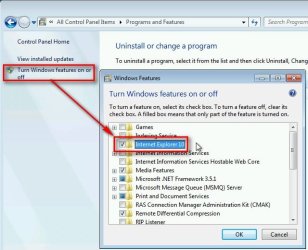
This issue (Outlook not able to open URL links after upgrading IE) can usually be solved quite easily by disabling the upgraded IE and reverting to older version, rebooting and enabling upgraded IE again.

To disable / enable upgraded IE, go to Control Panel > Programs and Features > Turn Windows features on or off and select / deselect the new upgraded IE accordingly:

2013-11-04_134349.jpg
Kari
 

My Computer My Computer

Computer type
Laptop
Computer Manufacturer/Model Number
HP ENVY 17-1150eg
OS
Windows 10 Pro x64 EN-GB
CPU
1.6 GHz Intel Core i7-720QM Processor
Memory
6 GB
Graphics Card(s)
ATI Mobility Radeon HD 5850 Graphics
Sound Card
Beats sound system with integrated subwoofer
Monitor(s) Displays
17" laptop display, 22" LED and 32" Full HD TV through HDMI
Screen Resolution
1600*900 (1), 1920*1080 (2&3)
Hard Drives
Internal: 2 x 500 GB SATA Hard Disk Drive 7200 rpm
External: 2TB for backups, 3TB USB3 network drive for media
Cooling
As Envy runs a bit warm, I have it on a Cooler Master pad
Keyboard
Logitech diNovo Media Desktop Laser (bluetooth)
Mouse
Logitech Performance Mouse MX
Internet Speed
50/10 Mbps VDSL
Antivirus
Windows Defender 4.3.9431.0
Browser
Maxthon 3.5.2., IE11
Back
Top