
Solved Classic Mode

phenix

New member
Member
VIP
Local time
9:38 PM
Messages
254
Thanks for any help.
I hate this jossling around from one OS to another.
I guess Windows 8 will be no different.
It will probably require me to have two computers
One with all my personnel stuff and NOT connected to the internet.
The other one to let Microsoft play games.

Anyway I used the Classic Mode in Vista Business.
Is there a way to set Windows 7 to this mode?
 

My Computer

Computer type
PC/Desktop
Computer Manufacturer/Model Number
had the system built by PCsandParts
OS
windows 7 Pro 64 bit
CPU
mini tower
Motherboard
h110m-k (lga1151)
Memory
4g
Graphics Card(s)
nvidia geforce gt730 graphics card
Sound Card
high definition audio device
Monitor(s) Displays
19" dell ultra sharp
Screen Resolution
1280 x 800
Hard Drives
Kingston SSD
PSU
?
Case
?
Cooling
?
Keyboard
standard ps/2 keyboard
Mouse
ps/2 compatible optical
Internet Speed
fiber optics
Antivirus
ESET Smart Security
Browser
IE11
Other Info
no Wifi. Bose speakers, optical drive tsstcorp dvd+-RW
You mean Classic Theme?
 

My Computer

Computer type
PC/Desktop
Computer Manufacturer/Model Number
Custom Build
OS
Windows 10 Pro x64
CPU
Intel Core i5 4440 @Stock
Motherboard
Gigabyte Z97 D3H
Memory
4 x 4GB HyperX Fury DDR3
Graphics Card(s)
Gigabyte GTX 1050Ti O4G
Sound Card
Integrated
Monitor(s) Displays
Dell P2417H
Screen Resolution
1920 x 1080
Hard Drives
Samsung EVO 850 120GB / Toshiba DT01ACA050 1TB 7200prm 32MB
PSU
Riotoro Onyx 750W
Case
NZXT H500 Black-Red
Cooling
Stock CPU + NZXT 120mm + 2x120mm red fans
Keyboard
Modecom Volcano Lanparty
Mouse
Asus ROG Gladius / DeepCool E-Pad Plus
Internet Speed
DOCSIS 50/3 Mbit
Browser
Google Chrome
Other Info
Asus K55VJ(i5 3210M, GT635M / 2GB, 8GB DDR3, 500GB HDD)
Thanks for answering.
No, it was called Classic Mode.
Probably a hang over from XP.
 

My Computer

Computer type
PC/Desktop
Computer Manufacturer/Model Number
had the system built by PCsandParts
OS
windows 7 Pro 64 bit
CPU
mini tower
Motherboard
h110m-k (lga1151)
Memory
4g
Graphics Card(s)
nvidia geforce gt730 graphics card
Sound Card
high definition audio device
Monitor(s) Displays
19" dell ultra sharp
Screen Resolution
1280 x 800
Hard Drives
Kingston SSD
PSU
?
Case
?
Cooling
?
Keyboard
standard ps/2 keyboard
Mouse
ps/2 compatible optical
Internet Speed
fiber optics
Antivirus
ESET Smart Security
Browser
IE11
Other Info
no Wifi. Bose speakers, optical drive tsstcorp dvd+-RW

My Computer

Computer type
PC/Desktop
Computer Manufacturer/Model Number
Self built custom
OS
64-bit Windows 11 Pro for Workstations
CPU
Intel i7-8700K OC'd to 5 GHz
Motherboard
ASUS ROG Maximus XI Formula Z390
Memory
64 GB (4x16GB) G.SKILL TridentZ RGB DDR4 3600 MHz
Graphics Card(s)
ASUS ROG-STRIX-GTX1080TI-O11G-GAMING
Sound Card
Integrated
Monitor(s) Displays
2 x Samsung Odyssey G7 27"
Screen Resolution
2560x1440
Hard Drives
1TB Samsung 990 PRO M.2,
4TB Samsung 990 PRO PRO M.2,
TerraMaster F8 SSD Plus NAS
PSU
Seasonic Prime Titanium 850W
Case
Thermaltake Core P3
Cooling
Corsair Hydro H115i
Keyboard
Logitech wireless K800
Mouse
Logitech MX Master 4
Internet Speed
2 Gb/s Download and 100 Mb/s Upload
Antivirus
Malwarebyte Anti-Malware Premium
Browser
Google Chrome
Other Info
Logitech Z625 speaker system,
Logitech BRIO 4K Pro webcam,
HP Color LaserJet Pro MFP M477fdn,
APC SMART-UPS RT 1000 XL - SURT1000XLI,
Galaxy S23 Plus phone
Classic Theme is Windows 2000 which is worse than file-cabinet-retro, it's like sanding all of the paint off a beautifully painted new car or painting a window black which looks out on the Rocky Mountains.

If one needs to claw back some performance then edit Visual Effects at Computer>Properties>Advanced Settings>Performance to leave out fading, sliding and dragging intact. The other features are what makes Win7 functionally beautiful.

If Win2000 in 2011 suits you, fine. Then this post is for others who appreciate the beauty in life, and how Win7 brings some elegance to the mundane. We often get screenshots posted with Classic graphics from those who had no idea Win7 can be breathtakingly beautiful.

Enjoy the most spectacular pictures ever taken in a background slideshow of all national editions of Win7: http://www.mydigitallife.info/2009/...on-scenery-regional-wallpapers-free-download/
 
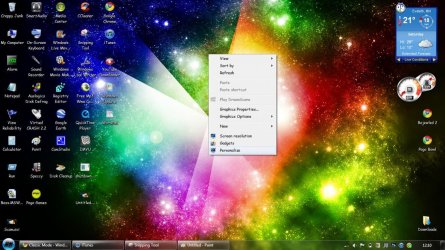
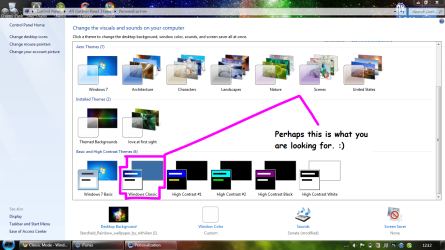
Hello, :) I assume that this is what you are talking about. follow these pictures.

http://www.sevenforums.com/tutorials/280-theme-change-save.html

>> Right click your desktop click personalize
Untitled.jpg
>> This Window Will Appear
Capture1.PNG
Scroll down and you will see Windows Classic click on that.. and hopefully this is what you are seeking. :)
 
Last edited by a moderator:

My Computer

Computer Manufacturer/Model Number
Compaq Presario CQ60
OS
Windows 7 Home Premium 64 bit SP1
CPU
[01]: Intel64 GenuineIntel 2.20 GHz
Motherboard
Hewlett-Packard 3612 (CPU)
Memory
2.0GB Dual-Channel DDR2 @ 332MHz (5-5-5-14)
Graphics Card(s)
Mobile Intel(R) GMA 4500M (797MB Memory)(64 Dedicated)
Sound Card
Conexant Pebble High Definition SmartAudio
Screen Resolution
1366x768 HD Intel 4 Series Express
Hard Drives
245GB High Speed TOSHIBA Disk Drive ATA Device (SATA) (Primary)
Cooling
Stock, w/ High Quality Cooling Pad.
Mouse
Synaptics Touchpad V 7.0
Internet Speed
Around 10 to 20 MB Per Sec. Comcast Internet.
@MegaScooter
For the next time it will be good to use the Snipping Tool in Windows 7. It's better with smaller pictures. ;)
 

My Computer

Computer type
PC/Desktop
Computer Manufacturer/Model Number
Custom Build
OS
Windows 10 Pro x64
CPU
Intel Core i5 4440 @Stock
Motherboard
Gigabyte Z97 D3H
Memory
4 x 4GB HyperX Fury DDR3
Graphics Card(s)
Gigabyte GTX 1050Ti O4G
Sound Card
Integrated
Monitor(s) Displays
Dell P2417H
Screen Resolution
1920 x 1080
Hard Drives
Samsung EVO 850 120GB / Toshiba DT01ACA050 1TB 7200prm 32MB
PSU
Riotoro Onyx 750W
Case
NZXT H500 Black-Red
Cooling
Stock CPU + NZXT 120mm + 2x120mm red fans
Keyboard
Modecom Volcano Lanparty
Mouse
Asus ROG Gladius / DeepCool E-Pad Plus
Internet Speed
DOCSIS 50/3 Mbit
Browser
Google Chrome
Other Info
Asus K55VJ(i5 3210M, GT635M / 2GB, 8GB DDR3, 500GB HDD)
Did you mean Classic View? That's the Microsoft page that describes how to enable it.
 

My Computer

Computer Manufacturer/Model Number
Dell Inspiron 530
OS
Windows 7 Ultimate (x64)
CPU
Q6600
Memory
8 GB
Graphics Card(s)
ATI Radeon HD 2600 XT
Monitor(s) Displays
Samsung Syncmaster P2450
Screen Resolution
1920x1080
Hard Drives
Samsung HD103UJ
Samsung HD501LJ
Internet Speed
25 Mb/s
I installed the program "Classic Shell".
It's better IMHO than what's in Windows7 but not exactly
like it was in Vista.
Windows Explorer was a pain to install but I think I have it right.
It also is not like it was in Vista.
Thanks for all your suggestions.
 

My Computer

Computer type
PC/Desktop
Computer Manufacturer/Model Number
had the system built by PCsandParts
OS
windows 7 Pro 64 bit
CPU
mini tower
Motherboard
h110m-k (lga1151)
Memory
4g
Graphics Card(s)
nvidia geforce gt730 graphics card
Sound Card
high definition audio device
Monitor(s) Displays
19" dell ultra sharp
Screen Resolution
1280 x 800
Hard Drives
Kingston SSD
PSU
?
Case
?
Cooling
?
Keyboard
standard ps/2 keyboard
Mouse
ps/2 compatible optical
Internet Speed
fiber optics
Antivirus
ESET Smart Security
Browser
IE11
Other Info
no Wifi. Bose speakers, optical drive tsstcorp dvd+-RW
breathtakingly beautiful?

Not everyone needs their computer to be breathtakingly beautiful...some need it to perform work. Windows had a great GUI that a lot of people understand and don't have time to re-learn a new GUI.

There are new advantages to the new GUI, but why not give people the option.

Anyhow, to answer your question do a Search for "Windows 7 Classic Shell"
or go here:
Welcome to Classic Shell
 

My Computer

OS
Win 7 Pro
But why file cabinet ugly? To me this is cutting off one's nose to spite modernity.

There are no resource advantages, so it seems mindless.

But the option was given forthwith so please allow me my opinion.

Thank you. Enjoy the full backgrounds collection.
 
i still have not found a really good reason to to leave windows xp in the dark.
it does everything i want it to.
sure i guess 7 is pretty if you have the computer to run it.
i can run it but get no aero since my intel 915 128mb is not supported.
but the free windows 7 enterprise trial was worth a test drive i guess.
sticking with my default o/s xp mce 05.
 

My Computer

OS
Windows XP Media Center Edition 2005 32 bit
My beach and travel laptop is a nearly 10 year old HP 510 with Celeron, 1 gb RAM and the Intel 915 GM/GMS, 910GML Express chipset. I hardly notice having no Aero but still enjoy great performance and crisp graphics.
 
i still have not found a really good reason to to leave windows xp in the dark.
it does everything i want it to.
sure i guess 7 is pretty if you have the computer to run it.
i can run it but get no aero since my intel 915 128mb is not supported.
but the free windows 7 enterprise trial was worth a test drive i guess.
sticking with my default o/s xp mce 05.

Andrew, nobody forces you to buy a new computer. Moreover, nobody forces you to install Windows 7 on your old one. I have some old computers myself: I have one 11-year-old Dell running Windows 2000 and also a 5-year-old laptop running XP. I have no intention to spend time and money upgrading these old mahcines to Windows 7. They serve their purpose (yes, I am still using them, even though their use now is limited to a few very specific tasks) and will keep doing so until either I won't need to do this anymore, or they break down.

I said it many times and I will say it again - for me computers are tools. I don't throw out a trusty screwdriver just because I saw a new pretty one in a supermarket. I also generally don't like "upgrading" the OS on existing machines, I just get new machines when I need them with whatever OS they come with.

That said, this Windows 7 machine was an upgrade from Vista. Why did I deviate from my usual routine? First, Windows 7 does not require more powerful hardware compared to Vista (and in fact supports more legacy - or older - hardware) and second, it is a big step forward in terms of performance and stability. The fact that it looks great is a plus, but then you can make Vista look like 7 if you wanted to.

Now, any new OS comes with a slightly changed GUI. In recent Windows I find these changes incremental and mostly one can restore "old" features (such as the Quick Launch, for instance). Some things, like some buttons in Explorer are no longer there. The functionality however is, you just need to click on a different button.

Does that require some learning or getting used to - probably yes.
Does that mean that some people will find it hard to adapt to the new OS - maybe.
Does that mean that the OS is bad - no!

If one does not like the new GUI one can always use the OS one likes, or find the third-party software that changes the GUI any way you want it.
 

My Computer

Computer Manufacturer/Model Number
Dell Inspiron 530
OS
Windows 7 Ultimate (x64)
CPU
Q6600
Memory
8 GB
Graphics Card(s)
ATI Radeon HD 2600 XT
Monitor(s) Displays
Samsung Syncmaster P2450
Screen Resolution
1920x1080
Hard Drives
Samsung HD103UJ
Samsung HD501LJ
Internet Speed
25 Mb/s
Hello, :) I assume that this is what you are talking about. follow these pictures.
http://www.sevenforums.com/tutorials/280-theme-change-save.html

>> Right click your desktop click personalize
View attachment 143177
>> This Window Will Appear
View attachment 143178
Scroll down and you will see Windows Classic click on that.. and hopefully this is what you are seeking. :)

@2010MegaScooter....That's an excellent desktop wallpaper!!! Where did you get it from?
 

My Computer

OS
Win 7 Professional 64bit
Back
Top