Classic Shell is looking for testers

Ivo

New member
Local time
6:21 AM
Messages
398
Location
Washington
Hi


I am getting close to releasing the next major version of Classic Shell. Some of the new features are:
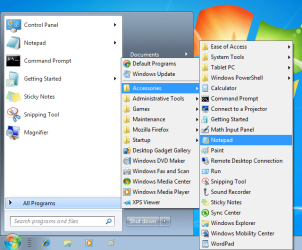
  • Cascading All Programs menu
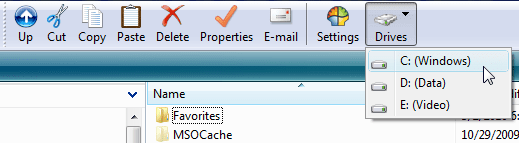
  • Dropdown menus for the Explorer toolbar
  • Automatically show more details in Explorer operations
(see the attached screenshots)

Before the public release I want to have a closed beta to catch any major stability issues. I am looking for 16 volunteers to install and play with the new version.

Please send an email to <redacted> if you are interested. Include your system configuration (Windows7 or Vista or Windows Server, 32 or 64-bit, Home or Professional or Ultimate) and which theme you are using - Classic, Basic, Aero, or a custom theme. If you are selected, you will get an email with instructions to download and install the new version.

The closed beta will run for about 10 days. After that an official beta version will be released, which will be available for everybody.

Why would you want to participate? You will get an early view of some exciting new features and will get an opportunity to propose changes before the features are finalized.

Counting on your support
Ivo
 

Attachments
  • cascading_menu.png
    cascading_menu.png
    37.3 KB · Views: 40
  • DrivesMenu.png
    DrivesMenu.png
    9.3 KB · Views: 20
  • details.png
    details.png
    9.3 KB · Views: 25

My Computer My Computer

At a glance

Windows 7 Home 64, Vista Ultimate 64
Computer Manufacturer/Model Number
Me :) I build all my PCs
OS
Windows 7 Home 64, Vista Ultimate 64
I am not accepting any more beta testers. There will be a public version by the end of this weekend. Check Source Forge in a few days.
 

My Computer My Computer

At a glance

Windows 7 Home 64, Vista Ultimate 64
Computer Manufacturer/Model Number
Me :) I build all my PCs
OS
Windows 7 Home 64, Vista Ultimate 64
Ivo, so now you can remove your email from original post. It's not only against forum rules, but can also cause an avalanche of junk mail.

;) Kari
 

My Computer My Computer

At a glance

Windows 10 Pro x64 EN-GB1.6 GHz Intel Core i7-720QM Processor6 GBATI Mobility Radeon HD 5850 Graphics
Computer type
Laptop
Computer Manufacturer/Model Number
HP ENVY 17-1150eg
OS
Windows 10 Pro x64 EN-GB
CPU
1.6 GHz Intel Core i7-720QM Processor
Memory
6 GB
Graphics Card(s)
ATI Mobility Radeon HD 5850 Graphics
Sound Card
Beats sound system with integrated subwoofer
Monitor(s) Displays
17" laptop display, 22" LED and 32" Full HD TV through HDMI
Screen Resolution
1600*900 (1), 1920*1080 (2&3)
Hard Drives
Internal: 2 x 500 GB SATA Hard Disk Drive 7200 rpm
External: 2TB for backups, 3TB USB3 network drive for media
Cooling
As Envy runs a bit warm, I have it on a Cooler Master pad
Keyboard
Logitech diNovo Media Desktop Laser (bluetooth)
Mouse
Logitech Performance Mouse MX
Internet Speed
50/10 Mbps VDSL
Antivirus
Windows Defender 4.3.9431.0
Browser
Maxthon 3.5.2., IE11
Thanks for the reminder, Kari. I included my email so people can contact me privately and not worry about showing their address in a public place. Of course there is no need for that anymore.
 

My Computer My Computer

At a glance

Windows 7 Home 64, Vista Ultimate 64
Computer Manufacturer/Model Number
Me :) I build all my PCs
OS
Windows 7 Home 64, Vista Ultimate 64
The reasoning behind requesting that you do not include your email address in your posts, and the reason why I have added this to the Forum Rules is for your own safety and to prevent spamming (remember, search bots and spiders trawl the sites). There is nothing preventing you giving your address to others, however we would advise that you use caution and only do this through the PM (Private Messaging) system.
 

My Computer My Computer

At a glance

Windows 8.1 Pro RTM x64Intel Core-i5-3570K 4-core @ 3.4GHz (Ivy Brid...4 x 4GB DDR3-1600 Corsair Vengeance CMZ8GX3M2...MSI GeForce GTX770 Gaming OC 2GB
Computer type
PC/Desktop
Computer Manufacturer/Model Number
Dwarf Dwf/11/2012 r09/2013
OS
Windows 8.1 Pro RTM x64
CPU
Intel Core-i5-3570K 4-core @ 3.4GHz (Ivy Bridge) (OC 4.4GHz)
Motherboard
ASRock Z77 Extreme4-M
Memory
4 x 4GB DDR3-1600 Corsair Vengeance CMZ8GX3M2A1600C9B (16GB)
Graphics Card(s)
MSI GeForce GTX770 Gaming OC 2GB
Sound Card
Realtek High Definition on board solution (ALC 898)
Monitor(s) Displays
ViewSonic VA1912w Widescreen (VGA)
Screen Resolution
1440x900
Hard Drives
OCZ Agility 3 SSD 120GB SATA III x2 (RAID 0)
Samsung HD501LJ 500GB SATA II x2
Hitachi HDS721010CLA332 1TB SATA II
Iomega 1.5TB Ext USB 2.0
WD 2.0TB Ext USB 3.0
PSU
XFX Pro Series 850W Semi-Modular
Case
Gigabyte IF233
Cooling
1 x 120mm Front Inlet 1 x 120mm Rear Exhaust
Keyboard
Microsoft Comfort Curve Keyboard 3000 (USB)
Mouse
Microsoft Comfort Mouse 3000 for Business (USB)
Internet Speed
NetGear DG834Gv3 ADSL Modem/Router (Ethernet) ~4.0 Mb/s (O2)
Antivirus
Avast! 8.0.1497
Browser
IE 11
Other Info
Optical Drive: HL-DT-ST BD-RE BH10LS30 SATA Bluray
Lexmark S305 Printer/Scanner/Copier (USB)
WEI Score: 8.1/8.1/8.5/8.5/8.25
Asus Eee PC 1011PX Netbook (Windows 7 x86 Starter)
Hi Ivo,

I've a few questions about your program before installing it:

- can it create a separate Start Button inside current Start Menu or on the Task Bar instead of replacing Win7 Start Button?
- If I group all installed programs inside your Start Menu in software categories, can I do it such a way that program shortcuts will be auto uninstalled when that program is uninstalled, despite shortcuts location changed by grouping?
- If I group all programs into categories inside your Start Menu, will it be auto sinched with Win7 Start Menu Program filter (it collects shortcuts from All Users and User Start Menus), when new programs are installed?

I think, creating Program Categories is very important feature to group shortcuts and avoid clattering. Otherwise the advantages are slim. But programs Uninstall should not be affected, there should be no shortcut leftovers.

Basically, I want to group program shortcuts into categories, and the concern is, the shortcuts won't be deleted on their program Uninstall after grouping, and also your Start Menu won't match source Menu folders (assuming it creates duplicate Start Menu folders with all installed Program Shortcuts).
 

My Computer My Computer

At a glance

Win 7
OS
Win 7
* can it create a separate Start Button inside current Start Menu or on the Task Bar - No. The classic start menu will use the same button. However you can use different methods for opening it (Shift+click, middle-click, custom hotkeys, etc).

* If I group all installed programs inside your Start Menu in software categories... - No. Just like the normal Windows 7 start menu, the classic menu shows the contents of the Start Menu folders. No more, no less. If you move a shortcut from one place to another, the uninstaller will not know about it and can't delete it.

* If I group all programs into categories inside your Start Menu, will it be auto sinched with Windows 7 Start Menu Program filter - Yes. Both start menus will display the same shortcuts, however links in the same folder may be ordered differently (since each start menu maintains its own order).
 

My Computer My Computer

At a glance

Windows 7 Home 64, Vista Ultimate 64
Computer Manufacturer/Model Number
Me :) I build all my PCs
OS
Windows 7 Home 64, Vista Ultimate 64
well, this program was great... until a windows update went through last week and disabled it from working...

the shell is gone, and the menu in the shell is grayed out :(

Windows 7 x64
 

My Computer My Computer

At a glance

Microsoft Windows 7 x64 RTM
OS
Microsoft Windows 7 x64 RTM
Take a look at this troubleshooting guide: Classic Shell: FAQ
Let me know if you still can't make it work. For the record, I'm using Windows 7 x64 with all updates, and I don't have any problems.
 

My Computer My Computer

At a glance

Windows 7 Home 64, Vista Ultimate 64
Computer Manufacturer/Model Number
Me :) I build all my PCs
OS
Windows 7 Home 64, Vista Ultimate 64
Same here, Ivo. I love your Classic Shell and Classic Explorer. It is the BEST add-on for Windows 7 ever, IMO. Thank you for making this fantastic tool.

Did I mention I really, really like it? :D
 

My Computer My Computer

At a glance

Windows 7 Ultimate x64 SP1Core2 Duo4 GBGM965 on-board
Computer Manufacturer/Model Number
Toshiba L355D
OS
Windows 7 Ultimate x64 SP1
CPU
Core2 Duo
Motherboard
Intel
Memory
4 GB
Graphics Card(s)
GM965 on-board
Sound Card
RealTek on-board
Monitor(s) Displays
19"+17"(laptop)
Screen Resolution
1440x900 (x 2)
Hard Drives
500GB Ext. 200GB Internal
PSU
N/A
Case
N/A
Cooling
N/A
Back
Top