- Local time
- 3:22 PM
- Messages
- 179

My Computer
At a glance
Windows 7 64 Bit
- OS
- Windows 7 64 Bit


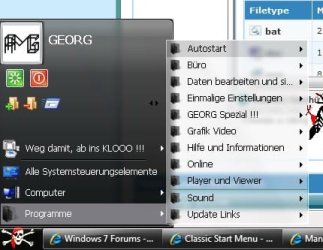
A guy on this web site has found a workaround to get something approximating the classic start menu.
" "Classic" menu option does not exist in Window" Yes it does, but MS denies it!
It's been my one pet hate not to have the classic menu, all fixed by this.
It works exactly as his pictures show.


Just use this:
Welcome to Classic Shell
Perfect! FREE. Does all we want from the CLASSIC START MENU!
1) Open the settings, go to the Customize Start Menu tab and double-click on the PrintersItem on the left
2) Delete the command that says "printers" and press Tab
3) The Link property should get enabled. Enter this text there - ::{26EE0668-A00A-44D7-9371-BEB064C98683}\0\::{A8A91A66-3A7D-4424-8D24-04E180695C7A}
4) Delete the label and icon - you will get the correct ones automatically from the Link
5) Change the tip to reflect the new functionality (enter any text you feel like)