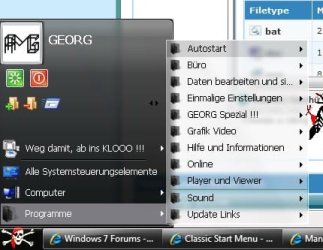
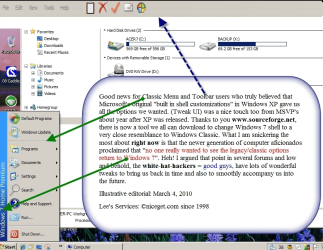
Classic Start Menu

The point is NOT which way is better. The point is to be able to do it the way YOU want. May we stay on the original question?
 
The point is NOT which way is better. The point is to be able to do it the way YOU want. May we, please, stay on the original question?
 

My Computer

Computer Manufacturer/Model Number
self built
OS
Windows 7 Professional 64-bit
CPU
Intel E8400 3GHz
Motherboard
Intel DX48BT2
Memory
Kingston PC3-10700H 4Gb
Graphics Card(s)
XFX Radeon HD 5850 BlackEd.
Sound Card
Asus Xonar DG
Monitor(s) Displays
2x Samsung SM-T220HD 22"
Screen Resolution
1680x1050 on two monitors
Hard Drives
OCZ Vertex 2 120gb 3.5" (OS)
Seagate Momentus XT 500gb
Samsung F3 1Tb (games)
2x Samsung F1 1Tb
PSU
Thermaltake ToughPower 850w
Case
Thermaltake Armor
Cooling
Scythe Mugen II
Keyboard
Microsoft Comfort Curve USB
Mouse
Razer Diamondback 3G
Internet Speed
8128/443
Add menu item for Start Menu

I liked the solution posted here:

Get Windows XP Styled Classic All Programs List in Windows Vista and 7 - Tweaking with Vishal

This involves replacing the Favorites menu with the Start Menu folder, and allowing the rollover option.

1. Open regedit and go to following keys one by one:
HKEY_CURRENT_USER\Software\Microsoft\Windows\CurrentVersion\Explorer\Shell Folders
HKEY_CURRENT_USER\Software\Microsoft\Windows\CurrentVersion\Explorer\User Shell Folders
2. Now you'll need to change the value of Favorites string value in right-side pane to:
C:\ProgramData\Microsoft\Windows\Start Menu\Programs


(or C:\ProgramData\Microsoft\Windows\Start Menu , which is what I like.)

Change C: to your system drive, if windows is installed in your system someplace other than c: .


3. That's it. Log off or restart your system and now "Favorites" link in start menu will change to "Programs" and will show all program shortcuts installed in your system just like XP start menu does.


On the Start Menu Orb, make sure "Favorites" is ticked. It will now be displayed as Programs (or Start Menu, depending on which string value you used).


Also tick the box "Open submenus when I pause on them with the mouse pointer."
This will expand the menu automatically.


Now I edit my C:\ProgramData\Microsoft\Windows\Start Menu folder the way I like it, to resemble my Classic Start-up menu.


Note that the C:\ProgramData\Microsoft\Windows\Start Menu is for all users.


If you only wish to show your specific user Start Menu, use

C:\Users\specificuser\AppData\Roaming\Microsoft\Windows\Start Menu

(or C:\Users\specificuser\AppData\Roaming\Microsoft\Windows\Start Menu\Programs)
 

My Computer

OS
Kubuntu Karmic Koala 64-bit

Attachments

  • classic windows.png
    classic windows.png
    491.9 KB · Views: 216

My Computer

Computer Manufacturer/Model Number
My own Custom Build: Asus, Corsair, Transcend, AMD, PNY, Ultra
OS
W7 64 Bit
CPU
AMD Phenom x4 4000Mhz
Memory
8 GB DDR-2
Graphics Card(s)
PNY-NVIDIA GeForce GTX 460 1GB GDDR5 PCI-e
Monitor(s) Displays
Dual: Flatron L1942T
Hard Drives
C: Drive (Agility 2 Solid State Drive 60 GB)
D: Drive (HDD Internal Western Digital 640 GB)
PSU
650 Watt
Cooling
Corsair Hydro H6 Liquid Cooler
Internet Speed
25 mbps down - 3 mbps up
Last edited:

My Computer

Computer Manufacturer/Model Number
My own Custom Build: Asus, Corsair, Transcend, AMD, PNY, Ultra
OS
W7 64 Bit
CPU
AMD Phenom x4 4000Mhz
Memory
8 GB DDR-2
Graphics Card(s)
PNY-NVIDIA GeForce GTX 460 1GB GDDR5 PCI-e
Monitor(s) Displays
Dual: Flatron L1942T
Hard Drives
C: Drive (Agility 2 Solid State Drive 60 GB)
D: Drive (HDD Internal Western Digital 640 GB)
PSU
650 Watt
Cooling
Corsair Hydro H6 Liquid Cooler
Internet Speed
25 mbps down - 3 mbps up
Hey, guys, just google for "classic shell" and you will find what you are looking for. For me. the main thing I wanted is the "up one level" button back. For some reason M$ took it away, too easy i suppose. Now I've got it back and am happy. One day I will have it fixed so it's as quick as XP.
 

My Computer

Computer Manufacturer/Model Number
Medion E7214
OS
Windows 7 Home Premium 32bit.
CPU
Core i3-350m
Memory
3G
Monitor(s) Displays
17.5"
Hard Drives
500GB
I was wondering why in settings, the printer and devices changed to printers only. Where can I change that?
 

My Computer

OS
Win7 x64
Just found it:
1) Open the settings, go to the Customize Start Menu tab and double-click on the PrintersItem on the left
2) Delete the command that says "printers" and press Tab
3) The Link property should get enabled. Enter this text there - ::{26EE0668-A00A-44D7-9371-BEB064C98683}\0\::{A8A91A66-3A7D-4424-8D24-04E180695C7A}
4) Delete the label and icon - you will get the correct ones automatically from the Link
5) Change the tip to reflect the new functionality (enter any text you feel like)
 

My Computer

OS
Win7 x64
Back
Top