
Solved Clean install - High Definition Audio Device listed twice!?

0pTicaL

New member
Power User
Local time
2:13 PM
Messages
294
Location
San Francisco
I am running a clean install of Windows 7 Pro x64 SP1 on a Asus P8Z68 Deluxe. When I first installed Windows, first thing I did was install Intel's chipset drivers and IRST drivers, then all other mobo drivers. Checked Device Manager and everything is detected.

Here's where it gets weird, I had a MSI R6970 installed on a workbench and when it was time to put everything in the case the video card wouldn't fit.

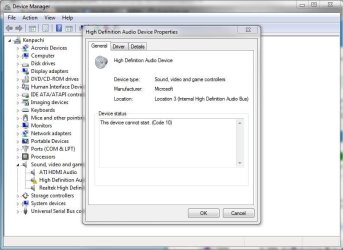
I had spare GPUs lying around so I used a ATI 5450 in the meantime. However once I installed the 5450 and booted the system, then restart after detection, device manager is showing there's a unknown High Definition Audio Device in device manager.

I tried uninstall Realtek's drivers (R266) and reinstalling them, didn't work. I tried installing 'ATI HDMI Audio Device' from Realtek's website, didn't work.

Now I'm starting to think, does this have something to do with AMD's drivers?
 

Attachments
  • hdad.JPG
    hdad.JPG
    61.9 KB · Views: 409

My Computer My Computer

Computer type
PC/Desktop
Computer Manufacturer/Model Number
Less is more
OS
Windows 7 Ultimate x64 SP1
CPU
Core i7 2600k (4.6GHz)
Motherboard
ASUS P8Z68 Deluxe (3603)
Memory
16GB G.SKILL Ares 1600MHz
Graphics Card(s)
MSI R6970 Lightning
Sound Card
Asus Xonar Essence ST (UNi drivers 1.41)
Monitor(s) Displays
Samsung P2570, CrossOver 27Q LED-P
Screen Resolution
1920*1080, 2560*1440
Hard Drives
256GB OCZ Vector, 2x Hitachi 4TB (7K4000), Hitachi 3TB (7K3000 & 5K3000)
PSU
Seasonic X750
Case
Lian-Li PC-P80N
Cooling
NZXT HAVIK 140 (2x GELID Wing12PL Push/Pull)
Keyboard
CM Storm Trigger (Brown Switch)
Mouse
Logitech G400
Internet Speed
55Mbps/10Mbps
Other Info
Speakers - Klipsch ProMedia 2.1
Headphones - Sennheiser HD595
Router - ASUS RT-N66U
Webcam - Logitech C910
You're correct - this ATI card supports HDMI 1.3 which can transfer video and audio over a single cable. For that reason the card has its own audio device onboard, which requires drivers from AMD.

It will not conflict in any way with your existing Realtek audio, it's simply an additional audio device you may instruct Windows to use instead.
 

My Computer My Computer

Computer type
PC/Desktop
Computer Manufacturer/Model Number
Custom-built
OS
Windows 7 Professional SP1 32-bit
CPU
Intel Core 2 Duo E6600 2.4GHz
Motherboard
Asus PL5D2
Memory
4GB DDR2-667 (4x1GB in dual-channel config)
Graphics Card(s)
nVidia GeForce 9800 GT
Sound Card
Creative X-Fi XtremeMusic
Monitor(s) Displays
Acer P236H
Screen Resolution
1920x1200 (DVI)
Hard Drives
OCZ SSD Vertex Plus 60GB SATA (Firmware 3.55), 64MB cache
Hitachi HD321KJ SATA, 320GB, 7200rpm, 16MB cache
PSU
Antec TruePower 2.0
Case
Cooler Master Centurion
Cooling
Too many fans
Keyboard
Standard
Mouse
Microsoft wireless optical mouse
Internet Speed
AT&T U-verse (18mbit/sec)
Antivirus
Microsoft Security Essentials
Browser
Firefox
Other Info
Other devices:
Compaq CQ-60 laptop
Google Nexus 7 (2012) tablet
Nvidia SHIELD tablet (US/LTE)
Hardkernel ODROID-XU single-board computer (Samsung Exynos 5420)
The problem I'm having now is how to get it to detect? I tried uninstalling Realtek and AMD's drivers and reinstalling, doesn't work, '?' is still there.
 

My Computer My Computer

Computer type
PC/Desktop
Computer Manufacturer/Model Number
Less is more
OS
Windows 7 Ultimate x64 SP1
CPU
Core i7 2600k (4.6GHz)
Motherboard
ASUS P8Z68 Deluxe (3603)
Memory
16GB G.SKILL Ares 1600MHz
Graphics Card(s)
MSI R6970 Lightning
Sound Card
Asus Xonar Essence ST (UNi drivers 1.41)
Monitor(s) Displays
Samsung P2570, CrossOver 27Q LED-P
Screen Resolution
1920*1080, 2560*1440
Hard Drives
256GB OCZ Vector, 2x Hitachi 4TB (7K4000), Hitachi 3TB (7K3000 & 5K3000)
PSU
Seasonic X750
Case
Lian-Li PC-P80N
Cooling
NZXT HAVIK 140 (2x GELID Wing12PL Push/Pull)
Keyboard
CM Storm Trigger (Brown Switch)
Mouse
Logitech G400
Internet Speed
55Mbps/10Mbps
Other Info
Speakers - Klipsch ProMedia 2.1
Headphones - Sennheiser HD595
Router - ASUS RT-N66U
Webcam - Logitech C910
The drivers for the videocard should take care of this for you. To download them, go here:

AMD Graphics Drivers & Software

The drivers installed by Windows tend to be more basic and not include the audio device component.
However, if you're simply going to use your laptop normally and not connect it to a HDMI output device such as a TV, then you might simply ignore the missing audio device as it does no harm to your system.

Again, the ATI HDMI audio device is completely separate from the Realtek audio and there's no need to uninstall the Realtek drivers.
 

My Computer My Computer

Computer type
PC/Desktop
Computer Manufacturer/Model Number
Custom-built
OS
Windows 7 Professional SP1 32-bit
CPU
Intel Core 2 Duo E6600 2.4GHz
Motherboard
Asus PL5D2
Memory
4GB DDR2-667 (4x1GB in dual-channel config)
Graphics Card(s)
nVidia GeForce 9800 GT
Sound Card
Creative X-Fi XtremeMusic
Monitor(s) Displays
Acer P236H
Screen Resolution
1920x1200 (DVI)
Hard Drives
OCZ SSD Vertex Plus 60GB SATA (Firmware 3.55), 64MB cache
Hitachi HD321KJ SATA, 320GB, 7200rpm, 16MB cache
PSU
Antec TruePower 2.0
Case
Cooler Master Centurion
Cooling
Too many fans
Keyboard
Standard
Mouse
Microsoft wireless optical mouse
Internet Speed
AT&T U-verse (18mbit/sec)
Antivirus
Microsoft Security Essentials
Browser
Firefox
Other Info
Other devices:
Compaq CQ-60 laptop
Google Nexus 7 (2012) tablet
Nvidia SHIELD tablet (US/LTE)
Hardkernel ODROID-XU single-board computer (Samsung Exynos 5420)
Delete/uninstall the driver "ATI HDMI Audio" using the Device manager. Reboot.
Use the link that Corazon posted and download the CCC package which has the AMD HDMI driver included.
If all goes well, your driver should read "AMD High Definition Audio Device"
 

My Computer My Computer

Computer type
PC/Desktop
Computer Manufacturer/Model Number
Custom Build
OS
Windows 7 Home Premium 64 bit
CPU
Intel Core i7-4790
Motherboard
GA-Z87X-D3H
Memory
G.SKILL 8GB (2 x 4GB) DDR3 F3-10666CL9D-8GBNT
Graphics Card(s)
AMD Radeon R7 250
Sound Card
Realtek ALC892
Monitor(s) Displays
Samsung UN32EH5000, Dell 1703FPT
Screen Resolution
1920 x 1080, 1280 x 1024
Hard Drives
WD5003AZEX
WD10EZEX
Samsung HD103SJ
Samsung 128 GB 840 PRO
PSU
SeaSonic M12II SS-500GM
Case
Fractal Design Define R4
Cooling
Zalman CNPS9900ALED
Keyboard
Logitech K800
Mouse
Logitech M705
Internet Speed
16 Mbps
Antivirus
Avast
Browser
Firefox
Other Info
Bose Companion 2 Multimedia Speakers
I did exactly that and it's still and it still undetected. I tried disabling onboard in the BIOS and it goes away so I'm stumped as to why it shows up twice in Device Manager.
 

Attachments

  • dm.JPG
    dm.JPG
    45.3 KB · Views: 186

My Computer My Computer

Computer type
PC/Desktop
Computer Manufacturer/Model Number
Less is more
OS
Windows 7 Ultimate x64 SP1
CPU
Core i7 2600k (4.6GHz)
Motherboard
ASUS P8Z68 Deluxe (3603)
Memory
16GB G.SKILL Ares 1600MHz
Graphics Card(s)
MSI R6970 Lightning
Sound Card
Asus Xonar Essence ST (UNi drivers 1.41)
Monitor(s) Displays
Samsung P2570, CrossOver 27Q LED-P
Screen Resolution
1920*1080, 2560*1440
Hard Drives
256GB OCZ Vector, 2x Hitachi 4TB (7K4000), Hitachi 3TB (7K3000 & 5K3000)
PSU
Seasonic X750
Case
Lian-Li PC-P80N
Cooling
NZXT HAVIK 140 (2x GELID Wing12PL Push/Pull)
Keyboard
CM Storm Trigger (Brown Switch)
Mouse
Logitech G400
Internet Speed
55Mbps/10Mbps
Other Info
Speakers - Klipsch ProMedia 2.1
Headphones - Sennheiser HD595
Router - ASUS RT-N66U
Webcam - Logitech C910
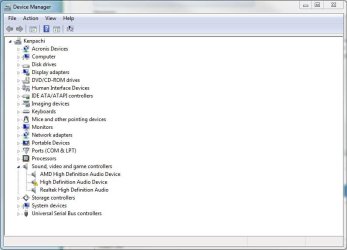
The AMD audio is for HDMI, Realtek is for other (on board) audio, speakers, headphones and such. It is normal and causes no harm, here's mine...
Capture.PNG

...so twice ain't so bad. ;)
 

My Computer My Computer

Computer type
PC/Desktop
Computer Manufacturer/Model Number
Home Built Desktop By DataTech
OS
Windows 7 Ultimate X64 SP1
CPU
Intel i5-2550K, Differing ~4.4-4.8GHz No built in GPU
Motherboard
ASUS P8Z68-V PRO/GEN3
Memory
16GB G.Skill Sniper 1866MHz @ 2133MHz 2x8GB
Graphics Card(s)
ASUS GTX650TIB-DC2OC-2GD5, (650TI Boost)
Sound Card
Onboard Realtek 5-1
Monitor(s) Displays
Samsung P2570HD
Screen Resolution
1920x1080
Hard Drives
Samsung 840 Pro 256GB SSD for OS, 500GB Seagate Constellation (Enterprise drive) for Data
PSU
Corsair HX650W
Case
Inwin Dragon Rider
Cooling
Hyper 212 EVO w/two Noctua fans, push-pull, @1300 RPM
Keyboard
E-Z Eyes, bright yellow keys with large characters
Mouse
steelseries SENSEI Laser Pro Gaming
Internet Speed
48-51Mbs Mbs down, 11 Mbs up Xfinity Cable
Antivirus
Norton Internet Security 2013
Browser
IE 10, Opera, Pale Moon if needed
Other Info
4 case fans, LG BluRay-RE, ASUS DVD-RW, Mr. Fusion power supply, 1.21 gigawatts.
The difference is yours are detected, I can't get mine to detect.

I'm going to do a reinstall since I haven't started putting any serious information on the OS.

I just thought this problem was weird since swapping out my 6970 for a 5450 shouldn't cause any issues because AMD uses unified drivers. Now that it's happened I don't know how to remedy it and being a perfectionist it's annoying having a exclamation mark in Device Manager.
 

My Computer My Computer

Computer type
PC/Desktop
Computer Manufacturer/Model Number
Less is more
OS
Windows 7 Ultimate x64 SP1
CPU
Core i7 2600k (4.6GHz)
Motherboard
ASUS P8Z68 Deluxe (3603)
Memory
16GB G.SKILL Ares 1600MHz
Graphics Card(s)
MSI R6970 Lightning
Sound Card
Asus Xonar Essence ST (UNi drivers 1.41)
Monitor(s) Displays
Samsung P2570, CrossOver 27Q LED-P
Screen Resolution
1920*1080, 2560*1440
Hard Drives
256GB OCZ Vector, 2x Hitachi 4TB (7K4000), Hitachi 3TB (7K3000 & 5K3000)
PSU
Seasonic X750
Case
Lian-Li PC-P80N
Cooling
NZXT HAVIK 140 (2x GELID Wing12PL Push/Pull)
Keyboard
CM Storm Trigger (Brown Switch)
Mouse
Logitech G400
Internet Speed
55Mbps/10Mbps
Other Info
Speakers - Klipsch ProMedia 2.1
Headphones - Sennheiser HD595
Router - ASUS RT-N66U
Webcam - Logitech C910
Figured out the problem! It's Sandy Bridge's integrated audio. Run Intel's integrated display driver, reboot and it will detect.
 

My Computer My Computer

Computer type
PC/Desktop
Computer Manufacturer/Model Number
Less is more
OS
Windows 7 Ultimate x64 SP1
CPU
Core i7 2600k (4.6GHz)
Motherboard
ASUS P8Z68 Deluxe (3603)
Memory
16GB G.SKILL Ares 1600MHz
Graphics Card(s)
MSI R6970 Lightning
Sound Card
Asus Xonar Essence ST (UNi drivers 1.41)
Monitor(s) Displays
Samsung P2570, CrossOver 27Q LED-P
Screen Resolution
1920*1080, 2560*1440
Hard Drives
256GB OCZ Vector, 2x Hitachi 4TB (7K4000), Hitachi 3TB (7K3000 & 5K3000)
PSU
Seasonic X750
Case
Lian-Li PC-P80N
Cooling
NZXT HAVIK 140 (2x GELID Wing12PL Push/Pull)
Keyboard
CM Storm Trigger (Brown Switch)
Mouse
Logitech G400
Internet Speed
55Mbps/10Mbps
Other Info
Speakers - Klipsch ProMedia 2.1
Headphones - Sennheiser HD595
Router - ASUS RT-N66U
Webcam - Logitech C910
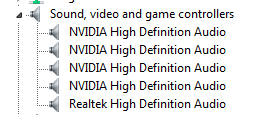
Help me out here guys :)) like him i don't an Mananger

hey guys please help with my prob
 

My Computer My Computer

Computer Manufacturer/Model Number
Pcworx
OS
Windows 7 starter x32
Memory
2.02 MB
Sound Card
Realtek High Definition Audio Driver
Monitor(s) Displays
LG
Keyboard
intex
Mouse
Intex
Internet Speed
5mbs
What is the Intel integrated display driver?

Figured out the problem! It's Sandy Bridge's integrated audio. Run Intel's integrated display driver, reboot and it will detect.

I have a P8Z68/GEN3 Deluxe motherboard and am on a fresh install of Windows 7 SP1 x64. I have two HD Audio devices: one for the Realtek Audio and one other that "cannot start" (maybe for the Sandy Bridge HDMI Audio?) If possible, could you describe in more detail what you had to do? I tried uninstalling the Intel HD Graphics Family display adapter from Device Manager and reinstalling it after rebooting but that did not solve my problem.

You got this driver from the CD that came with the motherboard? I can't seem to find the Intel integrated display driver for some reason.

Any help you can give would be great!

Thanks,
mahi
 

My Computer My Computer

OS
Windows 7 SP1 Ultimate x64
CPU
i5 2500K
Motherboard
Asus P8Z68/GEN3 Deluxe
Memory
Corsair Vengeance 2133
Graphics Card(s)
EVGA nVidia GTX 560 Ti
Monitor(s) Displays
Samsung SyncMaster T220
Hard Drives
Seagate 2TB
Crucial M4 SSD 64GB
PSU
Corsair HX 750
Case
Corsair 500r
Cooling
CoolerMaster Hyper 212 Plus
After two hours of digging around, I went to Intel's site. They have an auto-detect drivers option. I ended up reinstalling the display driver from there. I followed Support for the 2nd Generation Intel® Core™ Processors with Intel® HD Graphics 3000/2000 (I have an i5-2500K so this may not apply to everyone) After that, I downloaded Intel Graphics Media Accelerator Driver for Windows 7* 64, Windows Vista* 64 (exe)

I must have had a problem installing the driver the first time around.

Thanks to 0pTicaL for posting his solution!
 

My Computer My Computer

OS
Windows 7 SP1 Ultimate x64
CPU
i5 2500K
Motherboard
Asus P8Z68/GEN3 Deluxe
Memory
Corsair Vengeance 2133
Graphics Card(s)
EVGA nVidia GTX 560 Ti
Monitor(s) Displays
Samsung SyncMaster T220
Hard Drives
Seagate 2TB
Crucial M4 SSD 64GB
PSU
Corsair HX 750
Case
Corsair 500r
Cooling
CoolerMaster Hyper 212 Plus
After two hours of digging around, I went to Intel's site. They have an auto-detect drivers option. I ended up reinstalling the display driver from there. I followed Support for the 2nd Generation Intel® Core™ Processors with Intel® HD Graphics 3000/2000 (I have an i5-2500K so this may not apply to everyone) After that, I downloaded Intel Graphics Media Accelerator Driver for Windows 7* 64, Windows Vista* 64 (exe)

I must have had a problem installing the driver the first time around.

Thanks to 0pTicaL for posting his solution!

Glad to hear you figured it out. The auto-detect drivers option on Intel's site is a great help since it was very difficult for me to find the exact drivers needed on older systems and on newer ones.
 

My Computer My Computer

Computer type
PC/Desktop
Computer Manufacturer/Model Number
Less is more
OS
Windows 7 Ultimate x64 SP1
CPU
Core i7 2600k (4.6GHz)
Motherboard
ASUS P8Z68 Deluxe (3603)
Memory
16GB G.SKILL Ares 1600MHz
Graphics Card(s)
MSI R6970 Lightning
Sound Card
Asus Xonar Essence ST (UNi drivers 1.41)
Monitor(s) Displays
Samsung P2570, CrossOver 27Q LED-P
Screen Resolution
1920*1080, 2560*1440
Hard Drives
256GB OCZ Vector, 2x Hitachi 4TB (7K4000), Hitachi 3TB (7K3000 & 5K3000)
PSU
Seasonic X750
Case
Lian-Li PC-P80N
Cooling
NZXT HAVIK 140 (2x GELID Wing12PL Push/Pull)
Keyboard
CM Storm Trigger (Brown Switch)
Mouse
Logitech G400
Internet Speed
55Mbps/10Mbps
Other Info
Speakers - Klipsch ProMedia 2.1
Headphones - Sennheiser HD595
Router - ASUS RT-N66U
Webcam - Logitech C910
i have a m2n-268 motherboardc an changed processor from amd athalon 64 x2 3800+ to amd athalon 64 x2 6000+ and running 4.00gb ram ddr2 5300 and win 7 ult 64 and showing amd hd audio like others in the dev mgr. but cannot get it to recognize speakers plugged into grteen output port in back or the green port in front of tower now. have tried drivers for things lf all sorts all over and cant find any that get it torecognize the speakers now. am using a ati radeon hd 4670 1gb graphics card btw. any suggestions?
 

My Computer My Computer

Computer Manufacturer/Model Number
compaq presario sr5130nx
OS
win 7 ult 64
CPU
amd athalon x2 64 6000+
Motherboard
M2N-268 ivy
Memory
4gb (2x2gb) ddr2 6400 800mghz
Graphics Card(s)
ati radeon hd 4670 1gb
High Definition Audio Device listed twice cannot start. Fixed

P8Z68 Deluxe - Had this problem and resolved it disabling the Intel graphics in BIOS

EFI BIOS Utility Advanced Mode
Initiate iGPU < disable this item

You will not be able to use LUCID's VIRTU with the Intel graphics disabled, however I found it of little use. Your results may vary.

Cheers Bill D.
 

My Computer My Computer

Computer Manufacturer/Model Number
Home Brew
OS
Windows 8 64 bit
CPU
i7-2600k
Motherboard
Asus P8Z68 Deluxe
Memory
16 gb
Graphics Card(s)
AMD 6800
Hard Drives
60 GB SSD
700 GB Hard Drive
Intel Rapid Storage Technology
Case
Corsair
Back
Top