
- Local time
- 4:42 PM
- Messages
- 50,634
This is not uncommon, so I would not worry about it. You can always remove the Drive letter in Disk Mgmt. Drive Letter - Add, Change, or Remove in Windows 7 - Windows 7 Forums

This is not uncommon, so I would not worry about it. You can always remove the Drive letter in Disk Mgmt. Drive Letter - Add, Change, or Remove in Windows 7 - Windows 7 Forums
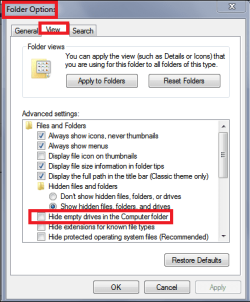
See if checking Hide empty drives in the Computer folder does want you want.
The setting is in Windows Explorer > Tools > Folder Options
View attachment 359789
In Tools / Folder Options uncheck Show all folders and see if that helps.
Windows Explorer, Tools is in the menu bar.

thanksWhen i uncheck Show all folders i can still see hidden files.
I don't see my empty DVD drive listed in the Navigation pane.
If I insert a disc, it gets displayed in the Navigation pane.


