Clean Install Windows 7

How to Do a Clean Installation with Windows 7

   Information
This will show you how to do a clean installation with a retail Windows 7. A OEM Windows 7 may have a few different screens than below, but basically the same.

Yes, you can do a clean install from a upgrade Windows 7 version. :)
NOTE: See this tutorial for how: Clean Install with a Upgrade Windows 7 Version

   Note
Do a Clean Installation if:
  • Your computer has no operating system installed, or it’s running a version of Windows prior to Windows Vista with Service Pack 1 (including Windows XP).
  • You do NOT want to preserve your data, programs, or system drivers.
  • You want to delete your current operating system and replace it with Windows 7.
  • You want to create a multiboot system by installing Windows 7 on a separate hard disk partition.
   Tip

  • Sometimes you may have a problem with installing Windows 7 with more than 2 GB of RAM installed on some older motherboards. If you have this problem, then you should install Windows 7 with a maximum of 2GB of RAM installed and add the rest of the RAM after Windows 7 is fully installed. You may need to flash your motherboard BIOS with the latest version to support more RAM like this. (WARNING - DO NOT FLASH THE BIOS if you do not know what you are doing. Please ask for help instead. One mistake can kill your motherboard permanently.)
  • Before doing this clean install, you should download and save all of your device drivers to a USB flash drive, DVD, another HDD, or some other media to have them handy to make setting Windows 7 up easier when finished installing Windows 7. For example, having the network driver available in case you cannot connect to the internet until it's installed.
   Warning
Windows 7 Minimum Hardware Requirements:

NOTE: For more information on this, see: Windows 7 system requirements
  • 1 GHz 32-bit or 64-bit processor
  • 1 GB RAM for 32-bit Windows 7 OR 2 GB RAM for 64-bit Windows 7
  • 16 GB available hard disk space for 32-bit Windows 7 OR 20 GB for 64-bit Windows 7
  • Graphics card or chip that supports DirectX 9 with 128 MB memory (to have Aero theme enabled)
  • DVD-R/W drive, or bootable USB 2.0 port with Windows 7 USB flash drive
  • Internet or phone access to activate Windows 7.


Here's How:1. Boot the computer from your Windows 7 installation DVD/USB.
NOTE: Make sure that the CD/DVD drive is selected first and your HDD second in the boot priority order in your BIOS settings. Usually it is by default.

   Warning
If you want to install Windows 7 using UEFI instead of BIOS, then see this below first.

How to Install Windows 7 Using "Unified Extensible Firmware Interface" (UEFI)

   Note
If you do not have a Windows 7 with SP1 installation DVD/USB, then you can download the latest official Windows 7 with SP1 ISO file at the links below.

:ar: Microsoft Software Recovery

:ar: Microsoft: Windows 7 Direct Download Links

You can use Windows 7 USB-DVD Download Tool to create a bootable DVD or USB flash drive with the ISO to do the clean install with.


2. If using a DVD, then when prompted, press any key to boot from the installation DVD. (See screenshot below)
NOTE: You will only have about 8 seconds to press this key. If you miss it, you will have to restart the computer.Step1.jpg
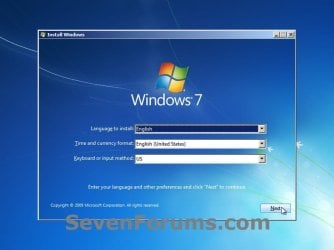
3. Set up your language preferences, and click on the Next button. (See screeshot below).step3.jpg
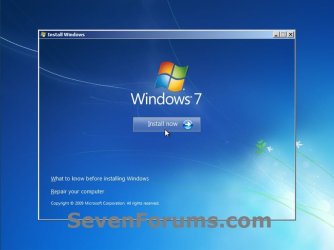
4. Click on the Install Now button to start the installation. (See screenshot below)step4.jpg
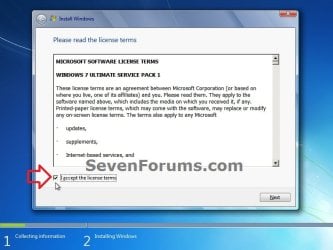
5. Check the I accept the license terms box, and click on Next. (See screenshot below)step5.jpg
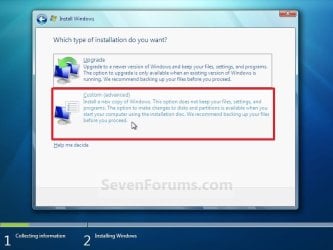
6. Click on the Custom (advanced) option. (See screenshot below)Step6.jpg
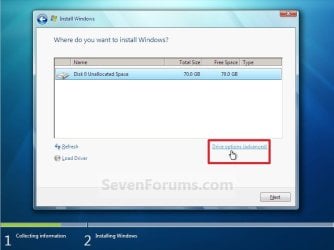
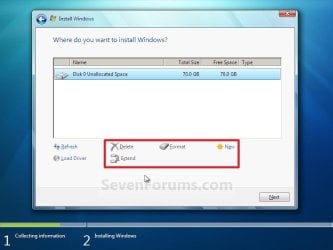
7. Select the hard drive or partition that you want to install Windows 7 on, and click on the Drive Options (advanced) link. (See screenshot below)
NOTE: If the hard drive or partition that you have selected is unallocated, then you can just click on the Next button instead and go to step 9 since it is already empty.
WARNING: You may not have the Drive options (advanced) option unless the installation is done at boot, and not running the installation from within your current OS.Step7.jpg
8. Select a hard drive or partition that you want to do a clean install of Windows 7 on, do what Drive options (advanced) you want if any, and click on the Next button when finished. (See screenshot below)
NOTE: If you have your hard drives in a RAID setup, then connect your USB key with the RAID drivers on it, click on Load Driver, select the folder on the USB key that contains the RAID drivers to install them. Afterwards, your RAID drives will be available to select from to install Windows 7 on.

   Tip
Drive options (advanced)
  • If you have more than one partition for a disk # (hard drive) and want to get rid of them to make that disk # one partition drive again, then select a partition with that disk # and click on the Delete option for each partition with the same disk # until there is only one "unallocated space" with that disk # left as in the screenshot below.
  • To shrink an existing partition to create another partition to install Windows 7 on instead, select the partition you want shrink and click on the Extend option. Type in how much in MB (1 GB = 1024 MB) that you want to shrink it by. Now select the new extended partition.
   Note
The 100 MB System Reserved partition is used for the Boot Manager code, BCD (Boot Configuration Database), System Recovery Options (Windows RE), and start up files for BitLocker (if turned on).
  • If you want to have the 100 MB System Reserved partition in addition to the Windows 7 C: partition on a HDD or SSD after installation, then you would need to make sure that all partitions on the drive have been deleted until it is only unallocated space. Next, select the unallocated drive to install Windows 7 on. If there are no partitions on the disk, you will get the 100 MB System Reserved.
  • If you do not want to have the 100 MB System Reserved partition and only the Windows 7 C: partition on a HDD or SSD after installation, then select a formatted partition or drive to install Windows 7 on. If there are any partitions on the disk, you won't get the 100 MB System Reserved.
Step8.jpg
9. The installation of Windows 7 will now begin. (See screenshot below)
NOTE: During the installation process, your screen may flash and computer will restart a few times.Step9.jpg
10. After the final restart, you will see this screen for a moment. (See screenshot below)step10.jpg
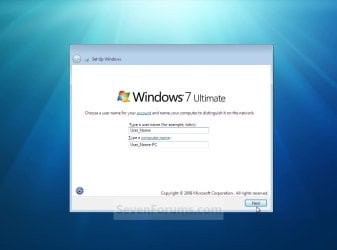
11. Type in any user name that you want for your default administrator account and any computer name, then click on the Next button. (See screenshot below)Step11.jpg
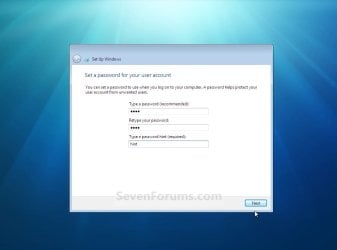
12. Type in a password you want for your default administrator account. Type it in again to confirm it, then type in a hint for your password. Click on the Next button. (See screenshots below)
WARNING: The password will be case sensitive. The hint will be seen by all users on the computer, so do not type your password as the hint.
NOTE: If you do not want your your user account password protected at this time or do not want to have to type in a hint, then leave this blank and click on the Next button. You can create a password later for your user account in the Control Panel User Accounts after installing Windows 7 without having to type in a hint.Step12A.jpg

Step12B.jpg
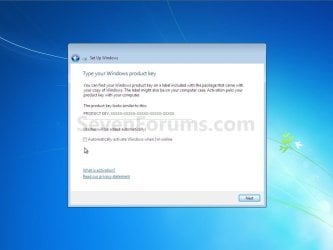
13. Type in your Windows 7 product key number. (See screenshot below step 14)

14. Uncheck the Automatically activate Windows when I'm online box, then click on the Next button. (See screenshot below)
NOTE: You can activate Windows 7 later after you make sure it is running properly. (See step 21 below)
If you chose to automatically activate Windows 7 online when you set up your computer, automatic activation begins trying to activate your copy of Windows three days after you log on for the first time.Step13.jpg
15. Click on Use recommended settings to allow automatic Windows Updates and proper security settings. (See screenshot below)
NOTE: For more information about these recommended settings, click on the Learn more about each option link in this window.Step14.jpg
16. Select your time zone and set your time and date settings, then click on the Next button. (See screenshot below)Step15.jpg
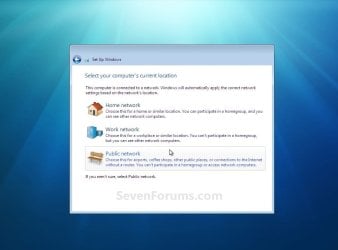
17. Click on your computer's correct network location type location to select it and have the settings for that location automatically applied. (See screenshot below)Step16.jpg
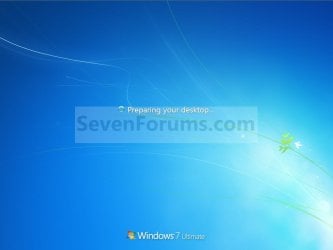
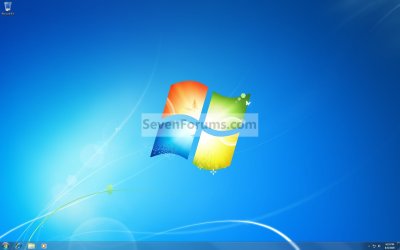
18. Windows 7 will now prepare your desktop to startup. (See screenshots below)Step17.jpg

Desktop.jpg
19. When it's finished and you are at your desktop, you can now remove or disconnect your installation DVD/USB from step 1 above.

20. Install all of your device drivers, then Windows Updates.

21. Refresh your Windows Experience Index (WEI) score.

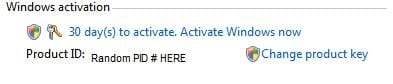
22. When finished, all you will need to do is to activate Windows 7. (See screenshot below)
Activate.jpg
   Tip
If you are dual booting with another OS (ex: Vista), then that OS partition may not show up in Computer with a driver letter in Windows 7. You will need to add a drive letter to the OS (ex: Vista) partition in Windows 7 Disk Management for it to show up in Computer with a driver letter.


That's it,
Shawn


Related Tutorials

 
Last edited:
Yes, it does clear up my question. I will do that but first I will finish doing a back up of the files I currently have with Vista 64, just to have it. I will then do the custom install like you said and then move the files from the windows.old. It may be a windows.old.000 as I already have a windows.old file there. I got the real upgrade off ebay for $80, no tax and free shipping. After reading up on the different versions I decided the home premium is all I will use.

I did not realize that with windows 7 you can actually use the windows.old files because with Vista you could not use them as you would use a back up.

Thanks for the added information.
 

My Computer

Computer type
PC/Desktop
Computer Manufacturer/Model Number
Self made
OS
windows 7 home premium 64, and Windows 10 64 bit
CPU
I7 940
Motherboard
ASUS P6TX58D Premium- BIOS VERSION 1402
Memory
12 GB Dominator 3 channel 1600
Graphics Card(s)
Radeon R9 Fury Nitro
Sound Card
Z1
Monitor(s) Displays
50 Inch Panasonic TV
Screen Resolution
1920x1080
Hard Drives
Main drive OCZ Revodrive V2 and 8 TB multi drives
PSU
Coolermaster 1000
Case
CoolerMaster 932
Cooling
Coolermaster Dual fan
Keyboard
mx 5500 revolution
Mouse
mx 5500 revolution
Internet Speed
12 mb
Browser
Chrome
Other Info
set up for 3D Blue Ray applications with a surround room of 12 speaker Definitive Technology and multi amps, main is driven by yamaha M-65
You're welcome Mike. :)
 

My Computer

Computer type
PC/Desktop
Computer Manufacturer/Model Number
Self built custom
OS
64-bit Windows 11 Pro for Workstations
CPU
Intel i7-8700K OC'd to 5 GHz
Motherboard
ASUS ROG Maximus XI Formula Z390
Memory
64 GB (4x16GB) G.SKILL TridentZ RGB DDR4 3600 MHz
Graphics Card(s)
ASUS ROG-STRIX-GTX1080TI-O11G-GAMING
Sound Card
Integrated
Monitor(s) Displays
2 x Samsung Odyssey G7 27"
Screen Resolution
2560x1440
Hard Drives
1TB Samsung 990 PRO M.2,
4TB Samsung 990 PRO PRO M.2,
TerraMaster F8 SSD Plus NAS
PSU
Seasonic Prime Titanium 850W
Case
Thermaltake Core P3
Cooling
Corsair Hydro H115i
Keyboard
Logitech wireless K800
Mouse
Logitech MX Master 4
Internet Speed
2 Gb/s Download and 100 Mb/s Upload
Antivirus
Malwarebyte Anti-Malware Premium
Browser
Google Chrome
Other Info
Logitech Z625 speaker system,
Logitech BRIO 4K Pro webcam,
HP Color LaserJet Pro MFP M477fdn,
APC SMART-UPS RT 1000 XL - SURT1000XLI,
Galaxy S23 Plus phone
Hey Brink thanks for this guide i just installed it yesterday... the only problem i ran into is when the computer restarted during the install... instead of letting it boot to the Hard Drive i booted it to the disk... But i simply restarted the computer again and let it boot to the HD

Thanks again this really helped!
 

My Computer

Computer Manufacturer/Model Number
Toshiba A215
OS
Windows 7 Home Premium 32bit
Memory
2Gb Ram
Graphics Card(s)
ATI Radeon X1200
Screen Resolution
12800 x 800
Hard Drives
160GB
Keyboard
US Keyboard
Internet Speed
Comcast High Speed Internet (running off router)
You're welcome AceGuy. I'm happy to hear that you got it installed now. :)
 

My Computer

Computer type
PC/Desktop
Computer Manufacturer/Model Number
Self built custom
OS
64-bit Windows 11 Pro for Workstations
CPU
Intel i7-8700K OC'd to 5 GHz
Motherboard
ASUS ROG Maximus XI Formula Z390
Memory
64 GB (4x16GB) G.SKILL TridentZ RGB DDR4 3600 MHz
Graphics Card(s)
ASUS ROG-STRIX-GTX1080TI-O11G-GAMING
Sound Card
Integrated
Monitor(s) Displays
2 x Samsung Odyssey G7 27"
Screen Resolution
2560x1440
Hard Drives
1TB Samsung 990 PRO M.2,
4TB Samsung 990 PRO PRO M.2,
TerraMaster F8 SSD Plus NAS
PSU
Seasonic Prime Titanium 850W
Case
Thermaltake Core P3
Cooling
Corsair Hydro H115i
Keyboard
Logitech wireless K800
Mouse
Logitech MX Master 4
Internet Speed
2 Gb/s Download and 100 Mb/s Upload
Antivirus
Malwarebyte Anti-Malware Premium
Browser
Google Chrome
Other Info
Logitech Z625 speaker system,
Logitech BRIO 4K Pro webcam,
HP Color LaserJet Pro MFP M477fdn,
APC SMART-UPS RT 1000 XL - SURT1000XLI,
Galaxy S23 Plus phone
Yes you can, but you must be careful that you format with the Win 7 disc at the time of your re install.
The win installer will see you present legal version and set a flag in RAM. It knows you are entitled to upgrade, and 'remembers' even after you format the partition in preparation for your new clean install.

Re enter your 25 digit Win 7 key when asked, and all should be well.

Note: Go NOT switch off your computer during the process at any time or the validation flag will be lost.


Thanks alot Nosmo :) my computers way faster now
 
Last edited by a moderator:

My Computer

Computer Manufacturer/Model Number
hp pavilion dv9417ca
OS
windows 7
It really works :) Thanks Brink :) ... Just installed with my Upgrade Home Premium, works like a charm :)
 

My Computer

OS
Windows 7 Home Premium
CPU
Intel Core 2 Duo 8400
Motherboard
MSI P45 Neo2
Memory
4 GB Kingston DD2 800
Graphics Card(s)
MSI 4850 Radeon
Sound Card
XFI - Xtrememusic
Monitor(s) Displays
LG 2261 VPF
Hard Drives
Seagate 250 + 160 GB
You're welcome Sega. :)
 

My Computer

Computer type
PC/Desktop
Computer Manufacturer/Model Number
Self built custom
OS
64-bit Windows 11 Pro for Workstations
CPU
Intel i7-8700K OC'd to 5 GHz
Motherboard
ASUS ROG Maximus XI Formula Z390
Memory
64 GB (4x16GB) G.SKILL TridentZ RGB DDR4 3600 MHz
Graphics Card(s)
ASUS ROG-STRIX-GTX1080TI-O11G-GAMING
Sound Card
Integrated
Monitor(s) Displays
2 x Samsung Odyssey G7 27"
Screen Resolution
2560x1440
Hard Drives
1TB Samsung 990 PRO M.2,
4TB Samsung 990 PRO PRO M.2,
TerraMaster F8 SSD Plus NAS
PSU
Seasonic Prime Titanium 850W
Case
Thermaltake Core P3
Cooling
Corsair Hydro H115i
Keyboard
Logitech wireless K800
Mouse
Logitech MX Master 4
Internet Speed
2 Gb/s Download and 100 Mb/s Upload
Antivirus
Malwarebyte Anti-Malware Premium
Browser
Google Chrome
Other Info
Logitech Z625 speaker system,
Logitech BRIO 4K Pro webcam,
HP Color LaserJet Pro MFP M477fdn,
APC SMART-UPS RT 1000 XL - SURT1000XLI,
Galaxy S23 Plus phone
would this solve my problem with windows 7 installing some system files on my second partiton?
 

My Computer

Computer Manufacturer/Model Number
HP Pavilion p6795a
OS
windows 7 64 bit
CPU
intel core i5 3.30GHz Quad Core
Motherboard
HP
Memory
6gb
Graphics Card(s)
AMD RADEON HD 6450 1GB Dedicated
Sound Card
ATI HIGH DEFINITION SOUND
Monitor(s) Displays
LG
Screen Resolution
16:9 Hd
Hard Drives
1TB
Cooling
Fan
Keyboard
Wireless
Mouse
HP wireless keyboard and mouse
Internet Speed
fast enough
Other Info
Beast Of A Machine!
would this solve my problem with windows 7 installing some system files on my second partiton?

No i dont think so.. depends really how you have it set up and if that's messed up then no it will not. Plus if it is an upgrade or a full disc you are installing or upgrading.

i also replied back to your email. so check your messages :)
 

My Computer

Computer Manufacturer/Model Number
HP's, Dell's
OS
Win-7HP, VistaHP, XP
CPU
AMD Athlon II 240 dual-core processor 5050E 2,6 GHz
Memory
6GB
Graphics Card(s)
1GB NVIDIA GeForce GT 220 [DVI, HDMI, VGA adapter]
Sound Card
Asus Xonar Essence STX
Monitor(s) Displays
HP 2159m 21.5-inch 16:9 Full LCD HD Widescreen
Screen Resolution
1920x1080
Hard Drives
500GB 7200 rpm SATA 3Gb/s hard drive
Seagate EHD 250gb
Seagate EHD 1T
Internet Speed
16mb
Win 7 Install Tutorial

Brink,
You have done a good job in presenting this material.
However your notes do contain a number of exceptions which result in your advice:
Flash Bios, Reset Bios, & a few other not so easy to implement directions.
I do not consider myself a novice or newbie.
But faced with the possibility I might have to follow one or more of these instructions & given that in many circumstances I would be off line until the re-install was completed I can see only problems for any "first timer to this task".
I humbly suggest you consider letting readers know what level of expertise is required if something you mention as "might happen" does happen.
I could of course print your Tutorial but I would also have to hunt down other solutions (how to flash bios Or reset Bios for example). I'm just not going to do that.
Trying to be constructive I hope you see my point.
Pete
 

My Computer

OS
win 7
CPU
Intel Core i7-860 2.8GHz
Motherboard
Gigabyte GA-P55-UD3P P55 1156pin DDR3 MoBrd
Memory
4 Gb
Graphics Card(s)
Gigabyte PCI-E 1Gb 9600GT
Sound Card
On board
Monitor(s) Displays
17" LG Flatron L1730S
Hard Drives
Seagate 1 Tb x 2
PSU
460 watts
Case
Coolmaster Centurion 05
Cooling
120mm + 80mm fans
Brink,
You have done a good job in presenting this material.
However your notes do contain a number of exceptions which result in your advice:
Flash Bios, Reset Bios, & a few other not so easy to implement directions.
I do not consider myself a novice or newbie.
But faced with the possibility I might have to follow one or more of these instructions & given that in many circumstances I would be off line until the re-install was completed I can see only problems for any "first timer to this task".
I humbly suggest you consider letting readers know what level of expertise is required if something you mention as "might happen" does happen.
I could of course print your Tutorial but I would also have to hunt down other solutions (how to flash bios Or reset Bios for example). I'm just not going to do that.
Trying to be constructive I hope you see my point.
Pete

Hello Pete,

Thank you, all suggestions for improvements are welcomed. I'm not sure if that would be possible since each motherboard is usually a bit different on how to perform these tasks. I would prefer to have them ask questions if they do not know how so we can give them specific help for their system.

I have added a warning though to help prevent someone from trying this if they do not know or are unsure of what they are doing though.
 

My Computer

Computer type
PC/Desktop
Computer Manufacturer/Model Number
Self built custom
OS
64-bit Windows 11 Pro for Workstations
CPU
Intel i7-8700K OC'd to 5 GHz
Motherboard
ASUS ROG Maximus XI Formula Z390
Memory
64 GB (4x16GB) G.SKILL TridentZ RGB DDR4 3600 MHz
Graphics Card(s)
ASUS ROG-STRIX-GTX1080TI-O11G-GAMING
Sound Card
Integrated
Monitor(s) Displays
2 x Samsung Odyssey G7 27"
Screen Resolution
2560x1440
Hard Drives
1TB Samsung 990 PRO M.2,
4TB Samsung 990 PRO PRO M.2,
TerraMaster F8 SSD Plus NAS
PSU
Seasonic Prime Titanium 850W
Case
Thermaltake Core P3
Cooling
Corsair Hydro H115i
Keyboard
Logitech wireless K800
Mouse
Logitech MX Master 4
Internet Speed
2 Gb/s Download and 100 Mb/s Upload
Antivirus
Malwarebyte Anti-Malware Premium
Browser
Google Chrome
Other Info
Logitech Z625 speaker system,
Logitech BRIO 4K Pro webcam,
HP Color LaserJet Pro MFP M477fdn,
APC SMART-UPS RT 1000 XL - SURT1000XLI,
Galaxy S23 Plus phone
Brink,

I'm in the process of doing a "clean" install using an Windows 7 Upgrade disc. Thanks for the tutorial. One question though, after the clean install from an upgrade, is it recommended to create a Boot Disc? And if so, would that be all that is needed should something happen and Windows 7 would need to be reinstalled?

Thanks much.
 

My Computer

OS
Windows 7
Hello Summett, and welcome to Seven Forums.

You could just use your Windows 7 installation disc to reinstall if ever need be.

Instead, if you have the hard drive space for it, create a system image backup of your clean install with all the drivers installled. This way if you lost your Windows 7 installation some how, you could just do a system image recovery to be right back to when it was created.

Hope this helps,
Shawn
 

My Computer

Computer type
PC/Desktop
Computer Manufacturer/Model Number
Self built custom
OS
64-bit Windows 11 Pro for Workstations
CPU
Intel i7-8700K OC'd to 5 GHz
Motherboard
ASUS ROG Maximus XI Formula Z390
Memory
64 GB (4x16GB) G.SKILL TridentZ RGB DDR4 3600 MHz
Graphics Card(s)
ASUS ROG-STRIX-GTX1080TI-O11G-GAMING
Sound Card
Integrated
Monitor(s) Displays
2 x Samsung Odyssey G7 27"
Screen Resolution
2560x1440
Hard Drives
1TB Samsung 990 PRO M.2,
4TB Samsung 990 PRO PRO M.2,
TerraMaster F8 SSD Plus NAS
PSU
Seasonic Prime Titanium 850W
Case
Thermaltake Core P3
Cooling
Corsair Hydro H115i
Keyboard
Logitech wireless K800
Mouse
Logitech MX Master 4
Internet Speed
2 Gb/s Download and 100 Mb/s Upload
Antivirus
Malwarebyte Anti-Malware Premium
Browser
Google Chrome
Other Info
Logitech Z625 speaker system,
Logitech BRIO 4K Pro webcam,
HP Color LaserJet Pro MFP M477fdn,
APC SMART-UPS RT 1000 XL - SURT1000XLI,
Galaxy S23 Plus phone
Hello, I have 2 questions and sincerely hope it has not been covered as of yet. I skimmed through all the posts, but I did not see it. If it has been posted, please either link me to that post or just copy it here...I sincerely apologize if this is a repeat in anyway...

This will be the first time I've updated an OS with additional hard drives and wondered...if I do a clean install of Win 7, will I loose my info on my other drives?

My HTPC has a 1tb Primary, 1tb storage (full), and a 500gig storage (full).
My Primary PC has a 750gig primary (roughly 1/3 full)
I also have a 500gig portable (half full)

BEFORE YOU ANSWER...please read...the one I'm concerned about is the HTPC and I don't have enough room in my other computer to back things up. I do have a portable hard drive...but that doesn't have enough room either...even combined with my main PC. I'm tempted to purchase an additional hard drive just to do this...but I'd honestly rather avoid that if possible. If my files were to get erased...yes I'd be pissed...but it would not be THAT big of a loss...but it would be upsetting.

ALSO - I'm a Vista Ultimate user...on 2 PC's...and I have yet to hear back from Microsoft from several emails I have sent them. Are all of us Vista Ultimate users just screwed or what for an upgrade? I was going to jump at the Win 7 Pro versions for 50% off and buy 3 of them as I really don't need Win 7 Ultimate...but back then, Microsoft said a Win 7 Ultimate deal would happen soon and for me it was the most logical upgrade path...but obviously it hasn't materialized and now Microsoft won't reply.

So now that I missed out on the deal for 50% off Win 7 Pro...I may have to just get the Win 7 Premium Family Pack as I have 3 PC's I have to update (2 Vista Ultimate & 1 XP Pro). If Microsoft would just reply back with a REAL answer...or even offer me 3 copies of Win 7 Pro for 50% off due to the misleading they did on their response to my original email...I'd jump on it...but such is life...

Anyone have any answers on both...it would be sincerely appreciated
 

My Computer

OS
Windows 7 Home Premium x64
CPU
Q6600
Motherboard
Gigabyte GA-EP45-UD3P
Memory
Corsair TWIN2X4086-8500C5D
Graphics Card(s)
Nvidia 8800GTX
Sound Card
Onboard M/B
Hard Drives
WD 750GB Blue
PSU
PC Power & Cooling Silencer 750
Case
Antec 900
Cooling
Thermalright Ultra 120 Extreme
Keyboard
Logitech Wave Pro
Mouse
Logitech MX1100
Hello Dragon, and welcome to Seven Forums.

Answers in-line:


This will be the first time I've updated an OS with additional hard drives and wondered...if I do a clean install of Win 7, will I loose my info on my other drives?

My HTPC has a 1tb Primary, 1tb storage (full), and a 500gig storage (full).
My Primary PC has a 750gig primary (roughly 1/3 full)
I also have a 500gig portable (half full)

When you do a clean install, you will only lose what drive or partition that you select and format to install Windows 7 on and nothing elses.

To be safe, you can do a custom install instead. This way all of your files from current installation will be placed in a C:\Windows.old folder in the new Windows 7 installation. This way you can easily copy any files back that you may want.


ALSO - I'm a Vista Ultimate user...on 2 PC's...and I have yet to hear back from Microsoft from several emails I have sent them. Are all of us Vista Ultimate users just screwed or what for an upgrade? I was going to jump at the Win 7 Pro versions for 50% off and buy 3 of them as I really don't need Win 7 Ultimate...but back then, Microsoft said a Win 7 Ultimate deal would happen soon and for me it was the most logical upgrade path...but obviously it hasn't materialized and now Microsoft won't reply.

So now that I missed out on the deal for 50% off Win 7 Pro...I may have to just get the Win 7 Premium Family Pack as I have 3 PC's I have to update (2 Vista Ultimate & 1 XP Pro). If Microsoft would just reply back with a REAL answer...or even offer me 3 copies of Win 7 Pro for 50% off due to the misleading they did on their response to my original email...I'd jump on it...but such is life...

The Family pack will save you more money since it comes with one product key number that can be installed and activated on up to 3 computers.


Hope this helps,
Shawn
 

My Computer

Computer type
PC/Desktop
Computer Manufacturer/Model Number
Self built custom
OS
64-bit Windows 11 Pro for Workstations
CPU
Intel i7-8700K OC'd to 5 GHz
Motherboard
ASUS ROG Maximus XI Formula Z390
Memory
64 GB (4x16GB) G.SKILL TridentZ RGB DDR4 3600 MHz
Graphics Card(s)
ASUS ROG-STRIX-GTX1080TI-O11G-GAMING
Sound Card
Integrated
Monitor(s) Displays
2 x Samsung Odyssey G7 27"
Screen Resolution
2560x1440
Hard Drives
1TB Samsung 990 PRO M.2,
4TB Samsung 990 PRO PRO M.2,
TerraMaster F8 SSD Plus NAS
PSU
Seasonic Prime Titanium 850W
Case
Thermaltake Core P3
Cooling
Corsair Hydro H115i
Keyboard
Logitech wireless K800
Mouse
Logitech MX Master 4
Internet Speed
2 Gb/s Download and 100 Mb/s Upload
Antivirus
Malwarebyte Anti-Malware Premium
Browser
Google Chrome
Other Info
Logitech Z625 speaker system,
Logitech BRIO 4K Pro webcam,
HP Color LaserJet Pro MFP M477fdn,
APC SMART-UPS RT 1000 XL - SURT1000XLI,
Galaxy S23 Plus phone
Hello Shawn,

Thanks for the answer, I was sure I would not lose any info on the other drives being that they are connected at the time of the install, but I wanted to be sure as due to my situation having Vista Ultimate...I have to do a clean install (which I prefer anyways) rather then the upgrade.

As far as the Family Pack...I have been considering that...but as a Vista Ultimate user...I feel so screwed over (would love to use other 4 letter words...but won't) by Microsoft that there is no Win 7 Ultimate offer like the one they had for Premium & Professional. I want Win 7 Pro..but due to me having 3 computers to upgrade...I don't want to put down that much money. The only draw back to Premium is it's limit of 16 gigs of memory...some day I may exceed that. I can't say for sure I would...but it's possible I would with my main computer.
 

My Computer

OS
Windows 7 Home Premium x64
CPU
Q6600
Motherboard
Gigabyte GA-EP45-UD3P
Memory
Corsair TWIN2X4086-8500C5D
Graphics Card(s)
Nvidia 8800GTX
Sound Card
Onboard M/B
Hard Drives
WD 750GB Blue
PSU
PC Power & Cooling Silencer 750
Case
Antec 900
Cooling
Thermalright Ultra 120 Extreme
Keyboard
Logitech Wave Pro
Mouse
Logitech MX1100
You're welcome Dragon. :)
 

My Computer

Computer type
PC/Desktop
Computer Manufacturer/Model Number
Self built custom
OS
64-bit Windows 11 Pro for Workstations
CPU
Intel i7-8700K OC'd to 5 GHz
Motherboard
ASUS ROG Maximus XI Formula Z390
Memory
64 GB (4x16GB) G.SKILL TridentZ RGB DDR4 3600 MHz
Graphics Card(s)
ASUS ROG-STRIX-GTX1080TI-O11G-GAMING
Sound Card
Integrated
Monitor(s) Displays
2 x Samsung Odyssey G7 27"
Screen Resolution
2560x1440
Hard Drives
1TB Samsung 990 PRO M.2,
4TB Samsung 990 PRO PRO M.2,
TerraMaster F8 SSD Plus NAS
PSU
Seasonic Prime Titanium 850W
Case
Thermaltake Core P3
Cooling
Corsair Hydro H115i
Keyboard
Logitech wireless K800
Mouse
Logitech MX Master 4
Internet Speed
2 Gb/s Download and 100 Mb/s Upload
Antivirus
Malwarebyte Anti-Malware Premium
Browser
Google Chrome
Other Info
Logitech Z625 speaker system,
Logitech BRIO 4K Pro webcam,
HP Color LaserJet Pro MFP M477fdn,
APC SMART-UPS RT 1000 XL - SURT1000XLI,
Galaxy S23 Plus phone
Brilliant. Totally despondent after I could not activate my WIN7 Pro upgrade on my laptop. Found this post, ran the reg update and bingo.....thanks alot. Much appreciated
Pete
 

My Computer

OS
windows7

My Computer

Computer type
PC/Desktop
Computer Manufacturer/Model Number
Self built custom
OS
64-bit Windows 11 Pro for Workstations
CPU
Intel i7-8700K OC'd to 5 GHz
Motherboard
ASUS ROG Maximus XI Formula Z390
Memory
64 GB (4x16GB) G.SKILL TridentZ RGB DDR4 3600 MHz
Graphics Card(s)
ASUS ROG-STRIX-GTX1080TI-O11G-GAMING
Sound Card
Integrated
Monitor(s) Displays
2 x Samsung Odyssey G7 27"
Screen Resolution
2560x1440
Hard Drives
1TB Samsung 990 PRO M.2,
4TB Samsung 990 PRO PRO M.2,
TerraMaster F8 SSD Plus NAS
PSU
Seasonic Prime Titanium 850W
Case
Thermaltake Core P3
Cooling
Corsair Hydro H115i
Keyboard
Logitech wireless K800
Mouse
Logitech MX Master 4
Internet Speed
2 Gb/s Download and 100 Mb/s Upload
Antivirus
Malwarebyte Anti-Malware Premium
Browser
Google Chrome
Other Info
Logitech Z625 speaker system,
Logitech BRIO 4K Pro webcam,
HP Color LaserJet Pro MFP M477fdn,
APC SMART-UPS RT 1000 XL - SURT1000XLI,
Galaxy S23 Plus phone
Brink...any ideas?

I went ahead and got the Family Pack...2 computers down...but I've run into an issue. The first one I installed windows as a "custom install"...but the vista boot screen...the little green bar that goes from left to right with microsoft corporation logo at the bottom...is still there. My 2nd computer I did has the actual Win 7 flying balls into the glowing Windows logo...what did I do wrong? Is it possible that it did not install properly? It seems to be Win 7 when I log all the way in...but that 1 screen is bothering the hell out of me. I know it's trivial...but I can be a bit of a perfectionist..sorry.
 

My Computer

OS
Windows 7 Home Premium x64
CPU
Q6600
Motherboard
Gigabyte GA-EP45-UD3P
Memory
Corsair TWIN2X4086-8500C5D
Graphics Card(s)
Nvidia 8800GTX
Sound Card
Onboard M/B
Hard Drives
WD 750GB Blue
PSU
PC Power & Cooling Silencer 750
Case
Antec 900
Cooling
Thermalright Ultra 120 Extreme
Keyboard
Logitech Wave Pro
Mouse
Logitech MX1100
Back
Top