Hi to all of you guys.
I did a clean install based on your tutorial but it went a little different than I expected. I did the installation on a 320 GB harddisk that allready had Windows 7 on it but it was messed up. It had one primary partition of 58,6 GB with Windows 7 Pro on it and an extended partition of 239,5 GB with Vista on it and some free space. When I got to the part that asked me where do you want to install Windows, I started to delete those two partitions. What I really wanted was one big 320 GB of unallocated space with the intention of dividing it by two so I can have one primary partition of 160 GB for my Windows 7 Home Premium and the rest for my data. I guess that I must have shrink that extended partition instead of deleting it. There was no way back after the deletion. I was left with the only option of creating new partition and it gave me only 60.000 MB for the primary partition which I did but of course it took away 100 MB for the system reserved.
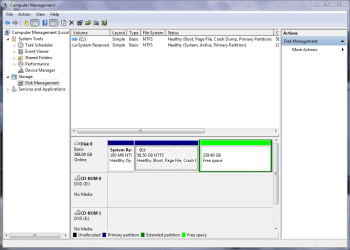
What I have now is one partition with 100 MB NTFS, one partition with 58,50 GB NTFS with my C:\ drive and 239,49 GB free space. I have not activate yet. But if I do it over again will I be able to do it the way I really wanted? Or maybe that 58,50 GB for my C:\ drive is not that small after all if I don't put to much stuff on it, which brings me to the next question. I want to create what is left on the HD in a data partition but I guess that programs I will have to put on my C:\ drive. Also is there a possibillity that I can dual boot with the same version of Windows 7 Home Premium on another HD (I have an 80 GB HDD)
Well your support is highly appreciated.
Thank you guys.
I did a clean install based on your tutorial but it went a little different than I expected. I did the installation on a 320 GB harddisk that allready had Windows 7 on it but it was messed up. It had one primary partition of 58,6 GB with Windows 7 Pro on it and an extended partition of 239,5 GB with Vista on it and some free space. When I got to the part that asked me where do you want to install Windows, I started to delete those two partitions. What I really wanted was one big 320 GB of unallocated space with the intention of dividing it by two so I can have one primary partition of 160 GB for my Windows 7 Home Premium and the rest for my data. I guess that I must have shrink that extended partition instead of deleting it. There was no way back after the deletion. I was left with the only option of creating new partition and it gave me only 60.000 MB for the primary partition which I did but of course it took away 100 MB for the system reserved.
What I have now is one partition with 100 MB NTFS, one partition with 58,50 GB NTFS with my C:\ drive and 239,49 GB free space. I have not activate yet. But if I do it over again will I be able to do it the way I really wanted? Or maybe that 58,50 GB for my C:\ drive is not that small after all if I don't put to much stuff on it, which brings me to the next question. I want to create what is left on the HD in a data partition but I guess that programs I will have to put on my C:\ drive. Also is there a possibillity that I can dual boot with the same version of Windows 7 Home Premium on another HD (I have an 80 GB HDD)
Well your support is highly appreciated.
Thank you guys.
My Computer
- OS
- windows 7 home premium 64bit
- CPU
- Intel (R) Pentium (R) 4 CPU 3.06 GHz
- Motherboard
- Gigabyte GA-81865 GME-775
- Memory
- Ultra 1024 MB PC2700 DDR 333 MHz (2 RAM)
- Graphics Card(s)
- Nvidia Geforce 6200 256 Mbytes
- Sound Card
- Realtek AC'97 Audio
- Monitor(s) Displays
- Generic PnP monitor
- Screen Resolution
- 1024*768 @ 75 Hz
- Hard Drives
- Seagate ST3320620AS 320 GB Serial ATA
- Case
- PC312 Lyra Super Case
- Internet Speed
- 100 Mbps