
Hello All
I did a fresh install of Win7 Pro 64Bit yesterday from an OEM disc to a new Samsung 850 Pro SSD.
2 sets of initial updates, which included SP1, went without a hitch with Windows Updater set to let me know when updates are available so I can choose to download etc.
Today I got an alert that there were 200+ updates available for download, I went through them and deselected KB3133977 which can mess with Asus MB's, then hit continue... an hour later my system was still "Preparing to Download."
I changed the Updater settings to Download but let me choose what to install, rebooted, and a short while later I was told there were 173 updates ready to install.
I checked again to make sure KB3133977 hadn't made it back onto the list and hit continue... 15 minutes later my system was still "Preparing to Install."
At this point I figured something must be broken, so considered rolling back through the Restore Points, trying a Repair install, or just nuking the drive and starting again.
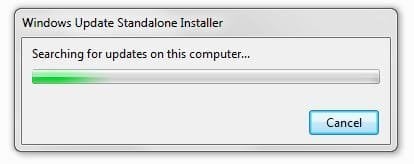
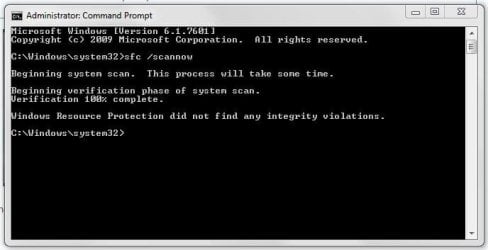
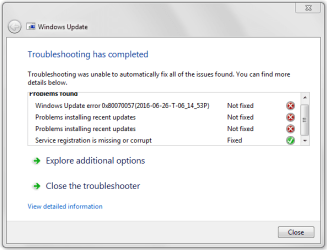
But before trying any of the above I've included the CBS file, a screen grab of the SURT tool after 2hrs, the sfc Scannow results, and the results of running the Windows Updater Troubleshooter.
I hope you guys can help... thanks in advance!
Paul
I did a fresh install of Win7 Pro 64Bit yesterday from an OEM disc to a new Samsung 850 Pro SSD.
2 sets of initial updates, which included SP1, went without a hitch with Windows Updater set to let me know when updates are available so I can choose to download etc.
Today I got an alert that there were 200+ updates available for download, I went through them and deselected KB3133977 which can mess with Asus MB's, then hit continue... an hour later my system was still "Preparing to Download."
I changed the Updater settings to Download but let me choose what to install, rebooted, and a short while later I was told there were 173 updates ready to install.
I checked again to make sure KB3133977 hadn't made it back onto the list and hit continue... 15 minutes later my system was still "Preparing to Install."
At this point I figured something must be broken, so considered rolling back through the Restore Points, trying a Repair install, or just nuking the drive and starting again.
But before trying any of the above I've included the CBS file, a screen grab of the SURT tool after 2hrs, the sfc Scannow results, and the results of running the Windows Updater Troubleshooter.
I hope you guys can help... thanks in advance!
Paul
Attachments
My Computer
At a glance
Win7 Pro 64BitIntel Core 2 Duo E8400 3MHz6GB Kingston DDR2 800GeForce 8400 GS 512MB
- OS
- Win7 Pro 64Bit
- CPU
- Intel Core 2 Duo E8400 3MHz
- Motherboard
- MSI P43-Neo3-F
- Memory
- 6GB Kingston DDR2 800
- Graphics Card(s)
- GeForce 8400 GS 512MB
- Sound Card
- SoundBlaster Audigy 24bit
- Monitor(s) Displays
- Samsung
- Hard Drives
- OCZ Vertex 60GB SSD (OS/Apps only)
1x WD 500GB 7200rpm (Data + Win7 Profile)
1x WD 1TB 7200rpm (Data only)
- PSU
- Apevia 500w
- Case
- Apevia Spyder full tower

