cleaned out all of my start menu items

Vosberg1

Is there not a cause?
Member
Local time
9:57 AM
Messages
46
Location
Post Falls ID
OK, quick breif. Using Windows 7 Ult N 32 bit, and yesterday i was doing some cleaning of some old folders, and files. I ran a program called Glary Utilities, and, now i have an odd problem. It cleaned out all of my start menu items, sans for the ones that i had pined. (Screenshot of that) I have tried a couple of things, but i admit, i am at a loss of what to do. How do i get back the items in the Start Menu? The cached ones, that is.
 

Attachments

  • This is odd.jpg
    This is odd.jpg
    135.7 KB · Views: 44

My Computer My Computer

At a glance

Windows 7 Ultimate x861.66 Ghz3 Gb
Computer Manufacturer/Model Number
Toshiba
OS
Windows 7 Ultimate x86
CPU
1.66 Ghz
Memory
3 Gb
Screen Resolution
1280x800
Hard Drives
75 GB Seagate
320 Gb Seagate Ext
500 Gb Seagate Ext
Mouse
Logitech
Other Info
Laptop A105
Why don't you restore your computer to a date prior to using glary utilities?
 

My Computer My Computer

At a glance

Systems 1 and 2: Windows 7 Enterprise x64, Wi...System 1: i7 [email protected], System 2: AMD FX-41...System 1: 8GB System 2: 8GBSystem 1: ATI FirePro V4800 System 2: Radeon ...
Computer Manufacturer/Model Number
Dell and Custom
OS
Systems 1 and 2: Windows 7 Enterprise x64, Win 8 Developer
CPU
System 1: i7 [email protected], System 2: AMD FX-4100 Zambezi 3.6G
Motherboard
System 1:Dell 06NWYK System 2: ASUS M5A97 AM3+
Memory
System 1: 8GB System 2: 8GB
Graphics Card(s)
System 1: ATI FirePro V4800 System 2: Radeon HD 6850
Sound Card
System 1: onboard System 2: onboard
Monitor(s) Displays
System1: Viewsonic HDMI 24"
Screen Resolution
System 1: 1920x1080 System 2: 1920x1080
Hard Drives
System 1: Mirrored .5B drives System 2: Seagate Barracuda ST1000DM003 1TB 7200 RPM 64MB Cache SATA 6.0Gb/s
Case
System 1: Dell System 2: Cooler Master
Internet Speed
10 MBPS
Win7 requires no tweaking besides normal system settings. It will always wind up working against you in the long run - or sooner, as you found out.

Windows Defender has a Software Explorer in its Options which allows you to see a more user friendly listing of what Startup items are than msconfig>Startup. Any that arent clear can be googled to quickly find their purpose.

I uncheck everything except AV and gadgets as others to me are freeloaders on CPU/RAM and can spy you.
 
If you're still stuck, maybe a hair of the dog:

Glarysoft Forum "Disk Clean" I mistake Deleted Files, File UnDelete Help?

I used to use that program but didn't reinstall it the last time around. It seems to me that there was also a "backup" folder in case you ended up in a situation such as yours. Look in "My Documents" or under C:\Users\username\AppData, then either Local or Roaming for a Glarysoft folder. :)
 

My Computer My Computer

At a glance

Main - Windows 7 Pro SP1 64-Bit; 2nd - Window...Main - Core i7 2600K; 2nd - Core i7 920Main - 16GB Corsair Vengeance; 2nd - 12GB Cor...Main - XFX Radeon 6870 1GB; 2nd - XFX Radeon ...
Computer Manufacturer/Model Number
Self
OS
Main - Windows 7 Pro SP1 64-Bit; 2nd - Windows Server 2008 R2
CPU
Main - Core i7 2600K; 2nd - Core i7 920
Motherboard
Main - Asus P8Z68-V Pro/Gen3; 2nd - Gigabyte GA-EX58-UDR3
Memory
Main - 16GB Corsair Vengeance; 2nd - 12GB Corsair Vengeance
Graphics Card(s)
Main - XFX Radeon 6870 1GB; 2nd - XFX Radeon 4870 1GB
Sound Card
Both: Onboard Realtek Azalia
Monitor(s) Displays
Main - Hann 25" + I-INC 25" + Acer 23"; 2nd - Upgrading Soon
Screen Resolution
Main - 1920x1080 (All Three Monitors); 2nd - Upgrading Soon
Hard Drives
Main - (1) Crucial M4 128GB (Boot)
Main - (1) Seagate 2TB 64MB Cache (Data)
Main - (1) Seagate 2TB 64MB Cache (Data Backup)
2nd - (1) Intel X25-M SSD 80GB (Boot)
2nd - (3) Seagate 1TB 32MB Cache (Data Backup)
2nd - (1) Seagate 320GB (Because)
PSU
Main - OCZ 600W Modular; 2nd - OCZ 600W
Case
Main - Thermaltake Element G; 2nd - NZXT something or other
Cooling
Main - Corsair H80; 2nd - Prolimatech Megahalems
Keyboard
Main - Razer Reclusa; 2nd - Old MS Keyboard
Mouse
Main - Logitech MX Revolution; 2nd - Old MS Mouse
Internet Speed
20Mbps Time-Warner Cable
Vosberg,

By cleaned out, do you mean that the items no longer appear in that list above the search bar? Do you mean that the programs were removed from your computer? Do you mean the programs were removed from the list of programs which are run at startup time?
 

My Computer My Computer

At a glance

MS Windows 7 Ultimate SP1 64-bitAMD A10-4600M6.00 GB Dual-Channel DDR3 @ 798MHz (11-11-12-28)AMD Radeon HD 7660G
Computer Manufacturer/Model Number
Toshiba Satellite S875D-S7239 laptop
OS
MS Windows 7 Ultimate SP1 64-bit
CPU
AMD A10-4600M
Motherboard
AMD Pumori (Socket FT1)
Memory
6.00 GB Dual-Channel DDR3 @ 798MHz (11-11-12-28)
Graphics Card(s)
AMD Radeon HD 7660G
Sound Card
High Definition Audio Device
Monitor(s) Displays
Generic PnP Monitor (1600x900@60Hz)
Screen Resolution
1600x900@60Hz
Hard Drives
SSD 119GB Corsair CSSD-V128GB2 ATA Device
Keyboard
Standard PS/2 Keyboard
Mouse
HP Wireless Optical Mobile Mouse Model FHA-3410
Internet Speed
What the local pub, local coffee shop offers.
Other Info
Optical Drive:MATSHITA BD-CMB UJ160B ATA Device


Also have an Asus ha1002xp netbook with Win 7 Ultimate installed.
Windows Defender has a Software Explorer in its Options which allows you to see a more user friendly listing of what Startup items are than msconfig>Startup. Any that arent clear can be googled to quickly find their purpose.

I'm having trouble finding that, could post a screenshot or give some more info of where I would find that feature. Thanks.

After doing some searching around, it says that software explorer isn't included in my version of windows. Is there a way to get it that you know of? Or do i just need to use something else?
 

My Computer My Computer

At a glance

7 Home Premium (64bit)AMD FX4100 3.6Ghz - OC'd to 4Ghz8GB Crucial BallistixnVidia GeForce 440 1GB
Computer Manufacturer/Model Number
Custom Build
OS
7 Home Premium (64bit)
CPU
AMD FX4100 3.6Ghz - OC'd to 4Ghz
Motherboard
Gigabyte - GA-78LMT-S2P
Memory
8GB Crucial Ballistix
Graphics Card(s)
nVidia GeForce 440 1GB
Monitor(s) Displays
Acer X223w
Screen Resolution
1680x1050
Hard Drives
1TB Internal - WD Caviar Blue
640GB Internal - WD Caviar Green
2TB External - WD Caviar Green
2TB External WD Caviar Green
PSU
575
Case
Mid ATX
Cooling
6x 120mm Internal +60mm CPU Cooler
Keyboard
Microsoft
Mouse
Microsoft
Internet Speed
Cable
The ones that were not pinned were only temporary anyhow - those were the last ones you visited. If you care to get some back, go into All Programs and right click on the ones you want, then "Pin to start menu".
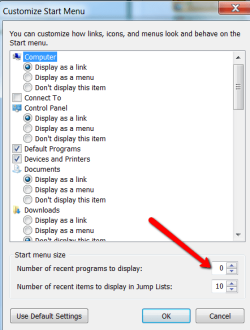
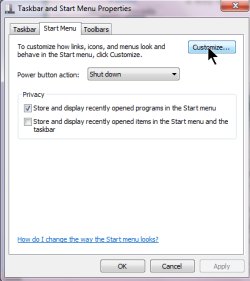
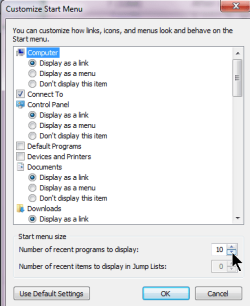
If you do not care to have all those temporaries, go to the start menu properties and set the number to zero (see picture).
 

Attachments

  • 2010-09-14_1805.png
    2010-09-14_1805.png
    16.9 KB · Views: 1

My Computer My Computer

At a glance

Vista, Windows7, Mint Mate, Zorin, Windows 8from 1.6GHz Duo to i7
Computer Manufacturer/Model Number
HP, Dell, Gateway, Toshiba - 4 laptops and 2 desktops
OS
Vista, Windows7, Mint Mate, Zorin, Windows 8
CPU
from 1.6GHz Duo to i7
Monitor(s) Displays
2x HP w2207
Hard Drives
5x HDD, 7x SSD, 12x Externals
Keyboard
with trackball - no mices
Mouse
Trackball mice
Internet Speed
DSL 6000
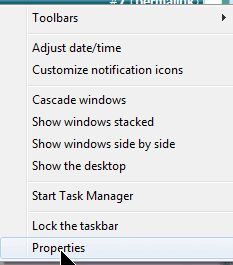
That empty space will get populated gradually by the programs you open. Also, right click on the Start orb, click on Properties and make sure the box "store and dispaly recently opened programs in start menu" is checked. (Glary probably unchecked that).
 

My Computer My Computer

At a glance

Windows 7 x64 pro/ Windows 7 x86 Pro/ XP SP3 x86
Computer Manufacturer/Model Number
Too many to describe...
OS
Windows 7 x64 pro/ Windows 7 x86 Pro/ XP SP3 x86
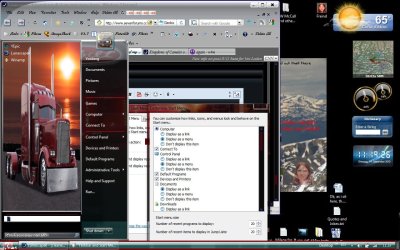
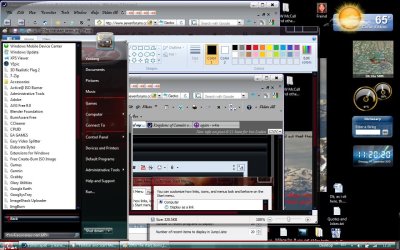
Well, it is the ones that you would open after time. I have opened quite a few, just like in these two, Paint was opened, but, it is not caching into the Start menu. I have it set for 20, i am at a loss.

I have tried a few of the suggestions, and to no avil as well.

Thanks for your help.
 

Attachments

  • 20for the start items.jpg
    20for the start items.jpg
    146.4 KB · Views: 3
  • Itstillhavetheprograms.jpg
    Itstillhavetheprograms.jpg
    151.3 KB · Views: 5

My Computer My Computer

At a glance

Windows 7 Ultimate x861.66 Ghz3 Gb
Computer Manufacturer/Model Number
Toshiba
OS
Windows 7 Ultimate x86
CPU
1.66 Ghz
Memory
3 Gb
Screen Resolution
1280x800
Hard Drives
75 GB Seagate
320 Gb Seagate Ext
500 Gb Seagate Ext
Mouse
Logitech
Other Info
Laptop A105
Vosberg,
Take a look at these and see if you have maybe overlooked a needed item.

Rt-clk on empty space.png

choose properties.png

checkmark store and display recently opened programs.png

Click on Customize.png

Dial in the number of recent programs.png

Click on OK button.png
 

My Computer My Computer

At a glance

MS Windows 7 Ultimate SP1 64-bitAMD A10-4600M6.00 GB Dual-Channel DDR3 @ 798MHz (11-11-12-28)AMD Radeon HD 7660G
Computer Manufacturer/Model Number
Toshiba Satellite S875D-S7239 laptop
OS
MS Windows 7 Ultimate SP1 64-bit
CPU
AMD A10-4600M
Motherboard
AMD Pumori (Socket FT1)
Memory
6.00 GB Dual-Channel DDR3 @ 798MHz (11-11-12-28)
Graphics Card(s)
AMD Radeon HD 7660G
Sound Card
High Definition Audio Device
Monitor(s) Displays
Generic PnP Monitor (1600x900@60Hz)
Screen Resolution
1600x900@60Hz
Hard Drives
SSD 119GB Corsair CSSD-V128GB2 ATA Device
Keyboard
Standard PS/2 Keyboard
Mouse
HP Wireless Optical Mobile Mouse Model FHA-3410
Internet Speed
What the local pub, local coffee shop offers.
Other Info
Optical Drive:MATSHITA BD-CMB UJ160B ATA Device


Also have an Asus ha1002xp netbook with Win 7 Ultimate installed.
  • Like
Reactions: whs
Just to mention again. If one wants little programs to change things on Windows 7 I would recommend using Microsoft site. Most of those 3rd party do da programs cause more problems with W7 than do good. Like has been posted before, go to a restore point before this program was installed and you should be back to were you want to be. Once you are there and you want to change something please ask here. If possible some one will help you.
 

My Computer My Computer

At a glance

Windows 10 Pro. 64/ version 1709 Windows 7 Pr...Intel i7-6800K @ 4.3Corsair Platinum 16 gig @2400EVGA GTX 1070 OC
Computer type
PC/Desktop
Computer Manufacturer/Model Number
Home made Desktop
OS
Windows 10 Pro. 64/ version 1709 Windows 7 Pro/64
CPU
Intel i7-6800K @ 4.3
Motherboard
ASUS X-99 Deluxe II
Memory
Corsair Platinum 16 gig @2400
Graphics Card(s)
EVGA GTX 1070 OC
Monitor(s) Displays
Asus 27" LED LCD/VE278Q
Screen Resolution
1920-1080 or 1280-720 HDMI
Hard Drives
INTEL SSD 730-240 Gb Sata 3.0/
PSU
EVGA Platium 1200W
Case
Phanteks Luxe Tempered Glass 8 fans/ one radiator
Cooling
XSPC/ Water Cooled CPU
Keyboard
Das 4 Professional
Mouse
Logitech M705/MX Anywhere 2-S
Internet Speed
100 mbits
Antivirus
Microsoft Security Essentials/ Malwarebytes Premium 3.0/ SAS
Browser
I.E. 11 default/Firefox/ ISP Time Warner Cable/Spectrum
Other Info
LG BluRay Burner/
Sound system-KLipsch-THX/
Icy Dock ssd Hot Swap bays.
Just to mention again. If one wants little programs to change things on Windows 7 I would recommend using Microsoft site. Most of those 3rd party do da programs cause more problems with W7 than do good. Like has been posted before, go to a restore point before this program was installed and you should be back to were you want to be. Once you are there and you want to change something please ask here. If possible some one will help you.
+1, you are absolutely right.
 

My Computer My Computer

At a glance

Vista, Windows7, Mint Mate, Zorin, Windows 8from 1.6GHz Duo to i7
Computer Manufacturer/Model Number
HP, Dell, Gateway, Toshiba - 4 laptops and 2 desktops
OS
Vista, Windows7, Mint Mate, Zorin, Windows 8
CPU
from 1.6GHz Duo to i7
Monitor(s) Displays
2x HP w2207
Hard Drives
5x HDD, 7x SSD, 12x Externals
Keyboard
with trackball - no mices
Mouse
Trackball mice
Internet Speed
DSL 6000
Well, final update. I dunno what cleared up the problem, but, things are now back to normal. To me it seems that maybe checking and double checking the opts in the start prefs cleared up what ever caused this. But, thanks for the advice, i was kinda confused about what happened for a while. And, i did uninstall Glary Utils for the moment.
 

My Computer My Computer

At a glance

Windows 7 Ultimate x861.66 Ghz3 Gb
Computer Manufacturer/Model Number
Toshiba
OS
Windows 7 Ultimate x86
CPU
1.66 Ghz
Memory
3 Gb
Screen Resolution
1280x800
Hard Drives
75 GB Seagate
320 Gb Seagate Ext
500 Gb Seagate Ext
Mouse
Logitech
Other Info
Laptop A105
Vosberg,

Glad to hear that all is well now and thanks for getting back to us with the update.

I have no idea what glary utilities is but I do know that I would never, never install such. If this software offers something that you feel that you can not live without, then let us know and we will show you how to accomplish the same using the built-in capabilities of Win 7.
 

My Computer My Computer

At a glance

MS Windows 7 Ultimate SP1 64-bitAMD A10-4600M6.00 GB Dual-Channel DDR3 @ 798MHz (11-11-12-28)AMD Radeon HD 7660G
Computer Manufacturer/Model Number
Toshiba Satellite S875D-S7239 laptop
OS
MS Windows 7 Ultimate SP1 64-bit
CPU
AMD A10-4600M
Motherboard
AMD Pumori (Socket FT1)
Memory
6.00 GB Dual-Channel DDR3 @ 798MHz (11-11-12-28)
Graphics Card(s)
AMD Radeon HD 7660G
Sound Card
High Definition Audio Device
Monitor(s) Displays
Generic PnP Monitor (1600x900@60Hz)
Screen Resolution
1600x900@60Hz
Hard Drives
SSD 119GB Corsair CSSD-V128GB2 ATA Device
Keyboard
Standard PS/2 Keyboard
Mouse
HP Wireless Optical Mobile Mouse Model FHA-3410
Internet Speed
What the local pub, local coffee shop offers.
Other Info
Optical Drive:MATSHITA BD-CMB UJ160B ATA Device


Also have an Asus ha1002xp netbook with Win 7 Ultimate installed.
Vosberg,

Glad to hear that all is well now and thanks for getting back to us with the update.

I have no idea what glary utilities is but I do know that I would never, never install such. If this software offers something that you feel that you can not live without, then let us know and we will show you how to accomplish the same using the built-in capabilities of Win 7.
That is very good advice Karl.
 

My Computer My Computer

At a glance

Vista, Windows7, Mint Mate, Zorin, Windows 8from 1.6GHz Duo to i7
Computer Manufacturer/Model Number
HP, Dell, Gateway, Toshiba - 4 laptops and 2 desktops
OS
Vista, Windows7, Mint Mate, Zorin, Windows 8
CPU
from 1.6GHz Duo to i7
Monitor(s) Displays
2x HP w2207
Hard Drives
5x HDD, 7x SSD, 12x Externals
Keyboard
with trackball - no mices
Mouse
Trackball mice
Internet Speed
DSL 6000
I would recommend before one installed a 3rd party program check here first. That will give that person a good idea what they might be getting into. At that point a informed decision can be made.
 

My Computer My Computer

At a glance

Windows 10 Pro. 64/ version 1709 Windows 7 Pr...Intel i7-6800K @ 4.3Corsair Platinum 16 gig @2400EVGA GTX 1070 OC
Computer type
PC/Desktop
Computer Manufacturer/Model Number
Home made Desktop
OS
Windows 10 Pro. 64/ version 1709 Windows 7 Pro/64
CPU
Intel i7-6800K @ 4.3
Motherboard
ASUS X-99 Deluxe II
Memory
Corsair Platinum 16 gig @2400
Graphics Card(s)
EVGA GTX 1070 OC
Monitor(s) Displays
Asus 27" LED LCD/VE278Q
Screen Resolution
1920-1080 or 1280-720 HDMI
Hard Drives
INTEL SSD 730-240 Gb Sata 3.0/
PSU
EVGA Platium 1200W
Case
Phanteks Luxe Tempered Glass 8 fans/ one radiator
Cooling
XSPC/ Water Cooled CPU
Keyboard
Das 4 Professional
Mouse
Logitech M705/MX Anywhere 2-S
Internet Speed
100 mbits
Antivirus
Microsoft Security Essentials/ Malwarebytes Premium 3.0/ SAS
Browser
I.E. 11 default/Firefox/ ISP Time Warner Cable/Spectrum
Other Info
LG BluRay Burner/
Sound system-KLipsch-THX/
Icy Dock ssd Hot Swap bays.
OK, i will take you up on that. First off, does 7 have a rock finder so that if i have to dig another hole, i wont hit the stupid things? (Just joking). No, the real question, is i do a lot of photography, and i got a little lazy for about 2 months, and just kept copying photos, and there happened to be a lot of dups, cause i did not clear my memory card after. So, i was using a lot of excess room on my external HDD. To try to find the dups, i was refereed to that Glary Utils. Is there a way that i can search for dup files using 7 only? That would help in cause i get busy again like i was...
 

My Computer My Computer

At a glance

Windows 7 Ultimate x861.66 Ghz3 Gb
Computer Manufacturer/Model Number
Toshiba
OS
Windows 7 Ultimate x86
CPU
1.66 Ghz
Memory
3 Gb
Screen Resolution
1280x800
Hard Drives
75 GB Seagate
320 Gb Seagate Ext
500 Gb Seagate Ext
Mouse
Logitech
Other Info
Laptop A105
I am not familiar with Glary Utilities; but there are several utilities out there that will find duplicate files. If you use such a utility, only get rid of your duplicate files - the ones you know you created yourself - such as documents, photos, etc. Do not delete a duplicate system file no matter how duplicates a utility may find of it. If you are not sure you created a file; do not delete it. Do not delete any files in system or program folders. Carefully compare the file properties: dates, sizes, etc. You may have two files of the same name in different folders that are two entirely different files. Do not let the utility make the decision for you. Verify each and every duplicate you wish to delete.

As other have said, do not try to tune Windows with a third party tune up utility. There is no program out there anywhere that can improve Win 7's efficiency or speed.
 

My Computer My Computer

At a glance

Windows 7 Ultimate 32 bitIntel(R) Pentium(R) 4 CPU 3.00GHz2.50 GB RAMNVIDIA GeForce 7600 GS
Computer Manufacturer/Model Number
Home built
OS
Windows 7 Ultimate 32 bit
CPU
Intel(R) Pentium(R) 4 CPU 3.00GHz
Motherboard
ASUS P4P800-VM Motherboard Chipset: Intel 865G + ICH5
Memory
2.50 GB RAM
Graphics Card(s)
NVIDIA GeForce 7600 GS
Sound Card
SoundMax Integrated Digital Audio (Chip)
Monitor(s) Displays
ViewSonic VX 1962 wm
Screen Resolution
1680 X 1050
Hard Drives
Seagate Barracuda 7200.10 80 GB
ST380215A ATA Device 18.6 GB
Western Digital "My Book" external hard drive 750 GB
Cooling
Fan based
Keyboard
Microsoft Comfort Curve Keyboard 2000 v10 USB
Mouse
Logitec optic USB
Internet Speed
3.01 Mb/s download 0.64 Mb/s upload
OK, i will take you up on that. First off, does 7 have a rock finder so that if i have to dig another hole, i wont hit the stupid things? (Just joking). No, the real question, is i do a lot of photography, and i got a little lazy for about 2 months, and just kept copying photos, and there happened to be a lot of dups, cause i did not clear my memory card after. So, i was using a lot of excess room on my external HDD. To try to find the dups, i was refereed to that Glary Utils. Is there a way that i can search for dup files using 7 only? That would help in cause i get busy again like i was...

Here you go. I have used this many times. I don't like the interface and the checkboxes for picking the files are difficult at best, however it does work. I like that it can find files that are the same but named differently.

(i.e.)

D:\PIX 142K 11-23-2009 Vacation at Mom's Cabin (Around Pond).jpg
D:\PIX\Backup 142K 11-23-2009 Vacation at Mom's House (Lunch on the Pond).jpg
E:\Photos for Mom 142K 11-23-2009 Vacation Pix (Lunch on the Pond).jpg

Will all show up as duplicates and if you open them they are all the same picture. -WS

Duplicate & Same Files Searcher
 

My Computer My Computer

At a glance

Windows 7 Enterprise (x64); Windows Server 20...16GB
Computer type
PC/Desktop
Computer Manufacturer/Model Number
Dell OP7010
OS
Windows 7 Enterprise (x64); Windows Server 2008 R2 (x64)
Memory
16GB
Monitor(s) Displays
4 Dell 24" LCD
Screen Resolution
1280x1024
Keyboard
Dell
Mouse
Dell Optical
Internet Speed
40meg
Windows Defender has a Software Explorer in its Options which allows you to see a more user friendly listing of what Startup items are than msconfig>Startup. Any that arent clear can be googled to quickly find their purpose.

I'm having trouble finding that, could post a screenshot or give some more info of where I would find that feature. Thanks.

After doing some searching around, it says that software explorer isn't included in my version of windows. Is there a way to get it that you know of? Or do i just need to use something else?


Sorry man, you'll need to install CCleaner which is a great program for cleaning HD. Use the Startup interface on it, or use msconfig>Startup and google the items to know exactly what they are.

There's also a great new program called Soluto with a nice interactive menu which shows what startup items do (google if it doesn't) and recommends which to remove or delay.
 
Back
Top