Cleaning MSConfig

CJW

New member
Power User
VIP
Local time
10:43 PM
Messages
439
Toshiba Satellite A665-S5184X laptop

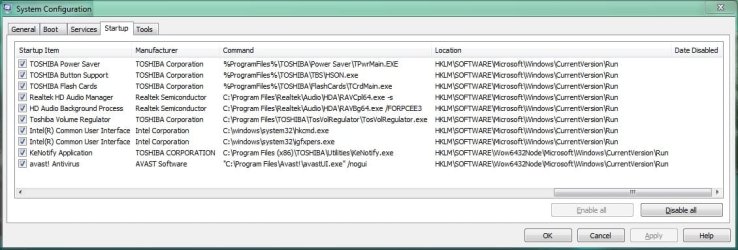
I've looked-up most of these entries, but only get answers as to what they are & where they came from; not descriptions as to WHAT they do & if they are safe to remove from startup. Which can I remove?

TPwrMain.EXE: Toshiba's Power Saver, I believe helps control my laptop's power/battery feature.
HSON.exe: Toshiba's Instant-On Utility, I believe this enables & manages my laptop's touch buttons.
TCrdMain.exe: either Toshiba's Flash Card Memory slot/the keys that flash on my screen when I press the FN key.
RAVCpl64.exe -s: Realtek HD Audio Manager.
RAVBg64.exe /FORPCEE3: HD Audio Background Process.
TosVolRegulator.exe: Toshiba Volume Regulator.
igfxtray.exe: Intel(R) Common User Interface.
hkcmd.exe: Intel(R) Common User Interface.
igfxpers.exe: Intel(R) Common User Interface.
KeNotify.exe: Program responsible for the 'F keys' alternative functions.
 

Attachments

  • MSConfig.JPG
    MSConfig.JPG
    88.3 KB · Views: 25

My Computer

Computer type
PC/Desktop
Computer Manufacturer/Model Number
Self built comfuser
OS
10 Pro. 64Bit
CPU
AMD FX 4100, 4-Core Black Edition. Socket AM3+ ~ 3.60GHz
Motherboard
ASUS M5A97 LE R2.0
Memory
2x 4GB Kingston HyperX DDR3-1866 (PC3-14900) - 8GB Total
Graphics Card(s)
ASUS Radeon HD 6670-2GD3
Sound Card
Onboard High Definition Audio Device
Monitor(s) Displays
HP 2009m LCD
Screen Resolution
1600x900, True Color (32bit), 60Hertz
Hard Drives
WD Blue - 1TB, 3D NAND - SATA SSD
PSU
XFX Pro 450W Core Edition - Fully Wired
Case
Antec Super Lanboy
Cooling
Stock CPU fan + 2 (1 front, 1 back) 120mm Antec fans
Keyboard
Logitech MK700/MK710
Mouse
Logitech M705
Internet Speed
Frontier FiOS 50/50
Antivirus
Windows Security
Browser
Vivaldi
Other Info
1x ASUS DRW-24B1ST Multi-DVD Rewriter
1x RocketFish AIO Media Card Reader
1x WD 1TB Passport USB External Drive
I'm not sure, but msconfig isn't for permanent changes. It's a diagnostic utility.

If you find that you can go without a few of these, then re-enable them in msconfig and then go to the Registry where they can be found as shown by msconfig and delete the subkey (subkeys are in the right-hand pane) for each one. They'll have the same name, so finding them will be easy. After deleting, log out of Windows and log back in (or just restart).

When you do this (or if you do), then you'll notice that it has completely disappeared from msconfig! ;)
 

My Computer

Computer type
PC/Desktop
TwoCables-
Yep, that's what I usually do. I check what the entries are & if I need them, if not, I go into the registry & delete those unneeded entries. It's just a few of these that are left that I'm not so sure of yet. Although, I did remove the igfxtray.exe; it's just a notification tray icon connected to my graphics driver & I didn't need it there.
 

My Computer

Computer type
PC/Desktop
Computer Manufacturer/Model Number
Self built comfuser
OS
10 Pro. 64Bit
CPU
AMD FX 4100, 4-Core Black Edition. Socket AM3+ ~ 3.60GHz
Motherboard
ASUS M5A97 LE R2.0
Memory
2x 4GB Kingston HyperX DDR3-1866 (PC3-14900) - 8GB Total
Graphics Card(s)
ASUS Radeon HD 6670-2GD3
Sound Card
Onboard High Definition Audio Device
Monitor(s) Displays
HP 2009m LCD
Screen Resolution
1600x900, True Color (32bit), 60Hertz
Hard Drives
WD Blue - 1TB, 3D NAND - SATA SSD
PSU
XFX Pro 450W Core Edition - Fully Wired
Case
Antec Super Lanboy
Cooling
Stock CPU fan + 2 (1 front, 1 back) 120mm Antec fans
Keyboard
Logitech MK700/MK710
Mouse
Logitech M705
Internet Speed
Frontier FiOS 50/50
Antivirus
Windows Security
Browser
Vivaldi
Other Info
1x ASUS DRW-24B1ST Multi-DVD Rewriter
1x RocketFish AIO Media Card Reader
1x WD 1TB Passport USB External Drive
The only thing I see in your screen print that I would not disable is the Avast Antivirus.
You can disable everything else and see how things work for you.
Most of these look like factory OEM programs that aren't really needed.
If you find you do use some of these other programs, you can always re-enable them.
 

My Computer

Computer type
PC/Desktop
Computer Manufacturer/Model Number
home built
OS
Multi-Boot W7_Pro_x64 W8.1_Pro_x64 W10_Pro_x64 +Linux_VMs +Chromium_VM
CPU
AMD Athlon II x4 620
Motherboard
Gigabyte GA-MA785G-UD3H
Memory
6GB GSkill DDR2 800
Graphics Card(s)
AMD 4670 GPU + AMD 4200 IGP
Sound Card
on board Realtek ALC889A
Monitor(s) Displays
RCA 40" LCD TV, Insignia 32" LCD TV, HP 15" LCD monitor
Screen Resolution
1680 x 1050
Hard Drives
OCZ Vertex 3 120GB,
Samsung F3 1TB (3),
Several others - WD, Seagate, Hitachi, ...
PSU
Corsair 500 W
Case
Rosewill mid tower
Cooling
CM 90mm rifle
Keyboard
Gyration wireless, Logitech wireless, Dell USB wired
Mouse
Gyration wireless, Logitech wireless, V7 USB wired
Internet Speed
Spectrum - 100Mbps D / 10Mbps U
Antivirus
Avast, MBAM3, EMET, WinPatrol
Browser
Pale Moon, Firefox, IE
Other Info
2 multi-boot PC's
Mainly HTPC/Office/Gen purpose (no gaming).
Trendnet USB KVM.
LG DVD burner/Blue Ray Player.
Tray system for removable SATA backup drives.

Not currently OCd, under-volted.
I use Hybrid sleep, rarely re-boot or shutdown.

Hauppauge HD-PVR, Avermedia PCIe TV Tuner, Hauppauge PCI TV Tuner.
TwoCables-
Yep, that's what I usually do. I check what the entries are & if I need them, if not, I go into the registry & delete those unneeded entries.

You must be pretty good with Windows tech to be able to edit the registry!
If you're not aware of it, a good utility is MS Sysinternals Autoruns.
Windows Sysinternals: Documentation, downloads and additional resources

Autoruns is much more advanced and capable than MSCONFIG.

There are many Sysinternals utilities that go beyond the built-in Windows utility.
I don't recommend these for most people, but if you can edit the registry, you might appreciate these if you learn them...
My personal favorite (most used) is Process Explorer rather than Task Manager...
;)
 

My Computer

Computer type
PC/Desktop
Computer Manufacturer/Model Number
home built
OS
Multi-Boot W7_Pro_x64 W8.1_Pro_x64 W10_Pro_x64 +Linux_VMs +Chromium_VM
CPU
AMD Athlon II x4 620
Motherboard
Gigabyte GA-MA785G-UD3H
Memory
6GB GSkill DDR2 800
Graphics Card(s)
AMD 4670 GPU + AMD 4200 IGP
Sound Card
on board Realtek ALC889A
Monitor(s) Displays
RCA 40" LCD TV, Insignia 32" LCD TV, HP 15" LCD monitor
Screen Resolution
1680 x 1050
Hard Drives
OCZ Vertex 3 120GB,
Samsung F3 1TB (3),
Several others - WD, Seagate, Hitachi, ...
PSU
Corsair 500 W
Case
Rosewill mid tower
Cooling
CM 90mm rifle
Keyboard
Gyration wireless, Logitech wireless, Dell USB wired
Mouse
Gyration wireless, Logitech wireless, V7 USB wired
Internet Speed
Spectrum - 100Mbps D / 10Mbps U
Antivirus
Avast, MBAM3, EMET, WinPatrol
Browser
Pale Moon, Firefox, IE
Other Info
2 multi-boot PC's
Mainly HTPC/Office/Gen purpose (no gaming).
Trendnet USB KVM.
LG DVD burner/Blue Ray Player.
Tray system for removable SATA backup drives.

Not currently OCd, under-volted.
I use Hybrid sleep, rarely re-boot or shutdown.

Hauppauge HD-PVR, Avermedia PCIe TV Tuner, Hauppauge PCI TV Tuner.
TwoCables-
Yep, that's what I usually do. I check what the entries are & if I need them, if not, I go into the registry & delete those unneeded entries.

You must be pretty good with Windows tech to be able to edit the registry!
If you're not aware of it, a good utility is MS Sysinternals Autoruns.
Windows Sysinternals: Documentation, downloads and additional resources

Autoruns is much more advanced and capable than MSCONFIG.

There are many Sysinternals utilities that go beyond the built-in Windows utility.
I don't recommend these for most people, but if you can edit the registry, you might appreciate these if you learn them...
My personal favorite (most used) is Process Explorer rather than Task Manager...
;)

Being able to edit the Registry for this requires just a few basic skills:

  1. Knowing where to look in the Startup tab for the location of the key in the Registry
  2. Knowing how to access the Registry Editor
  3. Knowing how to access that key which requires knowing how to expand a tree structure
  4. Knowing how to locate and delete a file because this skill is required for deleting the subkeys
All in all, this is a very basic thing, especially when easy-to-follow instructions are given.
 

My Computer

Computer type
PC/Desktop
I'm ok at editing the registry & not too scared of poking around in there, despite all of Microsoft's warnings :p. That said, I did try the "safe" route before of 1st unchecking items in MSConfig & rebooting; only to find out that when I rechecked the ones I really wanted to stay, I lost some of their functionality even though they were still listed in MSConfig & the registry correctly. Strange & a pain to get back to normal (Factory Restore!)

I'm also looking into my optical drive & having a little problem trying to figure this one out.
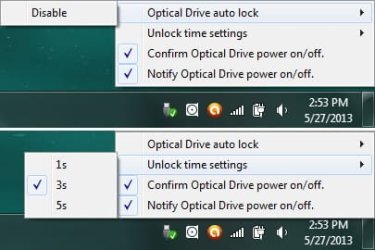
In my Notification Area there is an icon for my optical drive. I always assumed that a built-in optical drive is always on, so why do I have/need an icon in the Notification Area? When I take a look at the options (attached pic) I see no way of removing this from the Notification Area & if I find out how, will this disable the drive? I'm just wondering because I'm tring to shorten my laptop's boot time (currently at 37-40 seconds).
 

Attachments

  • Optical Drive.jpg
    Optical Drive.jpg
    19.6 KB · Views: 9

My Computer

Computer type
PC/Desktop
Computer Manufacturer/Model Number
Self built comfuser
OS
10 Pro. 64Bit
CPU
AMD FX 4100, 4-Core Black Edition. Socket AM3+ ~ 3.60GHz
Motherboard
ASUS M5A97 LE R2.0
Memory
2x 4GB Kingston HyperX DDR3-1866 (PC3-14900) - 8GB Total
Graphics Card(s)
ASUS Radeon HD 6670-2GD3
Sound Card
Onboard High Definition Audio Device
Monitor(s) Displays
HP 2009m LCD
Screen Resolution
1600x900, True Color (32bit), 60Hertz
Hard Drives
WD Blue - 1TB, 3D NAND - SATA SSD
PSU
XFX Pro 450W Core Edition - Fully Wired
Case
Antec Super Lanboy
Cooling
Stock CPU fan + 2 (1 front, 1 back) 120mm Antec fans
Keyboard
Logitech MK700/MK710
Mouse
Logitech M705
Internet Speed
Frontier FiOS 50/50
Antivirus
Windows Security
Browser
Vivaldi
Other Info
1x ASUS DRW-24B1ST Multi-DVD Rewriter
1x RocketFish AIO Media Card Reader
1x WD 1TB Passport USB External Drive
It may be a function of AHCI hotplugging. Is the OD also listed in Safely Remove Hardware where all plugged drives show up under AHCI installs? You can uncheck Show and it should vamooski.

May I ask what startups you need beside Avast and why? It's a specialty of mine and I like to hear reasoned arguments for keeping certain OEM software because it's true some users find it beneficial even though most is crapware.
 
May I ask what startups you need beside Avast and why? It's a specialty of mine and I like to hear reasoned arguments for keeping certain OEM software because it's true some users find it beneficial even though most is crapware.

Hi Greg,
I helped someone a while back that said they were getting "Some type of HD warnings"...
I found it was an OEM Utility displaying these warnings.
I created the System Recovery discs, and within weeks the HD did fail...
The HD was replaced under warranty by Best Buy and the Laptop OEM.
Restoring the system was much easier having the Recovery discs that most people don't create.
In this case, I thought it was good that an OEM utility did alert the user of a problem before a catastrophe.
 

My Computer

Computer type
PC/Desktop
Computer Manufacturer/Model Number
home built
OS
Multi-Boot W7_Pro_x64 W8.1_Pro_x64 W10_Pro_x64 +Linux_VMs +Chromium_VM
CPU
AMD Athlon II x4 620
Motherboard
Gigabyte GA-MA785G-UD3H
Memory
6GB GSkill DDR2 800
Graphics Card(s)
AMD 4670 GPU + AMD 4200 IGP
Sound Card
on board Realtek ALC889A
Monitor(s) Displays
RCA 40" LCD TV, Insignia 32" LCD TV, HP 15" LCD monitor
Screen Resolution
1680 x 1050
Hard Drives
OCZ Vertex 3 120GB,
Samsung F3 1TB (3),
Several others - WD, Seagate, Hitachi, ...
PSU
Corsair 500 W
Case
Rosewill mid tower
Cooling
CM 90mm rifle
Keyboard
Gyration wireless, Logitech wireless, Dell USB wired
Mouse
Gyration wireless, Logitech wireless, V7 USB wired
Internet Speed
Spectrum - 100Mbps D / 10Mbps U
Antivirus
Avast, MBAM3, EMET, WinPatrol
Browser
Pale Moon, Firefox, IE
Other Info
2 multi-boot PC's
Mainly HTPC/Office/Gen purpose (no gaming).
Trendnet USB KVM.
LG DVD burner/Blue Ray Player.
Tray system for removable SATA backup drives.

Not currently OCd, under-volted.
I use Hybrid sleep, rarely re-boot or shutdown.

Hauppauge HD-PVR, Avermedia PCIe TV Tuner, Hauppauge PCI TV Tuner.
Good reminder, David. The HD monitor OEM software should probably be reinstalled with Windows. How about battery tenders? They seem to be wrapped up in a Power-modification package sometimes that is pretty intrusive and seems itself unnecessary.
 
gregrocker:
I'm just trying to boost my laptop's boot time (currently at 37-40 seconds using BootRacer) & would like to know what I do need, don't need & entries to keep because I like them.

Here's what I have in my Startup tab of MSConfig:
TPwrMain.EXE: Toshiba's Power Saver, I believe helps control my laptop's power/battery feature.
HSON.exe: Toshiba's Instant-On Utility, I believe this enables & manages my laptop's touch buttons.
TCrdMain.exe: either Toshiba's Flash Card Memory slot/the keys that flash on my screen when I press the FN key.
RAVCpl64.exe -s: Realtek HD Audio Manager.
RAVBg64.exe /FORPCEE3: HD Audio Background Process.
TosVolRegulator.exe: Toshiba Volume Regulator.
hkcmd.exe: Intel(R) Common User Interface.
igfxpers.exe: Intel(R) Common User Interface.
KeNotify.exe: Program responsible for the 'F keys' alternative functions.

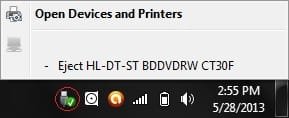
Below is the pop-up I get when I select the Safely Remove Hardware & Eject Media icon. I see no Show selection, but if I select Eject ..., the OD ceases to work at all & the SRW & EM icon goes away (OD icon stays) w/o a way to turn the OD back on. So how can I remove the OD icon but keep it turned on?
 

Attachments

  • SRH & EM.jpg
    SRH & EM.jpg
    6.5 KB · Views: 54

My Computer

Computer type
PC/Desktop
Computer Manufacturer/Model Number
Self built comfuser
OS
10 Pro. 64Bit
CPU
AMD FX 4100, 4-Core Black Edition. Socket AM3+ ~ 3.60GHz
Motherboard
ASUS M5A97 LE R2.0
Memory
2x 4GB Kingston HyperX DDR3-1866 (PC3-14900) - 8GB Total
Graphics Card(s)
ASUS Radeon HD 6670-2GD3
Sound Card
Onboard High Definition Audio Device
Monitor(s) Displays
HP 2009m LCD
Screen Resolution
1600x900, True Color (32bit), 60Hertz
Hard Drives
WD Blue - 1TB, 3D NAND - SATA SSD
PSU
XFX Pro 450W Core Edition - Fully Wired
Case
Antec Super Lanboy
Cooling
Stock CPU fan + 2 (1 front, 1 back) 120mm Antec fans
Keyboard
Logitech MK700/MK710
Mouse
Logitech M705
Internet Speed
Frontier FiOS 50/50
Antivirus
Windows Security
Browser
Vivaldi
Other Info
1x ASUS DRW-24B1ST Multi-DVD Rewriter
1x RocketFish AIO Media Card Reader
1x WD 1TB Passport USB External Drive
What do you see when you hover your mouse over the OD icon?

Then, what do you get when you left-click it?

What do you get when you right-click it?

This is before and after ejecting. I'm just trying to find out what that icon is really for.
 

My Computer

Computer type
PC/Desktop
Looking at the pics below, when I hover the cursor over the OD's icon, I see a message stating if it's On/Off. Left-clicking doesn't do anything, but Right-clicking gives me the same options whether the OD is On/Off. The only differences are that the SRH & EM icon goes away when OD is turned off & the OD's drive changes color.
 

Attachments

  • On.jpg
    On.jpg
    23.5 KB · Views: 9
  • Off.jpg
    Off.jpg
    23.2 KB · Views: 5

My Computer

Computer type
PC/Desktop
Computer Manufacturer/Model Number
Self built comfuser
OS
10 Pro. 64Bit
CPU
AMD FX 4100, 4-Core Black Edition. Socket AM3+ ~ 3.60GHz
Motherboard
ASUS M5A97 LE R2.0
Memory
2x 4GB Kingston HyperX DDR3-1866 (PC3-14900) - 8GB Total
Graphics Card(s)
ASUS Radeon HD 6670-2GD3
Sound Card
Onboard High Definition Audio Device
Monitor(s) Displays
HP 2009m LCD
Screen Resolution
1600x900, True Color (32bit), 60Hertz
Hard Drives
WD Blue - 1TB, 3D NAND - SATA SSD
PSU
XFX Pro 450W Core Edition - Fully Wired
Case
Antec Super Lanboy
Cooling
Stock CPU fan + 2 (1 front, 1 back) 120mm Antec fans
Keyboard
Logitech MK700/MK710
Mouse
Logitech M705
Internet Speed
Frontier FiOS 50/50
Antivirus
Windows Security
Browser
Vivaldi
Other Info
1x ASUS DRW-24B1ST Multi-DVD Rewriter
1x RocketFish AIO Media Card Reader
1x WD 1TB Passport USB External Drive
Right click on the Taskbar
Left click Properties
Click on Customize in Notification Area
If you have "Always show all icons and notifications on the taskbar" checked, uncheck it
Do you see the OD listed, and can you set it to "Hide icon and notifications"?
 

My Computer

Computer type
PC/Desktop
Computer Manufacturer/Model Number
home built
OS
Multi-Boot W7_Pro_x64 W8.1_Pro_x64 W10_Pro_x64 +Linux_VMs +Chromium_VM
CPU
AMD Athlon II x4 620
Motherboard
Gigabyte GA-MA785G-UD3H
Memory
6GB GSkill DDR2 800
Graphics Card(s)
AMD 4670 GPU + AMD 4200 IGP
Sound Card
on board Realtek ALC889A
Monitor(s) Displays
RCA 40" LCD TV, Insignia 32" LCD TV, HP 15" LCD monitor
Screen Resolution
1680 x 1050
Hard Drives
OCZ Vertex 3 120GB,
Samsung F3 1TB (3),
Several others - WD, Seagate, Hitachi, ...
PSU
Corsair 500 W
Case
Rosewill mid tower
Cooling
CM 90mm rifle
Keyboard
Gyration wireless, Logitech wireless, Dell USB wired
Mouse
Gyration wireless, Logitech wireless, V7 USB wired
Internet Speed
Spectrum - 100Mbps D / 10Mbps U
Antivirus
Avast, MBAM3, EMET, WinPatrol
Browser
Pale Moon, Firefox, IE
Other Info
2 multi-boot PC's
Mainly HTPC/Office/Gen purpose (no gaming).
Trendnet USB KVM.
LG DVD burner/Blue Ray Player.
Tray system for removable SATA backup drives.

Not currently OCd, under-volted.
I use Hybrid sleep, rarely re-boot or shutdown.

Hauppauge HD-PVR, Avermedia PCIe TV Tuner, Hauppauge PCI TV Tuner.
Uncheck the two choices which are currently checked on the OD icon's right click context menu.


I would also disable all items in msconfig>Startup and >Services (after Hiding MS Services) besides your AV to see how they run. The hotkeys should still work, and the battery crapware is normally intrusive and should be uninstalled to get it out of the native Win7 Power Options which only presents problems and no benefits I've seen.

The audio listings are not needed unless you've customized a system using specializd controls in it which need instant tray access, which you'd know if you had.
 
Last edited:
I unchecked the Confirm & Notify selections for the OD & all seems to be working as normal.
I know how to hide Notification icons, but I wanted to know why it's there in the 1st place. Isn't a built-in OD AWLAYS On?

Below are screenshots of my Services & Startups along w/what I do know, if I'm wrong, please let me know.
Startup:
* TOSHIBA Power Saver: Management of the PCs power consumption (Eco settings I believe).
* TOSHIBA Button Support: Used for touch buttons above the F-keys, disable & buttons do not work.
* TOSHIBA Flash Cards: On-screen F-keys alternate functions when holding down FN key. Tested before & screwed-up some functionality.
* Realtek HD Audio Manager: Detects & allows configuring of headphones & microphones.
* HD Audio Background Process: Related to above.
* Toshiba Volume Regulator: Increases & decreases PCs volume automatically depending on the ambient noise level.
* Intel's hkcmd.exe: Hotkey Command Module.
* Intel's igfxpers.exe: Will automatically switch screen resolutions when using a docking station/external monitor.
* KeNotify Application: Responsible for the FlashCards utility.
* avast! Antivirus: Leaving enabled.

Why are there 2 processes (TCrdMain.exe & KeNotify.exe) for the same function?
 

Attachments

  • MSConfig~1.jpg
    MSConfig~1.jpg
    55.4 KB · Views: 9
  • MSConfig~2.jpg
    MSConfig~2.jpg
    77.4 KB · Views: 7

My Computer

Computer type
PC/Desktop
Computer Manufacturer/Model Number
Self built comfuser
OS
10 Pro. 64Bit
CPU
AMD FX 4100, 4-Core Black Edition. Socket AM3+ ~ 3.60GHz
Motherboard
ASUS M5A97 LE R2.0
Memory
2x 4GB Kingston HyperX DDR3-1866 (PC3-14900) - 8GB Total
Graphics Card(s)
ASUS Radeon HD 6670-2GD3
Sound Card
Onboard High Definition Audio Device
Monitor(s) Displays
HP 2009m LCD
Screen Resolution
1600x900, True Color (32bit), 60Hertz
Hard Drives
WD Blue - 1TB, 3D NAND - SATA SSD
PSU
XFX Pro 450W Core Edition - Fully Wired
Case
Antec Super Lanboy
Cooling
Stock CPU fan + 2 (1 front, 1 back) 120mm Antec fans
Keyboard
Logitech MK700/MK710
Mouse
Logitech M705
Internet Speed
Frontier FiOS 50/50
Antivirus
Windows Security
Browser
Vivaldi
Other Info
1x ASUS DRW-24B1ST Multi-DVD Rewriter
1x RocketFish AIO Media Card Reader
1x WD 1TB Passport USB External Drive
I unchecked the Confirm & Notify selections for the OD & all seems to be working as normal.
I know how to hide Notification icons, but I wanted to know why it's there in the 1st place. Isn't a built-in OD AWLAYS On?

Below are screenshots of my Services & Startups along w/what I do know, if I'm wrong, please let me know.
Startup:
* TOSHIBA Power Saver: Management of the PCs power consumption (Eco settings I believe).
* TOSHIBA Button Support: Used for touch buttons above the F-keys, disable & buttons do not work.
* TOSHIBA Flash Cards: On-screen F-keys alternate functions when holding down FN key. Tested before & screwed-up some functionality.
* Realtek HD Audio Manager: Detects & allows configuring of headphones & microphones.
* HD Audio Background Process: Related to above.
* Toshiba Volume Regulator: Increases & decreases PCs volume automatically depending on the ambient noise level.
* Intel's hkcmd.exe: Hotkey Command Module.
* Intel's igfxpers.exe: Will automatically switch screen resolutions when using a docking station/external monitor.
* KeNotify Application: Responsible for the FlashCards utility.
* avast! Antivirus: Leaving enabled.

Why are there 2 processes (TCrdMain.exe & KeNotify.exe) for the same function?

I don't know why there are 2. Maybe one depends on the other.

Anyway, I am just as confused as you are that the optical drive needs an icon in the Notification Area. On one hand, it looks to me like there are many things that don't need to be there, but on the other, it's not a custom-made computer like mine is, so I am afraid to start messing with anything. I mean, only Toshiba knows, y'know?
 

My Computer

Computer type
PC/Desktop
I always disable ALL startups except for the AV program* and those that I started myself (e.g. Rocket Dock and the gadgets). Never had any problem.

* Many AV programs do not even show in the startups because they have their own autostart method.
But if you are chicken and would rather start a few of those useless buggers, you can set them to a delayed start (e.g. 2 minutes after boot).
 

My Computer

Computer Manufacturer/Model Number
HP, Dell, Gateway, Toshiba - 4 laptops and 2 desktops
OS
Vista, Windows7, Mint Mate, Zorin, Windows 8
CPU
from 1.6GHz Duo to i7
Monitor(s) Displays
2x HP w2207
Hard Drives
5x HDD, 7x SSD, 12x Externals
Keyboard
with trackball - no mices
Mouse
Trackball mice
Internet Speed
DSL 6000
Back
Top