Cleaning MSConfig

Actually this is known having helped with many Toshiba Clean Reinstalls over the years here.

You do not need any of the bloatware starting up. If your battery tender bloatware gives you longer battery life that might be an exception, but I haven't found one that actually does. As with all other WIn7 installs you only need the AV starting with Windows. The others are freeloaders and can spy on you.

The OD likely has bloatware causing it to also start up in the SysTray, or it is an anomaly having to do with an AHCI install which enables hotplugging and puts all or most SATA devices into Safely Remove Hardware.
AHCI vs IDE - Difference and Comparison | Diffen
 
Last edited:
Just to add, "AHCI" is the Advanced Host Controller Interface. It's for the SATA controllers.

I always wanted to know this back before I knew what AHCI meant, and somehow, knowing helped me out.
 

My Computer

Computer type
PC/Desktop
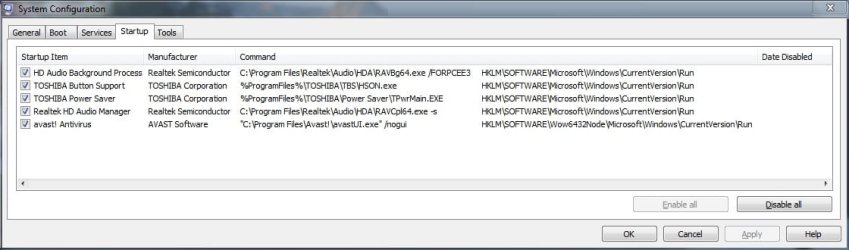
Been doing some more testing as of late & I removed a few more entries from MSConfig's Startup tab by way of the registry:
* Intel's hkcmd.exe (Hotkey Command Module): Because I don't use them anyway.
* Intel's igfxpers.exe: Can still switch & link screens when using a docking station/external monitor.
* KeNotify Application: Not exactly sure how it helps the FlashCards utility, but nothing seems to be harmed by removing this.
* Toshiba Flash Cards: Keys still work just fine after removing.
* Toshiba Volume Regulator: I can use the touch buttons above my F-Keys for volume regulation.

All I have left are:
* avast! Antivirus: Leaving enabled.
* HD Audio Background Process: Related to Realtek HD Audio Manager.
* Realtek HD Audio Manager: Detects & allows configuring of headphones & microphones.
* Toshiba Button Support: Used for touch buttons above the F-keys, disable & buttons will not work.
* Toshiba Power Saver: Management of the PCs power consumption (Eco settings I believe).
 

My Computer

Computer type
PC/Desktop
Computer Manufacturer/Model Number
Self built comfuser
OS
10 Pro. 64Bit
CPU
AMD FX 4100, 4-Core Black Edition. Socket AM3+ ~ 3.60GHz
Motherboard
ASUS M5A97 LE R2.0
Memory
2x 4GB Kingston HyperX DDR3-1866 (PC3-14900) - 8GB Total
Graphics Card(s)
ASUS Radeon HD 6670-2GD3
Sound Card
Onboard High Definition Audio Device
Monitor(s) Displays
HP 2009m LCD
Screen Resolution
1600x900, True Color (32bit), 60Hertz
Hard Drives
WD Blue - 1TB, 3D NAND - SATA SSD
PSU
XFX Pro 450W Core Edition - Fully Wired
Case
Antec Super Lanboy
Cooling
Stock CPU fan + 2 (1 front, 1 back) 120mm Antec fans
Keyboard
Logitech MK700/MK710
Mouse
Logitech M705
Internet Speed
Frontier FiOS 50/50
Antivirus
Windows Security
Browser
Vivaldi
Other Info
1x ASUS DRW-24B1ST Multi-DVD Rewriter
1x RocketFish AIO Media Card Reader
1x WD 1TB Passport USB External Drive
The Power Saver is just more crapware that intrudes into Win7's better Power Management feature and is not needed. I would uninstall it in Control Panel.

You're still messing with the worst install of Win7 one can have, which is why no tech enthusiast would run the corrupt factory preinstall but instead does a Clean Reinstall - Factory OEM Windows 7 to unleash Win7 native performance.

Until then there is more to just disabling the bloatware given in Clean Up Factory Bloatware
 
Been doing some more testing as of late & I removed a few more entries from MSConfig's Startup tab by way of the registry:
* Intel's hkcmd.exe (Hotkey Command Module): Because I don't use them anyway.
* Intel's igfxpers.exe: Can still switch & link screens when using a docking station/external monitor.
* KeNotify Application: Not exactly sure how it helps the FlashCards utility, but nothing seems to be harmed by removing this.
* Toshiba Flash Cards: Keys still work just fine after removing.
* Toshiba Volume Regulator: I can use the touch buttons above my F-Keys for volume regulation.

All I have left are:
* avast! Antivirus: Leaving enabled.
* HD Audio Background Process: Related to Realtek HD Audio Manager.
* Realtek HD Audio Manager: Detects & allows configuring of headphones & microphones.
* Toshiba Button Support: Used for touch buttons above the F-keys, disable & buttons will not work.
* Toshiba Power Saver: Management of the PCs power consumption (Eco settings I believe).

Nice work! Now you're workin' like a pro (seriously).
 

My Computer

Computer type
PC/Desktop
This is sooooo much easier on my self-built desktop than it is on the laptop! I know just what gets installed on the desktop & exactly what I need in Startup (which is usually just 2 items), but on the laptop I don't know exactly what entry is for what & scouring the internet for complete answers is not always easy. That being said, I'm pretty happy the way it sits now ...
 

Attachments

  • MSConfig.jpg
    MSConfig.jpg
    48.5 KB · Views: 10
  • BootRacer.jpg
    BootRacer.jpg
    34.8 KB · Views: 10

My Computer

Computer type
PC/Desktop
Computer Manufacturer/Model Number
Self built comfuser
OS
10 Pro. 64Bit
CPU
AMD FX 4100, 4-Core Black Edition. Socket AM3+ ~ 3.60GHz
Motherboard
ASUS M5A97 LE R2.0
Memory
2x 4GB Kingston HyperX DDR3-1866 (PC3-14900) - 8GB Total
Graphics Card(s)
ASUS Radeon HD 6670-2GD3
Sound Card
Onboard High Definition Audio Device
Monitor(s) Displays
HP 2009m LCD
Screen Resolution
1600x900, True Color (32bit), 60Hertz
Hard Drives
WD Blue - 1TB, 3D NAND - SATA SSD
PSU
XFX Pro 450W Core Edition - Fully Wired
Case
Antec Super Lanboy
Cooling
Stock CPU fan + 2 (1 front, 1 back) 120mm Antec fans
Keyboard
Logitech MK700/MK710
Mouse
Logitech M705
Internet Speed
Frontier FiOS 50/50
Antivirus
Windows Security
Browser
Vivaldi
Other Info
1x ASUS DRW-24B1ST Multi-DVD Rewriter
1x RocketFish AIO Media Card Reader
1x WD 1TB Passport USB External Drive
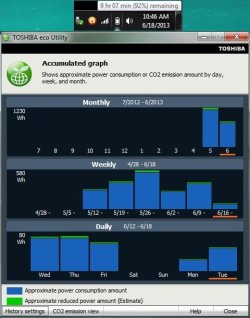
Take a look at my pic below, is there anyway of checking how true the battery reading is other than using the laptop ALL day?
 

Attachments

  • Eco.jpg
    Eco.jpg
    38.8 KB · Views: 3

My Computer

Computer type
PC/Desktop
Computer Manufacturer/Model Number
Self built comfuser
OS
10 Pro. 64Bit
CPU
AMD FX 4100, 4-Core Black Edition. Socket AM3+ ~ 3.60GHz
Motherboard
ASUS M5A97 LE R2.0
Memory
2x 4GB Kingston HyperX DDR3-1866 (PC3-14900) - 8GB Total
Graphics Card(s)
ASUS Radeon HD 6670-2GD3
Sound Card
Onboard High Definition Audio Device
Monitor(s) Displays
HP 2009m LCD
Screen Resolution
1600x900, True Color (32bit), 60Hertz
Hard Drives
WD Blue - 1TB, 3D NAND - SATA SSD
PSU
XFX Pro 450W Core Edition - Fully Wired
Case
Antec Super Lanboy
Cooling
Stock CPU fan + 2 (1 front, 1 back) 120mm Antec fans
Keyboard
Logitech MK700/MK710
Mouse
Logitech M705
Internet Speed
Frontier FiOS 50/50
Antivirus
Windows Security
Browser
Vivaldi
Other Info
1x ASUS DRW-24B1ST Multi-DVD Rewriter
1x RocketFish AIO Media Card Reader
1x WD 1TB Passport USB External Drive
I don't know why you're still playing with the crapware which no tech enthusiast would waste time on. Those are poorly-written programs which duplicate better versions built into the best OS ever, and which smother its native performance.
 
Back
Top