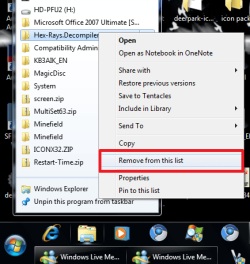
clearing jump lists

akimatsu123

New member
Local time
4:13 PM
Messages
10
Hi,

This may be a stupid question, but how do you clear the jump lists in Windows 7? Before, one would clear the "Recent" folder under

Documents and Settings > USERNAME > RECENT

Or the equivalent in Vista.

How can this be accomplished in Windows 7?
 

My Computer

Computer Manufacturer/Model Number
Lenovo X200 Tablet
OS
Windows 7
CPU
Intel Core Duo L9400 (1.86 GHz + 1.86 GHz)
Graphics Card(s)
Mobile Intel 45 Express Chipset Family (WDDM 1.1)
Sound Card
Conexant High Definition SmartAudio 221
Screen Resolution
1280x800
Keyboard
USA
here

jump.png
 

My Computer

Computer Manufacturer/Model Number
Tx2500z Tablet Pc/Homemade Server
OS
Windows 7 Ult x64(x2), HomePrem x32(x4), Server 08 (+VM), 08 R2 (VM) , SuSe 11.2 (VM), XP 32 (VM)
CPU
Turion X2 ultra (oh well came with laptop)/P4 @3.2 (yes P4)
Motherboard
IDK HP Motherboard / Intel DG965SS
Memory
OCZ Dual Channel 4GB kit/ 1gb Dual Channel
Graphics Card(s)
HD 3200 graphics /GMA x3100 (yay for intergrated!!)
Sound Card
Realtek HD Audio(mic working, well sort of)/Siig IC-70012
Monitor(s) Displays
built-in Hp 12" laptop screen/ Acer 19"
Screen Resolution
1280x800 /1440x900
Cooling
All Air Cooled
Mouse
Logi MX Rev. /MS Wheel Optical 1.1A /Logitech Optical Mouse
Internet Speed
College baby but its still routed through vpn to 1536k...
Other Info
love my wacom pen and pressure sensitivity...
wished it worked in 7, SUSE for that matter though
thanks for your reply

is there a way i can clear ALL of them instead of clicking on each one individually?
 

My Computer

Computer Manufacturer/Model Number
Lenovo X200 Tablet
OS
Windows 7
CPU
Intel Core Duo L9400 (1.86 GHz + 1.86 GHz)
Graphics Card(s)
Mobile Intel 45 Express Chipset Family (WDDM 1.1)
Sound Card
Conexant High Definition SmartAudio 221
Screen Resolution
1280x800
Keyboard
USA
I don't know if there is a way to clear them, as you wish, but you can prevent them starting.
Right click the Start orb and select properties.
You can untick both items under the Start Menu tab, if that suits.
Click customise.
Now, if you scroll down, there are a couple of options there to make your menu cleaner.
1. Default Programs
2. Highlite newly installed programs
3. Recent items
 

My Computer

Computer Manufacturer/Model Number
Three desktops and one laptop with good specs..
OS
Vista and now 7 in 32 and 64 bit.
Back
Top