
Cleartype problem

azzis

New member
Local time
1:26 PM
Messages
2
Hi All!
I have trouble with windows 7 cleartype system. After installation it's great! Cleartype work perfect. But after installation some programs into the system i have strange effect. In some windows cleartype not work properly. View my screenshot in attachment. It's very strange!
 

Attachments
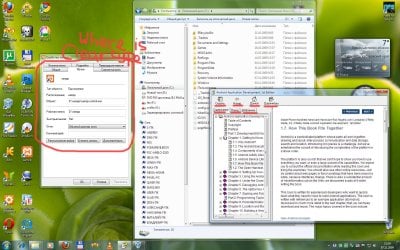
  • 1.jpg
    1.jpg
    317.6 KB · Views: 1,066

My Computer

OS
Windows 7
Hi there
is it only Russian or does it work in English.

Incidentally you'll get a better rendering if in the personalisation option you make the fonts just a little bigger.

Do it in Custom size. You don't need to use 120% bigger - do it to suit yourself.

Also try changing the standard fonts - Cyrillic letters might come out better in different fonts -- don't know as I'm not a Russian / Serbian speaker.

Cheers
jimbo
 

My Computer

Computer type
PC/Desktop
Computer Manufacturer/Model Number
Custom built, several laptops HP/ASUS
OS
Linux CENTOS 7 / various Windows OS'es and servers
CPU
Intel i7 Intel i5
Memory
8GB, 16GB
Graphics Card(s)
On Motherboard
Sound Card
Realtek HD audio
Monitor(s) Displays
Apple Cinema display, Samsung LCD
Screen Resolution
1920 X 1080
Hard Drives
4 X 1TB SATA
Mouse
Toshiba wireless laser
Internet Speed
> 20MB up
Hi, Jimbo!

It's bug not only in russian fonts. English words too.
I play with personalisations options. This options not influence to cleartype.
Where i can changing the standard fonts? I don't find this options in Aero theme.

I also observe cleartype work fine if i change System language in Regional settings to English, but russian letters somewere is broken or is "_" symbol.
 

My Computer

OS
Windows 7
Fonts not showing clear-typing.

There are several fonts that just won't show any visible effects to ClearType™. They may be designed that way, or may only show visible ClearType™ under certain conditions.

You may try the following:

  • Increase the font size.
  • Change the font style to bold.
  • Try a different font in the program.
  • Try a different font for the desktop theme.
  • Try a different desktop theme.
  • Try a larger display setting (control panel / display)
  • Try a different clear-type configuration.
I hope this will help anyone who has trouble keeping there desktop and/or display readable.
 
Last edited:

My Computer

Computer Manufacturer/Model Number
Hewlett-Packard / HP 625
OS
Windows 7 Home Basic 32bit
CPU
AMD Athlon™ II P320 Dual-Core Processor 2.10 GHz
Memory
2.00 GiB (1.75 GiB usable)
Graphics Card(s)
ATI Mobility Radeon HD 4250
Sound Card
ATI
Monitor(s) Displays
Flat Panel LCD 1366x768
Hard Drives
SATA 320 GiB
Back
Top