Hi,
I would have hoped that in the evolution of windows, such a basic need as to be able to not lose whats on the clipboard when needing to make a second copy, would have been dealt with by now, but Msoft seem to overlook the basic needs of users here and concentrate on stuff not vital to us.
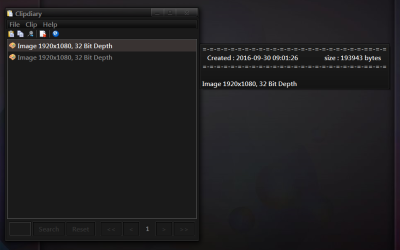
I have installed Ditto, but its also lacking from the outset, I cant see the order indicated of the clips I copied, thats no good, some are numbered then the numbering vanishes, and double clicking one doesnt paste it when I am in photoshop wishing to paste in stills made during a tutorial on youtube, instead it changes its order, so now I am totally confused, and the very small image of what was copied is too small to see what the copy was, so hit F3 to view it, but then its distorted, not same proportion, so need to stretch the window wider, then click next one, but not sure if I am clicking previous or subsequent copy, then have to hit F3 and yet again stretch the window. I simply need it to paste my clips in order I made them, i.e select #1 then I need to click back into photoshop, and go ctrl v, then launch the prog ditto, select next clip, then go back into photoshop, ctrl v, and so on .
What will do this, on a windows 7 64bit pro OS ? Yankee Clipper lll is 32bit and a guy was having it lose its billboard function under 64bit in a post and no answer was ever forthcoming. I need it to give me a take order numbering system, and keep the number with the icon, let me see the image it holds, bigger than ditto, and have a scroll bar to move them up and down. Ideally a double click pastes it, and doesnt change its order in the palette ! else a right click option that says paste ! all of which Ditto lacks.
DBenz
I would have hoped that in the evolution of windows, such a basic need as to be able to not lose whats on the clipboard when needing to make a second copy, would have been dealt with by now, but Msoft seem to overlook the basic needs of users here and concentrate on stuff not vital to us.
I have installed Ditto, but its also lacking from the outset, I cant see the order indicated of the clips I copied, thats no good, some are numbered then the numbering vanishes, and double clicking one doesnt paste it when I am in photoshop wishing to paste in stills made during a tutorial on youtube, instead it changes its order, so now I am totally confused, and the very small image of what was copied is too small to see what the copy was, so hit F3 to view it, but then its distorted, not same proportion, so need to stretch the window wider, then click next one, but not sure if I am clicking previous or subsequent copy, then have to hit F3 and yet again stretch the window. I simply need it to paste my clips in order I made them, i.e select #1 then I need to click back into photoshop, and go ctrl v, then launch the prog ditto, select next clip, then go back into photoshop, ctrl v, and so on .
What will do this, on a windows 7 64bit pro OS ? Yankee Clipper lll is 32bit and a guy was having it lose its billboard function under 64bit in a post and no answer was ever forthcoming. I need it to give me a take order numbering system, and keep the number with the icon, let me see the image it holds, bigger than ditto, and have a scroll bar to move them up and down. Ideally a double click pastes it, and doesnt change its order in the palette ! else a right click option that says paste ! all of which Ditto lacks.
DBenz
My Computer
At a glance
Windows 7 64bit proIntel Core i7 479032Gb DDR3GeForce GTX970
- Computer type
- PC/Desktop
- Computer Manufacturer/Model Number
- Custom built
- OS
- Windows 7 64bit pro
- CPU
- Intel Core i7 4790
- Motherboard
- Gigabyte Z97P-D3 Intel Z97 Socket 1150 DDR3
- Memory
- 32Gb DDR3
- Graphics Card(s)
- GeForce GTX970
- Hard Drives
- Samsung SSD for OS and WD green for data
- Antivirus
- Kaspersky Internet Security 2014
- Browser
- Firefox