Solved Clone Dual Boot on SSD

Tweakit

New member
Power User
Local time
10:45 PM
Messages
75
I have an older laptop with a 60GB drive and in a dual boot configuration of XP and Windows 7 32 bit. I ordered a 120GB SSD and I’d like to make a clone of the existing drive on the SSD. I did some reading and I’m now discovering this may not be so easy and is certainly not the same as cloning to another HD. My thinking was to use the Windows 7 backup feature to make an image of the entire 60GB (source) drive and then simply restore this image to the new SSD (target) drive. I’ve read that the partitions on the SSD must be “aligned” which is different than a standard HD which doesn’t care about that. The problem is that the windows XP partition on the source drive is not aligned in my case. I understand that Windows 7 backup will create partitions on the target drive featuring the same alignment as originally seen on the source drive. Ergo, this method will create a problem on the SSD unless the partitions on the source drive are aligned from the start. Here’s my question. Is it possible using DISKPART or some other utility to align the XP partition on the source drive prior to creating the image? If this is possible then the restored image should also have aligned partitions on the SSD and all should be good. If I can align the XP partition on the source drive what do I need and how is this done?
Thanks for reading.
 

My Computer

Computer type
PC/Desktop
Computer Manufacturer/Model Number
Custom Build
OS
Windows 7 professional 64 bit
CPU
i7-870
Motherboard
Gigabyte GA-P55-USB3 (rev 2)
Memory
G.Skill F3-10666CL9D-8GBRL; (8GB)
Graphics Card(s)
Radeon HD4670
Sound Card
on board
Monitor(s) Displays
Dell U2311H plus ASUS PB238
Screen Resolution
1080P (dual monitors)
Hard Drives
VelociRaptor WD1500HLHX 150GB (system)
2TB Samsung spinpoint (data)
596GB WD caviar blue (data)
PSU
FSP AS400 400W ATX2.31/EPS2.92
Case
Antec Sonata III 500
Cooling
CPU cooled by Rosewill HSF RCX-Z90-CP
Keyboard
Microsoft ergonomic PS-2
Mouse
Logitech M510
Internet Speed
very fast via cable
Antivirus
Microsoft Security Essentials
Browser
Chrome and IE10
Other Info
Also have hauppauge TV Card HVR-1600
CPU, case and GPU Fans are controlled by SpeedFan.
I "transferred" a multi-boot PC from a HD to an SSD using this tutorial by whs.
http://www.sevenforums.com/tutorials/149969-ssd-install-transfer-operating-system.html

After the transfer, I found i made a mistake and the SSD alignment was wrong.
I fixed it with this tutorial and help from whs:
http://www.sevenforums.com/tutorials/113967-ssd-alignment.html
That "re-alignment" took a lot of time, and i learned.

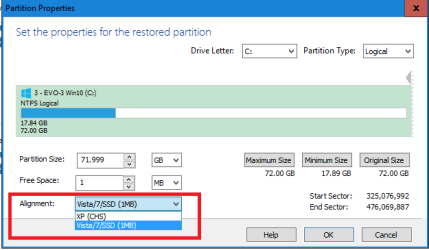
If you use Macrium Reflect to "transfer" the OS's to the new SSD, make sure you choose SSD alignment rather than XP.
I think that's where i made my mistake, i didn't change the alignment to "SSD".
It copied my HD alignment to the new SSD, and was not right for the SSD.

whs helped me and got me fixed, but he is not available right now on SF as far as i know.

a screen print of Macrium that might help in the transfer

SSD_Align.PNG
 

My Computer

Computer type
PC/Desktop
Computer Manufacturer/Model Number
home built
OS
Multi-Boot W7_Pro_x64 W8.1_Pro_x64 W10_Pro_x64 +Linux_VMs +Chromium_VM
CPU
AMD Athlon II x4 620
Motherboard
Gigabyte GA-MA785G-UD3H
Memory
6GB GSkill DDR2 800
Graphics Card(s)
AMD 4670 GPU + AMD 4200 IGP
Sound Card
on board Realtek ALC889A
Monitor(s) Displays
RCA 40" LCD TV, Insignia 32" LCD TV, HP 15" LCD monitor
Screen Resolution
1680 x 1050
Hard Drives
OCZ Vertex 3 120GB,
Samsung F3 1TB (3),
Several others - WD, Seagate, Hitachi, ...
PSU
Corsair 500 W
Case
Rosewill mid tower
Cooling
CM 90mm rifle
Keyboard
Gyration wireless, Logitech wireless, Dell USB wired
Mouse
Gyration wireless, Logitech wireless, V7 USB wired
Internet Speed
Spectrum - 100Mbps D / 10Mbps U
Antivirus
Avast, MBAM3, EMET, WinPatrol
Browser
Pale Moon, Firefox, IE
Other Info
2 multi-boot PC's
Mainly HTPC/Office/Gen purpose (no gaming).
Trendnet USB KVM.
LG DVD burner/Blue Ray Player.
Tray system for removable SATA backup drives.

Not currently OCd, under-volted.
I use Hybrid sleep, rarely re-boot or shutdown.

Hauppauge HD-PVR, Avermedia PCIe TV Tuner, Hauppauge PCI TV Tuner.
Thanks for this information DavidE!
• When you transferred the multi-boot did you do this one partition at a time? Is that the way Macrium Reflect works?
• If so, when I transfer the XP partition, would I still select “Vista/7/SSD” under alignment rather then “XP(CHS)?”
• In order to accomplish the re-alignment after transferring the system(s) can’t this be done by using this tool: How to align partition without data loss? ?
Let me know what you think and thanks again for your quick reply!
 

My Computer

Computer type
PC/Desktop
Computer Manufacturer/Model Number
Custom Build
OS
Windows 7 professional 64 bit
CPU
i7-870
Motherboard
Gigabyte GA-P55-USB3 (rev 2)
Memory
G.Skill F3-10666CL9D-8GBRL; (8GB)
Graphics Card(s)
Radeon HD4670
Sound Card
on board
Monitor(s) Displays
Dell U2311H plus ASUS PB238
Screen Resolution
1080P (dual monitors)
Hard Drives
VelociRaptor WD1500HLHX 150GB (system)
2TB Samsung spinpoint (data)
596GB WD caviar blue (data)
PSU
FSP AS400 400W ATX2.31/EPS2.92
Case
Antec Sonata III 500
Cooling
CPU cooled by Rosewill HSF RCX-Z90-CP
Keyboard
Microsoft ergonomic PS-2
Mouse
Logitech M510
Internet Speed
very fast via cable
Antivirus
Microsoft Security Essentials
Browser
Chrome and IE10
Other Info
Also have hauppauge TV Card HVR-1600
CPU, case and GPU Fans are controlled by SpeedFan.
Yes, i "transferred" (Restored) one partition at a time.
You could try cloning, it might be easier and faster for you.
I never used it.
I would select “Vista/7/SSD” for the alignment.
I think that's a mistake i made, i didn't select that choice and the restore copied my HD alignment to the SSD, and it was aligned wrong for an SSD.

When i transferred my triple boot Test Box from a HD to an SSD, this is what i did:

Create a System Image backup for each of my OS partitions.
Backup the DATA partition using Robocopy.
I put all these backups on a different "Backup HD" that i normally keep offline.

Connect the new SSD.
I use Minitool Partition Wizard, it has more features and options than Windows Disk Management.
It's always been reliable for me, and it's easier for me to use.

Initialize the SSD as MBR (I have Legacy BIOS, not UEFI).
Create all the partitions i want, sized as I want, and Primary or Logical as I want.
I create the partition where I want the boot manager installed as Primary, it has to be Primary or the PC won't boot.
I create all other partitions as Logical.

Then I restore each OS System Image backup to the partition on the new SSD, one at a time with Macrium.
Shut down the PC.
Disconnect the HD i am transferring from, this HD should not be needed going forward, but i keep it "as-is" in case something goes wrong and the new SSD doesn't work correctly.
I disconnect all other storage devices.

Boot the PC with the new SSD, and make sure all OS's can boot, and everything works ok.
Often it won't boot because i have "tweaked" some things and made changes that corrupt the boot code / boot manager.
Then I pop in my W7 installation DVD, boot from that and run a Startup Repair.
A Startup Repair has always fixed my boot issues when transferring my OS's to a new storage device.

Then i reconnect a HD with my DATA.

My way may be overkill, but i try to make sure everything is backed-up and offline so i don't lose something and need to do a Data Recovery.
 

My Computer

Computer type
PC/Desktop
Computer Manufacturer/Model Number
home built
OS
Multi-Boot W7_Pro_x64 W8.1_Pro_x64 W10_Pro_x64 +Linux_VMs +Chromium_VM
CPU
AMD Athlon II x4 620
Motherboard
Gigabyte GA-MA785G-UD3H
Memory
6GB GSkill DDR2 800
Graphics Card(s)
AMD 4670 GPU + AMD 4200 IGP
Sound Card
on board Realtek ALC889A
Monitor(s) Displays
RCA 40" LCD TV, Insignia 32" LCD TV, HP 15" LCD monitor
Screen Resolution
1680 x 1050
Hard Drives
OCZ Vertex 3 120GB,
Samsung F3 1TB (3),
Several others - WD, Seagate, Hitachi, ...
PSU
Corsair 500 W
Case
Rosewill mid tower
Cooling
CM 90mm rifle
Keyboard
Gyration wireless, Logitech wireless, Dell USB wired
Mouse
Gyration wireless, Logitech wireless, V7 USB wired
Internet Speed
Spectrum - 100Mbps D / 10Mbps U
Antivirus
Avast, MBAM3, EMET, WinPatrol
Browser
Pale Moon, Firefox, IE
Other Info
2 multi-boot PC's
Mainly HTPC/Office/Gen purpose (no gaming).
Trendnet USB KVM.
LG DVD burner/Blue Ray Player.
Tray system for removable SATA backup drives.

Not currently OCd, under-volted.
I use Hybrid sleep, rarely re-boot or shutdown.

Hauppauge HD-PVR, Avermedia PCIe TV Tuner, Hauppauge PCI TV Tuner.
Thanks DavidE for the very detailed information. This is very helpful! My SSD (SanDisk SDSSDA-120G-G25) won’t be delivered for a few more days and I’ll start working on it then. I downloaded the MiniTool Partition Wizard Ver 9.1 (latest) and started playing with it. It certainly has a very friendly interface along with a lot of capability. It also includes a wizard specifically for doing SSD clones (new in ver 9). I think to use the clone wizard a usb to SATA cable is needed for cases where there is only one SATA interface on the mobo so I probably won’t try the clone wizard unless all else fails. It also has the capability of ‘aligning’ selected or all partitions on a drive which should be useful for DIY cloning. I haven’t used these features yet but pulled them up just to take a look.
I’ll follow up when I have some results or with more questions if I hit any snags. Thanks again for the help. :)
 

My Computer

Computer type
PC/Desktop
Computer Manufacturer/Model Number
Custom Build
OS
Windows 7 professional 64 bit
CPU
i7-870
Motherboard
Gigabyte GA-P55-USB3 (rev 2)
Memory
G.Skill F3-10666CL9D-8GBRL; (8GB)
Graphics Card(s)
Radeon HD4670
Sound Card
on board
Monitor(s) Displays
Dell U2311H plus ASUS PB238
Screen Resolution
1080P (dual monitors)
Hard Drives
VelociRaptor WD1500HLHX 150GB (system)
2TB Samsung spinpoint (data)
596GB WD caviar blue (data)
PSU
FSP AS400 400W ATX2.31/EPS2.92
Case
Antec Sonata III 500
Cooling
CPU cooled by Rosewill HSF RCX-Z90-CP
Keyboard
Microsoft ergonomic PS-2
Mouse
Logitech M510
Internet Speed
very fast via cable
Antivirus
Microsoft Security Essentials
Browser
Chrome and IE10
Other Info
Also have hauppauge TV Card HVR-1600
CPU, case and GPU Fans are controlled by SpeedFan.
Completed the SSD clone... sort of.

OK, the drive came in a few hours ago and I’ve got my dual boot (XP pro sp3 and Win7-32bit) all cloned over the new SSD drive. Here’s how I did it:
• While booted into win7 on the original HDD I created a full disk image using Win7 backup. That image was stored on an external usb drive.
• I removed the HDD and put in the new unformatted SSD and restored the image to the drive using the win 7 bootable system repair disk (previously created from within windows backup).
• Once the restore was completed, I shutdown the computer.
• Then I booted into Minitools Partition Wizard (great tool!) from its bootable CD and executed ‘Align All Partions.’ On its own it added ‘Repair Master Boot Record’ to the task list so that was done also.
• Shutdown, removed the CD, and booted to the new SSD.
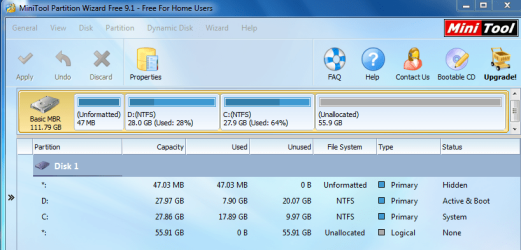
The good news is that both OS’s appear to be working fine! The process was quite simple and I’m shocked at how fast this old laptop has become; absolutely shocked. Something is a little perplexing however. I attached a snip of PW wizard showing all partitions on the SSD after the clone. For this display, I’m booted on the Win 7 partition so the D drive is win XP. It’s D that contains the MBR. This is the way it was on the original HDD except note here that the hidden OEM partition is now showing up as unformatted! I’m pretty sure this was FAT and contained some data on the original HDD but now it’s empty and unformatted. This small partition originated from the original XP installation and when win 7 was added as a dual boot, only its system, C: partition was added. I know Win 7 and XP use these small partitions for something but I don’t know what and I don’t know what I’m missing since that small partition is effectively gone now.
Does anyone have any suggestions on what I need to do or what I’m giving up by not having the small partition available? I’d like to get some guidance on this point. If I had to, I suppose I could make an image of the original partition and restore just that small partition but I really have no idea if it’s needed. Also the alignment of that unformatted partition is bad since it starts at sector 63; probably doesn’t matter since it unformatted. I do have some tuning to do like activate AHCI, trim and a few other things but I don’t want start that stuff until I get some help with small partition issue. Thanks for reading.
 

Attachments

  • PWizzard.PNG
    PWizzard.PNG
    70.4 KB · Views: 2

My Computer

Computer type
PC/Desktop
Computer Manufacturer/Model Number
Custom Build
OS
Windows 7 professional 64 bit
CPU
i7-870
Motherboard
Gigabyte GA-P55-USB3 (rev 2)
Memory
G.Skill F3-10666CL9D-8GBRL; (8GB)
Graphics Card(s)
Radeon HD4670
Sound Card
on board
Monitor(s) Displays
Dell U2311H plus ASUS PB238
Screen Resolution
1080P (dual monitors)
Hard Drives
VelociRaptor WD1500HLHX 150GB (system)
2TB Samsung spinpoint (data)
596GB WD caviar blue (data)
PSU
FSP AS400 400W ATX2.31/EPS2.92
Case
Antec Sonata III 500
Cooling
CPU cooled by Rosewill HSF RCX-Z90-CP
Keyboard
Microsoft ergonomic PS-2
Mouse
Logitech M510
Internet Speed
very fast via cable
Antivirus
Microsoft Security Essentials
Browser
Chrome and IE10
Other Info
Also have hauppauge TV Card HVR-1600
CPU, case and GPU Fans are controlled by SpeedFan.
That's great to hear you got the OS's transferred to the SSD, they're working and much faster.

As far as the OEM Partition.
Your SF specs show Custom Build, but post #1 says it's an older laptop.
Dell, HP, (and maybe other manufacturers) use an OEM partition for diagnostics, utilities, etc.
If it's one of these manufacturers, that's probably what the OEM partition is used for.
As it's an older laptop with XP, my guess is any utilities would only work for XP, and not work with Win 7.

You can do a search for Windows OEM partiton and get a lot of hits.
Here is one SF thread i found:
http://www.sevenforums.com/installation-setup/100997-oem-reserved-partition-what.html

You might need to search for your specific laptop manufacturer/model to see what this partition is used for.

If you do want to migrate it to the new SSD, i suggest setting it up exactly as the original partition, such as FAT/FAT32, etc.
Do you still have the original 60GB HD so you can check the partition settings ?
It's up to you if you want to transfer this partition to the SSD using a Macrium image.

imho your Win 7 partition is very small and you might run into free space problems going forward.
It should be easy to extend (resize) this partition using any or all of the unallocated space.
 

My Computer

Computer type
PC/Desktop
Computer Manufacturer/Model Number
home built
OS
Multi-Boot W7_Pro_x64 W8.1_Pro_x64 W10_Pro_x64 +Linux_VMs +Chromium_VM
CPU
AMD Athlon II x4 620
Motherboard
Gigabyte GA-MA785G-UD3H
Memory
6GB GSkill DDR2 800
Graphics Card(s)
AMD 4670 GPU + AMD 4200 IGP
Sound Card
on board Realtek ALC889A
Monitor(s) Displays
RCA 40" LCD TV, Insignia 32" LCD TV, HP 15" LCD monitor
Screen Resolution
1680 x 1050
Hard Drives
OCZ Vertex 3 120GB,
Samsung F3 1TB (3),
Several others - WD, Seagate, Hitachi, ...
PSU
Corsair 500 W
Case
Rosewill mid tower
Cooling
CM 90mm rifle
Keyboard
Gyration wireless, Logitech wireless, Dell USB wired
Mouse
Gyration wireless, Logitech wireless, V7 USB wired
Internet Speed
Spectrum - 100Mbps D / 10Mbps U
Antivirus
Avast, MBAM3, EMET, WinPatrol
Browser
Pale Moon, Firefox, IE
Other Info
2 multi-boot PC's
Mainly HTPC/Office/Gen purpose (no gaming).
Trendnet USB KVM.
LG DVD burner/Blue Ray Player.
Tray system for removable SATA backup drives.

Not currently OCd, under-volted.
I use Hybrid sleep, rarely re-boot or shutdown.

Hauppauge HD-PVR, Avermedia PCIe TV Tuner, Hauppauge PCI TV Tuner.

My Computer

Computer type
PC/Desktop
Computer Manufacturer/Model Number
Home made Desktop
OS
Windows 10 Pro. 64/ version 1709 Windows 7 Pro/64
CPU
Intel i7-6800K @ 4.3
Motherboard
ASUS X-99 Deluxe II
Memory
Corsair Platinum 16 gig @2400
Graphics Card(s)
EVGA GTX 1070 OC
Monitor(s) Displays
Asus 27" LED LCD/VE278Q
Screen Resolution
1920-1080 or 1280-720 HDMI
Hard Drives
INTEL SSD 730-240 Gb Sata 3.0/
PSU
EVGA Platium 1200W
Case
Phanteks Luxe Tempered Glass 8 fans/ one radiator
Cooling
XSPC/ Water Cooled CPU
Keyboard
Das 4 Professional
Mouse
Logitech M705/MX Anywhere 2-S
Internet Speed
100 mbits
Antivirus
Microsoft Security Essentials/ Malwarebytes Premium 3.0/ SAS
Browser
I.E. 11 default/Firefox/ ISP Time Warner Cable/Spectrum
Other Info
LG BluRay Burner/
Sound system-KLipsch-THX/
Icy Dock ssd Hot Swap bays.
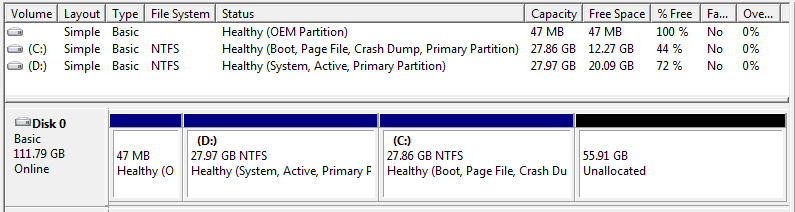
Thanks for your response DavidE. My apologies for the confusion on the system specs. My published system specs are for my desktop computer. The Laptop computer in question is one I recently purchased used. It is a Dell Latitude D630. As received it, I think it’s the same or very close to what Dell shipped. It came with XP Pro installed with only the 47MB OEM partition and the XP System partition. I had been confusing that partition with what Windows 7 calls the system reserved partition but i think now that XP may not have a system reserved partition. To compound my confusion on this, the windows 7 install resulted in no system reserved partition. I'm speculating that since the usual location for the Win 7 boot loader is the system reserved partition and since for a dual boot configuration of this sort, it resides on the XP system partition, that win 7 doesn’t have much need for the system reserved partition and doesn’t install it for such a dual boot case. I believe you are correct that the 47MB OEM partition is used for Dell specific diagnostics and who knows what else. I verified that the bootable diagnostics tools that Dell included are no longer working in the cloned SSD where they worked fine originally. I will do as you suggested and image that small OEM partition and restore it to the SSD and see if I can get those tools working. I think it’s worthwhile to have these Dell diagnostic tools. I’ll follow up with results.
I attached the Disk Manager snip.
 

Attachments

  • DiskMangr.PNG
    DiskMangr.PNG
    7.2 KB · Views: 0

My Computer

Computer type
PC/Desktop
Computer Manufacturer/Model Number
Custom Build
OS
Windows 7 professional 64 bit
CPU
i7-870
Motherboard
Gigabyte GA-P55-USB3 (rev 2)
Memory
G.Skill F3-10666CL9D-8GBRL; (8GB)
Graphics Card(s)
Radeon HD4670
Sound Card
on board
Monitor(s) Displays
Dell U2311H plus ASUS PB238
Screen Resolution
1080P (dual monitors)
Hard Drives
VelociRaptor WD1500HLHX 150GB (system)
2TB Samsung spinpoint (data)
596GB WD caviar blue (data)
PSU
FSP AS400 400W ATX2.31/EPS2.92
Case
Antec Sonata III 500
Cooling
CPU cooled by Rosewill HSF RCX-Z90-CP
Keyboard
Microsoft ergonomic PS-2
Mouse
Logitech M510
Internet Speed
very fast via cable
Antivirus
Microsoft Security Essentials
Browser
Chrome and IE10
Other Info
Also have hauppauge TV Card HVR-1600
CPU, case and GPU Fans are controlled by SpeedFan.
If you install Windows into unallocated space it creates 2 partitions, a System Reserved partition for the boot manager, and a partition for Windows. If you install Windows into a pre-defined partition, it installs the boot manager AND Windows into the single [C] partition. This is how installing in Legacy BIOS / MBR works. UEFI / GPT is something else, i don't have UEFI or a GPT boot disk. There is no right or wrong to having or not having a System Reserved partition. Both scenarios work. If you can boot with the original HD and post a Disk Management screen print that might help. Then we would know what you started with.
 

My Computer

Computer type
PC/Desktop
Computer Manufacturer/Model Number
home built
OS
Multi-Boot W7_Pro_x64 W8.1_Pro_x64 W10_Pro_x64 +Linux_VMs +Chromium_VM
CPU
AMD Athlon II x4 620
Motherboard
Gigabyte GA-MA785G-UD3H
Memory
6GB GSkill DDR2 800
Graphics Card(s)
AMD 4670 GPU + AMD 4200 IGP
Sound Card
on board Realtek ALC889A
Monitor(s) Displays
RCA 40" LCD TV, Insignia 32" LCD TV, HP 15" LCD monitor
Screen Resolution
1680 x 1050
Hard Drives
OCZ Vertex 3 120GB,
Samsung F3 1TB (3),
Several others - WD, Seagate, Hitachi, ...
PSU
Corsair 500 W
Case
Rosewill mid tower
Cooling
CM 90mm rifle
Keyboard
Gyration wireless, Logitech wireless, Dell USB wired
Mouse
Gyration wireless, Logitech wireless, V7 USB wired
Internet Speed
Spectrum - 100Mbps D / 10Mbps U
Antivirus
Avast, MBAM3, EMET, WinPatrol
Browser
Pale Moon, Firefox, IE
Other Info
2 multi-boot PC's
Mainly HTPC/Office/Gen purpose (no gaming).
Trendnet USB KVM.
LG DVD burner/Blue Ray Player.
Tray system for removable SATA backup drives.

Not currently OCd, under-volted.
I use Hybrid sleep, rarely re-boot or shutdown.

Hauppauge HD-PVR, Avermedia PCIe TV Tuner, Hauppauge PCI TV Tuner.
To make sure I understand correctly; do you still want a Dual Boot??

The system specs of the laptop would be helpful.
It's very old and might not meet the needed specs for Windows 7. Some of the old laptops with XP installed only had 512 mb of ram.
 

My Computer

Computer type
PC/Desktop
Computer Manufacturer/Model Number
Home made Desktop
OS
Windows 10 Pro. 64/ version 1709 Windows 7 Pro/64
CPU
Intel i7-6800K @ 4.3
Motherboard
ASUS X-99 Deluxe II
Memory
Corsair Platinum 16 gig @2400
Graphics Card(s)
EVGA GTX 1070 OC
Monitor(s) Displays
Asus 27" LED LCD/VE278Q
Screen Resolution
1920-1080 or 1280-720 HDMI
Hard Drives
INTEL SSD 730-240 Gb Sata 3.0/
PSU
EVGA Platium 1200W
Case
Phanteks Luxe Tempered Glass 8 fans/ one radiator
Cooling
XSPC/ Water Cooled CPU
Keyboard
Das 4 Professional
Mouse
Logitech M705/MX Anywhere 2-S
Internet Speed
100 mbits
Antivirus
Microsoft Security Essentials/ Malwarebytes Premium 3.0/ SAS
Browser
I.E. 11 default/Firefox/ ISP Time Warner Cable/Spectrum
Other Info
LG BluRay Burner/
Sound system-KLipsch-THX/
Icy Dock ssd Hot Swap bays.
Thanks DavidE for the info on boot managers etc. I made a screen shot with the original HDD but can’t find it. Anyway it’s identical to what you’ll find in post #9 except that the unallocated space to the right of C: is only about 20MB and the total drive size shows up at about 55.5MB. All else is same on the HDD starting point for clone to SSD.
Yes, I still want and do have a Dual Boot now on the SDD per post #6. The only issue since my last post was getting the OEM partition to work properly. It contains the Dell Diagnostic Tools which are worth having though not essential. System specs of the Dell Latitude D630 Laptop are Core 2 Duo T7500, 2.2GHz, 2GB ram, XP Pro with Win 7 Home Premium added as dual boot as per subject of this thread.
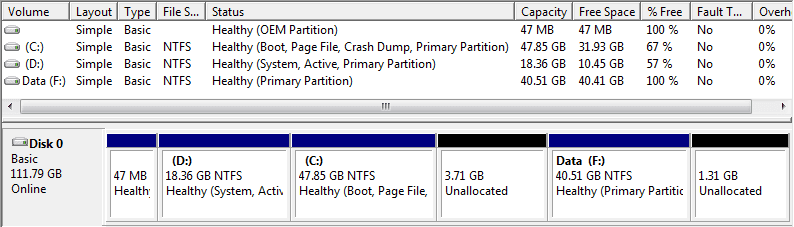
So, back to the remaining issue. Recall the OEM partition was not working as of my last post #9. Since then, I imaged the OEM partition of the original HDD and recovered it to the SDD. That solved the problem and the bootable Diagnostics worked. However then the OEM partition was not aligned for SDD use. Its first sector was 63. So, I used Partition Wizzard to align it and also to adjust the sizes of the other partitions to something more suitable and add a data partition. The alignment process resulted in the first sector of the OEM partition moving from 63 to 2048 as expected. Also PW shrunk the OEM partition by about 1MB which shouldn’t matter. After that, all continued to work fine but the Diagnostics went dead at the point where it would normally boot to the OEM Partition. I thought about it for a little and concluded that you really can’t move the OEM partition without getting into trouble. My theory which I would very much like some feedback on is as follows. The Dell diagnostics is in two parts. First some very basic testing is done right from the Bios. If the user wants more exhaustive testing there is a prompt to continue at which point the bios points to the OEM partition and boots from it into the test program. Since the OEM partition is hidden and has no drive letter my speculation is that to do anything with it you need to know exactly where to go on the drive. That information is likely hardwired into the bios and can’t be changed. Ergo the OEM partition must begin at sector 63 as Dell designed which means you can not align it for an SSD! Its either aligned and doesn’t work or it’s not aligned and does! I opted to re-image it again and keep the original alignment and this worked fine. My thinking is that it is not important for this partition to be aligned as long as the other partitions are. From what I’ve read, alignment is important to achieve proper speed and lifetime from the SSD. Since the OEM partition is very rarely used, not being in alignment will have no effect on the lifetime of the SSD. Also, since this is a very small diagnostic utility speed is not important. Ergo I thought there was no problem living with an OEM partition out of alignment. I would like your comments on this conclusion since I may have overlooked something. Here are my remaining questions:
1. As per above I would like comments, agree/disagree with my conclusion that a misaligned OEM partition is no big deal.
2. I’ve read that defragmentation should be turned off for SSDs. Is this good guidance? My win 7 is already 8% fragmented probably from the resizing and moving around. I’d like to get some thoughts on this before I defrag or turn it off.
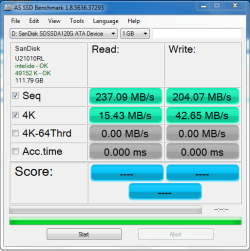
3. Any thoughts on updating drivers to go from IDE mode to AHCI? I attached the benchmark. The specs of the SSD are here: SanDisk SSD PLUS 2.5" 120GB SATA Revision 3.0 (6 Gbit/s) Internal Solid State Drive (SSD) SDSSDA-120G-G25 - Newegg.com it seems the write speeds are somewhat better then specified and the read speeds are less. I’m not even sure if I have sata2 or sata1 but the read speed of 237MHz would imply sata2. I guess AHCI might bring that up to 300MHz. Any thoughts?
Also, I attached the final disk manager screen of the present configuration. All works fine. Thanks for reading and I look forwards to your comments on the above opened questions or anything else.
 

Attachments

  • benchmark.PNG
    benchmark.PNG
    17.7 KB · Views: 11
  • DMsnip.PNG
    DMsnip.PNG
    8.5 KB · Views: 3

My Computer

Computer type
PC/Desktop
Computer Manufacturer/Model Number
Custom Build
OS
Windows 7 professional 64 bit
CPU
i7-870
Motherboard
Gigabyte GA-P55-USB3 (rev 2)
Memory
G.Skill F3-10666CL9D-8GBRL; (8GB)
Graphics Card(s)
Radeon HD4670
Sound Card
on board
Monitor(s) Displays
Dell U2311H plus ASUS PB238
Screen Resolution
1080P (dual monitors)
Hard Drives
VelociRaptor WD1500HLHX 150GB (system)
2TB Samsung spinpoint (data)
596GB WD caviar blue (data)
PSU
FSP AS400 400W ATX2.31/EPS2.92
Case
Antec Sonata III 500
Cooling
CPU cooled by Rosewill HSF RCX-Z90-CP
Keyboard
Microsoft ergonomic PS-2
Mouse
Logitech M510
Internet Speed
very fast via cable
Antivirus
Microsoft Security Essentials
Browser
Chrome and IE10
Other Info
Also have hauppauge TV Card HVR-1600
CPU, case and GPU Fans are controlled by SpeedFan.
I agree with you about the alignment of the OEM partition.
I don't think it will hurt the SSD to have that partition misaligned so you can use the diagnostic tools if/when needed.

Defrag should not be used on SSD's.
Make sure the Defrag scheduled task(s) does not auto defrag the SSD partitions.
I don't remember if XP has a Defrag scheduled task.
Trim should be used for SSD's.
Here is a tutorial that has info about Trim:
http://www.sevenforums.com/tutorials/70822-ssd-tweaks-optimizations-windows-7-a.html

As far as i know XP does not support Trim.
The SSD manufacturer may offer a utility to use Trim with XP.
You would have to search for that, or ask SanDisk.

AHCI is preferred and could offer some performance improvements over IDE.
Here is a tutorial for changing Win 7 to AHCI:
http://www.sevenforums.com/tutorials/61869-ahci-enable-windows-7-vista.html

Here is an article i found for changing XP to AHCI:
https://expertester.wordpress.com/2008/07/27/how-to-enable-ahci-windows-xp/
I've never done this, so i can't comment on any problems, if it works, etc.

Create Backup Images before making these changes so you can easily recover if anything goes wrong.
 

My Computer

Computer type
PC/Desktop
Computer Manufacturer/Model Number
home built
OS
Multi-Boot W7_Pro_x64 W8.1_Pro_x64 W10_Pro_x64 +Linux_VMs +Chromium_VM
CPU
AMD Athlon II x4 620
Motherboard
Gigabyte GA-MA785G-UD3H
Memory
6GB GSkill DDR2 800
Graphics Card(s)
AMD 4670 GPU + AMD 4200 IGP
Sound Card
on board Realtek ALC889A
Monitor(s) Displays
RCA 40" LCD TV, Insignia 32" LCD TV, HP 15" LCD monitor
Screen Resolution
1680 x 1050
Hard Drives
OCZ Vertex 3 120GB,
Samsung F3 1TB (3),
Several others - WD, Seagate, Hitachi, ...
PSU
Corsair 500 W
Case
Rosewill mid tower
Cooling
CM 90mm rifle
Keyboard
Gyration wireless, Logitech wireless, Dell USB wired
Mouse
Gyration wireless, Logitech wireless, V7 USB wired
Internet Speed
Spectrum - 100Mbps D / 10Mbps U
Antivirus
Avast, MBAM3, EMET, WinPatrol
Browser
Pale Moon, Firefox, IE
Other Info
2 multi-boot PC's
Mainly HTPC/Office/Gen purpose (no gaming).
Trendnet USB KVM.
LG DVD burner/Blue Ray Player.
Tray system for removable SATA backup drives.

Not currently OCd, under-volted.
I use Hybrid sleep, rarely re-boot or shutdown.

Hauppauge HD-PVR, Avermedia PCIe TV Tuner, Hauppauge PCI TV Tuner.
Thanks!

Thanks very much DavidE for your interest and all of your help! Very much appreciated! I'm going to mark this thread as solved.
 

My Computer

Computer type
PC/Desktop
Computer Manufacturer/Model Number
Custom Build
OS
Windows 7 professional 64 bit
CPU
i7-870
Motherboard
Gigabyte GA-P55-USB3 (rev 2)
Memory
G.Skill F3-10666CL9D-8GBRL; (8GB)
Graphics Card(s)
Radeon HD4670
Sound Card
on board
Monitor(s) Displays
Dell U2311H plus ASUS PB238
Screen Resolution
1080P (dual monitors)
Hard Drives
VelociRaptor WD1500HLHX 150GB (system)
2TB Samsung spinpoint (data)
596GB WD caviar blue (data)
PSU
FSP AS400 400W ATX2.31/EPS2.92
Case
Antec Sonata III 500
Cooling
CPU cooled by Rosewill HSF RCX-Z90-CP
Keyboard
Microsoft ergonomic PS-2
Mouse
Logitech M510
Internet Speed
very fast via cable
Antivirus
Microsoft Security Essentials
Browser
Chrome and IE10
Other Info
Also have hauppauge TV Card HVR-1600
CPU, case and GPU Fans are controlled by SpeedFan.
Back
Top