Clone With AOMEI

feetand nches

New member
Power User
VIP
Local time
4:36 PM
Messages
555
This is my first time trying to Clone a Drive so I am hoping to get a little help. I'll be doing this over the weekend.

I'm using AOMEI Backupper because it's GUI is very simple, and maybe a little less confusing than Macrium. I use Macrium on my main pc to Backup the System, but still getting used to it. I've also used AOMEI to backup my laptop.

My questions are below, and please add to it if needed. It seems pretty straight forward, but, I' never done it before so am a bit nervous.

-I'll be Cloning from a 250GB WD HDD to a 1TB WD HDD.

Here are the options at the Clone Tutorial at AOMEI:

a) If you want to adjust the partitions size or location on the destination disk,
click the "Edit partitions on the destination disk" button. Options available are:

1. Copy without resizing partitions: Do not do any changes.

2. Fit partition to entire disk: The destination disk partitions will be
automatically resized to the entire disk, appropriate for the disk size.

3. Edit partitions on this disk: Manually adjust the partition size and
location by dragging a slider bar.


MY QUESTIONS:

2. If I choose #2 will it expand all partitions equally, or is it smart enough to know to just expand the C Drive?

3. If I choose #3 will it be straight forward...LOL, or is that a loaded question? I'm guessing, and hoping it will be super easy, and just adjust the C Drive and let er rip!

a. The drive surely has a Recovery Partition on it and will probably want to keep it. I know this will take longer but o-well, that's fine.

I have done some partitioning but not super proficient at it yet. Also done some in Linux, and it's usually a challenge, but always get er done somehow.

Thanks, Nasty7
 
Last edited:

My Computer

Computer type
Laptop
Computer Manufacturer/Model Number
HP Pavilion dv7-6c23cl
OS
Windows 7 Home Premium 64bit
CPU
AMD A8-3520M
Motherboard
Hewlett-Packard 180B (Socket FS1)
Memory
6.00GB DDR3 @ 674MHz (9-9-9-24)
Graphics Card(s)
512MB ATI AMD Radeon HD 6620G
Sound Card
IDT High Definition Audio CODEC
Monitor(s) Displays
Generic PnP Monitor
Screen Resolution
(1600x900@60Hz)
Hard Drives
Samsung 850 EVO 250GB SSD
Mouse
Logitec M525
Internet Speed
30-75Mbps
Antivirus
Avast Free, Unfortunately
Browser
Google Chrome, Firefox, IE
3. If I choose #3 will it be straight forward...LOL, or is that a loaded question? I'm guessing, and hoping it will be super easy, and just adjust the C Drive and let er rip!

Yes, it should be fine.
 

My Computers

System One System Two

  • Computer type
    PC/Desktop
    OS
    7 X64
    CPU
    i5 8400
    Motherboard
    gigabyte b365m ds3h
    Memory
    2x8gb 3200mhz
    Hard Drives
    various
    PSU
    pure power 11 400w cm
    Case
    Coolermaster
    Cooling
    cryorig m9i
  • Computer type
    PC/Desktop
    OS
    7x64
    CPU
    g5400
    Motherboard
    ga b365m ds3h
    Memory
    8gb ddr4 2400
    PSU
    xfx pro 450w

My Computer

Computer type
Laptop
Computer Manufacturer/Model Number
HP Pavilion dv7-6c23cl
OS
Windows 7 Home Premium 64bit
CPU
AMD A8-3520M
Motherboard
Hewlett-Packard 180B (Socket FS1)
Memory
6.00GB DDR3 @ 674MHz (9-9-9-24)
Graphics Card(s)
512MB ATI AMD Radeon HD 6620G
Sound Card
IDT High Definition Audio CODEC
Monitor(s) Displays
Generic PnP Monitor
Screen Resolution
(1600x900@60Hz)
Hard Drives
Samsung 850 EVO 250GB SSD
Mouse
Logitec M525
Internet Speed
30-75Mbps
Antivirus
Avast Free, Unfortunately
Browser
Google Chrome, Firefox, IE
Keep in mind that a clone backup is not the same as an image backup. A clone basically gets all of the raw information from the drive, errors and all; while an image gets the files and folders. In other words, a clone is a low-level backup, while an image is a high-level backup.

It would be good to do both types of backups, because each one offers different benefits. Also, in case one fails, you have the other.
 

My Computer

Computer type
PC/Desktop
Computer Manufacturer/Model Number
Dell
OS
Linux Mint 18.2 xfce 64-bit (VMWare host) / Windows 8.1 Pro 32-bit (VMWare guest)
CPU
Haswell
Memory
4 GB
Monitor(s) Displays
Acer 23"
Screen Resolution
1920 x 1080
Hard Drives
Two hard drives, 1TB each: One for Linux, one for my data.
Keyboard
IBM Model M
Antivirus
Sophos (Linux), Trend Micro (Windows)
Browser
Firefox, Opera
Other Info
I use Samba to share my data drive with the other computers at my house and with my guest session in VMWare Workstation Player.
I should be using the Clone to start with though right? Image first then attempt the Clone to New Drive?

I was thinking I would check the Hardware first, in fact, I have a spare HP PSU that may work to test that theory.

Then do a sfc scan, and or a CHKDSK C: /R? I did see that the SMART was good, but that is not always accurate from my experience. Just want to make sure there is no heat before attempting one of these.

I'm glad you said something, I was going to backup all Files anyhow, but I was thinking "Clone" was going to bring everything over?

Is it possible to just Image it and then drop that Image onto the new Drive?

If this don't work for me, don't worry, I'll find out if they have Recovery Media, and I have Retail Install Media also.

Do I need to Install AOMEI to do this, or just run from DVD?

Lastly, AOMEI or Macrium, is one better than the other?
I have Macrium Installed on my Main Machine, so for at least one part of this I could Image to my Personal Backup.

I know that's a lot, any help is great! I'll need to do this one day soon on one of my machines.

Thanks, Nasty7
 

My Computer

Computer type
Laptop
Computer Manufacturer/Model Number
HP Pavilion dv7-6c23cl
OS
Windows 7 Home Premium 64bit
CPU
AMD A8-3520M
Motherboard
Hewlett-Packard 180B (Socket FS1)
Memory
6.00GB DDR3 @ 674MHz (9-9-9-24)
Graphics Card(s)
512MB ATI AMD Radeon HD 6620G
Sound Card
IDT High Definition Audio CODEC
Monitor(s) Displays
Generic PnP Monitor
Screen Resolution
(1600x900@60Hz)
Hard Drives
Samsung 850 EVO 250GB SSD
Mouse
Logitec M525
Internet Speed
30-75Mbps
Antivirus
Avast Free, Unfortunately
Browser
Google Chrome, Firefox, IE
Is it possible to just Image it and then drop that Image onto the new Drive?

Yes.
Do I need to Install AOMEI to do this, or just run from DVD?

You can run Aomei from booted media containing the Aomei pe components, it isn't necessary to install it.
 

My Computers

System One System Two

  • Computer type
    PC/Desktop
    OS
    7 X64
    CPU
    i5 8400
    Motherboard
    gigabyte b365m ds3h
    Memory
    2x8gb 3200mhz
    Hard Drives
    various
    PSU
    pure power 11 400w cm
    Case
    Coolermaster
    Cooling
    cryorig m9i
  • Computer type
    PC/Desktop
    OS
    7x64
    CPU
    g5400
    Motherboard
    ga b365m ds3h
    Memory
    8gb ddr4 2400
    PSU
    xfx pro 450w
I should be using the Clone to start with though right? Image first then attempt the Clone to New Drive?

I was thinking I would check the Hardware first, in fact, I have a spare HP PSU that may work to test that theory.

Then do a sfc scan, and or a CHKDSK C: /R? I did see that the SMART was good, but that is not always accurate from my experience. Just want to make sure there is no heat before attempting one of these.

I'm glad you said something, I was going to backup all Files anyhow, but I was thinking "Clone" was going to bring everything over?

Is it possible to just Image it and then drop that Image onto the new Drive?

If this don't work for me, don't worry, I'll find out if they have Recovery Media, and I have Retail Install Media also.

Do I need to Install AOMEI to do this, or just run from DVD?

Lastly, AOMEI or Macrium, is one better than the other?
I have Macrium Installed on my Main Machine, so for at least one part of this I could Image to my Personal Backup.

I know that's a lot, any help is great! I'll need to do this one day soon on one of my machines.

Thanks, Nasty7

Both types of backup are valid and complete backups, but they perform that function differently. A clone backup non-intelligently moves through the whole drive, backing up all of the bits of data exactly as they are laid out on the drive, including the empty space. An image backup, on the other hand, intelligently backs up only the files and folders. A side benefit of an image backup is that it has the effect of defragmenting the contents. A clone backup preserves everything as is, fragmentation and all.

If I were going to do both types of backups, I would probably do the clone first, then the image. But it's not a big deal which one you do first.

I would do at least one of the backups before you do anything else.
 

My Computer

Computer type
PC/Desktop
Computer Manufacturer/Model Number
Dell
OS
Linux Mint 18.2 xfce 64-bit (VMWare host) / Windows 8.1 Pro 32-bit (VMWare guest)
CPU
Haswell
Memory
4 GB
Monitor(s) Displays
Acer 23"
Screen Resolution
1920 x 1080
Hard Drives
Two hard drives, 1TB each: One for Linux, one for my data.
Keyboard
IBM Model M
Antivirus
Sophos (Linux), Trend Micro (Windows)
Browser
Firefox, Opera
Other Info
I use Samba to share my data drive with the other computers at my house and with my guest session in VMWare Workstation Player.
If I could have the ideal "restore" kit, this is what it would include:
  • A complete set or two of original factory install DVDs, if available, so that you can get the computer back to original factory condition.
  • A Windows install disk, so that you can do a clean install of Windows.
  • A second, identical hard drive -- whenever you do a backup, remove the current hard drive and put in the second hard drive, then do a restore to the second hard drive. You will know immediately if your backup was successful.
  • One or two copies of an emergency boot disk, so that you can boot the computer and do a restore if your hard drive fails.
  • Several pairs of 2TB external hard drives -- each backup would be kept on two drives; when they fill up, I would use two others, etc., etc.
No one does all of that. But the more you have in your restore kit, the greater are your chances of recovery in the event of a failure.

I have separate data and Windows drives. I backup Windows every now and then, but I back up my data more often than that -- about once a month. In all honesty, that's all I can get myself to do; but at least it's something. I do have the original recovery disks, as well as a backup of when the computer was new.
 

My Computer

Computer type
PC/Desktop
Computer Manufacturer/Model Number
Dell
OS
Linux Mint 18.2 xfce 64-bit (VMWare host) / Windows 8.1 Pro 32-bit (VMWare guest)
CPU
Haswell
Memory
4 GB
Monitor(s) Displays
Acer 23"
Screen Resolution
1920 x 1080
Hard Drives
Two hard drives, 1TB each: One for Linux, one for my data.
Keyboard
IBM Model M
Antivirus
Sophos (Linux), Trend Micro (Windows)
Browser
Firefox, Opera
Other Info
I use Samba to share my data drive with the other computers at my house and with my guest session in VMWare Workstation Player.
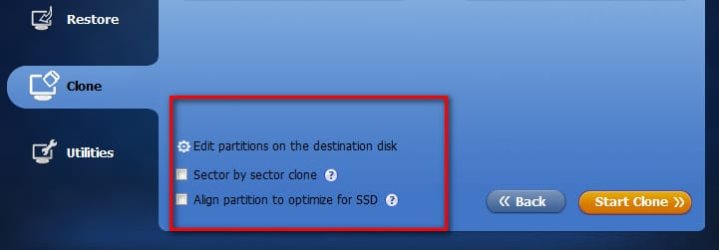
A clone backup non-intelligently moves through the whole drive, backing up all of the bits of data exactly as they are laid out on the drive, including the empty space.

You must be using very old clone tools. Modern ones do intelligent clones ( with sector by sector as an option).

I suggest you look at Aomei.

CLONE1.jpg
 

My Computers

System One System Two

  • Computer type
    PC/Desktop
    OS
    7 X64
    CPU
    i5 8400
    Motherboard
    gigabyte b365m ds3h
    Memory
    2x8gb 3200mhz
    Hard Drives
    various
    PSU
    pure power 11 400w cm
    Case
    Coolermaster
    Cooling
    cryorig m9i
  • Computer type
    PC/Desktop
    OS
    7x64
    CPU
    g5400
    Motherboard
    ga b365m ds3h
    Memory
    8gb ddr4 2400
    PSU
    xfx pro 450w
O&O ( no free version - Aomei is a better option for the OP ) offers 3 clone methods.

O&OCLONE.jpg
 

My Computers

System One System Two

  • Computer type
    PC/Desktop
    OS
    7 X64
    CPU
    i5 8400
    Motherboard
    gigabyte b365m ds3h
    Memory
    2x8gb 3200mhz
    Hard Drives
    various
    PSU
    pure power 11 400w cm
    Case
    Coolermaster
    Cooling
    cryorig m9i
  • Computer type
    PC/Desktop
    OS
    7x64
    CPU
    g5400
    Motherboard
    ga b365m ds3h
    Memory
    8gb ddr4 2400
    PSU
    xfx pro 450w
You must be using very old clone tools. Modern ones do intelligent clones ( with sector by sector as an option).

I suggest you look at Aomei.

I'll have to do that.

Well, let me restate: I think that there is value in the "exact-copy", old-school type of clone which preserves everything, even the free space and the fragmentation. I think it's good to have that kind of clone backup as well as an image backup.
 

My Computer

Computer type
PC/Desktop
Computer Manufacturer/Model Number
Dell
OS
Linux Mint 18.2 xfce 64-bit (VMWare host) / Windows 8.1 Pro 32-bit (VMWare guest)
CPU
Haswell
Memory
4 GB
Monitor(s) Displays
Acer 23"
Screen Resolution
1920 x 1080
Hard Drives
Two hard drives, 1TB each: One for Linux, one for my data.
Keyboard
IBM Model M
Antivirus
Sophos (Linux), Trend Micro (Windows)
Browser
Firefox, Opera
Other Info
I use Samba to share my data drive with the other computers at my house and with my guest session in VMWare Workstation Player.
Sorry for all the questions, but I have now (with your help) have narrowed down what I think I should choose as a Backup Option. This is what I'm thinking of doing now guys, please tell me what you think.

Firstly, I wonder if I should even attempt to run sfc, or CHKDSK C: /R with the heat on this thing. I just checked and it was at 51C or 123.8F. This was with IE, Chrome, Task Manager, Speccy and Three for Four Instances of File Explorer open, and eventually went up to 53 just before I shut er down.

Now I will try another PSU I have that is identical to this one, and is known to be good to see if that will bring down heat.

1. I believe that I should choose "Disk Backup" in AOMEI at least to get one Image. But, this does not allow for Resizing Partitions, that I can see.
Disk Backup

Here they are confusing me also:
"You can backup multiple hard disks in one time by clicking “Add” to continue adding source drives, but when it comes to restoration, you can only restore these disks one by one. Moreover, the number of disks after recovery will be the same as the source disks; it is impossible to restore several disks’ image to one large drive."
I say this because they have only One Partition Highlighted when they use the Word "hard disks" they do mean an HDD right, and not a Partition? I've seen folks use the word "disk" to describe a Partition?

2. Then, (and here is where I need my and held) as to which is the best way to put this OS to another, larger HDD, Image or Clone. It seems as though you guys are saying that either is good. And the only thing that a noob like me can see that will affect this process is Resizing the C Drive during the process. I wonder if this is the way to do this, or, would it be better done from within Windows 7?
a. And if I do Resize C Drive, do I, or Should I, choose Sector by Sector Clone?

Here is the sector-by-sector-clone link I read. Very cool AOMEI is tool to say the least.
The Best Tool of Sector by Sector Clone: AOMEI Backupper

The AOMIE Pages are pretty good, but not great IMO. One thing they are saying is this:
"Disk clone only supports to clone 3 partition at most from GPT to MBR, so if the source disk contains over 3partitions, the remaining partition should use “Partition Clone”."
This won't matter for me as I'm going from MBR to MBR right?

NOTE: I can drop a "sysprep" Image I have onto this pc, but am trying to save all the work of reinstalling everything, of course.

Thanks again, Nasty7
 

My Computer

Computer type
Laptop
Computer Manufacturer/Model Number
HP Pavilion dv7-6c23cl
OS
Windows 7 Home Premium 64bit
CPU
AMD A8-3520M
Motherboard
Hewlett-Packard 180B (Socket FS1)
Memory
6.00GB DDR3 @ 674MHz (9-9-9-24)
Graphics Card(s)
512MB ATI AMD Radeon HD 6620G
Sound Card
IDT High Definition Audio CODEC
Monitor(s) Displays
Generic PnP Monitor
Screen Resolution
(1600x900@60Hz)
Hard Drives
Samsung 850 EVO 250GB SSD
Mouse
Logitec M525
Internet Speed
30-75Mbps
Antivirus
Avast Free, Unfortunately
Browser
Google Chrome, Firefox, IE
Mr.JimP -- "...No one does all of that..." I wouldn't say that, I do almost exactly the same 5 things you do :)
 

My Computer

Computer type
PC/Desktop
Computer Manufacturer/Model Number
Antec desktop; Acer Aspire laptops
OS
Windows 7 Professional 64-bit
CPU
Desktop i5; Acers i5 & i7
Memory
desktop 16GB; 1 Acer 8GB & 1 Acer 16GB
Hard Drives
1TB split into 2 equal partitions [OS and data] usable by RJS
Internet Speed
AT&T DSL
Browser
FF, GChrome, msIE
Other Info
Windows 7 Firewall, Emsisoft AM/AV, MSE [scan-only], SpywareBlaster, Ruiware/BillP combine
Mr.JimP -- "...No one does all of that..." I wouldn't say that, I do almost exactly the same 5 things you do :)

I don't even do all of that! The most I have been able to get myself to do is to do a full backup about once every two months on each of my computers.

With some things, I save to two separate drives, so that I'll have a backup copy in case of drive failure.

But if it was my job to do the backups for my company, I would do all of the things I have mentioned, plus some; It's amazing how much more you can get yourself to do when someone is paying you to do it!
 

My Computer

Computer type
PC/Desktop
Computer Manufacturer/Model Number
Dell
OS
Linux Mint 18.2 xfce 64-bit (VMWare host) / Windows 8.1 Pro 32-bit (VMWare guest)
CPU
Haswell
Memory
4 GB
Monitor(s) Displays
Acer 23"
Screen Resolution
1920 x 1080
Hard Drives
Two hard drives, 1TB each: One for Linux, one for my data.
Keyboard
IBM Model M
Antivirus
Sophos (Linux), Trend Micro (Windows)
Browser
Firefox, Opera
Other Info
I use Samba to share my data drive with the other computers at my house and with my guest session in VMWare Workstation Player.
Mr.Jim, OP is surrounded by many backup / restore / cloning programs and routines :)
 

My Computer

Computer type
PC/Desktop
Computer Manufacturer/Model Number
Antec desktop; Acer Aspire laptops
OS
Windows 7 Professional 64-bit
CPU
Desktop i5; Acers i5 & i7
Memory
desktop 16GB; 1 Acer 8GB & 1 Acer 16GB
Hard Drives
1TB split into 2 equal partitions [OS and data] usable by RJS
Internet Speed
AT&T DSL
Browser
FF, GChrome, msIE
Other Info
Windows 7 Firewall, Emsisoft AM/AV, MSE [scan-only], SpywareBlaster, Ruiware/BillP combine
Thanks for all the help guys, got er done. All went well and system is up and running. Now I have a much better grip on how all this works thanks to all the members here, the best!
 

My Computer

Computer type
Laptop
Computer Manufacturer/Model Number
HP Pavilion dv7-6c23cl
OS
Windows 7 Home Premium 64bit
CPU
AMD A8-3520M
Motherboard
Hewlett-Packard 180B (Socket FS1)
Memory
6.00GB DDR3 @ 674MHz (9-9-9-24)
Graphics Card(s)
512MB ATI AMD Radeon HD 6620G
Sound Card
IDT High Definition Audio CODEC
Monitor(s) Displays
Generic PnP Monitor
Screen Resolution
(1600x900@60Hz)
Hard Drives
Samsung 850 EVO 250GB SSD
Mouse
Logitec M525
Internet Speed
30-75Mbps
Antivirus
Avast Free, Unfortunately
Browser
Google Chrome, Firefox, IE
Back
Top