Solved Cloning Disappointed

heritage

New member
Local time
12:12 AM
Messages
14
:confused: I want to avoid the hazel of installing and updating Win 7 if current hard drive dies. All else (e.g. documents, AppData, eMail backed up and easily restored). I have identical hard drives (SATA) and cloned current drive "successfully". When I swap the drives, everything seems to work perfectly. If I use only the cloned drive (which would be the case where original failed) Windows starts to boot but stops with message something like "not genuine Windows"). Defeats the purpose.

Anyone know how to make this work? (Or explain the failure.)

For those who like details: Windows 7 Ultimate, Macrium Reflect Free
I found a Thread which discusses how to do this with Paragon but I couldn't get it to clone; just backup.

I also have a similar computer and I cloned the same way with Acronis True Image.

Ironic that MS seems to think I am a pirate. I get Windows, most MS and Adobe software free through my university.
 

My Computer

Computer type
PC/Desktop
Computer Manufacturer/Model Number
custom
OS
windows 7 ultimate x64
CPU
intel i5
Motherboard
gigabyte
Memory
8 GB
Hard Drives
2 x 500 GB Western Digital
Antivirus
MSE
Browser
Firefox (IE if I have to)
Sorry, but MS uses the hard drive serial number as part of the hash code it generates to validate a Windows install. When you changed out the drive, the new hash code won't match the old one -- hence the validation message.

You would probably have to reactivate Win7.
 

My Computer

Computer type
PC/Desktop
Computer Manufacturer/Model Number
Custom
OS
Win7 Pro 32-bit, Win8 Pro 32-bit
CPU
AMD Phenom II X6 1090T
Motherboard
Gigabyte
Memory
4GB ddr3 1300
Graphics Card(s)
AMD HD 4290 onboard
Sound Card
Builtin Realtek HD Audio
Monitor(s) Displays
Samsung 24" widescreen, LG 23" widescreen
Screen Resolution
1920x1200/1920x1080
Hard Drives
Kingston 256GB SSD
Keyboard
Logitech Illuminated Keyboard
Mouse
Logitech M705 wireless mouse
Antivirus
Norton Av 2013
Browser
IE v10
I use Imaging (not cloning) for OS+Programs partition system backups.
I've restored Images to a different HD/SSD than the Image was created on many times.
I've never had a "not genuine" issue, or needed to re-activate after restoring.
I use Acronis TI (paid).

I don't understand why imaging would work differently than cloning for this ...
You might want to test using Imaging to see if you have the same problem ...
 

My Computer

Computer type
PC/Desktop
Computer Manufacturer/Model Number
home built
OS
Multi-Boot W7_Pro_x64 W8.1_Pro_x64 W10_Pro_x64 +Linux_VMs +Chromium_VM
CPU
AMD Athlon II x4 620
Motherboard
Gigabyte GA-MA785G-UD3H
Memory
6GB GSkill DDR2 800
Graphics Card(s)
AMD 4670 GPU + AMD 4200 IGP
Sound Card
on board Realtek ALC889A
Monitor(s) Displays
RCA 40" LCD TV, Insignia 32" LCD TV, HP 15" LCD monitor
Screen Resolution
1680 x 1050
Hard Drives
OCZ Vertex 3 120GB,
Samsung F3 1TB (3),
Several others - WD, Seagate, Hitachi, ...
PSU
Corsair 500 W
Case
Rosewill mid tower
Cooling
CM 90mm rifle
Keyboard
Gyration wireless, Logitech wireless, Dell USB wired
Mouse
Gyration wireless, Logitech wireless, V7 USB wired
Internet Speed
Spectrum - 100Mbps D / 10Mbps U
Antivirus
Avast, MBAM3, EMET, WinPatrol
Browser
Pale Moon, Firefox, IE
Other Info
2 multi-boot PC's
Mainly HTPC/Office/Gen purpose (no gaming).
Trendnet USB KVM.
LG DVD burner/Blue Ray Player.
Tray system for removable SATA backup drives.

Not currently OCd, under-volted.
I use Hybrid sleep, rarely re-boot or shutdown.

Hauppauge HD-PVR, Avermedia PCIe TV Tuner, Hauppauge PCI TV Tuner.
Problem with the disk signature. I am making something to fix that.


:confused: I want to avoid the hazel of installing and updating Win 7 if current hard drive dies. All else (e.g. documents, AppData, eMail backed up and easily restored). I have identical hard drives (SATA) and cloned current drive "successfully". When I swap the drives, everything seems to work perfectly. If I use only the cloned drive (which would be the case where original failed) Windows starts to boot but stops with message something like "not genuine Windows"). Defeats the purpose.

Anyone know how to make this work? (Or explain the failure.)

For those who like details: Windows 7 Ultimate, Macrium Reflect Free
I found a Thread which discusses how to do this with Paragon but I couldn't get it to clone; just backup.

I also have a similar computer and I cloned the same way with Acronis True Image.

Ironic that MS seems to think I am a pirate. I get Windows, most MS and Adobe software free through my university.
 

My Computers

System One System Two

  • Computer type
    PC/Desktop
    OS
    7 X64
    CPU
    i5 8400
    Motherboard
    gigabyte b365m ds3h
    Memory
    2x8gb 3200mhz
    Hard Drives
    various
    PSU
    pure power 11 400w cm
    Case
    Coolermaster
    Cooling
    cryorig m9i
  • Computer type
    PC/Desktop
    OS
    7x64
    CPU
    g5400
    Motherboard
    ga b365m ds3h
    Memory
    8gb ddr4 2400
    PSU
    xfx pro 450w
I rarely clone a drive but with imaging I have never had a non-genuine issue. I know swapping in a clone takes 2 minutes and restoring an image maybe 12-20 minutes, but it works well. This also would require another, 3rd, HDD to store images too.
 

My Computer

Computer type
PC/Desktop
Computer Manufacturer/Model Number
Home Built Desktop By DataTech
OS
Windows 7 Ultimate X64 SP1
CPU
Intel i5-2550K, Differing ~4.4-4.8GHz No built in GPU
Motherboard
ASUS P8Z68-V PRO/GEN3
Memory
16GB G.Skill Sniper 1866MHz @ 2133MHz 2x8GB
Graphics Card(s)
ASUS GTX650TIB-DC2OC-2GD5, (650TI Boost)
Sound Card
Onboard Realtek 5-1
Monitor(s) Displays
Samsung P2570HD
Screen Resolution
1920x1080
Hard Drives
Samsung 840 Pro 256GB SSD for OS, 500GB Seagate Constellation (Enterprise drive) for Data
PSU
Corsair HX650W
Case
Inwin Dragon Rider
Cooling
Hyper 212 EVO w/two Noctua fans, push-pull, @1300 RPM
Keyboard
E-Z Eyes, bright yellow keys with large characters
Mouse
steelseries SENSEI Laser Pro Gaming
Internet Speed
48-51Mbs Mbs down, 11 Mbs up Xfinity Cable
Antivirus
Norton Internet Security 2013
Browser
IE 10, Opera, Pale Moon if needed
Other Info
4 case fans, LG BluRay-RE, ASUS DVD-RW, Mr. Fusion power supply, 1.21 gigawatts.
Thanks for the responses. I am still learning at my advanced age - the problem being remembering it all.
I will try imaging. I have done that a few times but not for Windows. Will have to think about the details.
Looking forward to SIW2's results. Another chance for me to learn something.
 

My Computer

Computer type
PC/Desktop
Computer Manufacturer/Model Number
custom
OS
windows 7 ultimate x64
CPU
intel i5
Motherboard
gigabyte
Memory
8 GB
Hard Drives
2 x 500 GB Western Digital
Antivirus
MSE
Browser
Firefox (IE if I have to)
Thanks for the responses. I am still learning at my advanced age - the problem being remembering it all.
I will try imaging. I have done that a few times but not for Windows. Will have to think about the details.
Looking forward to SIW2's results. Another chance for me to learn something.

Yea, there is a lot to think about with backup strategy...
But, that's what helps us senior folks keep going -trying and learning ! :p ;) :geek:

Another advantage of imaging is you can save multiple images on the same HD so you can restore from a different backup image "save point/date created" if you run into problems.
With cloning, the entire HD is "copied" so you only have the latest "clone backup" available if you have problems.

I keep several backup images so I can restore to an earlier point in time if restoring the latest backup image did not fix the issue I just "found"...
 

My Computer

Computer type
PC/Desktop
Computer Manufacturer/Model Number
home built
OS
Multi-Boot W7_Pro_x64 W8.1_Pro_x64 W10_Pro_x64 +Linux_VMs +Chromium_VM
CPU
AMD Athlon II x4 620
Motherboard
Gigabyte GA-MA785G-UD3H
Memory
6GB GSkill DDR2 800
Graphics Card(s)
AMD 4670 GPU + AMD 4200 IGP
Sound Card
on board Realtek ALC889A
Monitor(s) Displays
RCA 40" LCD TV, Insignia 32" LCD TV, HP 15" LCD monitor
Screen Resolution
1680 x 1050
Hard Drives
OCZ Vertex 3 120GB,
Samsung F3 1TB (3),
Several others - WD, Seagate, Hitachi, ...
PSU
Corsair 500 W
Case
Rosewill mid tower
Cooling
CM 90mm rifle
Keyboard
Gyration wireless, Logitech wireless, Dell USB wired
Mouse
Gyration wireless, Logitech wireless, V7 USB wired
Internet Speed
Spectrum - 100Mbps D / 10Mbps U
Antivirus
Avast, MBAM3, EMET, WinPatrol
Browser
Pale Moon, Firefox, IE
Other Info
2 multi-boot PC's
Mainly HTPC/Office/Gen purpose (no gaming).
Trendnet USB KVM.
LG DVD burner/Blue Ray Player.
Tray system for removable SATA backup drives.

Not currently OCd, under-volted.
I use Hybrid sleep, rarely re-boot or shutdown.

Hauppauge HD-PVR, Avermedia PCIe TV Tuner, Hauppauge PCI TV Tuner.

My Computer

Computer type
PC/Desktop
Computer Manufacturer/Model Number
Home Built Desktop By DataTech
OS
Windows 7 Ultimate X64 SP1
CPU
Intel i5-2550K, Differing ~4.4-4.8GHz No built in GPU
Motherboard
ASUS P8Z68-V PRO/GEN3
Memory
16GB G.Skill Sniper 1866MHz @ 2133MHz 2x8GB
Graphics Card(s)
ASUS GTX650TIB-DC2OC-2GD5, (650TI Boost)
Sound Card
Onboard Realtek 5-1
Monitor(s) Displays
Samsung P2570HD
Screen Resolution
1920x1080
Hard Drives
Samsung 840 Pro 256GB SSD for OS, 500GB Seagate Constellation (Enterprise drive) for Data
PSU
Corsair HX650W
Case
Inwin Dragon Rider
Cooling
Hyper 212 EVO w/two Noctua fans, push-pull, @1300 RPM
Keyboard
E-Z Eyes, bright yellow keys with large characters
Mouse
steelseries SENSEI Laser Pro Gaming
Internet Speed
48-51Mbs Mbs down, 11 Mbs up Xfinity Cable
Antivirus
Norton Internet Security 2013
Browser
IE 10, Opera, Pale Moon if needed
Other Info
4 case fans, LG BluRay-RE, ASUS DVD-RW, Mr. Fusion power supply, 1.21 gigawatts.
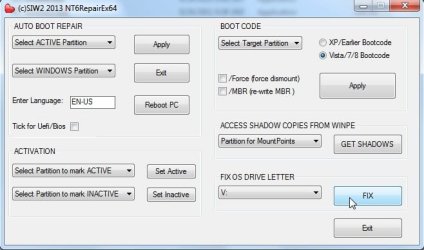
It took a while, but here it is. I made this for winpe, however the bit you need works fine run from within Windows as well.

View attachment NT6repairEx64.zip


Run it as administrator, select the non starting windows partition in the dropdown and click FIX.

NT6REP1.jpg


Then a little cmd window pops up telling you it all completed successfully:

NT6REP2.jpg
 

My Computers

System One System Two

  • Computer type
    PC/Desktop
    OS
    7 X64
    CPU
    i5 8400
    Motherboard
    gigabyte b365m ds3h
    Memory
    2x8gb 3200mhz
    Hard Drives
    various
    PSU
    pure power 11 400w cm
    Case
    Coolermaster
    Cooling
    cryorig m9i
  • Computer type
    PC/Desktop
    OS
    7x64
    CPU
    g5400
    Motherboard
    ga b365m ds3h
    Memory
    8gb ddr4 2400
    PSU
    xfx pro 450w
Amazing

:DThanks to SIW2. I can't believe you did this. I see why you have all those accolades.

At first your reply completely confused me but after staring at it a while I think I understand.

At the moment I have an original drive and a cloned drive. The cloned drive will not boot if it is the only drive installed (although it will boot if both drive are installed).
Your instructions are to run your program 'NT6repairEx64.EXE' (presumably from the original drive);
Select the cloned drive, and click 'FIX'

Sorry to be a nuisance. I will wait a while to see if you correct me.

Wow!
 

My Computer

Computer type
PC/Desktop
Computer Manufacturer/Model Number
custom
OS
windows 7 ultimate x64
CPU
intel i5
Motherboard
gigabyte
Memory
8 GB
Hard Drives
2 x 500 GB Western Digital
Antivirus
MSE
Browser
Firefox (IE if I have to)
Your instructions are to run your program 'NT6repairEx64.EXE' (presumably from the original drive);
Select the cloned drive, and click 'FIX'

Yes, exactly. rt click it and Run it as Administrator
 

My Computers

System One System Two

  • Computer type
    PC/Desktop
    OS
    7 X64
    CPU
    i5 8400
    Motherboard
    gigabyte b365m ds3h
    Memory
    2x8gb 3200mhz
    Hard Drives
    various
    PSU
    pure power 11 400w cm
    Case
    Coolermaster
    Cooling
    cryorig m9i
  • Computer type
    PC/Desktop
    OS
    7x64
    CPU
    g5400
    Motherboard
    ga b365m ds3h
    Memory
    8gb ddr4 2400
    PSU
    xfx pro 450w
The cloned windows should then boot fine and reassign letters to any other volumes.

Rarely, it doesn't, so after booting into it you can fire up disk mgmt and add letters to other volumes manually.
 

My Computers

System One System Two

  • Computer type
    PC/Desktop
    OS
    7 X64
    CPU
    i5 8400
    Motherboard
    gigabyte b365m ds3h
    Memory
    2x8gb 3200mhz
    Hard Drives
    various
    PSU
    pure power 11 400w cm
    Case
    Coolermaster
    Cooling
    cryorig m9i
  • Computer type
    PC/Desktop
    OS
    7x64
    CPU
    g5400
    Motherboard
    ga b365m ds3h
    Memory
    8gb ddr4 2400
    PSU
    xfx pro 450w
Works fine on my 64-bit machine. Is there any way to get it to run on my 32-bit machine? (which rejects it now).
Looks like there are quite a few other really useful tasks your program can perform. Looking forward to researching those.
Again, a tip of my hat and a load of thanks. The computer community is amazing!
 

My Computer

Computer type
PC/Desktop
Computer Manufacturer/Model Number
custom
OS
windows 7 ultimate x64
CPU
intel i5
Motherboard
gigabyte
Memory
8 GB
Hard Drives
2 x 500 GB Western Digital
Antivirus
MSE
Browser
Firefox (IE if I have to)
I will compile 32 bit version when I get a moment. 32 bit is more useful as it will work in both 32 and 64 bit windows. However, standard winpe is bit version specific, so that is where separate versions are needed.

If you want all the functions, you would need a copy of bootsect.exe in the path ( easiest is to put nt6repair in the same folder as bootsect.exe and create a shortcut to nt6repair.

You will get bootsect.exe included if you d/l Boyans wonderful little program VisualBCD . You can then pop nt6repair into the Program Files\Visual bcd folder.

VisualBCD 0.9.3.1

Download Visual BCD
 

My Computers

System One System Two

  • Computer type
    PC/Desktop
    OS
    7 X64
    CPU
    i5 8400
    Motherboard
    gigabyte b365m ds3h
    Memory
    2x8gb 3200mhz
    Hard Drives
    various
    PSU
    pure power 11 400w cm
    Case
    Coolermaster
    Cooling
    cryorig m9i
  • Computer type
    PC/Desktop
    OS
    7x64
    CPU
    g5400
    Motherboard
    ga b365m ds3h
    Memory
    8gb ddr4 2400
    PSU
    xfx pro 450w
I feel like I am back in school again; Looking forward to following your instructions. You would make a great professor.
 

My Computer

Computer type
PC/Desktop
Computer Manufacturer/Model Number
custom
OS
windows 7 ultimate x64
CPU
intel i5
Motherboard
gigabyte
Memory
8 GB
Hard Drives
2 x 500 GB Western Digital
Antivirus
MSE
Browser
Firefox (IE if I have to)

My Computers

System One System Two

  • Computer type
    PC/Desktop
    OS
    7 X64
    CPU
    i5 8400
    Motherboard
    gigabyte b365m ds3h
    Memory
    2x8gb 3200mhz
    Hard Drives
    various
    PSU
    pure power 11 400w cm
    Case
    Coolermaster
    Cooling
    cryorig m9i
  • Computer type
    PC/Desktop
    OS
    7x64
    CPU
    g5400
    Motherboard
    ga b365m ds3h
    Memory
    8gb ddr4 2400
    PSU
    xfx pro 450w
I am running out of adequate ways to express my admiration. What you have done will be a presentation at our January Computer Club meeting. I will leave out the particulars so no one will pester you. Our 100 or so members need to know there are people like you out there. Perfect timing for the Christmas season.
 

My Computer

Computer type
PC/Desktop
Computer Manufacturer/Model Number
custom
OS
windows 7 ultimate x64
CPU
intel i5
Motherboard
gigabyte
Memory
8 GB
Hard Drives
2 x 500 GB Western Digital
Antivirus
MSE
Browser
Firefox (IE if I have to)
Happy New Year.:D
 

My Computers

System One System Two

  • Computer type
    PC/Desktop
    OS
    7 X64
    CPU
    i5 8400
    Motherboard
    gigabyte b365m ds3h
    Memory
    2x8gb 3200mhz
    Hard Drives
    various
    PSU
    pure power 11 400w cm
    Case
    Coolermaster
    Cooling
    cryorig m9i
  • Computer type
    PC/Desktop
    OS
    7x64
    CPU
    g5400
    Motherboard
    ga b365m ds3h
    Memory
    8gb ddr4 2400
    PSU
    xfx pro 450w
Great help SIW2!

I'm still curious as to why I don't see this issue using imaging (see my post #3). :confused:
Is Acronis Imaging "smarter" than Macrium Cloning with making changes for a "different HD ID" ?

With cloning, the new and old HD must be known when the clone is performed...
With Imaging, there is no way to know what HD the backup image might be restored onto...
Am I correct with that understanding/assumptions?

Thanks and Happy New Year,
David
 

My Computer

Computer type
PC/Desktop
Computer Manufacturer/Model Number
home built
OS
Multi-Boot W7_Pro_x64 W8.1_Pro_x64 W10_Pro_x64 +Linux_VMs +Chromium_VM
CPU
AMD Athlon II x4 620
Motherboard
Gigabyte GA-MA785G-UD3H
Memory
6GB GSkill DDR2 800
Graphics Card(s)
AMD 4670 GPU + AMD 4200 IGP
Sound Card
on board Realtek ALC889A
Monitor(s) Displays
RCA 40" LCD TV, Insignia 32" LCD TV, HP 15" LCD monitor
Screen Resolution
1680 x 1050
Hard Drives
OCZ Vertex 3 120GB,
Samsung F3 1TB (3),
Several others - WD, Seagate, Hitachi, ...
PSU
Corsair 500 W
Case
Rosewill mid tower
Cooling
CM 90mm rifle
Keyboard
Gyration wireless, Logitech wireless, Dell USB wired
Mouse
Gyration wireless, Logitech wireless, V7 USB wired
Internet Speed
Spectrum - 100Mbps D / 10Mbps U
Antivirus
Avast, MBAM3, EMET, WinPatrol
Browser
Pale Moon, Firefox, IE
Other Info
2 multi-boot PC's
Mainly HTPC/Office/Gen purpose (no gaming).
Trendnet USB KVM.
LG DVD burner/Blue Ray Player.
Tray system for removable SATA backup drives.

Not currently OCd, under-volted.
I use Hybrid sleep, rarely re-boot or shutdown.

Hauppauge HD-PVR, Avermedia PCIe TV Tuner, Hauppauge PCI TV Tuner.
My Experience

I am following this discussion with great interest but cannot contribute much.
I know that others often benefit from simply reading so I will tell you my ending to the original thread.
The NT6RepairEx86 ran on my 64-bit and 32-bit computers (both). The cloned drive boots fine.
One interesting note: The first time the clone ran by itself, a message appeared in the lower right corner which said something like Windows is not genuine and gave the build number and something else. This disappeared and everything worked fine. The second time the cloned drive booted, the message did not appear.

Since I don't pirate and get Windows free from work, none of that bothers me. I just don't want to spend 8 hours updating Windows if my hard drive fails. Only happened once in ten years but it can happen.

Details probably don't matter but here are some in case they do:
Gigabyte Mother, Win7 Ultimate 64-bit, Western Digital HDs cloned with Acronis True Image Free
Phoenix Mother, Win7 Ultimate 32-bit, Seagate HDs cloned with Macrium Reflect Free

I also made image files earlier but have not tried recovering with them. Let sleeping dogs lie.
 

My Computer

Computer type
PC/Desktop
Computer Manufacturer/Model Number
custom
OS
windows 7 ultimate x64
CPU
intel i5
Motherboard
gigabyte
Memory
8 GB
Hard Drives
2 x 500 GB Western Digital
Antivirus
MSE
Browser
Firefox (IE if I have to)
Back
Top